Recent Discussions
Learn how leading partners drive co-sell success with Microsoft Marketplace
Want to create more Marketplace opportunities and strengthen your co-sell motion? Join Reis Barrie, CEO of Carve Partners, for a practical discussion on how leading software companies use Microsoft Marketplace to accelerate growth, engage Microsoft sellers, and create repeatable paths to revenue. You'll learn the fastest path toward transactable offers and Azure IP co-sell eligibility, explore the seller habits that consistently generate Marketplace opportunities, and discover strategies for identifying high-potential accounts and shortening sales cycles. The session will also cover Marketplace signals, funding opportunities, and proven engagement approaches that help partners build momentum sooner. Whether you're responsible for sales, alliances, Marketplace strategy, or go-to-market execution, this session offers actionable insights you can apply immediately. Stay for the live Q&A and bring your questions. Add to your calendar: How leading partners drive co-sell success with MarketplaceChoosing the right offer type for your cloud and AI solutions
Whether you're bringing a new AI solution to market or evaluating how to scale an existing application, understanding Marketplace offer types can help you choose the right path to monetization and customer adoption. zCheck out this short video that compares the capabilities of SaaS offers, Container offers, and Azure managed applications to understand which model best aligns with your architecture, deployment requirements, and customer needs.
Marketplace Publishing - Email with the Certification Team
Greetings partners, fellows, and friends, Standards Core is a 2nd year ISV - we currently have 1 SaaS and 2 Office add-in listings, now working on our first Apps and agents for Microsoft 365 and Copilot ... we have submitted our first publish, can currently working to address certification details. Why am I posting this? Well, after the 1st submission, in addition to the certification report on Marketplace, we also received an email - thereafter questions/iterations were immediately interactive with very quick and clearly attentive responses. So I wanted to mention that we really appreciate that!! Previous submissions that I have experienced were through the submissions portal only - the personalized email interaction was a pleasant surprise, and made the process feel much warmer than the previous "formal" portal-only interaction. Thank you [certification team], and looking forward to re-submit shortly. Thanks again, Leon, CTO/Standards Core LLCLearn how to move co-sell opportunities from ready to closed-won with greater consistency
What separates co-sell ready opportunities from closed-won success? The answer often comes down to stakeholder alignment, commercial readiness, and a clear strategy for engaging Microsoft and partner resources at the right time. Join Kevin Flitcroft, Head of Sales for SaaSify at Spektra Systems, as he shares practical guidance for helping partners improve deal execution and revenue outcomes. Learn how to align opportunities to Microsoft priorities, determine when to engage Microsoft sellers, position Microsoft Marketplace early in the sales cycle, and support customer purchasing goals through effective commercial motions. You'll also explore the Audit/Activate/Run framework and discover how successful organizations create repeatable co-sell practices that help increase win rates, strengthen pipeline development, and drive more consistent business growth. Discover how leading partners turn co-sell opportunities into consistent business growth. Attend this live session to gain practical strategies you can apply to your next opportunity. Add to your calendar: Microsoft co-sell playbook: From co-sell ready to closed-wonThe AI Trust Gap: We're Auditing Outputs, But Nobody's Watching the Input
Hi all, Manjish here, founder of Pryvasee.AI. I want to open a conversation rather than make a pitch, because I think this is a problem bigger than any one company can solve, and I'd like to hear how others in this community are approaching it. Over the past year, watching enterprises adopt LLMs like ChatGPT, Claude, Gemini, Grok, DeepSeek, etc one pattern kept showing up. Almost every governance conversation started after the prompt was sent. Teams were building dashboards to review AI outputs, running periodic audits, writing acceptable use policies. All useful, but all reactive. Nobody I spoke to had a clear answer to a much simpler question: what actually happens to the sensitive data in that prompt in the moments before it leaves your organisation's control? That gap is why we built Pryvasee.AI differently. Instead of sitting after the model and reviewing what came back, we sit before it. Pryvasee Guard screens prompts, documents, and images for PII, PHI, and PCI and other such sensitive data before anything reaches a model. Pryvasee Thread lets you run the same request across OpenAI, Gemini, Grok, and DeepSeek from one interface, so you're never trusting a single model's answer by default. And the Trust Engine scores every response that comes back for groundedness and hallucination risk, so there's a number behind "does this look right" instead of a gut feeling. We built it natively on Azure (AKS, Azure SQL, Azure SQL Ledger for a tamper evident audit trail) because we think the next wave of AI governance problems won't just be about data leakage. They will be about proving, after the fact, exactly what happened, for a regulator, an auditor, or your own board. Most organisations can't do that today for a single AI interaction, let alone thousands a day across four different model providers. We're early. MVP/Beta since July 2026, live on the Microsoft Commercial Marketplace since late August, and currently working through a handful of enterprise pilots rather than claiming a long customer list. I would rather be upfront about that than oversell it. What I'm genuinely curious about: for those of you building or advising on enterprise AI adoption, is anyone handling the "before the model" problem today, whether with tooling, policy, or something else? And do you think this becomes a bigger issue as more employees start using multiple AI tools side by side, or does it resolve itself as the big model providers add more guardrails natively? Would love to hear how others are thinking about this.
Can Marketplace Become the Trusted Delivery Ecosystem for Specialized Microsoft Services?
Over the past several years, Azure Marketplace has become an increasingly important mechanism for connecting customers, partners, publishers, and Microsoft. As Marketplace adoption grows, I have been reflecting on one aspect of ecosystem collaboration. Many customer initiatives involve multiple organizations, each with different responsibilities, commercial models, onboarding requirements, and procurement processes. This raises an interesting question for the community: Can Azure Marketplace play a larger role in reducing operational friction between Marketplace participants who are already transacting through the platform? Potential outcomes could include: Faster customer project execution. Simpler cross-organizational collaboration. Greater adoption of Marketplace-transactable solutions. Reduced administrative overhead. Increased Marketplace transaction activity. From a Marketplace ecosystem perspective, reducing friction between participants may create value for customers, partners, publishers, and Microsoft alike. I would be interested in learning: Whether others have encountered similar challenges. Whether existing Marketplace capabilities already address this area. Which future improvements would have the greatest impact. Looking forward to hearing the community's perspective.Discover how Dragon Copilot solutions can reach clinicians through Microsoft Marketplace
As healthcare organizations adopt AI to streamline care delivery, partners have a new opportunity to bring innovation directly into clinical workflows. Microsoft Marketplace now supports Dragon Copilot Physician Apps and Agents, helping partners deliver intelligent solutions that support documentation, clinical insights, and workflow efficiency at the point of care. Learn how Microsoft Marketplace helps partners publish, monetize, and scale Dragon Copilot solutions through flexible commercial models, trusted purchasing experiences, and targeted healthcare discovery experiences. Read the article to explore the new Dragon Copilot offer type and how to bring your healthcare innovation to market through Microsoft Marketplace. 👉 Read the full article: Accelerate healthcare innovation with Dragon Copilot apps and agents in Microsoft Marketplace
Microsoft Templates for Azure Application upload
Hi All, Are there ready to use templates for the documentation that Microsoft is requesting to upload for this offer type - such as Solution and Deployment Architecture, Customer Installation Guide, Customer Onboarding and Configuration Guide, Data Integration Guide. If yes, could someone share the links or the templates. Thank you!Verification docs resubmitted as requested — 9 business days, zero response — 2608140040001875
MPN Account ID: 7136847 Tracking ID: 2608140040001875 Timeline: Initial rejection on Aug 8. Case reopened, Vetting Operations requested additional business registration documents (address change filing + updated GST registration reflecting our current registered address). We submitted these on Aug 14, the same day they were requested. Your team's message committed to a follow-up within 2-3 business days — it's now been over a week with no acknowledgment of receipt or status update on the ticket. Could someone from Vetting Operations confirm receipt of the documents and the current review status? Happy to share any additional verification details by DM if that helps move this along. Thanks in advance. AshishVetting rejected 4 times, identical canned replies, no Fix Now, Program Not Found
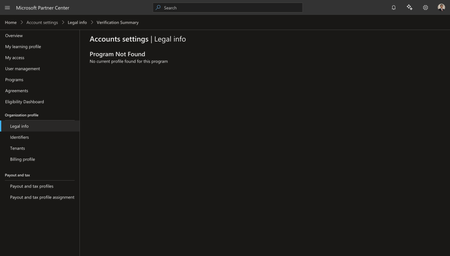
We are stuck in a loop that Microsoft support is not fixing, and each closure comes with the exact same copy-paste line, no diagnostic detail, no path forward. Legal Info shows Vetting Status: Rejected, no Fix Now button anywhere on the page (screenshot 1). Verification Summary returns "Program Not Found — No current profile found for this program" (screenshot 2). Tax and Program pages are inaccessible from the same account. This is an existing account with two live Azure Marketplace offers already published, not a fresh signup. We have submitted four separate appeals. All four were closed with the same templated response, word for word: Ticket 2608130040002080: "We've reviewed your appeal for verification. Based on the information you have provided to date, we have determined that your organization does not currently meet the requirements to pass verification. We have closed your application. If you decide to reapply, please review the information at https://aka.ms/CSPVerification and http://aka.ms/PartnerVerification to ensure you meet the latest requirements." Ticket 2608140040001403: "We've reviewed your appeal for verification. Based on the information you have provided to date, we have determined that your organization does not currently meet the requirements to pass verification. We have closed your application." Ticket 2608190040002484: "We've reviewed your appeal for verification. Based on the information you have provided to date, we have determined that your organization does not currently meet the requirements to pass verification. We have closed your application. If you decide to reapply, please review the information at https://aka.ms/CSPVerification and http://aka.ms/PartnerVerification to ensure you meet the latest requirements." Not one of these responses names a single missing document, a single mismatched field, or a single requirement we have failed to meet. "The information you have provided" is never specified. There is no Fix Now button to submit anything against, and Verification Summary does not even acknowledge the program exists. We are being asked to "reapply" against a process that gives no indication of what to change. Four appeals, four identical form letters, zero actionable detail. This is not a verification process, it is a wall. We need someone from Vetting Operations to state plainly what specifically is failing on this legal entity, or to escalate this out of the templated-response queue entirely. Happy to provide Seller ID, tenant ID, and all four ticket numbers again by DM if that speeds this up.How to get your cloud and AI solutions co-sell eligible on Marketplace
A transactable Microsoft Marketplace offer can play an important role in supporting your broader go-to-market strategy with Microsoft. This video walks through the essentials of Marketplace co-sell qualification. You'll also gain insight into how approved offers may participate in Microsoft customer-focused selling motions and help customers transact using committed Microsoft cloud spend.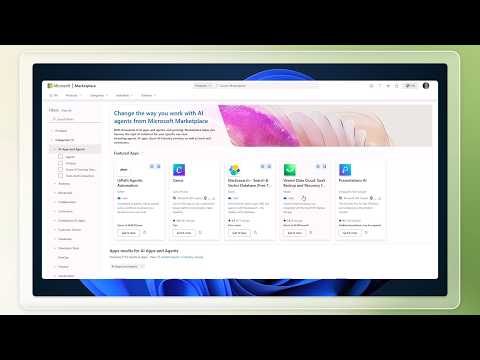
Legal entity vetting rejected: BusinessDpl, no Fix Now button, Verification Summary error
Our legal entity vetting in Partner Center is Rejected, Sub-Status dplVerification, Reason BusinessDpl. There is no Fix Now option for this sub-status. The Verification Summary page returns "Program Not Found." The Tax and Program pages are both inaccessible. Our Microsoft AI Cloud Partner Program registration also shows as deactivated. We have raised four support tickets with no resolution: 2607220040001822, 2607210040001506, 2608130040002080, 2608140040001403. Could a moderator confirm whether BusinessDpl requires review by the internal compliance team, and if so escalate this case to them? Happy to share our One Vet ID, Seller ID, and entity details by DM rather than posting them here. Thank you.Make confident buying decisions with Microsoft Marketplace
Help customers make confident technology decisions with a buying experience built around choice, flexibility, and business needs. Join this live Microsoft Marketplace session on September 2, 2026, to learn how intelligent discovery, free trials, private offer requests, and flexible contract durations can support evaluation and purchasing conversations. Partners will gain practical guidance for working with business, technology, procurement, and IT stakeholders throughout the buying process. Use the session to sharpen co-sell conversations, connect solution value to customer priorities, and discuss commercial arrangements that fit each organization. Registration is not required. Add the event to your calendar, sign in to the Tech Community, select Attend for reminders, and post questions before or during the live broadcast. Explore the event and prepare your next customer conversation today. 👉 Attend the session live: Evaluate and buy solutions with Microsoft MarketplaceWe are excited to announce a new AI-led experience for MyGoals!
Get a personalized MyGoals learning plan instantly. Building the right skills starts with the right learning plan for you—and now, you can tailor your learning journey with the new AI-powered Skilling Hub experience. Just choose your role, the topics that matter most to your business, and your preferred learning formats—then instantly get a tailored learning plan aligned to your goals. As your priorities evolve, you can revisit and refine your learning plan anytime. Plus, stay tuned for upcoming AI-powered guides to strengthen your Microsoft partnership, expand co-sell opportunities, and accelerate your Microsoft Marketplace journey. For new users, register and start building a new learning path today. For returning users, use your previous login credentials for MyGoals on LevelUp. Note: LevelUp MyGoals is a subset of Skilling Hub learning and soon be completely integrated into Skilling Hub. Get started84Views0likes0CommentsCSP August 2026 Monthly Partner Update
This month's updates covered important changes to agreements, security requirements, pricing capabilities, growth programs, and promotional offers that enable partners to increase customer adoption and make the most of upcoming CSP opportunities. Please use the survey link to share your feedback on these updates Survey Link. Visit the Launch Enablement Guide for additional readiness resources, guidance, and partner actions. This Month's Topic: Promotion Capabilities Consumption-based and per-user New Azure promotion capabilities will enable percentage-based discounts across eligible consumption scenarios, including pay-as-you-go, reserved instances, and pre-purchase plans, with discovery and redemption experiences available for sandbox testing. Upcoming per-user promotion enhancements will support more precise customer targeting by seat count and introduce greater flexibility for qualifying customers in new-to-offer scenarios. Watch the video for more details. If the player doesn’t load, open the video in a new window: Open video Important Links Visit the Azure promotions learn documentation Refer the https://aka.ms/Azure-Promos-FAQ Need More Information? Visit the Launch Enablement Guide for additional readiness resources, guidance, and partner actions.
SAP Benefits for Partner with Specialization
SAP on Azure helps customers modernize their SAP landscape with a secure, scalable cloud platform while unlocking AI, analytics, and productivity capabilities from Microsoft. It creates opportunities for partners to deliver migration, modernization, data, and AI services that drive business value for customers. Business Benefits Faster SAP migrations to the cloud using Azure's infrastructure and SAP-certified services. Reduced infrastructure costs through scalable cloud resources and pay-as-you-go consumption. Access to Microsoft and SAP joint go-to-market opportunities, which can help partners expand customer reach. Ability to build solutions that combine SAP business data with Microsoft AI, analytics, and productivity tools. AI & Innovation Benefits Extend SAP environments with Microsoft Copilot and Azure AI capabilities. Use Azure services for advanced analytics, machine learning, and data integration. Connect SAP data with Microsoft Fabric, Power BI, and Microsoft 365 to generate business insights. Reliability & Security Enterprise-grade security, compliance, and identity management through Microsoft Azure. High availability and disaster recovery options for mission-critical SAP workloads. Global Azure regions supporting multinational customers. Partner Benefits New consulting, migration, managed services, and AI transformation opportunities. Ability to create differentiated offerings around: RISE with SAP on Azure SAP S/4HANA migrations SAP Business Technology Platform (BTP) Data & AI solutions leveraging SAP and Microsoft technologies Access to Microsoft partner programs, co-sell motions, and marketplace opportunities (where applicable). We invite you to share any comments, feedback, or suggestions regarding additional partner benefits you would like to see included.Accelerate your AI go-to-market strategy with Microsoft Marketplace
AI innovation is moving faster than ever but building a successful AI solution requires more than choosing the right model. From development and deployment to discovery, customer adoption, and monetization, every decision plays a role in bringing AI-powered solutions to market. In this insightful article, Microsoft Marketplace experts explore how software companies can accelerate AI development by leveraging the Microsoft ecosystem, including Azure AI Foundry, Microsoft Copilot, and Microsoft Marketplace. Learn how to evaluate models, choose the right Marketplace offer type, improve solution discoverability through Intelligent Discovery, and build customer trust through secure-by-design practices. Whether you're enhancing an existing application with AI or developing a new AI-native solution, this article provides practical guidance for connecting innovation with commercial success helping you learn how Microsoft Marketplace can help transform your AI innovation into scalable business growth. Read the full article An overview of accelerating AI development with Microsoft MarketplaceStop searching for training. Start building skills faster.
Your next learning opportunity could be one question away. The Microsoft Partner Skilling Hub AI Agent is now available in the Microsoft Partner Skilling Hub. Designed to make skilling more personalized and efficient, the agent provides tailored recommendations, answers skilling-related questions, and creates technical skilling plans aligned to your role and goals. Instead of navigating multiple learning destinations, tell the agent what you want to achieve. It can surface relevant content from the Partner Skilling Hub, LevelUp, and Microsoft Learn and build a learning path tailored to your needs. To access the agent, open the Microsoft Partner Skilling Hub and select the AI Agent icon in the lower-right corner of the homepage. No separate installation or application is required. Check out the demo video for more information. Already tried it? Share how you're using the AI Agent and which recommendations have been most valuable for your team's skilling journey. Build your plan now in the Skilling Hub.56Views0likes0Comments




Events
See how successful software companies expand their reach, strengthen co-sell relationships, and create repeatable paths to revenue through Microsoft Marketplace. Join Reis Barrie, advisor to software...
Thursday, Sep 10, 2026, 08:30 AM PDTOnline
0likes
1Attendee
0Comments

Many complex organizations, such as large city, county, and state governments, have invested in ERP systems that simply don’t work for all their stakeholders.
Agencies with unique business ope...
Tuesday, Sep 15, 2026, 12:00 PM PDTOnline
0likes
0Attendees
0Comments
Recent Blogs
- 1 MIN READAccess the latest Instructor-Led Training (ILT) updates anytime at http://aka.ms/Courseware_Title_PlanAug 28, 202679Views0likes0Comments
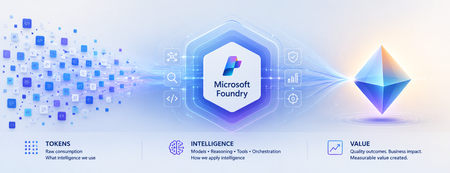
- Beyond Tokens: Rethinking AI Economics with Microsoft Foundry From the cost of intelligence to the value of outcomes Enterprise AI has an accounting problem. Executives expect agentic AI to...Aug 28, 202670Views0likes0Comments