dynamics 365
288 Topics
How long the Business Central environment remains as it is after subscription is expired?
https://learn.microsoft.com/en-us/microsoft-365/commerce/subscriptions/what-if-my-subscription-expires?view=o365-worldwide When investigating about this topic, it is often confused with "how long customers can access to the database even Microsoft support team. In fact, we were once told that the database (environment) will be destroyed step by step 30days after subscription is expired. However, this document explains that "the data will be deleted after 90days". Does this mean Business Central environment remains for 90days as it is and will be deleted after 90days? Are customers able to use the same environment without issue if they re-purchase the license within 90days after the subscription is expired?
Large Dataverse Database Migration
Hello folks, Hoping someone has come across this challenge before - customer has a 1.5Tb+ prod database that needs to be reduced drastically. Is there a Support request route we can raise to create a DB copy into the customers Azure SQL? this would be the quickest route to get a copy before running bulk deletions. Long Term Retention wont be enough in this case either. Any thoughts welcome. TIA
Business Central Device Licensing - Service Management
I posted this in the CSP area but realized this is where it should have been. Reposting. Suggestion...there really needs to be a category for licensing questions...and ideally a subcategory for Dynamics products...both cloud and on-prem. I'm posting this under the CSP category because I couldn't find a more suitable one. As a side note, understanding and figuring out licensing for various scenarios on the Business Central side is one of the most frustrating things we have to do. Microsoft really needs to form a dedicated licensing team that understands licensing thoroughly across all products to provide clear answers on these scenarios. We have a prospect for a new Business Central implementation that has a large number of field technicians. Our plan was to use Anveo's mobile app for field service which we've implemented previously on NAV. I reached out to Anveo to confirm pricing and they informed us that EVERY FIELD TECHNICIAN WILL NEED A FULL PREMIUM USER LICENSE. This is insane! We are priced out of this deal based on licensing. I can accept that a Team Member license is not sufficient here, but the fact that we can't use device licenses boggles my mind. We are priced out of competing in this space. I'm not even sure what I'm looking for here...I suppose confirmation that a full license is in fact required here as a first step. Microsoft seriously needs to review licensing rules for scenarios like this ASAP to reposition things to compete in markets such as this one. Our customer absolutely cannot afford a tier one ERP system like F&O...and this licensing policy will have us priced way higher than our competition in the tier two space. Very frustrating.Business Central Device license
I thought customers must have at least one Essentials or Premium SAL when purchasing Device license, but I can't find any description of this prerequisite in the license guide nor license term. To purchase a Team Member license, customers must have Dynamics 365 user SLs other than the Team Members SL according to the license term according to the license term. https://www.microsoft.com/licensing/terms/en-us/productoffering/MicrosoftDynamics365Services/MCA#Addons Is this not same for Device license or are customers allowed to purchase Device license only without other user licenses? If customers are required to have other user licenses to purchase one Device license, can we apply a 30day-trial license (Business Central Premium) for the initial month?
D365 Finance/Finance Premium mix&match for purchasing minimum?
Hi, can someone confirm if it's obligatory to meet the purchasing minimum requirements for both Finance and Finance Premium, i.e. if we purchase 20 regular Finance licenses, can we purchase only 5 Finance Premium or does it have to be the minimum 10? I've found resources online that say these 2 SKUs can be mixed & matched, but I can't seem to find definitive confirmation of this in the D365 Licensing Guide or any of MSFT resources. Thanks!SolvedPrice increase D365, impact on Base/Attach model?
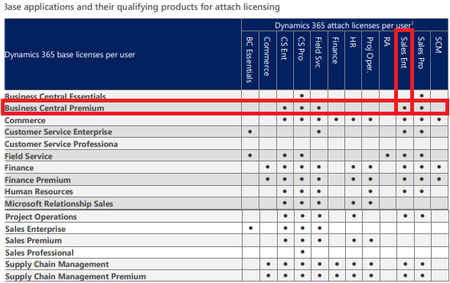
Hi all, Microsoft announced a general price increase of D365 licenses, with a increase of 10-15% for certain suites. See following blog: New pricing for Microsoft Dynamics 365 effective October 2024 - Microsoft Dynamics 365 Blog. I wonder how this price increase will affect the Base/Attach model and combinations you can make. Eg. the D365 Sales Enterprise license with increase from $95 --> $105. While the D365 BC Premium will remain on $100 (no increase for BC). This means, Sales Enterprise will be more expensive than BC Premium. Currently we can attach Sales Enterprise on a BC Premium license: General rule of thumb is that the Base license must be the highest priced license, and Attach licenses should be the cheaper licenses. But with this price change this will be turned around between Sales/BC. So how will this price increase impact the Base/Attach model for such cases and existing customers? Cheers, MartijnSolved4.5KViews4likes17CommentsD365 FO IUR - legacy benefits
Dear Community We have been using a D365 Finance instance since 2019 as IUR. As from my understanding, from the old silver/gold ERP competency. Since we bought the legacy benefits this summer, I assumed we‘ll get the D365 instance extended as well. But know I have to learn, that this is not included in the legacy benefits and our subscription will run out in one month. We‘d have to buy the subscriptions - really funny, we can not even use the software internally that we are selling/implementing at our customers? I know, we could get the Business Applications Designation - but for a partner with 20 employees, there is no chance to reach this (maybe for one year, but not a couple of years consecutively). Any ideas on this one? cheers DanielAnnouncing the general availability of Microsoft Copilot for Sales & Microsoft Copilot for Service
Summary On February 1, 2024, https://aka.ms/CopilotGAFeb2024 to customers. Copilot for Sales and Copilot for Service bring together the power of Copilot for Microsoft 365 with role-specific insights and actions to streamline business processes, automate repetitive tasks, and unlock productivity. Both provide flexibility to integrate with existing contact center and CRM systems, such as Microsoft Dynamics 365, Salesforce and ServiceNow, to get more done with less effort. Customers can purchase Copilot for Sales or Copilot for Service for $50 per user per month as a standalone license that includes Copilot for Microsoft 365. Customers who already own Copilot for Microsoft 365 can step-up for $20 per user per month to purchase Copilot for Sales or Copilot for Service. Copilot for Sales and Copilot for Service are available now to purchase through EA/EAS, MCA-E, and Buy-Online, and will be available to Cloud Solution Provider (CSP) partners on March 1. Microsoft Copilot for Sales Copilot for Sales is an AI assistant designed for sales teams to maximize productivity and close more deals. Copilot for Sales builds on Copilot for Microsoft 365, enhancing it with connectivity to CRM systems like Microsoft Dynamics 365 Sales and Salesforce Sales Cloud to bring sales-specific insights and recommendations to apps like Microsoft Outlook, Microsoft Teams, and Microsoft Word. Today, Copilot for Sales helps sellers and sales managers: Generate sales meeting preparation briefs in Word. Summarize emails and surface relevant buying intent and BANT (budget, authority, need, timing) analysis in Outlook. Generate emails in Outlook with relevant product, account, relationship, and opportunity information from their CRM system and Microsoft Graph. Add leads and update CRM records directly from Outlook. View meeting preparation notes and real-time sales insights during calls in Teams. View sales meeting summaries in Teams with conversation analysis, sales keywords and KPIs, and suggested tasks. Create collaborative deal rooms in Teams that sync with CRM data. Copilot for Microsoft 365 is also included in Copilot for Sales, providing sellers with additional productivity enhancements, like: Generate presentations in Microsoft PowerPoint. Generate plans and organize team information in Microsoft OneNote. Ask questions in natural language to catch up on customer interactions using Microsoft Copilot chat experience. Later this month, Copilot for Sales will also bring CRM connectivity to Microsoft Copilot chat experience, allowing sellers and sales managers to get quick insights on conversion and win rate, sales cycle, and pipeline. Microsoft Copilot for Service Copilot for Service helps organizations quickly realize the benefits of generative AI by extending their existing investments in CRM and contact center solutions to enhance customer experiences and boost agent productivity. Copilot for Service unlocks an organization’s trusted knowledge to accelerate onboarding and case resolution, improve efficiency, and automate tasks for agents in their flow of work. Without costly development time, organizations can simply point to their data and in a few minutes unlock generative AI-powered conversations across their knowledge bases. And for agents, they can tap into this knowledge with a copilot embedded directly in their desktop of choice such as Salesforce, as well as the other tools they already use every day like Outlook and Teams. Today Copilot for Service can help organizations: Enable generative AI-powered conversations across all their data with simplified “point and click” access to public websites, SharePoint, knowledgebase articles, and offline files. Access knowledge sources with pre-built integrations for Salesforce, ServiceNow, and Zendesk. Embed a copilot in agent desktops from Salesforce and other channels to support agents where they work. Copilot for Microsoft 365 is also included in Copilot for Service. We will introduce additional features in Microsoft 365 apps beginning later this month that will integrate data from CRM systems like Microsoft Dynamics 365 Customer Service and Salesforce Service Cloud—including: In Outlook, use Copilot to summarize and draft emails, access case summaries, browse and update CRM records, and schedule meetings informed by case summaries and other relevant information from CRM records. In Teams, use Copilot to browse and update CRM records during a meeting, as well as recap meetings, suggest follow-up action items, and create tasks that can all be saved to CRM systems directly from Teams. In Microsoft Copilot chat experience, ask questions over cases and contacts, as well as summarize cases—all from CRM data. Partner Opportunities with Microsoft Copilot for Sales and Microsoft Copilot for Service Microsoft Copilot for Sales and Microsoft Copilot for Service offer new opportunity to help your customers transform business operations using the power of AI. Customers are looking for your expertise to help them be more competitive and profitable. By adding Microsoft Copilot for Sales and/or Microsoft Copilot for Service to your practice, you can expand your customer base, and your revenue opportunities - offering services including business advisory, readiness and deployment, and adoption and change management. These open new possibilities for Business Applications Partners, as well as Modern Work partners to expand the value of Copilot for Microsoft 365. Call to Action Learn: Read the https://aka.ms/CopilotGAFeb2024 Attend the https://aka.ms/DYNA066EXT-Register for field and partners on February 13, 8:00-9:00 AM PST for an end-to-end overview of product narrative licensing, and sales motions Register for the Feb. 29 ‘What's Next for CSP Partners and Microsoft Copilot’ event. Register https://aka.ms/WhatsNextCSPRegistration, https://aka.ms/WhatsNextCSPRegistrationPM. Leverage the new content to drive conversations with your customers: Bookmark and visit the Partner Hub and the AI future of work https://aka.ms/AIFutureOfWorkPartner for the latest content including: Updated: https://dynamicspartners.transform.microsoft.com/download/protected?assetname=protectedassets%2FMicrosoft%20Copilot%20for%20Sales%20Pitch%20Deck.pptx&download=1&protected=1 New: https://dynamicspartners.transform.microsoft.com/download/protected?assetname=protectedassets%2FMicrosoft%20Copilot%20for%20Service%20-%20Pitch%20Deck.pptx&download=1&protected=1 Updated: https://microsoft.bl-1.com/h/i/dv6cXD0o/pDnMXBQ?url=https://adoption.microsoft.com/en-us/copilot-for-sales/