dynamics 365
547 Topics
How long the Business Central environment remains as it is after subscription is expired?
https://learn.microsoft.com/en-us/microsoft-365/commerce/subscriptions/what-if-my-subscription-expires?view=o365-worldwide When investigating about this topic, it is often confused with "how long customers can access to the database even Microsoft support team. In fact, we were once told that the database (environment) will be destroyed step by step 30days after subscription is expired. However, this document explains that "the data will be deleted after 90days". Does this mean Business Central environment remains for 90days as it is and will be deleted after 90days? Are customers able to use the same environment without issue if they re-purchase the license within 90days after the subscription is expired?Developing Finance and Operations Apps with Dynamics 365 Blueprint Survey Opportunity
Greetings! Microsoft is updating the credential for Developing Finance and Operations Apps with Dynamics 365, and we need your input through our exam blueprinting survey. The blueprint determines how many questions each skill in the exam will be assigned. Please complete the online survey by October 5, 2026. Please also feel free to forward the survey to any colleagues you consider subject matter experts for this certification. If you have any questions, feel free to contact John Sowles at josowles@microsoft.com or Don Tanedo at dtanedo@microsoft.com. Developing Finance and Operations Apps with Dynamics 365 blueprint survey link: https://www.starttest.com/starttest2/startsurvey?programid=187&guid=CAF9E231-3316-4D5C-98FD-1765E62FD1EB Thank you!140Views1like0Comments
Large Dataverse Database Migration
Hello folks, Hoping someone has come across this challenge before - customer has a 1.5Tb+ prod database that needs to be reduced drastically. Is there a Support request route we can raise to create a DB copy into the customers Azure SQL? this would be the quickest route to get a copy before running bulk deletions. Long Term Retention wont be enough in this case either. Any thoughts welcome. TIA
Business Central Device Licensing - Service Management
I posted this in the CSP area but realized this is where it should have been. Reposting. Suggestion...there really needs to be a category for licensing questions...and ideally a subcategory for Dynamics products...both cloud and on-prem. I'm posting this under the CSP category because I couldn't find a more suitable one. As a side note, understanding and figuring out licensing for various scenarios on the Business Central side is one of the most frustrating things we have to do. Microsoft really needs to form a dedicated licensing team that understands licensing thoroughly across all products to provide clear answers on these scenarios. We have a prospect for a new Business Central implementation that has a large number of field technicians. Our plan was to use Anveo's mobile app for field service which we've implemented previously on NAV. I reached out to Anveo to confirm pricing and they informed us that EVERY FIELD TECHNICIAN WILL NEED A FULL PREMIUM USER LICENSE. This is insane! We are priced out of this deal based on licensing. I can accept that a Team Member license is not sufficient here, but the fact that we can't use device licenses boggles my mind. We are priced out of competing in this space. I'm not even sure what I'm looking for here...I suppose confirmation that a full license is in fact required here as a first step. Microsoft seriously needs to review licensing rules for scenarios like this ASAP to reposition things to compete in markets such as this one. Our customer absolutely cannot afford a tier one ERP system like F&O...and this licensing policy will have us priced way higher than our competition in the tier two space. Very frustrating.Business Central Device license
I thought customers must have at least one Essentials or Premium SAL when purchasing Device license, but I can't find any description of this prerequisite in the license guide nor license term. To purchase a Team Member license, customers must have Dynamics 365 user SLs other than the Team Members SL according to the license term according to the license term. https://www.microsoft.com/licensing/terms/en-us/productoffering/MicrosoftDynamics365Services/MCA#Addons Is this not same for Device license or are customers allowed to purchase Device license only without other user licenses? If customers are required to have other user licenses to purchase one Device license, can we apply a 30day-trial license (Business Central Premium) for the initial month?
D365 Finance/Finance Premium mix&match for purchasing minimum?
Hi, can someone confirm if it's obligatory to meet the purchasing minimum requirements for both Finance and Finance Premium, i.e. if we purchase 20 regular Finance licenses, can we purchase only 5 Finance Premium or does it have to be the minimum 10? I've found resources online that say these 2 SKUs can be mixed & matched, but I can't seem to find definitive confirmation of this in the D365 Licensing Guide or any of MSFT resources. Thanks!SolvedNew agentic platform in Dynamics 365 for Sales and Service
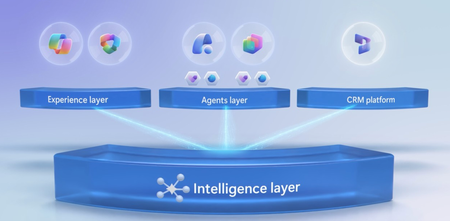
Ask a question and pull a grounded answer straight from your CRM and your calendar. Hand a prompt to Copilot Cowork and walk away with updated records, a finished presentation, and a drafted email, ready before your next meeting. Auto-fill a case description as you work, and walk into every quality review already scored against your team’s framework. Eric Boocock, Dynamics 365 Principal Program Manager, shares how these agents move with you from first prospect touch to case resolution, right inside the apps you work in every day. Along the way, he explains the mechanics of how everything works and your options to customize the experience with your own skills and instructions. Flag risks. Surface next steps. The Sales Qualification and Sales Opportunity Agents in Dynamics 365 turn raw leads and active deals into ready-to-run action plans. See how it works. Skip manual case notes and manual quality reviews. Dynamics 365 Customer Service agents auto-fill case fields and score every interaction against your framework, instantly. Check it out. One prompt. Full QBR prep. Copilot Cowork surfaces deals at risk, updates CRM, builds the PowerPoint, and drafts the briefing email before your next meeting. Start here. QUICK LINKS: 00:00 — Agentic platform in Dynamics 365 01:03 — Sales Qualification & Opportunity Agents 01:44 — Case Management & Quality Evaluation Agents 02:25 — Sales Agent in action 04:30 — Copilot Cowork 05:44 — Automate repeated tasks 07:33 — Power behind agentic platform 08:50 — Custom skills via Power Apps + Dataverse 09:57 — Wrap up Link References Get started at https://aka.ms/AgenticCXPlatform Unfamiliar with Microsoft Mechanics? As Microsoft’s official video series for IT, you can watch and share valuable content and demos of current and upcoming tech from the people who build it at Microsoft. Subscribe to our YouTube: https://www.youtube.com/c/MicrosoftMechanicsSeries Talk with other IT Pros, join us on the Microsoft Tech Community: https://techcommunity.microsoft.com/t5/microsoft-mechanics-blog/bg-p/MicrosoftMechanicsBlog Watch or listen from anywhere, subscribe to our podcast: https://microsoftmechanics.libsyn.com/podcast Keep getting this insider knowledge, join us on social: Follow us on Twitter: https://twitter.com/MSFTMechanics Share knowledge on LinkedIn: https://www.linkedin.com/company/microsoft-mechanics/ Enjoy us on Instagram: https://www.instagram.com/msftmechanics/ Loosen up with us on TikTok: https://www.tiktok.com/@msftmechanics Video Transcript: -CRM is no longer a single app, it’s a context layer, and AI agents are weaving it into every workflow and into every app that your sales and service teams touch. So how do you infuse the right context and role-specific customer intelligence across those surfaces to streamline human and agent tasks that use AI? Well, that’s what the agentic platform in Dynamics 365 solves for. It gives you pre-built, role-specific agents for sales and customer service to generate deep and persistent insights. That same underlying context carries forward in your flow of work as you use agents with Microsoft 365. For example, as you prep for upcoming meetings, together, with Copilot Cowork’s advanced reasoning, these agents don’t just surface insights, they interact directly with your CRM backend and produce presentable materials. And for task automation, you can use autonomous agents in Microsoft 365 to work 24/7 on your behalf. -Let’s make this real, starting with a tour of the sales and service agents in Dynamics 365 available to work alongside you. First, for sales, the Sales Qualification Agent can take a new lead, conduct external research on the company, combine it with what’s already in your CRM, and hand you, as a seller, a qualified summary with recommended next steps. In parallel, the Sales Opportunity Agent can work on active deals, researching the account, while also surfacing buying signals and risks in the process, along with deeper insights on stakeholders, competitors, and more, then recommending the next-step actions to advance the deal. -Next, on the customer service side of things, the Customer Intent Agent uses generative AI to discover the intent behind incoming conversations, in this case, an issue about travel insurance coverage. As a service rep, it helps you to quickly understand customer needs and guide you to a resolution with automatic response suggestions. The case management agent then automates case lifecycle, like you’re seeing here with the description field auto-filled, so you don’t need to do it manually. And the Quality Evaluation Agent automatically analyzes customer interactions against your scoring framework, generating insights to improve service quality, consistency, and coverage. These agents are grounded in business data. In fact, whether you’re in Dynamics 365 or Microsoft 365, you’re working off the same data right from the apps you already use, including mobile. -Let me show you how this comes to life with the Sales Agent in Microsoft 365. I have the Sales Agent open. And without even sending a prompt, I see my upcoming and past meetings, each surfaced with AI-generated highlights. Each highlight calls out the key themes to quickly get up to speed, plus tabs for the meeting overview, company overview, external attendees, and talking points, all grounded in CRM and past interactions. And if I need more specific information, I can Ask Sales directly for account summaries, relationship insights, customer sentiment, and more. And when I run any of these, I get a grounded answer almost instantly. And by the way, there’s also an equivalent service agent in Microsoft 365 Copilot. I’ll continue from the point of view of the seller, navigating a complex contract renewal, where you can use agents in line as you work in your office apps. -I’ll start from Outlook with a customer email. Rather than digging through reports, I’ll ask the agent, “What do I need to know about the Adatum renewal before our next meeting?” And in a few seconds, I get a focused brief. It finds account-related insights that I need to know before the meeting. And because Copilot is extensible, it brings in usage data from any sales application or knowledge source, plus approved content, like reference customers and success stories. It connects the CRM account and deal data with communication across emails and meetings, so that as a seller, you can catch up on what’s changed and what you need to do. And that same context follows you as you move on to other surfaces, like Dynamics 365 Sales, so you can find and resume past conversations right from CRM, all powered by Work IQ, the intelligence layer in Microsoft 365. Taking this a step further, I can use deeper reasoning and AI skills to create the documents and presentations I need for customer meetings. -That’s where Copilot Cowork can bring sales and service disciplines together for complex, multi-step work and content creation. I have the Cowork tab open in Microsoft 365, and I’ll enter my prompt to get the latest risk and opportunity information for my quarterly business review. I’m also asking it to write back any relevant new information to CRM. “Build me a PowerPoint presentation and write an email to share with the team before we meet.” I’ll run the prompt. And Cowork reasons across sales and service together, surfacing the deals at risk and the open customer service cases that could impact the review, with the most relevant and up-to-minute context behind each. It adds the record in CRM for QBR prep. Then Cowork continues by building the PowerPoint presentation that I requested. It even drafts an email to share with my internal team before the meeting, including the briefing deck. -Before I hit send, I open the presentation, and it’s packed with insights and next steps, all grounded with everything it just reasoned over. I’ve shown you how you can use prompts or manual triggers to have agents work on your behalf. But as I mentioned, you can also automate repeated tasks by running agents autonomously. Let me show you how to set that up. This time, I’ll start in Microsoft Teams under Apps. I want to create an autopilot agent that automatically generates customer leads for me. So I’ll search for Sales Development and choose the agent. I just need to give it a name and an email alias, so that it can work autonomously with its own identity. And I’ll confirm to kick off the creation process. That’s going to take a moment to create. -And once it’s ready, I can work with it like a member of my team. I’ll start with a small task, then expand that out to a longer-running set of tasks. From Teams, from a one-on-one chat, I can onboard my agent. I’ll use its suggested prompt to draft an outreach email. Then I just need to give it a prospect name and details. I’ll use my name to test. And it gets to work and checks in with its progress. Now, it’s reasoning over everything, and quickly drafts up the initial outreach email. From there, I can ask the agent to refine the mail a little. Now, I can provide feedback on any part of the email, but I’ll ask it to shorten the email and include a call to action. -Then I’ll add a company and product name to include, and it finalizes the email. Once everything looks good, I can give it a list of prospects to connect. I just need to point my agent to my spreadsheet, which contains details for multiple prospects, so that my agent can reach out to each one automatically and work through the list. And by the way, if you want to automate this even further, you could instead use CRM data ingestion, and it would run automatically as new customer records are added. And as customers respond, the agent will update me in the chat. So what’s powering the agentic platform in Dynamics 365? -First, our intelligence layer brings together your core business data, accounts, opportunities, and interaction history, along with saved insights, like deal risk and recommended actions. A business context layer connects all of this, linking people, accounts, deals, and activities, so it’s not just raw records, but a full picture of what’s going on. It’s extensible with skills and tools that give the agents what they need to take specific actions. Work IQ then adds signals from Microsoft 365, emails, meetings, documents, and chats, so agents understand what’s being discussed and can find related materials. Interacting with this intelligence layer is the experience layer with the apps you work in day-to-day, the agents layer with pre-built and custom agents, and Dynamics 365 as a direct interface for CRM. And every interaction feeds back into the system, continuously improving data, insights, and actions. For IT and business teams, this also means more secure AI at scale. It’s grounded in shared context, and respects your data security and access policies across experiences. -Let’s go deeper on how you can extend agentic experiences with custom skills and tools, and using the business intelligence you have sitting in connected systems or in Dataverse. In Power Apps, you can author business skills, like I’ve done here. These are scoped units of know-how that wrap Dataverse data and the logic for when to use it. You’ll see that the instructions include details for each step the agent needs to take, what I want the output format to look like, and some examples of inputs along with corresponding expected responses. -Let me show you this skill in action using Copilot Cowork. I’ll ask it to analyze another deal at Adatum to see if they have contract pricing. As it runs, you’ll see that it chains in the custom pricing skill we just saw. And then once it completes, it surfaces a contracted pricing recommendation, which is not available in the out of-the-box product. Copilot Cowork followed all of the instructions, formatting, and examples from the skill. The skills are governed by the same Dataverse security and lifecycle using role-based access. -So that’s how the agentic platform in Dynamics 365 brings the right context and role-specific customer intelligence into connected experiences to save you time. To get started, check out aka.ms/agenticcxplatform. Subscribe to Microsoft Mechanics for more AI updates. And thanks for watching.382Views0likes0Comments