tech question or issue
105 Topics
Partner Entra lockout for more than 2 months
Sole Global Administrator Locked Out (60+ Days) Following MAICPP Partner Launch Benefits Activation — Case #2607300040011056 Hello Microsoft Partner Community and Microsoft Community Managers, I been a partner for several decades, previously a higher capacity MAICPP I am posting from my active Developer account because my primary organization tenant has been completely locked out for over two months.. MAICPP Partner Launch Benefits Activation The activation of Entra subscription failed and a delay in partner tech support resulting in an administrative lockout across our tenant spnode.io The Issue & Support Bottleneck Attempts to authenticate or initiate self-service password recovery result in an explicit account lockout message The ticket has stalled across various support queues for over two months Initially routed to Microsoft Defender for Cloud Apps, where engineers confirmed it was outside their scope Re-routed toward the Azure / M365 Data Protection queue A communication delay occurred when I temporarily lost phone access and was in the hospital. I require intervention from a Community Manager or Partner Operations Escalation Lead to help route this stalled case directly to an active Duty Manager in the Partner Support for immediate identity verification Direct Callback Phone: 628-309-6705 Thank you for your assistance in restoring access to our partner tenant.
Windows Hardware Developer Program: how long for the EV cert questionnaire email?
Hello, I'm in the process of registering my company for the Windows Hardware Developer Program, following this guide: https://learn.microsoft.com/en-us/windows-hardware/drivers/dashboard/hardware-program-register So far I have completed: 1. Submitted the registration request 2. Uploaded the Extended Validation (EV) code signing certificate from the "Manage certificates" page, as instructed According to the documentation, I should receive a questionnaire email asking for additional information about my business before the approval review can proceed. However, it has now been about 9 business days (submitted on August 25) since I completed the steps above, and I still haven't received this email - I've also checked the junk/spam folder. Could someone from the Hardware Dev Center team help clarify: - The typical turnaround time for this questionnaire email - Whether there's any way to check the current status of my registration/verification from my side - What I should do if the email still doesn't arrive Thank you in advance for any guidance.
Verification docs resubmitted as requested — 9 business days, zero response — 2608140040001875
MPN Account ID: 7136847 Tracking ID: 2608140040001875 Timeline: Initial rejection on Aug 8. Case reopened, Vetting Operations requested additional business registration documents (address change filing + updated GST registration reflecting our current registered address). We submitted these on Aug 14, the same day they were requested. Your team's message committed to a follow-up within 2-3 business days — it's now been over a week with no acknowledgment of receipt or status update on the ticket. Could someone from Vetting Operations confirm receipt of the documents and the current review status? Happy to share any additional verification details by DM if that helps move this along. Thanks in advance. AshishGDAP and the 'Printer Administrator' role
Hello everyone! I see that the 'Printer Administrator' role is available in GDAP. However, we get "401 Error loading your content" messages when trying to access Universal Print in Azure. I checked the Workloads supported by granular delegated admin privileges - Partner Center | Microsoft Learn page but wasn't able to find a section for Universal Print at the moment. I believe a license is required to access this feature, which can't be assigned to an external identity, so I suspect that's our issue. A local tenant admin is able to access the universal print things without any issues. Are we doing something wrong? Can we look forward to seeing broader support for GDAP in the future? Thanks! -jon
Hardware Program registration deactivated and unable to create support case
Our organization completed Partner Verification successfully. However, the Hardware Program still shows "program registration is deactivated". We also cannot access Hardware Dashboard and cannot create a support case because Engage Center returns "No Access". Has anyone experienced this issue or can a Microsoft moderator help route this to the Hardware Program team? Thank you.Feature Request — Programmatic (API) access to Eligible/Ineligible Revenue data
Hi Product Team, We're building an automated backend pipeline to ingest and reconcile our incentive and revenue data across multiple Microsoft programs (MCI/Co-Op), and we've hit a gap we'd like to flag for future roadmap consideration. **Current situation** The Partner Payout API (api.partner.microsoft.com/v1.0/payouts) already gives us solid programmatic access to Earnings and Payments exports, which we use successfully today. However, the Eligible/Ineligible Revenue data available on the Earnings > Revenue page in Partner Center has no equivalent API endpoint — it's currently only accessible via manual UI download. We confirmed this with Commercial Marketplace Support (Service Request #2607220040003782), who kindly clarified that this is a known product limitation rather than a support/configuration issue, and suggested we raise it here directly with the Product Team. **Business impact** Without API access to this dataset, we're forced to rely on a manual, human-driven download step in an otherwise fully automated ingestion pipeline. This creates: - A recurring operational dependency on a person manually exporting and uploading the file on a schedule - A gap in our audit trail, since manual downloads are harder to log and timestamp consistently than API-driven exports - Reconciliation delays between Eligible/Ineligible Revenue and the Earnings/Payments data we already pull automatically via API **Request** We'd like to ask the Product Team to consider extending the existing Payout API (or a comparable endpoint) to support an asynchronous export request for Eligible/Ineligible Revenue data, following the same pattern already used for Earnings and Payments (create export request → poll status → download via secure blob link). Happy to share more detail on our use case if it's helpful for prioritization. Thank you for considering this. Regards, Carlos Rodrigues
Cannot Register for Windows Developer Program
In the Parter Centre, I'm trying to add the Windows Developer Program to the Programs my organisation is enrolled in. I have to log in again with my personal account which goes OK, I'm presented with a list of programs which I'm already enrolled in and may join, at the bottom of which is a further list under the title 'Other areas', which includes Windows app developer, but says 'To enrol in one of the following programs Sign in again using your personal account.' I sign in again but get an internal server error message "Value cannot be null. (parameter 'key')\r\n\r\n" The only way out of this is going back. When I do, I'm advised to close all browser windows and retry. I do and this time the sign-in works, but takes me back to the original page which invites me to sign in again. The error is repeatable; if I had the patience I think I could go around the loop indefinitely. I have tried a different browser, no change. I cannot find any help articles or any way of raising a support ticket with Microsoft. Can anyone help - I have an application I'd like to submit to the MS App Store, but no way of proceeding!SolvedTrouble receiving OTP emails from Microsoft Partner Center
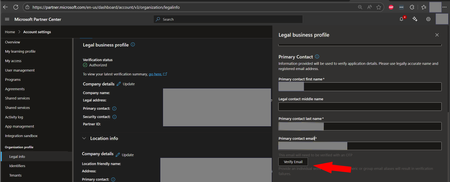
Hello! When clicking the Verify Email button in the location below, the primary contact email is not receiving the OTP verification email. I'm on my 6th Partner Center support ticket attempting to determine out why I am not receiving these emails. Partner center support is quick to help me verify the account manually, but I would really like to see the automated system working as intended to help future partners avoid running into this same issue. Could someone help me track down the email address these messages are coming from? Thanks! -jon For reference, the first few tickets I opened under the following workspace/topic, but the assigned engineers say "you picked the wrong topic try again." Workspace: Account Settings Topic: Account verification > E-mail ownership I ask what set of options I should pick to get my ticket routed to the right team, but I haven't located someone that can answer that question either. I've started choosing a random workspace and topic in the hopes that I get lucky. I don't think this strategy is going to work very well, but the partner center support team haven't suggested a better approach and I'm out of ideas. Maybe if I open enough tickets, someone on the partner center support team will notice and help me out.Solved