ai
598 TopicscSyksyn 2026 Tekniset ja myynnin Kumppanitunnit
Microsoftin tekniset ja myynnille suunnatut Kumppanitunnit järjestetään nykyään Microsoftin globaalilla Skilling Hub -sivustolla, josta ne ovat kätevästi saatavilla myöhemmin tallenteina materiaaleineen. Rekisteröidy Skilling Hub -portaaliin, josta löydät kaikki Microsoftin kumppanikoulutukset yhdessä paikassa eri kielillä tai tekstitettyinä. Rekisteröityessäsi voi valita ne kielet, kuten suomi, jollaista sisältöä haluat ensisijaisesti nähdä englannin kielisen koulutussisällön lisäksi. Kumppanitunti on joka toinen perjantai klo 10–11 järjestettävä Microsoftin kumppaniwebinaari, joka on tarkoitettu kaikille Microsoftin kumppaneille. Tekniset ja kaupalliset aiheet vuorottelevat ja olet tervetullut molempiin webinaareihin. Webinaareissa keskitymme Microsoftin ratkaisualueiden teknologioiden mielenkiintoisiin uutuuksiin, MAICPP-kumppaniohjelmaan, kumppanietuihin ja ratkaisumyyntiin. Microsoftin suomalaiset arkkitehdit, tuotepäälliköt, ratkaisumyyjät ja kumppanivastaavat ovat poimineet kiinnostavia ja hyödyllisiä aiheita, joita he vuorollaan esittelevät. Syksyn 2026 ohjelma Alla ovat suunnitellut päivät ja teemat Syksylle 2026, joiden tarkka aihe päivitetään aina lähempänä esityspäivää tälle sivulle. 18.9. Kaupallinen Kumppanitunti: Partner START FY27 - webinaari Katso tallenne tästä linkistä: Etkö päässyt mukaan START FY27 Kickoff -tapahtumaan? Webinaarissa saat kattavan katsauksen tapahtumassa käsiteltyihin FY27: n liiketoimintamahdollisuuksiin, strategisiin painopisteisiin sekä Microsoftin kumppaneille suunnattuihin ohjelmiin ja resursseihin. Puhujat: Kalle Saarikannas, Liiketoimintajohtaja, AI Business Solutions Teemu Lainiola, Liiketoimintajohtaja, Cloud & AI Platforms Mereta Laukkanen, Sr Partner Development Manager Jonna Kaarlenkaski, Partner Development Manager Intern Jonna Fred-Jokela, Sr Solution Engineer Manager 2.10. Tekninen Kumppanitunti: Copilot Cowork: Copilot Credits ja kustannusten hallinta Katso tallenne tästä linkistä! Tässä teknisessä kumppanitunnissa käymme läpi Copilot Coworkin toimintamallin, kulutuksen seurannan sekä kustannusten hallinnan. Lisäksi tarkastelemme, millaisia mahdollisuuksia kulutuspohjainen AI luo kumppaneiden palveluliiketoiminnalle. Puhujat: Henri Nevalainen, Microsoft Niko Hiltunen, IAMCP 9.10. Kaupallinen Kumppanitunti: Onko julkisen pilven suvereniteetti riittävä huomioiden sen kaikki hyödyt? Katso tallenne tästä linkistä! Euroopan unioni valmistelee uusia pilvi- ja tekoälyinfrastruktuuria koskevia linjauksia. Samanaikaisesti organisaatiot pohtivat, miten digitaalinen suvereniteetti, tekoälyn käyttöönotto, kyberturvallisuus ja sääntelyvaatimukset voidaan sovittaa yhteen käytännössä. Tervetuloa ajankohtaiseen webinaariin, jossa tarkastelemme Euroopan muuttuvaa pilviympäristöä ja mitä digitaalinen suvereniteetti tarkoittaa suomalaisille organisaatioille käytännössä. Lisäksi kerromme viimeisimmät tilannetiedot pilvipalveluiden kvanttiturvallisuuden ja Suomen datakeskushankkeiden osalta. Puhujat: Juha Karppinen, National Technology Officer, Microsoft Timo Salminen, Partner Solution Architect, Microsoft Niko Hiltunen, IAMCP 22.10. Kaupallinen Kumppanitunti: Frontier Transformation - Next level IQ & Uusi näkökulma kumppanin rooliin AI-aikakaudella Katso tallenne tästä linkistä! AI-transformaatio on siirtymässä yksittäisten työkalujen käyttöönotosta kohti laajempaa työn ja toimintamallien uudistamista. Kumppanitunnilla havainnollistamme käytännön esimerkin avulla, kuinka organisaation toimintaa voidaan tarkastella digitaalisen genomin kautta, organisaatiosta ja tiedosta aina työhön, mikrotehtäviin ja agentteihin asti. Samalla tarkastelemme, mitä muutos tarkoittaa kumppaneille: miten tunnistaa uusia asiakasarvon mahdollisuuksia, rakentaa vaikuttavampia AI-keskusteluja ja auttaa asiakkaita etenemään kohti agenttipohjaista toimintamallia. Tule mukaan katsomaan demo ja pohtimaan, mitä seuraavan vaiheen AI-transformaatio mahdollistaa sinun asiakkaillesi. Puhujat: Hans Dolk, Asiakkuusjohtaja / Defence & Intelligence, Public Safety and National Security Juha Liljeblom,Teknologia Strategisti / Defence & Intelligence, Public Safety and National Security 23.10. Kaupallinen Kumppanitunti: Uudistunut Microsoft Copilot: ominaisuudet, käyttötavat ja kustannusten hallinta Katso tallenne tästä linkistä! Microsoft Copilot uudistuu merkittävästi. Copilotista rakentuu paikka, jossa käyttäjä voi kysyä, delegoida, rakentaa ja automatisoida työtä. Uudet Home-, Code- ja Autopilot-kokemukset laajentavat Copilotin käyttöä päivittäisestä AI-avustamisesta kohti pidempikestoista agenttityötä ja käyttäjien itse rakentamia ratkaisuja. Webinaarin tavoitteena on antaa kumppaneille selkeä kokonaiskuva siitä, miten uudistunut Copilot muuttaa asiakkaiden AI:n käyttötapoja, lisensointi- ja kulutuskeskustelua sekä kumppaneille avautuvia mahdollisuuksia. Puhujat: Harri Mikkanen, Microsoft Tuulia Piehl, Microsoft Henri Nevalainen, Microsoft Eetu Hämäläinen, IAMCP 30.10. Tekninen Kumppanitunti: Villi vai hallittu? Tekoälyagentit hallintaan Microsoft Agent 365:llä Rekisteröidy mukaan tästä linkistä! Agentteja syntyy organisaatioihin nopeammin kuin kukaan ehtii niitä seurata. Niitä rakentavat työntekijät, niitä hankitaan kumppaneilta ja niitä kytketään liiketoiminnan dataan ja työkaluihin. Kenellä on oikeudet mihinkin, kuka agentin omistaa, kun tekijä lähtee talosta, ja mihin luottamuksellinen data päätyy? Tässä teknisessä kumppanitunnissa käymme läpi, miten Microsoft Agent 365:llä saadaan agentit näkyviin, hallintaan ja suojattua työkaluilla, jotka ovat asiakkailla todennäköisesti jo käytössä: Microsoft 365 -admin-portaalilla, Entralla, Purviewilla ja Defenderillä. Tarkastelemme eroa "villin" ja "hallitun" agentin välillä. Villi agentti julkaistaan suoraan kaikille ilman tarkistusta, ja sillä on tekijänsä kaikki oikeudet. Hallittu agentti kulkee hyväksyntäprosessin kautta, sillä on nimetty omistaja ja sen pääsy on rajattu Entran, Purviewin ja Defenderin käytännöillä. Puhujat: Heta Kuosa, Microsoft Christine Dienel, Microsoft Risto Lahi, IAMCP 6.11. Kaupallinen Kumppanitunti: Microsoft 365 Copilot, Fabric ja GitHub Copilot: kokeiluista tuotantoon – mitä kumppanin pitää tietää nyt Rekisteröidy mukaan tästä linkistä! Microsoft 365 Copilot on uudistunut kokonaisuudeksi, joka tarjoaa neljä erilaista tapaa hyödyntää tekoälyä työssä: Chat toimii apuna päivittäisessä työssä, Cowork vie monivaiheisia tehtäviä alusta loppuun, Code mahdollistaa sovellusten ja työkalujen rakentamisen, ja Autopilot pitää työn etenemässä taustalla. Tällä Kumppanitunnilla keskitymme erityisesti Copilot Coworkiin sekä tutustumme myös Coden ja Autopilotin mahdollisuuksiin. Copilotin tehokas hyödyntäminen edellyttää kuitenkin myös laadukasta ja tarkoituksenmukaista dataa. Siksi tarkastelemme, miten Microsoft Fabric tuo hallitun ja kontekstualisoidun liiketoimintadatan Copilotin hyödynnettäväksi ja millainen rooli datalla on tekoälyratkaisujen rakentamisessa. Lisäksi näytämme, miten Codella rakennettua työkalua voi kehittää eteenpäin esimerkiksi GitHub Copilotilla, kun siitä kasvaa vaativampi tuotantosovellus. Lopuksi puhumme siitä, miten kumppanit voivat auttaa asiakkaitaan siirtymään kokeiluista laajaan käyttöön ja millaisia liiketoimintamahdollisuuksia se avaa. Puhujat: Kalle Saarikannas, Liiketoimintajohtaja, AI Business Solutions Teemu Lainiola, Liiketoimintajohtaja, Cloud & AI Platforms 20.11. Tekninen Kumppanitunti: Valittuja paloja Microsoft Ignitesta Rekisteröitymislinkki päivittyy tähän Puhujat: 4.12. Kaupallinen Kumppanitunti: Kumppaniohjelmat ja insentiivit Rekisteröitymislinkki päivittyy tähän Puhujat: 18.12. Tekninen Kumppanitunti: Agentit Azuressa Rekisteröidy mukaan tästä linkistä! Azure Copilot pitää sisällään uusia palveluiden elinkaarenhallintaan liittyviä agentteja. Tule kuulemaan, miten voit hyödyntää näitä omissa palveluissasi! Puhujat: Timo Salminen, Partner Solution Architect, Microsoft827Views0likes0CommentsPartner Blog | From AI adoption to recurring revenue: The SMB partner opportunity at Microsoft Ignite 2026
For many small and medium-sized businesses (SMBs), the AI conversation has moved beyond whether the investment can deliver value. Customers are increasingly focused on what comes next: how to embed AI into everyday work, extend it across business processes, and manage it securely as adoption grows. That shift creates an even bigger opportunity for partners. By building the services, managed offerings, and intellectual property (IP) that turn adoption into measurable outcomes and recurring revenue, partners can create a durable path for growth, particularly in the SMB segment, where customers often rely on them for both technology and ongoing expertise. In a recent Morning Brew interview, Allison West Hughes, Microsoft Corporate Vice President, Global Small Medium Business, noted that SMBs adopt AI tools about 10 percentage points faster than enterprises. She also highlighted the role partners play across geographies, industries, customer sizes, and service models as SMB customers build agents and secure their data. Microsoft Ignite 2026, taking place November 17–20 at the Moscone Center in San Francisco and online, is an opportunity to build on that momentum. For partners serving SMB customers, the focus is on turning growing AI demand into a repeatable growth motion that connects adoption, security, managed services, and ongoing customer value. Registration for the in-person and online experiences is open. Secure your spot, then use the Partner Business view of the schedule builder to create an agenda around the capabilities and offers you want to build next. Turn AI adoption into a repeatable SMB growth motion Frontier Transformation describes the shift toward AI and agents becoming repeatable, governed capabilities embedded in how organizations work, serve customers, and run business processes. For SMB customers, making that shift practical matters. They need a path that brings intelligence and trust together without adding unnecessary complexity. That creates a natural role for partners to connect licensing, deployment, security, adoption, agents, measurement, and ongoing management across the customer journey. It also changes the economics of an AI practice. Instead of treating deployment as the end of an engagement, partners can use it as the beginning of a longer-term services relationship: identify high-value scenarios, establish the security and governance foundation, drive adoption, extend into agents and business processes, measure value, and continue optimizing over time. That is the opportunity we will explore at Microsoft Ignite in Frontier Transformation: The Next Trillion-Dollar Partner Opportunity, where I am joining David Lochridge, General Manager, Commercial Partner. The session is designed for channel leaders, AI-native partners evaluating platforms, and partners serving SMB and corporate customers. We will focus on four practical questions: Where are the strongest AI growth opportunities emerging for partners? How can industry solutions, AI-powered services, managed offerings, and IP create more repeatable revenue? What capabilities are needed to operationalize AI securely, including governance, adoption, change management, and Frontier Transformation engineering? How can an initial customer engagement develop into a longer-term services relationship? The goal is to leave with a clearer view of the business model behind Frontier Transformation and the capabilities required to turn customer AI adoption into recurring services revenue. Go deeper on monetization For partners ready to get specific about packaging, pricing, and scaling offers, the partner theater session From Experimentation to Monetizing AI goes deeper into the operating model behind an AI practice. Explore the Partner Business theater sessions in the Microsoft Ignite catalog. The session focuses on moving from customer curiosity to measurable outcomes through repeatable offerings, AI-powered IP, and agentic solutions. The important question is not simply what you can build. It is how you package that capability so your sales and delivery teams can take it to market consistently, and customers can understand the value they are buying. Partners serving SMB customers should also add two sessions to their agenda. The Frontier Transformation Partner keynote on Wednesday, November 18, from 9:00 to 10:00 AM Pacific Time will explore how organizations are redesigning work and scaling AI adoption, along with what those shifts mean for partner capability and customer opportunity. The SMB Partner Path: Turning AI Ambition into Customer Growth will focus more directly on making AI practical for SMB customers through a unified conversation and repeatable path from ambition to business value. Together, these sessions can inform a simple question to bring back to your business: What is the next AI offer we can package, sell, deliver, and manage repeatedly for our SMB customers? Continue reading here91Views0likes1CommentThe Context Advantage
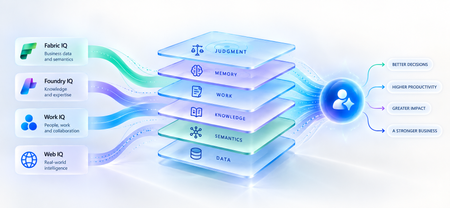
A strange thing happens when enterprises upgrade their AI models. The model gets smarter. The benchmarks improve. The demos become more impressive. And sometimes, the business outcome barely moves. The agent still asks questions the organization answered months ago. It recommends something policy doesn't allow. It treats a strategic customer like any other customer. It proposes an architecture your engineering team rejected six months ago. The problem isn't necessarily intelligence. It is ignorance of the business. That distinction matters because the world's most capable models are becoming available to almost everyone. Your competitors can increasingly access the same frontier intelligence you can. What they cannot access is your customer history, operating knowledge, organizational memory or understanding of how decisions actually get made. Models are becoming shared. Context remains proprietary. And that may be where the next enterprise AI advantage is built. Intelligence Without Context is Surprisingly Ordinary Consider a simple enterprise question: Can we offer this customer a larger discount? A powerful model can reason about discounts. But answering that question properly may require the customer's lifetime value, current contract, payment history, margins and approval thresholds and perhaps a conversation yesterday in which the account executive learned that a competitor had entered the deal. The model isn't missing intelligence. It is missing context. Humans rarely make important decisions from one piece of information. We combine data, experience, relationships, history and situational awareness almost unconsciously. Agents need a version of the same capability. That is why enterprise AI is moving from an era dominated by prompt engineering toward one increasingly shaped by context engineering. Satya Nadella recently described the emerging market simply as “a world of context engineering.” Prompt engineering asks: What should I tell the model? Context engineering asks the larger question: What does the model need to understand before it can act well? That difference becomes critical as AI moves from answering questions to performing work. The Enterprise Context Stack In discussions about enterprise agents, “context” can easily become shorthand for giving a model access to more data. That definition is too narrow. I think about enterprise context as a stack: DATA → SEMANTICS → KNOWLEDGE → WORK → MEMORY → JUDGMENT Data tells the agent what happened: orders, transactions, inventory, claims and customer records. Semantics tells it what that data means to the business: what constitutes a strategic customer, how margin is calculated, which assets belong to which production line. Knowledge tells it what the organization knows: policies, contracts, procedures, research and accumulated expertise. Work tells it what is happening now: who is involved, what has been discussed and which commitments already exist. Memory tells it what happened before: previous interactions, decisions, exceptions and outcomes. And judgment helps determine what should happen next. Memory deserves particular attention because it is context agents can accumulate through experience. Microsoft Foundry now distinguishes between session, user and procedural memory - moving agents beyond remembering a conversation toward remembering preferences and learning how work gets done across repeated interactions. Sometimes the cheapest way to make an agent meaningfully better may not be a bigger model. It may be a better memory. Not every agent needs every layer. But the more consequential its responsibility, the richer, and more carefully governed, its context usually needs to become. This is where context stops being a retrieval problem and starts becoming an enterprise architecture problem. Context Is Becoming Infrastructure This shift is now visible well beyond any one technology platform. Gartner increasingly describes a context layer as an architectural foundation for agentic AI - bringing together semantics, operational state, provenance and other enterprise signals so agents can act reliably. Anthropic, approaching the problem from AI engineering, argues that context should be treated as a finite resource that must be carefully curated rather than simply expanded. Microsoft's recent direction is particularly interesting through this lens. Work IQ, Fabric IQ, Foundry IQ and Web IQ increasingly form a shared intelligence layer across Microsoft's stack. Work IQ provides context about how work happens. Fabric IQ brings business semantics and relationships. Foundry IQ provides reusable enterprise knowledge and agentic retrieval. Web IQ extends that understanding with fresh external intelligence. The architectural implication matters more than the product names. Instead of every new agent rebuilding connectors, retrieval logic, semantic definitions and permissions, context becomes reusable infrastructure from which many agents can reason. Microsoft captured the shift particularly well: As agents become the new application model, context becomes critical infrastructure. Your Data Estate Is Not Automatically Your AI Moat For years, organizations have been told their data is a competitive advantage. Sometimes it is. But possessing data and making that data useful to an agent are very different things. Most enterprises don't suffer from a shortage of information. They suffer from an abundance of it -scattered across databases, documents, emails, meetings, applications and people's heads. The advantage doesn't come from connecting an agent to all of it. It comes from turning information into usable context: preserving business meaning, understanding relationships, distinguishing authoritative knowledge from convenient information, respecting permissions and retrieving what matters when a decision is being made. The enterprise with the most data may not build the best AI. The enterprise that makes its context most usable might. The Context Budget There is a trap on the other side too. If context improves AI, the natural instinct is to give the agent as much as possible. That is the wrong objective. Context consumes attention and compute. Irrelevant information creates noise. Stale information can mislead. Conflicting context can degrade reasoning rather than improve it. The objective should therefore not be maximum context. It should be minimum sufficient context the smallest trusted, relevant and permission-aware set of information required to produce the right outcome. In Beyond Tokens, I introduced the idea of an Intelligence Budget: How much intelligence does this outcome deserve? Enterprise agents increasingly need a companion concept. The Context Budget. How much context does this decision deserve? A scheduling agent may need calendars and preferences. A pricing agent may need customer economics, margins, commitments and approval policies. A clinical agent requires an entirely different level of completeness, provenance and governance. Every unnecessary token of context is cost. Every missing piece of necessary context is risk. Which gives us a useful way to think about enterprise agents: Right Intelligence × Right Context → Right Outcome Spend more intelligence where the outcome warrants it. Provide more context where the decision requires it. Do neither indiscriminately. What An Agent May Know Matters Too! There is another dimension to the Context Budget: permissions. Enterprise context belongs to someone. A system that retrieves the right answer but ignores whether the agent is entitled to see it isn't intelligent. It is a security problem. Enterprise context must therefore remain identity-aware and permission-aware as it moves from source systems into agent reasoning. This becomes especially important as agents gain persistent identities and greater autonomy. What an agent may know is as much a part of its job description as what it may do. Autonomy defines the boundary of action. Context defines the boundary of understanding. From RAG Projects To Context Architecture The first generation of enterprise GenAI often started with RAG: connect documents to a model and retrieve relevant passages. That was an important step. But an agentic enterprise cannot become a collection of hundreds of independent RAG pipelines, each separately rediscovering the organization's customers, products, policies, terminology and permissions. That risks creating another generation of technology fragmentation. The opportunity is to move from agent-specific retrieval toward reusable enterprise context. What knowledge should agents inherit? Which business entities should have common definitions? Which sources are authoritative? Which memories should persist—and which should be forgotten? And perhaps the hardest question: Who owns enterprise context? Today, responsibility is scattered across data teams, application teams, knowledge management, security, business functions and increasingly AI teams. In an agentic enterprise, context may need to be managed as a product, not everyone's side project. The Moat Is Not The Model Imagine two competing organizations using exactly the same frontier model. One connects it to fragmented documents and a handful of applications. The other has strong data foundations, shared business semantics, governed knowledge, connected workflows and organizational memory. They have access to the same AI. They do not have the same intelligence system. The second organization's agents understand customers more deeply, interpret signals more accurately and act with greater awareness of how the organization actually works. And that advantage compounds. Every workflow creates more context. Every interaction adds organizational memory. Every decision creates another signal from which future agents can reason. Models depreciate the moment a better one ships. Context appreciates every day you operate. That may be the most important strategic shift of all. Anyone can rent intelligence. No one can rent your context. Intelligence Is Becoming Abundant. Understanding Isn't. The first wave of enterprise AI taught us how powerful models could be. The next may teach us that models were only one part of the equation. An agent needs intelligence to reason. But it needs context to understand your business. As frontier intelligence becomes more accessible, enterprises may discover that their most defensible AI asset was never the model. It was everything the organization had learned before the model arrived: its data, semantics, knowledge, relationships, history, workflows and judgment. The organizations that turn those assets into trusted, reusable context will give every agent they build an advantage from day one. So perhaps the strategic question is no longer simply: Which model should we use? It is: What does our organization know that our competitors don't and can our AI actually use it? Because in a world where everyone can access intelligence, context may be what makes that intelligence uniquely yours. References Microsoft — FY2026 Q2 Earnings Conference Call Microsoft — FY2026 Q4 Earnings Conference Call Microsoft Learn — What is Foundry IQ? Microsoft Foundry — Foundry IQ: Build Smarter Agents Faster with Unified Knowledge and Serverless Retrieval Microsoft Foundry — What's New in Microsoft Foundry | Build 2026 Gartner — Context Engineering Is the New Prompt Engineering Gartner — Market Overview for AI Context Platforms Gartner — The 3 Core Components of the Context Layer for AI Agents304Views0likes2CommentsThe MSP guide to recurring revenue streams
AI is creating new opportunities for managed services providers (MSPs), but the opportunity goes beyond helping customers deploy the latest technology. As organizations adopt AI, they need ongoing help keeping their environments secure, governed, and ready for what comes next. Join Dux Raymond Sy, 17-year Microsoft MVP and Regional Director, for a practical conversation about turning those needs into recurring services for your managed service practice. Dux will explore opportunities around AI trust and security, Microsoft Intune, Microsoft Agent 365, and Microsoft Purview, and talk about how MSPs can build lasting customer value around them. Drawing on more than 20 years at the intersection of technology, business, and leadership, Dux works with organizations and partners around the world to move from AI experimentation to execution with security, governance, data readiness, and people at the center. Come ready for ideas you can take back to your business, plus the opportunity to learn and connect with fellow MSPs. Resources Read the What's new for MSPs blog for practical guidance to help managed service providers grow with Microsoft. Take the survey! Help us plan future meetups that are relevant and useful for you. Download the slides from this October meetup. The Microsoft Meetup for MSPs is a recurring online community session where Microsoft product teams and MVP practitioners share working guidance for managing customer tenants at scale. Bookmark the Microsoft Meetup for MSPs resource guide for future session dates and resources to help you on your journey.587Views1like5CommentsConnect development and Marketplace publishing
Marketplace Ingestion MCP and Product Ingestion APIs now support every Microsoft Marketplace product, giving publishers more options for incorporating publishing into development and release workflows. Explore agent-assisted publishing, direct API integration, and generally available SaaS and virtual machine APIs. Existing preview integrations continue to work, so teams can adopt the latest versions at their own pace. Read the blog: Agentic Marketplace publishing expands with broader product coverage and generally available APIsAgentic Marketplace publishing expands with broader product coverage and generally available APIs
When we introduced Marketplace Ingestion Model Context Protocol (MCP), the idea was simple: help developers start with what they want to accomplish, rather than with an API payload. Now, that workflow can go further. Marketplace Ingestion MCP and APIs have reached 100% product coverage for Microsoft Marketplace offers, giving publishers more ways to bring Microsoft Marketplace publishing into the development processes and tools they already use. We’ve also reached another important milestone: the Product Ingestion APIs for SaaS and virtual machine offers are now generally available (GA). Together, these updates give development teams more flexibility in how they build Marketplace publishing into their workflows, whether they work with an AI agent through Marketplace Ingestion MCP, integrate directly with APIs, or combine both approaches. From agentic publishing to broader product coverage In my previous post, I shared how Marketplace Ingestion MCP connects natural-language intent with Microsoft Marketplace publishing actions. That experience now supports a broader range of Marketplace products. With 100% product coverage across our MCPs and APIs, publishers can apply the same outcome-first approach across their Marketplace publishing workflows. Marketplace Ingestion MCP connects supported agentic experiences with Partner Center APIs. Instead of manually constructing API payloads, you can describe the publishing outcome you want. Your agent can then help retrieve the right schema, build and validate the payload, and perform supported publishing actions. For development teams, that means publishing can become part of the workflow rather than a separate activity after development is complete. SaaS and virtual machine APIs are now generally available Publishers that prefer to integrate directly with Marketplace publishing APIs also have an important update: Product Ingestion APIs for SaaS and virtual machine offers are now generally available. These APIs give development teams a programmatic way to create, publish, and manage their offers in Microsoft Marketplace. With these APIs now generally available, publishers have another way to build Marketplace publishing into their development and release processes. For teams already using the APIs, there is no need to immediately rework integrations built with older preview versions. Existing preview API versions continue to work. You can continue using those versions in your current integrations while adopting to the GA versions. If you're starting a new integration, we encourage you to use the latest generally available API versions for SaaS and virtual machine offers. Choose the workflow that works for your team There isn't one way every publisher needs to work. Some teams may want an agent-assisted experience, using natural language and Marketplace Ingestion MCP to handle more of the translation between publishing intent and API structures. Other teams may work directly with the Product Ingestion APIs to build publishing into automated processes. And some teams may combine both. The opportunity is to make Marketplace publishing fit more naturally into how your team develops and ships software. You can: Start with intent. Use Marketplace Ingestion MCP to describe the publishing outcome you want and let your agent help translate it into supported actions. Build repeatable workflows. Bring common offer creation and update tasks into development workflows, including CI/CD processes where appropriate. Integrate directly with APIs. Use the generally available Product Ingestion APIs for SaaS and virtual machine offers to build programmatic publishing experiences. Move forward at your own pace. Existing integrations using older preview API versions continue to work, giving teams flexibility in when they adopt the latest GA versions. What this means for publishers The goal is straightforward: give developers more flexibility in how they bring their cloud and AI solutions to customers through Microsoft Marketplace. Marketplace Ingestion MCP brings publishing closer to the tools and agentic workflows developers already use. The Product Ingestion APIs provide the foundation for teams that want direct programmatic integration. With expanded product coverage and GA APIs for SaaS and virtual machine offers, publishers have more options for building Marketplace publishing into the way they already develop and operate their products. If you've been exploring agent-assisted publishing, now is a good time to take another look. And if you're building directly with the Product Ingestion APIs, consider using the latest generally available SaaS and virtual machine API versions as you create new integrations. Get started Marketplace Ingestion MCP is included with access to Microsoft Marketplace submission APIs. To get started, you'll need: A Partner Center account with the required role Access to Microsoft Marketplace submission APIs An MCP-compatible client, such as Visual Studio Code or GitHub Copilot CLI, if you want to use Marketplace Ingestion MCP Learn more: Marketplace Ingestion MCP server | Microsoft Learn Product Ingestion API for Microsoft Marketplace | Microsoft Learn Product Ingestion API for SaaS | Microsoft Learn Product Ingestion API for virtual machines | Microsoft Learn Marketplace Ingestion MCP server - Marketplace publisher Publishing doesn't need to sit at the end of development. With agent-assisted workflows, broader product coverage, and generally available APIs, teams have more ways to make publishing a natural part of how they build and bring solutions to market.187Views2likes0CommentsLand Your Offer - Anatomy of Revenue Generating Partner Offer - Part 3 - Copilot Deployment
In Part 1 we looked at Copilot in 30, a $0 trial for SMB customers. In Part 2 we looked at Envisioning & POC, a funded pre-sales engagement. Part 3 moves to post-sales. The customer has bought Copilot seats. The job now is to get people using them. That job has a new reward. From 1 October 2026, the Frontier Accelerate for Copilot: M365 Copilot Deployment Accelerator pays in two milestones: one when you deliver the deployment, and one when the customer's active users grow. It also lands just after Microsoft introduced the new Copilot with Home, Code and Autopilot, usage-based billing and FinOps for AI. Deployment now covers more ground, and customers need a partner to cover it. Package this engagement as a Microsoft Marketplace offer and you have a repeatable way to turn paid seats into active users across your whole customer base. Start Here: Why Publishing on Microsoft Marketplace Matters Microsoft Marketplace is Microsoft's partner-focused business platform. It helps you reach more customers and makes buying from you simpler. A published offer gives your practice a permanent storefront where customers and Microsoft sellers already look for Copilot help. An offer also makes your work repeatable. You define the phases, activities, deliverables and sizes once. Then you run the same engagement for every qualified customer instead of scoping each one from scratch. Partner Center supports both professional service and managed service offers, so one listing can carry the deployment and the ongoing services that follow. The Opportunity: Seats Bought, Value Waiting Many organisations have bought Copilot ahead of their people adopting it. The gap between paid seats and monthly active users is value still waiting to be realised. Take a customer with 3,000 paid Copilot seats and 1,000 monthly active users. That leaves 2,000 seats, about $720K a year of Copilot investment at $30 per user per month, not yet part of anyone's working day. Closing that gap is what this engagement is designed to do. Customer eligibility for each size is set by two numbers: purchased Copilot seats, and unused seats (purchased seats minus active users). Both are in Partner Center's growth insights reporting in the AI Business Solutions & Security Insights (ASPX) dashboard. Use the dashboard's filters to find customers to land this offer with, and you will know which size each one qualifies for before the first conversation. Why Deployment Is Where Copilot Value Is Won Copilot delivers its value through daily use. The more people build it into how they work, the more value the business sees, and the stronger the case to extend it to more teams. The new Copilot widens what a good deployment covers. Home is the new starting point, with the full power of Word, Excel and PowerPoint built in through Office in Copilot. Code lets people build apps, dashboards and automations in plain language. Autopilot is a persistent agent that keeps work moving without a prompt. Advanced capabilities run on usage-based billing, governed through FinOps for AI. So deployment now goes beyond assigning licences. It means securing data, governing Code apps and Autopilot agents, training people on Chat, Office in Copilot and Code, and putting spend controls in place before usage scales. Each of these takes skills many customers do not yet have in-house. Each one is a service you can deliver. Meet the Offer: M365 Copilot Deployment Accelerator, Paid in Two Milestones The M365 Copilot Deployment Accelerator is a post-sales, partner-led engagement. It covers technical deployment of Microsoft 365 Copilot and Microsoft 365 Copilot Business, security and governance controls, user training, and adoption and change management. The essentials: Who qualifies: Customers with a minimum number of purchased Copilot seats and unused seats for each size: XXS 50+ and 25+, XS 300+ and 250+, S 500+ and 500+, M 1,500+ and 1,500+, L 3,000+ and 3,000+. Strategic 500 customers are not eligible. EDU and non-profit customers are not eligible for XXS and XS. How it is sized: Five sizes: XXS (10 hours), XS (20 hours), S (40 hours), M (100 hours) and L (200 hours). How it pays: Milestone 1 (Solution Deployment) is paid once your proof of execution (POE) is approved. It is guaranteed and does not depend on any outcome. Milestone 2 (Consumption Growth) is paid if the customer's incremental paid Copilot monthly active users reach the nominated band within a six-month window. Going above the band does not increase the payment. Falling below it means no Milestone 2 payment. How it runs: Nominate the customer into a size band (the band is locked once submitted). Get customer consent within 30 days. Deliver the work and submit POE (partner survey, customer attestation and invoice) within 90 days of consent. Each customer tenant can have up to two approved claims, one at a time. Who can deliver: Partners at Copilot JumpStart Ready or higher until 31 December 2026. From 1 January 2027, the Microsoft 365 Copilot specialization is required. Term: 1 October 2026 to 30 June 2027, or until the program cap is reached. Microsoft funds the deployment and rewards the growth. You own the delivery, the relationship and everything that follows. Your Role: From Deployer to Adoption Partner A deployment is not finished when licences are assigned. It is finished when people use Copilot every week and the sponsor can see the value. Your job is to get the customer there, phase by phase. Plan: Confirm the first business functions to adopt. Validate priority scenarios across Chat, Office in Copilot and the Microsoft 365 apps. Set KPIs and Responsible AI guardrails. Build a measurable business case that includes usage-based billing. Assess the environment and sequence remediation before deployment. Implement: Prepare the environment and assign licences. Configure data controls, fix oversharing, and govern Code apps and Autopilot agents. Enable admin tools. Set up the Copilot Dashboard, reporting and FinOps for AI spend controls. Launch a champions programme and community. Train users on Chat, Office in Copilot and Code. Adopt: Run prompt-a-thons on real scenarios. Survey users on their experience. Track incremental paid active users every month against the Milestone 2 band. Review audit logs and Copilot reports. Monitor service health, demand, cost and AI spend. Manage and Improve: Extend analytics with custom impact reports. Refine the business case with real data. Align policies to Home, Code and Autopilot on a set schedule. Optimise operations and AI spend. Mine help desk tickets for new agentic use cases. Keep training going as adoption spreads. Close out: Deliver an executive summary with recommendations, risks, owners and dates. Submit POE. Agree the plan to reach the nominated active user band within the six-month Milestone 2 window. Every phase moves one number: active users. It is the number the customer's sponsor watches most closely, and the one both milestones are built around. Inside the Offer: Activities and Hours by Engagement Size Below is the full activity plan behind the offer, with hours for each of the five sizes. Use it to size your own offer plans and statements of work. ID Phase Activity XXS XS S M L Pre-req Eligibility Minimum Copilot seats / unused seats (unused = seats minus active users) 50+ / 25+ 300+ / 250+ 500+ / 500+ 1,500+ / 1,500+ 3,000+ / 3,000+ P1 Plan Identify priority business functions 0.25 0.5 1 2.25 4.5 P2 Plan Determine high-value scenarios 0.5 1.25 2.25 5.75 11.5 P3 Plan Define success metrics and guardrails 0.5 0.75 1.5 3.75 7.5 P4 Plan Develop the business case, incl. usage-based billing (UBB) 0.5 1.25 2.25 5.75 11.5 P5 Plan Plan readiness and remediation 0.5 1 1.75 4.5 9 I1 Implement Prepare environment and assign licenses 0.75 1.5 3 7.75 15.25 I2 Implement Configure security and data controls 0.75 1.5 3 7.75 15.25 I3 Implement Enable administrative tools 0.5 0.75 1.5 3.75 7.5 I4 Implement Deploy analytics and reporting, incl. FinOps for AI 0.5 0.75 1.5 3.75 7.5 I5 Implement Activate champions and communities 0.25 0.75 1.25 3 6 I6 Implement Conduct training and communications 0.75 1.5 2.75 6.75 13.75 A1 Adopt Drive cross-organizational adoption 0.5 1.25 2.5 6 12.25 A2 Adopt Gather user feedback and sentiment 0.25 0.5 1.25 3 6 A3 Adopt Measure business impact and usage 0.5 1 2 5.25 10.75 A4 Adopt Monitor security and audit reports 0.25 0.5 1 2.75 5.25 A5 Adopt Monitor and evaluate operations, cost and AI spend 0.25 0.5 1.25 3 6 M1 Manage and Improve Extend analytics 0.25 0.5 1.25 3 6 M2 Manage and Improve Evolve the business case, incl. UBB 0.25 0.5 1.25 3 6 M3 Manage and Improve Policy review and refinement 0.25 0.5 1.25 3 6 M4 Manage and Improve Optimize operations and AI spend 0.5 0.75 1.5 3.75 7.5 M5 Manage and Improve Continuous process improvement 0.25 0.5 1.25 3 6 M6 Manage and Improve Continuous training and adoption 0.5 0.75 1.5 3.75 7.5 C1 Close-out Executive summary, POE and Milestone 2 growth plan 0.5 1.25 2.25 5.75 11.5 TOTAL Hours 10 20 40 100 200 Land Your Offer: What One Customer Is Worth The table below is the revenue anatomy of one Deployment Accelerator engagement at each of the five sizes. Four revenue streams stack on top of each other: Milestone 1, Solution Deployment: Microsoft funds the deployment work, from $1,625 for an XXS engagement to $32,500 for an L engagement. It is paid once POE is approved and is guaranteed. Milestone 2, Consumption Growth: a further $875 to $17,500, paid when the customer's incremental paid active users reach the nominated band within six months. This is where adoption work earns its own reward. CSP incentive on Copilot revenue: earned on the Copilot seats you transact. Customers who see their people using Copilot every day tend to renew and extend, so adoption work supports this stream too. Managed services: the recurring engagement described in After Close-out, which is where the largest and most durable share of revenue lives. Item XXS XS S M L Minimum Copilot seats / unused seats 50+ / 25+ 300+ / 250+ 500+ / 500+ 1,500+ / 1,500+ 3,000+ / 3,000+ Engagement hours 10 20 40 100 200 Milestone 2 target: incremental paid Copilot active users in six months 25+ 250+ 500+ 1,500+ 3,000+ Milestone 1, Solution Deployment (K) $1.63K $3.25K $6.5K $16.25K $32.5K Milestone 2, Consumption Growth (K) $0.88K $1.75K $3.5K $8.75K $17.5K Frontier Accelerate total (K) $2.5K $5K $10K $25K $50K CSP incentive on Copilot revenue (K)† $3.51K $21.06K $35.1K $105.3K $210.6K † Milestone payments shown at Market A rates for claims nominated from 1 October 2026. CSP incentive shown at a blended 19.5% (direct bill 2.5 + 7 + 10; indirect reseller 7 + 12.5) on the minimum Copilot seats for each size at $30 per user per month for 12 months. Illustrative estimates from the offer plan. Confirm current rates, market rates, eligibility and geographic restrictions (which apply to the L size) in the latest Microsoft Commercial Partner Incentives Guide. Now multiply. Everything above is the anatomy of a single customer. Landing the offer means running it across every qualifying customer in your base. The same ASPX view you use to check eligibility is your target list: sort the customers you manage by the gap between paid Copilot seats and active users, and check MCI eligibility and potential earnings for each. Do not forget your Part 2 customers: every Envisioning & POC engagement that converted to paid seats is a natural next candidate. How the Offer Fits Together: From Sizing to Proof of Execution The offer runs left to right in three layers: Sizing and value: five sizes from XXS (10 hours) to L (200 hours). Milestone 1 is paid on POE approval. Milestone 2 is paid when the active user band is met. Bands are locked at nomination. Five phases: Plan (P1 to P5), Implement (I1 to I6), Adopt (A1 to A5), Manage and Improve (M1 to M6) and Close-out (C1, T1, T2, X1). Each phase produces something the sponsor can see. Proof of execution: prioritised scenarios and a business case that includes usage-based billing; a secure, licensed Copilot environment; analytics, reporting and admin controls; active champions and trained users; incremental paid active users, impact and ROI measured; an executive summary, roadmap and POE. Plus a named wave 2 expansion beyond the first teams. The highlighted activities are champions and communities (I5), training and communications (I6), cross-organizational adoption (A1), business impact and usage (A3), extended analytics (M1), policy review (M3), operations and AI spend (M4), continuous training (M6), trial to paid licence conversion (T1), commercial proposal and signature (T2) and the wave 2 expansion plan (X1). These are where the engagement stops being a project and becomes an ongoing relationship: managed services, ongoing optimisation and follow-on professional services after the engagement closes. The managed services below are built from exactly these activities. After Close-out: Managed Services That Keep Delivering Close-out is the start of the real engagement. Package these six recurring services in your offer. Each one carries forward a highlighted activity from the deployment, is sized in partner days so you can price it, and drives a business outcome the sponsor can put a number on. Managed service Partner activity: what you deliver and measure Customer business outcome: what it drives (illustrative targets, M-size customer) Champions and community management • Effort: 1 to 2 days a month • Activity: Run the champions network and a Viva Engage or Teams community, host monthly prompt-a-thons on real work, and carry adoption into every business function (I5, A1) • Reported as: Active champions per function; community questions answered; functions above the utilisation target • One active champion for every 50 users (60 champions across 3,000 seats) • Adoption spreads from the first 2 business functions to 6+ within six months • Copilot how-to tickets to the help desk down 30 to 50% as peers answer questions first Continuous learning and enablement • Effort: 2 days a month • Activity: Deliver role-based training and launch communications for each new group, onboard new joiners within their first 30 days, and refresh training as new Copilot capabilities arrive (I6, M6) • Reported as: People trained by role; new joiners onboarded within 30 days; trained users active within 30 days • 2 to 4 hours saved per active user a week (≈5,000 to 10,000 hours across 2,500 active users) • 90%+ of trained users active within 30 days of training • New joiners productive with Copilot in their first month, not their first quarter Usage and impact analytics • Effort: 1 to 2 days a month • Activity: Track incremental paid active users against the Milestone 2 band every month, extend the Copilot Dashboard with third-party data, and build custom impact reports by function (A3, M1) • Reported as: Incremental active users against the band; utilisation (active users ÷ paid seats); impact by function • Utilisation lifted from 33% to 83% (1,000 to 2,500 active users) within six months, meeting the M band floor • ≈$540K a year of Copilot investment moved from unused to in use • Return shown in the customer's own numbers: ≈$1.08M a year of seats against $9.6M+ of staff time released at $40 per hour Policy lifecycle management • Effort: 1 day a month • Activity: Review and refine security and governance policies on a set schedule, and align them to Home, Code and Autopilot before each capability reaches users (M3) • Reported as: Policy reviews completed on schedule; new capabilities assessed before rollout; open policy exceptions • New Copilot capabilities switched on in weeks, not quarters, because policies are ready • Zero Copilot-related oversharing incidents as usage grows • Audit evidence for every policy decision available on request Service and AI spend optimisation • Effort: 1 to 2 days a month • Activity: Review KPIs, user feedback and AI spend each month, update the service management plan, and focus usage-based capabilities on the users and scenarios that justify them (M4) • Reported as: KPI trend; AI spend against budget; feedback themes closed • AI spend held within ±10% of budget, with no unplanned overage • Cost per active user down 10 to 20% a year as usage matures • Top user feedback themes acted on within 30 days Licence growth and wave planning • Effort: 1 day a month, plus 2 to 3 days per expansion wave • Activity: Convert trial licences to paid, prepare commercial proposals for named teams, and plan and date the next expansion wave (T1, T2, X1) • Reported as: Trials converted; proposals signed; next wave dated with named teams • New seats added only where a named team and use case are ready • Each new wave at 80%+ utilisation within 60 days • Wave 2 adds 250 to 500 seats, each backed by usage data from wave 1 Outcomes are illustrative targets for an M-size customer with 3,000 paid Copilot seats and 1,000 active users at nomination, at $30 per user per month, a blended $40 per hour staff cost and 48 working weeks a year. Validate them with each customer when you define success metrics (P3) and build the business case (P4), then report against them from A3 onwards. Effort scales with seats in scope, as the engagement hours do. Add the recurring rows together and one M-size customer sustains roughly 8 to 9 partner days a month after close-out, before expansion waves are counted. Every row pairs a number you can invoice against with a number the sponsor can take to the board. That is what turns a recurring service into a renewable one. Ready to Build Your Copilot Deployment Accelerator Offer? Read the engagement terms and mechanics in the Microsoft Commercial Partner Incentives Guide, and download the delivery guide and pre-engagement planning resources. Check your eligibility: Copilot JumpStart Ready or higher until 31 December 2026, then the Microsoft 365 Copilot specialization from 1 January 2027. Publish your offer in Partner Center as a professional service (the deployment accelerator) with a managed service follow-on (community, learning, analytics, policy, spend optimisation and licence growth). Build your first cohort: in ASPX, filter the customers you manage for paid Copilot seats with low Copilot utilisation and an adoption status of starting or struggling, then check MCI eligibility and potential earnings for each. Start with customers from your Envisioning & POC engagements that converted to paid. Nominate the right band: the band is locked at nomination and Milestone 2 pays only if incremental paid active users reach its floor. Use ASPX to set it: take today's Copilot MAU as your baseline, look at the recent trend and adoption status, and pick the band whose floor you can realistically add in six months. A customer with 3,000 paid seats and 1,000 active users qualifies for M, and reaching the M floor means adding 1,500 active users. If your plan adds 600, S is the safer choice. Book the close-out before Plan begins, so the Milestone 2 plan and the wave 2 conversation are already on the calendar. Your customers have already chosen Copilot. Help every one of their people make it part of how they work. Resources Engagement mechanics for Copilot Deployment Accelerators | Microsoft Commercial Partner Incentives Guide Microsoft Commercial Partner Incentives Guide M365 Copilot Deployment Accelerator: Delivery Guide M365 Copilot Deployment Accelerator: Pre-Engagement Planning Partner investments: October 2026 updates Archived incentive terms for claims nominated before 1 October 2026 The new Copilot is here: the opportunity for Microsoft partners Introducing the new Copilot with Home, Code and Autopilot359Views2likes0Comments