ai
890 TopicsHow software companies can expand their SMB reach with Microsoft Marketplace and AI
How can software companies turn a Microsoft Marketplace presence into greater customer reach and growth? Explore how Microsoft Marketplace can help software companies connect with more small and medium business (SMB) customers, support scalable sales, and expand into new markets in the age of AI. The article highlights Ntegral’s evolution from a traditional systems integrator to a software company with more than 300 enterprise solutions and deployments in more than 150 countries. You’ll also get a preview of what Ntegral President and CTO Dexter Hardy will bring to Ultimate Partner LIVE Reston, including practical perspectives on building beyond a Marketplace listing, developing pipeline, reaching SMB customers, and incorporating AI into a broader growth strategy. Read the full article to discover how Marketplace, AI-powered innovation, and an SMB-focused product strategy can work together to create new opportunities for software companies. 👉 Explore now: How software companies can reach more SMB customers through Microsoft Marketplace in the age of AI37Views0likes0CommentsNew Microsoft 365 Certified: AI Services Administrator Associate Certification
As AI moves deeper into mission-critical work, organizations need trusted administrators who can govern access, secure data, monitor services, and keep Microsoft 365 AI experiences running at enterprise scale. Show you’re ready with new Exam AB-650 (beta). AI-powered productivity is no longer just about enabling new capabilities, it’s about operating them with the right controls, safeguards, and visibility. Organizations need administrators who can help make Microsoft 365, Microsoft 365 Copilot, agents, and connected AI services secure, compliant, reliable, and scalable across the enterprise. The new Microsoft 365 Certified: AI Services Administrator Associate Certification validates the skills to configure, manage, secure, govern, and continuously optimize Microsoft 365 tenants, workloads, and AI services so organizations can adopt AI with confidence and drive effective outcomes at scale. To earn this Microsoft Certification, you’ll need to pass Exam AB-650: Administering Microsoft 365 and AI Services, currently in beta. Is this the right Certification for you? Candidates for this Certification: Configure, manage, secure, and govern Microsoft 365 tenants, workloads, and AI services, including Copilot, agents, and connected AI capabilities. Govern data access, protect information, and support collaboration between users and agents. Operate and continuously optimize Microsoft 365 and AI services at enterprise scale, helping to ensure reliable and effective outcomes in an AI-powered workplace. Candidates should have experience with Microsoft 365 workloads and Microsoft Entra ID, an understanding of Defender XDR capabilities, and familiarity with Microsoft Graph PowerShell. Ready to prove your skills? Take advantage of the discounted beta exam offer. The first 300 people who take Exam AB-650 (beta) on or before August 18, 2026, can get 80% off. To receive the discount, when you register for the exam and are prompted for payment, use code AB-650SkyClub . This is not a private access code. The seats are offered on a first-come, first-served basis. As noted, you must take the exam on or before August 18, 2026. Please note that this discount is not available in Turkey, Pakistan, India, or China. How to prepare Get ready to take Exam AB-650 (beta): Review the Exam AB-650 (beta) page for training resources, exam registration, and other details. The Exam AB-650 study guide explores key topics covered in the exam. Connect with Microsoft Training Services Partners in your area for in-person offerings. Need other preparation ideas? Check out Just How Does One Prepare for Beta Exams? Ready to get started? You can take Certification exams online, from your home or office. Get the details in Online proctored exams: What to expect and how to prepare. Remember, only the first 300 candidates can get 80% off Exam AB-650 (beta) with code AB-650SkyClub on or before August 18, 2026. Beta exam rescoring begins when the exam goes live, with final results released approximately 10 days later. For more details, read Creating high-quality exams: The path from beta to live. Stay tuned for general availability of this Certification in October 2026. Additional information For more Certification updates, read our recent blog post, Microsoft Credentials roundup: June 2026. Follow our credentials news on The Skills Hub Blog as we roll out additional new Certifications in August and September 2026. Join our Microsoft Worldwide Learning SME Group for Credentials on LinkedIn for beta exam alerts and opportunities to help shape future Microsoft learning and assessments. Explore Microsoft Credentials on AI Skills Navigator.16KViews6likes36CommentsSyksyn 2026 Tekniset ja myynnin Kumppanitunnit
Microsoftin tekniset ja myynnille suunnatut Kumppanitunnit järjestetään nykyään Microsoftin globaalilla Skilling Hub -sivustolla, josta ne ovat kätevästi saatavilla myöhemmin tallenteina materiaaleineen. Rekisteröidy Skilling Hub -portaaliin, josta löydät kaikki Microsoftin kumppanikoulutukset yhdessä paikassa eri kielillä tai tekstitettyinä. Rekisteröityessäsi voi valita ne kielet, kuten suomi, jollaista sisältöä haluat ensisijaisesti nähdä englannin kielisen koulutussisällön lisäksi. Kumppanitunti on joka toinen perjantai klo 10–11 järjestettävä Microsoftin kumppaniwebinaari, joka on tarkoitettu kaikille Microsoftin kumppaneille. Tekniset ja kaupalliset aiheet vuorottelevat ja olet tervetullut molempiin webinaareihin. Webinaareissa keskitymme Microsoftin ratkaisualueiden teknologioiden mielenkiintoisiin uutuuksiin, MAICPP-kumppaniohjelmaan, kumppanietuihin ja ratkaisumyyntiin. Microsoftin suomalaiset arkkitehdit, tuotepäälliköt, ratkaisumyyjät ja kumppanivastaavat ovat poimineet kiinnostavia ja hyödyllisiä aiheita, joita he vuorollaan esittelevät. Syksyn 2026 ohjelma Alla ovat suunnitellut päivät ja teemat Syksylle 2026, joiden tarkka aihe päivitetään aina lähempänä esityspäivää tälle sivulle. 18.9. Kaupallinen Kumppanitunti: Partner START FY27 - webinaari Katso tallenne tästä linkistä: Etkö päässyt mukaan START FY27 Kickoff -tapahtumaan? Webinaarissa saat kattavan katsauksen tapahtumassa käsiteltyihin FY27: n liiketoimintamahdollisuuksiin, strategisiin painopisteisiin sekä Microsoftin kumppaneille suunnattuihin ohjelmiin ja resursseihin. Puhujat: Kalle Saarikannas, Liiketoimintajohtaja, AI Business Solutions Teemu Lainiola, Liiketoimintajohtaja, Cloud & AI Platforms Mereta Laukkanen, Sr Partner Development Manager Jonna Kaarlenkaski, Partner Development Manager Intern Jonna Fred-Jokela, Sr Solution Engineer Manager 2.10. Tekninen Kumppanitunti: Copilot Cowork: Copilot Credits ja kustannusten hallinta Katso tallenne tästä linkistä! Tässä teknisessä kumppanitunnissa käymme läpi Copilot Coworkin toimintamallin, kulutuksen seurannan sekä kustannusten hallinnan. Lisäksi tarkastelemme, millaisia mahdollisuuksia kulutuspohjainen AI luo kumppaneiden palveluliiketoiminnalle. Puhujat: Henri Nevalainen, Microsoft Niko Hiltunen, IAMCP 9.10. Kaupallinen Kumppanitunti: Onko julkisen pilven suvereniteetti riittävä huomioiden sen kaikki hyödyt? Rekisteröidy mukaan tästä linkistä! Euroopan unioni valmistelee uusia pilvi- ja tekoälyinfrastruktuuria koskevia linjauksia. Samanaikaisesti organisaatiot pohtivat, miten digitaalinen suvereniteetti, tekoälyn käyttöönotto, kyberturvallisuus ja sääntelyvaatimukset voidaan sovittaa yhteen käytännössä. Tervetuloa ajankohtaiseen webinaariin, jossa tarkastelemme Euroopan muuttuvaa pilviympäristöä ja mitä digitaalinen suvereniteetti tarkoittaa suomalaisille organisaatioille käytännössä. Lisäksi kerromme viimeisimmät tilannetiedot pilvipalveluiden kvanttiturvallisuuden ja Suomen datakeskushankkeiden osalta. Puhujat: Juha Karppinen, National Technology Officer, Microsoft Timo Salminen, Partner Solution Architect, Microsoft Niko Hiltunen, IAMCP 22.10. Kaupallinen Kumppanitunti: Frontier Transformation - Next level IQ & Uusi näkökulma kumppanin rooliin AI-aikakaudella Rekisteröitymislinkki päivittyy tähän AI-transformaatio on siirtymässä yksittäisten työkalujen käyttöönotosta kohti laajempaa työn ja toimintamallien uudistamista. Kumppanitunnilla havainnollistamme käytännön esimerkin avulla, kuinka organisaation toimintaa voidaan tarkastella digitaalisen genomin kautta, organisaatiosta ja tiedosta aina työhön, mikrotehtäviin ja agentteihin asti. Samalla tarkastelemme, mitä muutos tarkoittaa kumppaneille: miten tunnistaa uusia asiakasarvon mahdollisuuksia, rakentaa vaikuttavampia AI-keskusteluja ja auttaa asiakkaita etenemään kohti agenttipohjaista toimintamallia. Tule mukaan katsomaan demo ja pohtimaan, mitä seuraavan vaiheen AI-transformaatio mahdollistaa sinun asiakkaillesi. Puhujat: Hans Dolk, Asiakkuusjohtaja / Defence & Intelligence, Public Safety and National Security Juha Liljeblom,Teknologia Strategisti / Defence & Intelligence, Public Safety and National Security 23.10. Kaupallinen Kumppanitunti: Uudistunut Microsoft Copilot: ominaisuudet, käyttötavat ja kustannusten hallinta Rekisteröidy mukaan tästä linkistä! Microsoft Copilot uudistuu merkittävästi. Copilotista rakentuu paikka, jossa käyttäjä voi kysyä, delegoida, rakentaa ja automatisoida työtä. Uudet Home-, Code- ja Autopilot-kokemukset laajentavat Copilotin käyttöä päivittäisestä AI-avustamisesta kohti pidempikestoista agenttityötä ja käyttäjien itse rakentamia ratkaisuja. Webinaarin tavoitteena on antaa kumppaneille selkeä kokonaiskuva siitä, miten uudistunut Copilot muuttaa asiakkaiden AI:n käyttötapoja, lisensointi- ja kulutuskeskustelua sekä kumppaneille avautuvia mahdollisuuksia. Puhujat: Harri Mikkanen, Microsoft Tuulia Piehl, Microsoft Henri Nevalainen, Microsoft 30.10. Tekninen Kumppanitunti: Rekisteröitymislinkki päivittyy tähän Puhujat: 6.11. Tekninen Kumppanitunti: Rekisteröitymislinkki päivittyy tähän Puhujat: 20.11. Kaupallinen Kumppanitunti: Rekisteröitymislinkki päivittyy tähän Puhujat: 4.12. Kaupallinen Kumppanitunti: Rekisteröitymislinkki päivittyy tähän Puhujat: 18.12. Tekninen Kumppanitunti: Agentit Azuressa Rekisteröitymislinkki päivittyy tähän Azure Copilot pitää sisällään uusia palveluiden elinkaarenhallintaan liittyviä agentteja. Tule kuulemaan, miten voit hyödyntää näitä omissa palveluissasi! Puhujat: Timo Salminen, Partner Solution Architect, Microsoft608Views0likes0CommentsAI-powered + human-focused: Powering workforce transformation
How Microsoft combines the reach and personalization of AI with human expertise to turn workforce learning into business impact. When we think about AI transformation, we have to start with employees. There is simply no way around it. You can deploy the technology and set ambitious goals, but if people do not have the confidence, skills, and support to use AI in their work, transformation will not happen. Employees are the ones who turn AI from an experiment into real business impact. Microsoft’s skilling approach brings together two complementary ideas: AI-powered skilling and human-focused learning. AI-powered experiences extend reach, personalization, and access. Human-focused experiences provide context, trust, dialogue, and connection. The point is not to choose between AI and people. It’s to combine their strengths in a portfolio that can meet different workforce needs, organizational goals, levels of readiness, and learning preferences. AI-powered learning experiences AI can make skilling more personal, relevant, and continuous. It can help employees identify the right place to start, shape learning around their roles and goals, adapt content to different needs and preferences, and provide support as they build and apply new skills. For organizations, AI makes it possible to guide learning at scale, align development with workforce priorities, and understand progress over time. AI Skills Navigator brings these capabilities together in one connected, AI-powered skilling experience for individuals and organizations. Learning shaped around individual and team needs Employees bring different goals and levels of experience to learning. AI Skills Navigator can help meet those differences at scale: employees can use AI to create skilling playlists around their own goals, while team leaders can create playlists tailored to their teams’ needs. In skilling sessions, an AI-powered coach can answer employees’ questions, help them work through concepts, and reinforce understanding with knowledge checks. Together, these experiences help organizations provide trusted, relevant learning while supporting each employee’s progress. Relevant skilling across roles The AI skills needed to lead, market, sell, build, secure, or manage technology are different. AI Skills Navigator supports roles across the organization with ready-to-use featured playlists curated by Microsoft around roles, topics, or outcomes. AI-generated podcasts and summaries also let employees transform written content into new modalities to easily revisit key ideas in a format that fits their preferences and available time—making role-relevant learning easier to access across the workforce. Guiding and measuring workforce skilling Organizations need more than access to learning. AI Skills Navigator enables leaders to assign skilling playlists across teams, business groups, or the entire company and track progress over time. Organizational reporting provides visibility into participation, playlist adoption, progress, popular content, and the skills employees are developing. These insights help leaders understand engagement, reinforce workforce priorities, and focus continued development where it matters most. Human skill building and delivery AI transformation demands more than technical skills. We pair technical and role-based skilling with enduring human capabilities such as curiosity, courage, compassion, creativity, collaboration, and judgment. These capabilities help employees ask better questions, navigate ambiguity, make responsible decisions, collaborate effectively, and adapt as roles evolve. Human-led learning reinforces them through context, dialogue, practice, and connection—experiences that complement the reach and personalization of AI-powered learning and prepare people not only to use AI tools, but to exercise judgment, adapt their work, and thrive as roles continue to evolve. Microsoft offers scalable skilling solutions designed to meet the needs of organizations at every stage of their AI transformation. In select situations where deeper support can accelerate progress, Microsoft works directly with customers on tailored skilling plans and private onsite or virtual delivery, combining role-based learning with human expertise, context, and practice to help teams move from AI intent to confident execution. One portfolio, two complementary approaches AI-powered and human-focused learning solve different parts of the same workforce challenge. AI-powered experiences make learning easier to personalize, discover, and scale. Human-focused experiences add the expertise, trust, context, and connection that people need to turn knowledge into confident action. Organizations can use on-demand, AI-led learning where flexibility and reach matter most, then add human-led delivery where deeper context, practice, or alignment is needed. The mix can vary by role, population, initiative, and stage of readiness. The next step: Explore AI Skills Navigator to find role-based learning, build a path that fits your goals, and start developing the skills to turn AI into impact—one skill at a time.418Views2likes0CommentsFrom discovery to decision: A connected way to buy in Microsoft Marketplace
When I talk with customers about technology decisions, one thing is clear: finding a promising solution is only the beginning. The real work is deciding whether that solution solves the business need. Can I understand my options quickly? How does one solution compare with another? Can my team try it before making a decision? And when we’re ready to move forward, can the purchase reflect the way our organization actually needs to buy? Those questions become even more important as organizations bring cloud and AI solutions into more workflows and evaluate a growing range of options. That’s why I’m excited about the latest enhancements to Microsoft Marketplace. They help customers to find, evaluate, and choose the cloud solutions, AI apps, and agents that best fit their needs. Start with what you’re trying to accomplish Technology searches don’t always begin with a product name. Often, you know the business outcome or technical scenario you’re trying to address, but you don’t yet know which solution will get you there. You may be looking for an agent that supports a particular workflow, a solution for an industry scenario, or simply a better way to explore the options available to you. This is where intelligent discovery changes the starting point. With smart search in Microsoft Marketplace, you can describe what you’re looking for in natural language. Marketplace uses that input to refine the search and help identify relevant solutions. I think about this as moving from “What should I search for?” toward “Here’s what I’m trying to do.” Once you begin finding potential solutions, the evaluation becomes more specific. You can compare up to three offerings side by side and add your own criteria to the comparison. That matters because every organization evaluates technology differently. The questions that matter to your developers may be different from the questions procurement or business leaders need answered. Interactive chat extends that approach to individual product pages. You can ask questions in natural language about the solution you’re viewing, giving you another way to find the information relevant to your evaluation without relying solely on navigating through each section of the listing. Together, these experiences create a more natural progression: start with your need, explore possible solutions, compare your options, and dig deeper where it matters. Evaluation becomes more meaningful when you can try the solution There’s a point in many technology decisions when research needs to become hands-on evaluation. You’ve learned about the solution. You’ve compared the options. Now you want to understand what it could mean for your organization. Free trials in Microsoft Marketplace help bring that evaluation into the same journey. Solutions with free trials are easy to identify through search, filters, and free trial badges. You can search for free trials or use the Free trial pricing filter to focus on solutions that offer one. Once a trial is underway, you can track its status and see the number of days remaining in the trial period through Azure portal or the Microsoft 365 admin portal, depending on where the solution is managed. If the evaluation confirms that the solution is right for you, you can move to a paid subscription at public pricing at any point during the trial without reinstalling the solution. If it isn’t the right fit, you can cancel before the trial ends. This is one of the changes I find especially useful because a trial becomes part of the evaluation journey itself. You can move from discovering and researching a solution into actually trying it, while retaining visibility into where you are in the trial. The right solution also needs the right commercial structure Technical fit is important, but it isn’t the only consideration. Once a team decides that a solution meets its requirements, the conversation often shifts. How long do we need it? How should the agreement be structured? Does a standard term fit the project we’re planning? This is where we’ve expanded the flexibility available through private offers in Microsoft Marketplace. Custom contract lengths can range from one month to 10 years for supported private offer scenarios. That means an agreement can be structured around a six-month requirement, an 18-month engagement, a multiyear deployment, or another duration appropriate to the customer and partner agreement. There is flexibility in billing as well, including monthly or one-time payment options and annual billing when the term is annual. Custom contract duration is available for SaaS and professional services through private offers. I see this as an important connection between technical planning and purchasing. A proof of concept doesn’t necessarily have the same commercial requirements as a long-term deployment. Providing more flexibility in contract duration can help the commercial agreement better reflect the scenario being planned. Sometimes the next step is simply starting a conversation Not every purchase can be represented by a standard offer. A customer may want to discuss customized pricing, different terms, or specific solution requirements with the publisher. Rather than treating that conversation completely separate from discovery, customers can now initiate it from supported Marketplace listings. With the ability to request a private offer, customers can share their contact information and details about what they’re looking for directly from the listing. The request is delivered to the publisher as a Marketplace lead, creating a clear starting point for the customer and partner to discuss the opportunity. Requesting a private offer is available for SaaS and professional services offers, as well as compute offers including virtual machines, Azure applications, and containers. It’s a relatively simple step, but I think it represents something bigger about the purchasing journey. Discovering a solution, evaluating it, and discussing how to buy it don’t need to feel like unrelated activities. Think of evaluation as a journey, not a search That’s my biggest takeaway from these updates. Searching is one moment in a much broader decision process. You are able to start by describing what you need using Smart Search. From there, you can narrow your options, compare up to three offerings, and ask more detailed questions about an individual solution. When a free trial is available, you can move from researching the solution to experiencing it. And once you’re ready to discuss purchasing, private offers can provide additional flexibility around commercial requirements. For me, the common thread is decision-making with more context at each step. As you evaluate your next solution, I’d keep a few questions in mind: What problem or technical scenario am I actually trying to address? What criteria matters most to the people who will build with, manage, or use this solution? Is a free trial available if we want to validate the fit? What contract duration and purchasing structure are available to reflect the way we plan to use it? Do we need to start a private offer conversation with the publisher? You don’t have to answer all of those questions at once. But thinking about them as parts of one journey can help connect technical evaluation with the eventual purchasing decision. Watch the Microsoft Marketplace customer office hour There’s more to explore than I can cover in a single post. In our Microsoft Marketplace customer office hour, we demonstrate intelligent discovery, smart search, solution comparison, interactive chat, free trials, custom contract lengths, and the ability to request a private offer. We also answer questions about moving from trials to paid subscriptions, finding trial offerings, comparing solutions, and working with private offers. If you’re evaluating cloud and AI solutions, I encourage you to watch the full session on demand at aka.ms/MarketplaceCustomerOfficeHours. And I’d love for the conversation to continue here in the Microsoft Marketplace Community. What are you evaluating today? What would help you make your next technology decision with greater confidence? Share your questions and scenarios with us. They can help shape the conversations we have in future customer office hours.91Views0likes0CommentsResource Guide: Making Physical AI Practical for Real‑World Industrial Operations
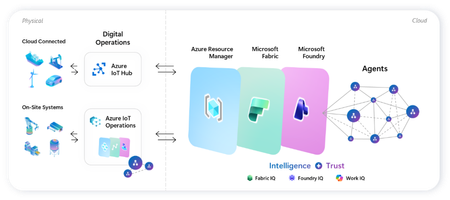
Microsoft's adaptive cloud approach brings cloud, edge, data, and AI together to help organizations turn operational technology (OT) data into intelligent action, without requiring everything to live in the cloud. At the center of this approach are key technologies that connect physical operations to cloud-scale data, analytics, and AI: Key Purpose Offering Direct-to-cloud device management + telemetry ingestion Azure IoT Hub Industrial connectivity + edge data plane Azure IoT Operations Unified analytics + real-time intelligence Microsoft Fabric On-device AI inferencing runtime Microsoft Foundry Industry recognition Microsoft named a Leader in the 2026 Gartner® Magic Quadrant™ for Global Industrial AIoT Platforms Read the announcement See it all come together Before diving into each component, watch this end-to-end demo showing how Azure IoT Operations, Azure IoT Hub, Microsoft Fabric, and Foundry Local work as one stack across the edge-to-cloud lifecycle - Making industrial AI practical for real-world operations with adaptive cloud. How these components work together Azure IoT Operations and Azure IoT Hub collect real-time data from operational assets and send semantically-ready, modeled data to Microsoft Fabric, where it's contextualized with enterprise data for downstream analytics. Microsoft Foundry extends to the edge through Foundry Local, so the same tooling used to deploy and manage AI models in the cloud applies to edge use cases. All of it integrates into Azure Resource Manager, bringing OT devices, assets, and edge AI models into the same management and security paradigm as every other Azure-managed resource. This blog walks through where to get started with each product capability: 1. Manage Cloud-Connected Devices and Telemetry with Azure IoT Hub Azure IoT Hub is a fully managed cloud service that enables secure bidirectional communication, device-to-cloud telemetry ingestion, cloud-to-device command execution, per-device authentication, remote management and more. Telemetry from IoT Hub can also be routed downstream into analytics platforms like Microsoft Fabric for visualization or AI modeling. Recommended Usage: Devices that utilize IoT Hub are distributed, stand-alone devices with fixed-functions. These devices typically do not require cloud-managed containerized workloads or cloud-managed proximal industrial protocol connectivity. Examples of appropriate device-to-cloud IoT Hub endpoint devices include water monitoring stations, vehicle telematics, distributed fluid level sensors, etc. Resources Current in-market services overview: IoT Hub: What is Azure IoT Hub? - Azure IoT Hub DPS: Overview of Azure IoT Hub Device Provisioning Service - Azure IoT Hub Device Provisioning Service ADU: Introduction to Device Update for Azure IoT Hub Building scalable solutions with Azure IoT platform: Best practices for large-scale IoT deployments - Azure IoT Hub Device Provisioning Service Scale Out an Azure IoT Hub-based Solution to Support Millions of Devices - Azure Architecture Center Azure IoT Hub scaling Try out our preview of new IoT Hub capabilities (integration with Azure Device Registry and Certificate Management) Learn more about these capabilities on our blog post: Azure IoT Hub + Azure Device Registry (Preview Refresh): Device Trust and Management at Fleet Scale… Integration with Azure Device Registry (preview): Integration with Azure Device Registry (preview) - Azure IoT Hub Microsoft-backed X.509 certificate management (preview): What is Microsoft-backed X.509 Certificate Management (Preview)? - Azure IoT Hub How to start with the preview: Deploy IoT Hub with ADR integration and certificate management (Preview) - Azure IoT Hub 2. Connect Industrial Assets with Azure IoT Operations Azure IoT Operations provides a unified data plane for the edge that runs on Azure Arc–enabled Kubernetes clusters and supports open industrial standards. It allows organizations to connect and capture equipment telemetry, normalize OT data locally, route hot-path signals to real-time analytics, securely manage layered industrial networks, and more. Edge‑processed data can then be sent upstream to Microsoft Fabric for AI‑driven analysis. Recommended Usage: Azure IoT Operations is intended to be the data plane for an adaptive cloud deployment extending the management, data, and AI capabilities of the Microsoft cloud to an on-prem device. This device binds to these cloud planes providing a platform for local data processing and intermittent connectivity. The target for these devices range from a small-gateway-style PC to a full data center. Azure IoT Operations endpoints enable cloud-managed containerized workloads and cloud-managed proximal industrial protocol connectivity. Examples of appropriate adaptive cloud and Azure IoT Operations endpoints include, on-robot computers, industrial machine controllers, retail store sensor/vision processing, and top-of-factory site infrastructure for line of business applications. Resources Azure IoT Operations Overview Azure IoT Operations Documentation Hub Releases · Azure/azure-iot-operations Quickstart: explore-iot-operations/quickstart at main · Azure-Samples/explore-iot-operations Latest release update: Open-source framework for scaling robotics from simulation to production on Azure + NVIDIA: microsoft/physical-ai-toolchain Demo video showcasing this in action: Making industrial AI practical for real-world operations with adaptive cloud How we built the demo: explore-iot-operations/quickstart at main · Azure-Samples/explore-iot-operations Edge-AI: microsoft/edge-ai: Production-ready Infrastructure as Code, applications, pluggable components, and… Latest Announcements & Blogs Making Physical AI Practical for Real-World Industrial Operations: Part 1 | Microsoft Community Hub Making Physical AI Practical for Real-World Industrial Operations: Part 2 | Microsoft Community Hub Introducing small form factor infrastructure: embed intelligence into physical systems Unlock Industrial Intelligence | Microsoft Hannover Messe 2026 From pilots to production: How Microsoft and partners are accelerating intelligent operations Partner Solutions How Mesh Systems Builds on Azure IoT Hub and Azure IoT Operations to Accelerate Industrial AI | Microsoft Community Hub Unlocking the Human Telemetry Layer for Safer Industrial Operations | Microsoft Community Hub Unlocking Smart Manufacturing: Siemens Industrial Edge Meets Azure IoT Operations Solving the Data Challenge for Manufacturers with Sight Machine & Azure IoT Operations | Microsoft Community Hub Microsoft and Rockwell Automation: Transforming Industrial AI Together | Microsoft Community Hub 3. Advanced Analytics with Microsoft Fabric Microsoft Fabric delivers a unified, end‑to‑end analytics platform that transforms streaming OT telemetry into real‑time insights and live dashboards. Fabric Operations Agents monitor industrial signals to recommend targeted actions, while Fabric IQ provides a shared semantic foundation that enables AI agents to reason over enterprise data with business context. Together, Fabric turns live industrial data into AI‑powered operational intelligence. Resources Get Started with Microsoft Fabric Learning Path Fabric Real-Time Intelligence documentation - Microsoft Fabric | Microsoft Learn Create and Configure Operations Agents - Microsoft Fabric | Microsoft Learn Fabric IQ documentation - Microsoft Fabric | Microsoft Learn 4.Run AI Models On‑Device with Foundry Local Foundry Local extends on‑device AI to Arc‑enabled Kubernetes edge clusters, providing a Microsoft‑validated inferencing layer for running AI models in industrial, disconnected or sovereign environments. Resources Foundry Local on Azure Local Documentation Participate in Foundry Local on Azure Local preview form Foundry Local on Azure Local: HELM deployment Demo Customer Stories Chevron: Chevron plans facilities of the future with Azure IoT Operations Husqvarna: Husqvarna Group Boosts Operational Efficiency with Azure Adaptive Cloud Ecopetrol: Azure IoT Operations and Azure IoT for energy help Ecopetrol optimize energy distribution while lowering operational costs P&G: Procter & Gamble cuts model deployment time up to 90% with Azure IoT Operations Toyota: Toyota Industries innovates its paint shop processes with Azure industrial AI and Azure IoT Hub1.3KViews3likes0CommentsWork IQ Cost and Pricing Model for Agents published in Marketplace
I would very much like to ask for assistance and input in regards of "Consumption, cost forecasting, break-even analysis and recommended customer pricing. " I believe a bit of context is required. We are about to publish two Work IQ MCP Agent in Marketplace. Both agents will be integrated to our existing Apps that are published in Marketplace. 1. iGlobe CRM for Teams and 2. iPlanner Pro for Outlook and Teams. Both Apps are multitenant Apps running on customers own tenant. The Apps can only be deployed from Marketplace. Lets use iPlanner Pro Agent as an example. In short, iPlanner Pro Agent uses Work IQ and MCP tools to understand emails, meetings and Microsoft 365 context, while iPlanner Pro turns that intelligence into structured Planner execution, including the appropriate plan, bucket, assignment, priority and supporting email context. Including saving the email or attachments on the task. A prompt could look like this "Find the latest email from email address removed for privacy reasons. Create a task for in Planner, put it in the correct Plan and bucket, assign it to the appropriate owner, set a due date for next week and save the email on the Planner Task" Work IQ and MCP provide context and intelligence, iPlanner Pro executes the structured actions, and Microsoft Planner remains the source of truth. To my understanding Work IQ API usage is billed through Copilot Credits rather than a separate per-user Work IQ license. Microsoft 365 Copilot includes Work IQ functionality within native Microsoft Copilot experiences, but third-party solutions such as iPlanner Pro consume Copilot Credits when they call Work IQ APIs. Work IQ does not require a separate API subscription, SKU or per-user licence. API usage is consumption-based and is measured in Copilot Credits. Work IQ operation Credit consumption Planning note Chat API Variable Depends on grounding, retrieval and reasoning complexity. Context API Variable Depends on the scenario and the sources used. Tool API 0.1 credit per API call Static component: $0.001 per call at $0.01 per credit. Example: 1,000 Tool API calls consume 100 credits, equivalent to $1.00 at the planning rate. Now here comes my confusion. 1. How do we know how many credits we are using with a prompt like the example I showed? the consumption is 0.1 credit per API call. 2. If I understand the above correct, the total consumption is calculated on the customer tenant. That consumption includes much more than just iPlanner Pro. Is that correct? 3. OR, will the sum of all customer using iPlanner Pro Agent be direct to us and we will be billed based on the total consumption of all our customers? If that is the case ( I don't think it is) then how do we know how much each customer consumed? 4. If consumption and billing is on the customer, how can the customer see what iPlanner Pro cost in consumed credits? This is important in regards of giving a cost forecast for customers. I am sure they would want that before start using the Agent. It is also important in regards of the question of if we should charge or offer it as a free agent? If we are billed then we will need to change for it. If the customer is billed then we probably will not be able to charge for it. I hope I have been able to explain my confusion. I tried asking contacts I have at Microsoft, but unfortunately haven't heard anything. That is why I am asking in the community. Have any one else the same challenge? what have you done? Can Microsoft assist here? I will be happy to take a Teams call and others are welcome to join. Thank youThe MSP guide to recurring revenue streams
AI is creating new opportunities for managed services providers (MSPs), but the opportunity goes beyond helping customers deploy the latest technology. As organizations adopt AI, they need ongoing help keeping their environments secure, governed, and ready for what comes next. Join Dux Raymond Sy, 17-year Microsoft MVP and Regional Director, for a practical conversation about turning those needs into recurring services for your managed service practice. Dux will explore opportunities around AI trust and security, Microsoft Intune, Microsoft Agent 365, and Microsoft Purview, and talk about how MSPs can build lasting customer value around them. Drawing on more than 20 years at the intersection of technology, business, and leadership, Dux works with organizations and partners around the world to move from AI experimentation to execution with security, governance, data readiness, and people at the center. Come ready for ideas you can take back to your business, plus the opportunity to learn and connect with fellow MSPs. How do I participate? Registration is not required. Add this event to your calendar and select Attend to receive reminders. Post your questions in advance, or any time during the live broadcast. The Microsoft Meetup for MSPs is a recurring online community session where Microsoft product teams and MVP practitioners share working guidance for managing customer tenants at scale. Bookmark the Microsoft Meetup for MSPs resource guide for future session dates and resources to help you on your journey.113Views0likes1CommentHow to run a managed service practice in the AI era
AI is rapidly changing how you deliver services, support customers, and operate your business. Join us for September's Microsoft Meetup for MSPs to explore a practical operating model for MSPs navigating the AI era. Learn why secure, well-managed tenants and standardized operating practices are critical prerequisites for introducing AI into service delivery and engineering workflows. See how multi-tenant management tools, supported APIs, monitoring, automation, and generated documentation can help create repeatable and scalable operations across your customer base. We'll also examine the role of professional services automation as a system of record for requests, approvals, evidence, time tracking, and billing, showing how automation can be connected through governed workflows that improve consistency without sacrificing accountability. Finally, we'll look at where human oversight remains essential, including AI-generated scripts, policy changes, customer communications, and any workflow that impacts access, security, or client data. Successful AI adoption starts with fundamentals, not prompts. Leave with practical ideas you can implement immediately, including one data-control improvement, one tenant-standardization opportunity, and one workflow you can automate within the next 90 days. Resources Read the What's new for MSPs blog for practical guidance to help managed service providers grow with Microsoft. Take the survey! Help us plan future meetups that are relevant and useful for you. Download the slides from this September meetup. The Microsoft Meetup for MSPs is a recurring online community session where Microsoft product teams and MVP practitioners share working guidance for managing customer tenants at scale. Bookmark the Microsoft Meetup for MSPs resource guide for future session dates and resources to help you on your journey.2.6KViews4likes19CommentsBring Marketplace publishing closer to your development workflow
Explore how AI agents can help make Microsoft Marketplace publishing a more natural part of the development workflow. Marketplace Ingestion MCP connects MCP-compatible agent tools with Partner Center APIs, helping publishers turn natural-language intent into supported publishing actions. Learn four ways teams can incorporate agent-assisted publishing into their workflows, from creating and validating offers to building repeatable processes and working from familiar developer tools such as Visual Studio Code and GitHub Copilot CLI. See how publishers can bring product development and publishing closer together while keeping people involved in reviewing and approving changes. Read the article54Views0likes0Comments