microsoft partner blog
247 TopicsLand Your Offer - Anatomy of Revenue Generating Partner Offer - Part 1 - Copilot in 30
Copilot in 30: A Ready-Made Marketplace Offer to Grow Your SMB Practice Thirty days. Twenty-five users. One repeatable offer that turns AI curiosity into a long-term customer relationship. Small and medium businesses know AI matters. What they lack is a trusted guide and a low-risk way to start. Copilot in 30 gives you both: a $0, 25-user, 30-day Microsoft 365 Copilot Business trial from Microsoft, wrapped in a structured journey that only a partner can deliver. Package it as a Microsoft Marketplace offer and you have a scalable on-ramp to every SMB customer in your base — and to the managed services that follow. Start Here: Why Publishing on Microsoft Marketplace Matters Microsoft Marketplace is Microsoft's partner-focused business platform, designed to help you reach more customers and simplify how you sell. A published offer gives your practice a permanent, discoverable storefront in the place customers already look for Copilot help. More importantly, an offer turns your expertise into something repeatable. Instead of scoping every engagement from scratch, you define the journey once — activities, timeline, deliverables — and run it across dozens of customers. Professional service and managed service offer types are available in Partner Center, so the same offer can carry both the 30-day journey and what comes after it. The SMB Opportunity Hiding in Plain Sight SMB customer segment is still early in their AI journey. These are organisations with 300 or fewer users on Microsoft 365 Business Basic, Standard or Premium — typically without an in-house AI team. That combination is exactly where partners win: high demand, limited internal capacity, and a customer base large enough that a well-designed, repeatable offer scales far beyond what bespoke projects can. Why Copilot Is the Right First AI Step for SMBs Microsoft 365 Copilot Business is the cost-effective Copilot add-on built for SMB customers, delivering the same capabilities as Microsoft 365 Copilot inside the apps their people already use — Outlook, Teams, Word, Excel and PowerPoint. No platform overhaul, minimal training, immediate relevance. Copilot is also the on-ramp. Once a team works confidently with Copilot, the natural next steps are agents, automated workflows and Copilot Cowork — each one deepening the customer's dependence on the partner who guided them there. Meet Copilot in 30: 25 Users, 30 Days, $0 Copilot in 30 is a limited-time, CSP partner-led Microsoft 365 Copilot Business trial for SMB customers with fewer than 300 employees. The essentials: What the customer gets: 25 Microsoft 365 Copilot Business seats for 30 days at $0, transacted through CSP New Commerce (Product ID CFQ7TTC0MM8R · SKU 006Z) Who qualifies: Customers on Microsoft 365 Business Basic, Standard or Premium with no paid Microsoft 365 Copilot today — one trial per customer How long it runs: Available to transact until 31 December 2026 What happens at Day 30: The trial auto-converts to a paid subscription unless renewal settings are changed, with a 7-day cancellation window What Microsoft provides: A launch kit, campaign materials, setup guidance, the Copilot Success Planner and conversion guidance Microsoft supplies the licences and the assets. The offer — and the customer relationship — is yours. Your Role: The Guide Who Turns a Trial Into a Habit A trial alone rarely changes behaviour. A guided trial does. Your job across the 30 days is to make sure 25 people experience real value in real work, and that the sponsor can see it. Before Day 0 — pick the right customers, become "Customer Zero" by using Copilot in your own business, secure a named sponsor and Copilot admin, and build a 30-day success plan with agreed measures. Day 0 — transact the trial, set the paid renewal quantity and term, complete admin setup, assign all 25 licences and run the kick-off with starter prompts. Days 1–28 — lead a weekly scenario (Outlook, Teams, Apps, Agents), review Copilot Analytics, re-engage low-activity users and capture proof points in the customer's own words. Days 29–30 — run the outcome and ROI review, confirm the paid offer and open the expansion and consumption conversation. Every touchpoint is partner expertise the customer cannot get from a licence alone — and every one moves the decision at Day 30 from "should we?" to "how much more?" Inside the Offer: Activities, Timeline and Deliverables Below is the full activity plan behind the offer, ready to drop into your own offer description or statement of work. ID Stage Activity Trial day (of 30) Key deliverables — Pre-req Customer eligibility (Copilot Business trial) Before Day 0 Active M365 Business base licence; no paid M365 Copilot; one $0 trial per customer; CSP New Commerce transactable; offer open to 31 Dec 2026 I1 Identify Build the prioritised target list Pre-trial Tier A/B target list from ASPX and Cloud Ascent; 50–300 eligible seats I2 Identify Confirm eligibility and trial fit Pre-trial Eligibility check: M365 Business base licence, no paid Copilot, one trial I3 Identify Launch the acquisition campaign Pre-trial Campaign email sent; briefing delivered; responses triaged into pipeline I4 Identify Be Customer Zero: complete microskilling Pre-trial Microskilling complete; internal Copilot experience; team briefed P1 Plan Confirm sponsor and success measures Pre-trial Named sponsor and admin; 25 trial users; agreed success measures P2 Plan Build the 30-day success plan Pre-trial Personalised Success Planner output; weekly scenarios; admin and user views P3 Plan Confirm technical and compliance readiness Pre-trial Minimum requirements verified; data and compliance review; blocker log A1 Activate Transact the trial in CSP New Commerce Day 0 25-seat, 30-day, $0 trial ordered (CFQ7TTC0MM8R · SKU 006Z) A2 Activate Configure the paid renewal settings Day 0 Renewal quantity, term and billing set; Cowork usage-based billing if in scope A3 Activate Complete admin setup and assign licences Day 0 Recommended settings on; 25 licences assigned (starts the clock) A4 Activate Run the kick-off and share starter prompts Day 0 Kick-off email; starter prompts; four-week prompt series scheduled X1 Experience Week 1 · Outlook — catch up and communicate Days 1–7 Week 1 prompts landed; first-week activation rate reviewed X2 Experience Week 2 · Teams — meetings that run themselves Days 8–14 Copilot Analytics checkpoint; recaps adopted; low-activity users re-engaged X3 Experience Week 3 · Apps — create in minutes Days 15–21 App scenarios and proof points; week 3 training gate before day 30 X4 Experience Week 4 · Agents — unlock the next level Days 22–28 Role-built agents trialled; 30-day usage trends from the admin centre C1 Convert Outcome review, paid offer and expansion plan Days 29–30 ROI review; 50-seat offer confirmed in 7 days; wave 2 plan; consumption conversation opened Land Your Offer: What One Customer Is Worth The table below is the revenue anatomy of one Copilot in 30 engagement — and it shows that the money is not in the trial, but in what the trial sets up. Item Value Detail Offer duration 30 days Trial clock runs Days 1–30; identify, plan and Day 0 setup precede it Trial offer 25 seats M365 Copilot Business · 30 days · $0 · one per customer · to 31 Dec 2026 CSP incentive — 25 seats (K) $0.32K 5.0% direct bill (2.5% M365 CSP Core + 2.5% Strategic Product Accelerator Tier 1) on 25 M365 Copilot Business seats x $21/mo† ≈ $6.3K/yr; indirect reseller 2.5% ≈ $0.16K Conversion target 50 seats Lead with 50 paid seats at conversion; sets up the wave 2 expansion plan CSP incentive — 50 seats (K) $0.63K 5.0% direct bill (Core + SPA Tier 1) on 50 M365 Copilot Business seats x $21/mo† ≈ $12.6K/yr; indirect reseller 2.5% ≈ $0.32K Frontier Accelerate deployment funding (K) $2.5K Microsoft Commercial Incentives funding for the Copilot deployment engagement when the conversion lands with 50 paid seats†; funds the deployment and adoption work that leads into managed services † Illustrative estimates from the offer plan. Confirm current incentive rates, funding and eligibility in Partner Center. Three streams stack on top of each other: CSP incentive — earned on every paid Copilot Business seat from the moment the trial converts, and growing again when the customer expands from 25 to 50 seats. Frontier Accelerate deployment funding — $2,500 available when you lead the conversion with 50 paid seats, paying for the deployment work that makes the expansion stick. Managed services — the recurring engagement described in Day 31 and Beyond, which is where the largest and most durable share of revenue lives. Now multiply. Everything above is the anatomy of a single customer. Landing the offer means running it across every eligible customer in your base — and you don't need to guess who they are. Partner Center's growth insights reporting, available through the AI Business Solutions & Security Insights (ASPX) dashboard, gives you account-level Copilot eligibility, seat whitespace, free Copilot Chat usage and adoption signals for the customers you already manage. To turn that export into a ranked target list, my colleague Brian O'Shea has built a Copilot for 30 Power BI dashboard that sits over your ASPX data and scores each customer on a 0–100 priority scale from eligible seats, whitespace, free-to-paid potential and opportunity signals — so your first cohort is the ten customers most likely to convert, not the first ten who reply. How the Offer Fits Together: From Trial Inputs to Proof of Value The offer runs left to right in three layers: Trial inputs — 25 users, 30 days, $0 CSP trial SKU; an SMB with 50–300 eligible Microsoft 365 seats; no paid Copilot today; a Business Basic, Standard or Premium base; one trial per customer to 31 Dec 2026; a named sponsor and Copilot admin; auto-conversion to paid unless changed. Five stages — Identify (I1–I4), Plan (P1–P3), Activate (A1–A4), Experience (X1–X4) and Convert (C1, T1, T2, W2). Each stage produces a concrete output the sponsor can see. Proof of value — a prioritised list and campaign responses; agreed use cases and success measures; a provisioned trial with 25 licences assigned; weekly usage from the Microsoft 365 admin centre; adoption proof points in the customer's words; paid conversion confirmed in Partner Center — and a named wave 2 expansion beyond the first 25. The highlighted activities — admin setup (A3), Week 4 agents (X4), 25→50 paid seats (T1), Frontier Accelerate funding (T2) and the wave 2 expansion plan (W2) — are where the engagement stops being a project and starts becoming an ongoing relationship: managed services, agent build-out, Copilot Studio and Copilot Cowork follow-on once the trial converts. Day 31 and Beyond: Managed Services That Keep Delivering The end of the trial is the start of the real engagement. Package these as standing services in your offer: Copilot adoption management — monthly Copilot Analytics business reviews, prompt and scenario refreshes, champion programme and onboarding for each new wave of users Licence and expansion management — take the customer from 25 to 50 paid seats and on to wave 2, aligning renewals, terms and billing as the footprint grows Agent build-out — design, build and maintain role-based agents with Copilot Studio for sales, service, finance and operations scenarios surfaced in Week 4 Copilot Cowork enablement and governance — introduce consumption-based Cowork scenarios, set budgets and cost controls, and report on usage each month Security, compliance and readiness — keep data protection, permissions and governance in step with expanding AI use, including a path to Microsoft 365 Business Premium Quarterly value reviews — refresh success measures, capture new proof points and agree the next expansion plan with the sponsor Each of these is a recurring, outcome-based service rather than a one-off project — and each keeps you positioned as the customer's AI partner as their needs grow. Ready to Build Your Copilot in 30 Offer? Download the Copilot in 30 launch kit and Microsoft 365 Copilot Partner FAQ from the Microsoft AI Cloud Partner Program. Be Customer Zero — run Copilot and the microskilling series inside your own business first. Publish your offer in Partner Center as a professional service (the 30-day journey) with a managed service follow-on (Day 31 and beyond). Pick your first cohort — customers with 50–300 seats on a Microsoft 365 Business plan and no paid Copilot today. Transact your first trial through CSP New Commerce (Product ID CFQ7TTC0MM8R · SKU 006Z) and set the paid renewal on Day 0. Book the Day 30 review before Day 1 — so the conversion and expansion conversation is already on the calendar. The window closes on 31 December 2026. The customers are already in your base. Publish the offer and start the clock. Resources From AI curiosity to Copilot adoption in 30 days — Microsoft Partner Blog Copilot in 30 Launch Kit — partner GTM playbook, customer trial guide, invitation and weekly prompt emails, admin setup guidance Build Your 30-Day Copilot Success Plan Copilot Success Planner Walkthrough video Partner Skilling Hub | Microskilling for Copilot in 30 Power BI Dashboard that integrates with your ASPXi Partner Data · By Brian O'Shea Create compelling customer business cases87Views0likes0CommentsPartner Blog | Plan today, grow tomorrow: Turn partner investments into sustained demand
The customer journey is changing, and partners have more opportunities to influence technology decisions across it. But taking advantage of those opportunities requires more than individual campaigns or one-time investments. Recent Omdia research maps 28 critical presales touchpoints, with additional customer success opportunities after the sale. Yet 62% of partners surveyed invest 10% or less of their marketing budgets in demand generation. For FY27, we see three areas that can reinforce one another: build the expertise customers increasingly expect, invest in sustained demand generation around the challenges they need to solve, and apply those capabilities to opportunities such as Microsoft Copilot and Frontier Transformation. 1. Build the expertise customers increasingly expect As AI becomes part of more business decisions and processes, customers are looking for partners that can connect technology to specific industries, workflows, and business challenges. That makes skilling a business investment. Marketing teams need enough technical and industry fluency to communicate value clearly. Sales and presales teams need to connect customer priorities to solutions. Technical teams need the depth to design and deliver them, while customer success teams need the expertise to drive adoption and identify opportunities to extend value. Start with the customer opportunities you want to pursue, then identify where your teams need greater depth. The Microsoft Partner Skilling Hub provides partner-focused learning across Microsoft Cloud solution areas, roles, and technical certifications. For partners that have earned co-op, eligible Partner AI Adoption activities may also provide an opportunity to build AI capability within your own organization. Applying AI and agents to your internal workflows can give your teams practical experience that strengthens customer conversations. Review the current Microsoft Commercial Partner Incentives Guide for applicable eligibility and requirements. 2. Invest in sustained demand generation around customer challenges Expertise creates more value when customers can discover it throughout their buying journey. Omdia's research shows that buyers use sources ranging from AI tools and search engines to social media, events, peer groups, partners, review sites, and digital marketplaces. A single webinar, email, or paid activation is unlikely to carry that entire journey. That makes isolated tactics less effective than a connected program that builds relevance and trust over time. Continue reading here84Views0likes0CommentsPartner Blog | Back at your desk? Start FY27 with the resources that matter most
A new fiscal year often begins before everyone is ready. If MCAPS Start for Partners arrived while you were wrapping up July, managing customer priorities, or taking some time away, now is a good moment to reconnect. What matters most is not whether you attended live, but what you do with the FY27 guidance from MCAPS Start now that you are back at your desk. As the new Microsoft fiscal year (FY27) gets underway, partners are turning their focus to planning, customer engagement, and execution. If MCAPS Start for Partners coincided with customer priorities, other commitments, or time away, now is a great opportunity to explore the guidance and resources available. Whether you joined the live sessions or are engaging with the content now, what matters most is having the insights and tools you need to make the year ahead a success. The MCAPS Start keynotes and sessions are available on demand, and the Microsoft Partner FY27 GTM Kickoff offers a deeper look at the year’s go-to-market priorities. Additionally, Microsoft has released new resources to help partners turn that strategy into action across skilling, benefits, Microsoft 365 Copilot, marketing, Microsoft Marketplace, cloud, AI, security, and partner operations. With brand new information and guidance, here is a practical way to get started. Start with the shift from kickoff to execution MCAPS Start for Partners established the direction for partners: build differentiated capability, go to market with greater reach, and align with Microsoft sellers to turn customer opportunities into business outcomes. The sessions from this event are now available on demand to watch and share with your team. The Microsoft Partner FY27 GTM Kickoff then dives into our priorities across AI Business Solutions, Commercial Cloud and AI, and Security. You can now play the session videos and download the presentations along with the transcripts. When it comes to Frontier Transformation, customers are moving from experimentation toward implementation, creating an opportunity for partners to connect their capabilities to real customer needs and measurable outcomes. A customer may need to modernize applications, infrastructure, or data before AI can scale. Another may be ready to build agents or redesign a business process. Others may be focused on Microsoft Copilot adoption, security, governance, or creating new AI-powered products and services. The right starting point reflects where each customer is along their AI journey and the outcomes they want to achieve. Pick the customer conversation you want to lead The Microsoft FY27 go-to-market approach is increasingly organized around customer conversations that connect foundational modernization with AI transformation. Frontier Accelerate provides a framework for thinking about that journey. Core Conversations focus on areas such as cloud and AI readiness, migration and modernization, data and platform modernization, security, and Copilot adoption. Frontier Conversations extend into emerging opportunities such as agentic AI and AI-powered business transformation. The question for partners is practical: Which conversations are you best positioned to lead today, and which capabilities will enable you to lead the next one? New research illustrates why that next conversation matters. In a Microsoft-commissioned Total Economic Impact™ study, Forrester Consulting modeled the potential Azure services opportunity for a composite small and medium-sized business (SMB) customer. The study estimated $23,278* in expected partner revenue over three years based on observed attach rates, compared with $95,000 in total potential services opportunity across the customer lifecycle. That broader opportunity spans Azure migration, data platform modernization and unification, and Azure AI and agentic solutions. The same pattern appears at enterprise scale. In a separate Microsoft-commissioned TEI study (download pdf), Forrester modeled approximately $3.0 million in expected partner revenue for a composite enterprise customer over three years, with a total potential partner opportunity of approximately $5.7 million. The research points to data platform modernization and unification, AI and agentic solutions, solutions development, and managed services as important areas for longer-term partner value. For partners, this reinforces the value of a land-and-expand approach. A migration can establish the cloud foundation and customer relationship. From there, partners can identify opportunities to modernize and unify data, introduce AI and agentic solutions, and provide managed services that create recurring value over time. The opportunity will vary by customer, but the progression gives you a way to connect today’s project with the customer’s longer-term transformation priorities. Continue reading here127Views0likes0CommentsPartner Blog | FY27 is the year to execute on AI: A starting point for Azure partners
FY27 is the year to execute on AI. For Azure partners, that means moving more customer AI initiatives into production, modernizing the cloud, data, application, security, and governance foundations they depend on, and connecting those investments to outcomes customers can measure. Across the partner ecosystem, you are starting from different places. Some partners are already scaling AI solutions in production. Others are modernizing legacy environments, unifying data, or strengthening security and governance so customers are ready for what comes next. The opportunity is to understand where each customer is today and create a practical path forward. Microsoft has aligned FY27 customer conversations, go-to-market guidance, incentives, skilling, and partner resources around that goal. The focus is less on starting with a product and more on starting with what the customer is trying to achieve. In July, MCAPS Start for Partners and the Microsoft Partner FY27 GTM Kickoff laid out that direction. If you missed the events or want to revisit a specific topic, the content is available on demand: Watch MCAPS Start for Partners on demand Explore the Microsoft Partner FY27 GTM Kickoff The more important question now is what you do with that guidance. Turn customer priorities into Core and Frontier conversations Customers rarely begin by asking for a portfolio of technologies. They begin with a challenge, an ambition, or an outcome: modernize an aging application, make fragmented data useful, strengthen security, improve employee productivity, automate a process, or create a new customer experience. That is the starting point for FY27. Core conversations establish the foundation customers need to become AI-ready. Depending on the customer, that can mean modernizing infrastructure and applications, bringing data together on a governed platform, improving security, or establishing the controls required to operate AI with confidence. Continue reading here193Views0likes0CommentsBeyond Tokens: Rethinking AI Economics with Microsoft Foundry
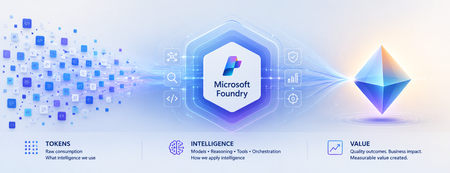
Beyond Tokens: Rethinking AI Economics with Microsoft Foundry From the cost of intelligence to the value of outcomes Enterprise AI has an accounting problem. Executives expect agentic AI to return roughly 171% on investment, according to one widely cited survey. Yet McKinsey finds only about 39% of organizations can attribute any earnings impact to AI at all. Both numbers can be true at once — because the gap between them is not a technology gap. It is a measurement gap. For the first few years of generative AI, one number dominated the economics conversation: tokens. How many tokens did a model consume? What was the cost per million tokens? Could a smaller model perform the same task? Those questions mattered when enterprises were experimenting with AI. They are no longer enough as AI moves into production. An enterprise agent doesn't simply consume tokens. It reasons, retrieves context, invokes tools, calls APIs, verifies its work, retries unsuccessful actions and sometimes escalates exceptions to humans. The model call might cost pennies. The business outcome could cost considerably more. Which leads to an increasingly important question: What is the right economic unit for intelligence? From AI experimentation to economic accountability The first wave of enterprise AI was about possibility: Can AI do this? The next wave is about production, as AI becomes embedded in software engineering, customer service, finance, healthcare and supply chains. And production changes the question: Should AI do this and at what cost? Microsoft has moved decisively onto this ground. In August 2026, the Microsoft Foundry team launched its Economics of Agent Optimization series, arguing that "tokens have become the new unit of technology spend" and that AI should be run as a managed investment system. On the latest earnings call, Satya Nadella described Microsoft's objective as "advancing the frontier on the cost-to-outcome curve, ensuring every customer can turn tokens into business results." The discipline is going mainstream too: 98% of FinOps teams now manage AI spend, up from 31% two years ago. Microsoft's series is largely about the numerator of that curve - making every request, agent and dollar more efficient. This article is about the denominator: what an outcome is, what it truly costs, and what it is worth. The evolution of Microsoft Foundry reflects the same shift. At Build 2026, Microsoft expanded the conversation beyond building agents toward tracing behavior, evaluating quality, monitoring production performance, optimizing agents and connecting their operation to ROI. Think of the progression as: Trace → Evaluate → Monitor → Optimize → ROI This is more than a technology roadmap. It represents a shift from observing AI as technology to managing AI as an economic asset. Tokens became the unit of spend. They were never the unit of value. Consider two AI agents handling the same customer-service workflow. Agent A costs $0.08 per interaction. Agent B costs $0.20. Agent A appears cheaper. But suppose Agent A successfully resolves only 55% of cases, while Agent B resolves 90%. The remainder require retries, additional reasoning or human intervention. Which agent is actually cheaper? The inexpensive interaction may produce the expensive resolution. This illustrates a fundamental problem: We often measure AI where it is consumed rather than where value is created. Tokens are a unit of consumption. Businesses operate in outcomes. A customer-service leader cares about issues resolved. An engineering leader cares about high-quality software reaching production. A finance leader cares about reconciliations completed accurately. The economic denominator needs to move closer to the business. The AI Economic Ladder I think of this evolution as an AI Economic Ladder: Tokens → Interactions → Tasks → Outcomes → Value Each step moves measurement closer to what the enterprise actually cares about. At the token level: What intelligence did we consume? At the interaction level: What did each AI run cost? At the task level: What did it cost to complete the work? At the outcome level: What did a successful result cost? At the value level: Was the outcome worth creating? An AI system can become more efficient at every technical metric while creating little economic value. Conversely, an expensive AI workflow could be extraordinarily valuable if it prevents revenue leakage, reduces operational risk or accelerates a critical business process. The objective isn't cheaper AI. It is better economics. Not every completed task is a successful outcome There is another complication. If an agent completes a workflow, should we count it as a successful outcome? Not necessarily. A meaningful outcome needs three characteristics: Completed. Quality-gated. Attributable. It must reach its intended end state, meet an explicit standard for quality, accuracy, safety or business acceptability, and be attributable to the agent or workflow that produced it. That gives us a more meaningful measure: Cost per Successful Outcome = Fully Loaded AI Workflow Cost / Completed, Quality-Gated, Attributable Outcomes The denominator becomes real only when named in business language: cost per prior authorization resolved in healthcare, per pull request triaged and tested in engineering, per disputed invoice reconciled in finance operations. If you cannot name the outcome in a sentence the process owner recognizes, you are not ready to measure it. The quality gate matters. With AI, "the system ran successfully" and "the system produced a good outcome" are not the same thing. Microsoft Foundry's tracing and evaluation capabilities become economically important for precisely this reason. Evaluation isn't merely quality control. It helps determine what gets counted as value. What does an AI outcome really cost? The true economic footprint goes far beyond inference: Model + Reasoning + Grounding + Tools + Orchestration + Infrastructure + Retries + Evaluation + Governance + Human Intervention Human intervention is particularly easy to overlook. Every time someone must review, correct, approve or recover an AI-generated outcome, the economics change. The same applies to verification. An agent reaching an acceptable result in three steps has different economics from one requiring fifteen steps and multiple retries. And verification is not a rounding error — it is the bulk of the bill. McKinsey's 2026 analysis of production agentic workflows found roughly 60% of an agentic task's cost is tied to refining answers — checking, repairing, re-verifying — not generating the initial response. Most of what you pay for is not intelligence. It is assurance. This means quality and economics are connected. The quality bar you set influences the cost you pay. The challenge isn't simply minimizing consumption. It is finding the right balance between quality, cost, speed and risk. Cost per outcome is only half the equation Now imagine two agents. Both cost $5 per successful outcome. One saves an employee ten minutes of administrative work. The other prevents $500 in revenue leakage. Their cost efficiency is identical. Their economics clearly aren't. So we need to move another step up the ladder: from Cost per Outcome to Value per Outcome. The question isn't only how cheaply AI can complete the work. It is: How much economic value does this outcome create relative to the intelligence required to produce it? Now the CIO, CFO, CAIO and business leader have a common conversation. Give every outcome an Intelligence Budget Not every problem deserves the smartest model available. Classifying an email may require relatively little intelligence. Resolving a complicated customer complaint may justify more context and reasoning. Assessing the risks in a multimillion-dollar contract may justify sophisticated reasoning, multiple validations and human review. Every business outcome therefore has an economically rational amount of intelligence worth spending on it. Call it an Intelligence Budget. This changes the architecture question from which model should we standardize on, to: What combination of model, reasoning, context, tools and human judgment does this outcome deserve? This is where Microsoft Foundry's model router becomes interesting. Individual requests can be dynamically routed so simpler work doesn't consume the same model resources as complex reasoning. If the Intelligence Budget is the economic principle, intelligent routing is one way of operationalizing it. The future enterprise AI architecture won't be about one model doing everything. It will route intelligence according to the economics, quality and risk of the outcome. Making AI economics observable None of this works without visibility. An AI system can be technically healthy and economically unhealthy — responsive and error-free while repeatedly choosing inefficient reasoning paths, invoking unnecessary tools or producing outputs requiring expensive human correction. AI economics and AI observability are becoming inseparable. Microsoft Foundry increasingly connects these disciplines. Tracing shows what an agent did. Evaluation determines whether it met required criteria. Observability helps monitor production behavior. Agent optimizer can test improvements across prompts, skills and models. Microsoft's emerging ROI capabilities take the next step by connecting operating costs with measures such as task completion, time saved and cost efficiency. Attribution is the bridge to the finance conversation. Teams place Azure API Management in front of Foundry endpoints as an AI Gateway, stream token telemetry into Application Insights, and use Entra Agent ID to give every agent run a discrete identity that maps cost to its cost center. Microsoft Agent 365 extends the discipline tenant-wide — spending policies, budget caps and departmental chargeback across Microsoft and third-party agents. Together, they create something enterprises have historically lacked: A feedback loop between how intelligence is consumed and what that intelligence accomplishes. The paradox of cheaper intelligence There is another reason AI economics will become more important as models get cheaper. The Jevons paradox suggests that when technology makes a resource cheaper and more efficient, total consumption can actually increase. AI may experience the same effect. Cheaper intelligence enables more agents, more reasoning and more workflows that were previously uneconomic. So we could see cost per unit of intelligence fall while total intelligence consumed rises. Cheaper AI may therefore produce larger AI bills. That isn't necessarily bad — provided value grows faster than consumption. The objective isn't minimum AI consumption. It is maximum economic value from AI consumption. From workload economics to portfolio economics As AI scales, economics becomes a capital-allocation question. I see three levels. Workload Economics: Is this AI system running efficiently? Outcome Economics: Is it producing quality outcomes economically? Portfolio Economics: Where should we put our next AI dollar? That final question will become increasingly important. An enterprise with hundreds of AI initiatives shouldn't assume every one deserves continued investment. Some should scale. Some need optimization. Some should be redesigned or consolidated. And some should be stopped. The ability to experiment cheaply created the first explosion of enterprise AI. The discipline to allocate capital intelligently will determine what scales. Who owns AI economics? Once an agent becomes part of how work gets done, its economics cannot remain purely an IT metric. The business understands the value of the outcome. Technology understands the architecture and optimization levers. Finance brings economic discipline and comparability. That suggests a shared model: Business owns the outcome. Technology owns the optimization levers. Finance owns the economic discipline. AI economics ultimately isn't just a technology-cost conversation. It is a business-performance and capital-allocation conversation. From abundant intelligence to intelligent economics We are entering an era where intelligence is becoming an increasingly abundant, programmable and variable-cost resource. Microsoft Foundry and the broader Microsoft AI stack are making it easier to build, evaluate, observe, optimize and govern that intelligence. But abundant intelligence does not guarantee abundant value. Enterprises still need to decide where AI belongs, how much intelligence each problem deserves, what defines a successful outcome, when humans should remain involved and which AI investments deserve more capital. The winners won't necessarily use the cheapest models. They won't consume the fewest tokens. And they won't be the organizations that build the most agents. They will become exceptionally good at moving up the AI Economic Ladder: from consumption, to outcomes, to value. Because the next era of AI won't be won by organizations that buy intelligence most cheaply. It will be won by those that convert intelligence into value most efficiently. Where to start: the first 90 days Define the denominator for your top three agents — what counts as done, what quality gate applies, who signs off. Instrument attribution — Azure API Management as an AI Gateway, token telemetry to Application Insights, Entra Agent ID on every run. Wire evaluations into the cost pipeline so only quality-gated outcomes count. Set Intelligence Budgets — model router per request, agent optimizer against your evaluators, Agent 365 policies as circuit breakers. Stand up a joint monthly review — business, technology and finance on one dashboard: outcomes delivered, cost per outcome, value per outcome. Frequently asked questions What is Cost per Successful Outcome in enterprise AI? The fully loaded cost of an AI workload divided by outputs that were completed, quality-gated and attributable - for example, cost per prior authorization resolved or per pull request triaged. It turns token metrics into the unit economics of AI-performed work. What is an Intelligence Budget? The economically rational amount of intelligence - model capability, reasoning, context, tools and human review — worth spending on a given outcome, based on its value and risk. Model router in Microsoft Foundry is one way to operationalize it. Why do AI agents cost more than single model calls? One agent task can involve planning, tool calls, retries and verification - many model calls with compounding context. Research on production agentic workflows attributes roughly 60% of task cost to refining and verifying answers, not generating the first response. Will falling model prices make AI cost management unnecessary? No. By the Jevons paradox, cheaper intelligence expands consumption, so total AI spend typically rises as unit prices fall. The discipline that matters is maximizing value per unit of intelligence. Who should own AI economics? A shared model: the business owns the outcome and its value, technology owns the optimization levers, and finance owns the economic discipline and review cadence. #MicrosoftFoundry #Agent365 #AzureAI #FinOps #AgenticAI #AIAgents #Azure #MicrosoftCostManagement #AIEconomics #Tokens References Microsoft Azure Blog: "The Economics of Agent Optimization: From pilots to measurable returns" (August 12, 2026) Microsoft FY26 Q4 earnings call (Satya Nadella, July 2026) McKinsey — "Cost versus value: managing agentic AI system performance" (July 2026) FinOps Foundation — State of FinOps 2026; Microsoft Learn — Model router for Microsoft Foundry; Agent optimizer; Foundry Control Plane cost optimization669Views1like2CommentsPartner Blog | Building the foundation for AI: Cloud, data, security, and AI skills for partners
Customers are moving beyond AI experimentation. They are looking for partners who can connect AI ambition to the cloud, data, security, governance, and business application capabilities required to put AI to work. That makes skilling across the Microsoft stack increasingly important. It can also make the question of where to start more difficult. This month, there is a simpler starting point. The Microsoft Partner Skilling Hub Agent can recommend training, answer skilling-related questions, and generate personalized technical skilling plans based on your role and goals. From there, you can build a focused path across Frontier Transformation, agents, Microsoft 365 Copilot, certifications, hands-on learning, and co-sell execution. The foundation for AI is broader than AI skills Frontier Transformation is the shift from targeted AI pilots to repeatable, governed AI capabilities embedded into the flow of work, business processes, and customer engagement. For partners, delivering that transformation requires more than expertise in a single AI product. It requires teams that understand how cloud infrastructure, data, security, agents, and business applications work together. That foundation matters across customer segments. For partners serving small and medium-sized businesses (SMBs), it can support you in guiding customers toward practical AI adoption while addressing security, governance, productivity, and business process needs together. This month, focus your skilling plan on five areas: validating your technical expertise, building agent platform capabilities, developing AI business application skills, earning industry-recognized certifications, and applying those skills through hands-on learning. Continue reading here143Views0likes0CommentsPartner Blog | Partner Center Technical Corner: August 2026 edition
Welcome to the August edition of Partner Center Technical Corner. This month’s updates are designed to empower you to identify growth opportunities, manage customer and subscription scenarios with more predictability, strengthen customer confidence through specialized capabilities, and gain greater visibility across Partner Center. Several of these updates put AI directly into the workflows your teams use every day. From sales recommendations to designation progress guidance, Partner Center is making it easier to move from insight to action. For a look at what is coming next, review the Partner Center Technical Roadmap and resources at the end of this post. Turn insights into growth AI-powered growth recommendations Cloud Solution Provider (CSP) partners now have AI-powered sales recommendations and business insights designed to identify potential growth opportunities, prioritize customer engagement, increase adoption, and grow revenue across your customer portfolio. The first wave of recommendations focuses on upsell, seat expansion, Copilot monetization through free-to-paid conversions, Microsoft 365 Copilot Chat activation, Enterprise Agreement (EA) to CSP migrations, and targeted promotions. Recommendations are available through the Partner Center agent and the Customer Overview page, and each includes business context so you can evaluate the next best action. Browse promotion details directly in Partner Center You can now browse and download active promotions inside the Pricing workspace. The Benefits page includes a sortable table with product, SKU, discount, term, billing cycle, and eligibility details. Selecting a row opens a full details panel, making it faster to identify upsell and renewal opportunities and confirm whether a promotion applies before placing an order. Continue reading here Be sure to follow our CSP discussion board to connect with subject matter experts and other CSP partners!224Views0likes0CommentsPartner Blog | MCAPS Start for Partners: Turn FY27 benefits updates into customer value
Customers are moving beyond isolated AI experiments and looking for practical ways to use AI to drive revenue, improve profitability, and create measurable business value. This creates an opportunity for partners to connect Microsoft technology with business outcomes, operationalize AI securely, and guide adoption at scale That work starts with becoming Customer Zero. By applying the latest Microsoft technologies within your own organization, you can build firsthand experience, validate business outcomes, and demonstrate your unique capabilities to customers with greater credibility. At MCAPS Start for Partners, Microsoft shared FY27 updates across partner benefits packages, Frontier offers, AI-driven partner experiences, designations, specializations, incentives, and go-to-market pathways. Together, these updates give you more ways to build capability, differentiate your organization, and turn your expertise into measurable customer value. The FY27 updates follow a practical progression: build capability through your benefits, apply Microsoft technology inside your organization, demonstrate your expertise, and activate the paths most relevant to your business model. Put partner benefits packages to work Built exclusively for partners, Partner benefits packages, provide discounted Microsoft product licenses, Azure credits, technical and Microsoft AI Cloud Partner Program consultations, and AI-powered marketing capabilities. You can use these resources to operate your business, skill your teams, develop solutions, and prepare for customer opportunities. The value comes from active use. New Omdia research found that 88% of surveyed partners said their package significantly helped grow their business, and 90% reported a positive return on investment. 1 Recent IDC research reinforced that partner benefits packages create the strongest return when treated as growth infrastructure, rather than simply as entitlements or discounts. 2 Put your partner benefits packages to work as Customer Zero. Use the included Microsoft technologies to build internal experience and proof points while strengthening your teams’ understanding of adoption, governance, measurement, and change management. This experience can make customer conversations more credible and delivery guidance more practical. The start of FY27 is a practical time to review your current package and confirm that it aligns with your business plans. Your Partner Center admin can purchase a benefits package based on the capacity and capabilities your organization needs. Partners can purchase multiple eligible partner benefits packages to expand their available benefits, although each individual package can be purchased only once per Partner Global Account. Differentiate your capabilities through designations and specializations Solutions Partner designations and specializations enable customers to recognize your capabilities, increase your discoverability, and connect your organization to applicable benefits, incentives, and go-to-market opportunities. Microsoft has consolidated the six current solution area designation badges into three, aligned to AI Business Solutions, Cloud & AI Platforms, and Security. This change impacts only the badges partners receive and does not affect how partners qualify for the designations. The six solution paths (Business Applications, Data & AI (Azure), Digital & App Innovation (Azure), Infrastructure (Azure), Modern Work, and Security) remain the foundation for requirements, scoring, and specializations. With badges aligned to the three commercial solution areas, you can more easily position your capabilities, support seller conversations, and show credibility where it matters most: in front of customers. Continue reading here169Views0likes0CommentsPartner Blog | From AI curiosity to Copilot adoption in 30 days
A focused, partner-led 30-day Copilot trial is now available, backed by record FY27 investments to accelerate SMB growth. Thirty days. Twenty-five users. One clear path to AI. For small and medium-sized businesses, AI is no longer a someday conversation, it's a right-now decision. SMB customers aren't asking whether AI matters anymore; they're asking how to put it to work in ways that are practical, fast, and secure. The hard part isn't interest. It's the starting line. Customers are looking to identify relevant use cases, experience AI in their everyday work, and evaluate its value before making a broader commitment. This creates a significant opportunity for Cloud Solution Provider (CSP) partners to lead customers from initial interest to sustained adoption. The SMB segment represents a Microsoft-estimated $625 billion* market opportunity in FY27, yet most organizations remain early in their AI transformation journey. As shared at MCAPS Start for Partners, FY27 brings record levels of CSP and programmatic incentive investments through the Microsoft AI Cloud Partner Program, alongside investments in partner capabilities, skilling and go-to-market resources designed to enable growth, bring new customers and workloads to the Microsoft ecosystem, and deliver customer success through Frontier transformation, starting with Microsoft Copilot. One of the primary investments we are making for the partner ecosystem is Copilot in 30, now available through CSP New Commerce. Copilot in 30 is a new, limited-time, CSP partner-led Microsoft 365 Copilot Business trial offering designed for SMB customers with fewer than 300 employees. It is available through December 31, 2026. This offer combines a 25-user, 30-day Microsoft 365 Copilot Business trial with partner-ready resources and customer guidance, campaign materials, setup resources, adoption content, and conversion guidance. Together, these resources give you a structured way to turn AI interest into hands-on Copilot experience. What’s new For partners, Copilot in 30 provides a repeatable path to turn customer engagement into adoption planning and growth. Rather than positioning Copilot as a standalone product trial, you can lead a guided experience centered on real business needs. Customers can explore how Microsoft 365 Copilot Business fits into their daily work, test scenarios across roles, and build confidence with a focused group of users. Copilot is the on-ramp. It enables people to work smarter and faster today, and it opens the door to the agents and workflows that follow. You can use the 30-day experience to guide customers through practical scenarios, identify high-value use cases, and create a clearer path from evaluation to paid Microsoft 365 Copilot Business deployment. Continue reading here183Views0likes0CommentsSpin Up MongoDB Atlas Clusters in Azure (Preview)
Your data platform just got a lot closer to home. You can now create MongoDB Atlas projects and deploy clusters directly from the Azure portal - the same place you already manage the rest of your cloud. This builds on the general availability of MongoDB Atlas as an Azure Native Integration. Back then, you could provision an Atlas organization from Azure and manage billing through the Azure Marketplace. Now the workflow goes all the way down to the thing that runs your app: the cluster. Atlas Projects & Clusters An Atlas Project is a logical container that groups clusters and related resources within your Atlas organization. Create one per app, team, or environment and then deploy clusters into it. An Atlas cluster is a fully managed MongoDB deployment running in the cloud. It is where your data lives and where it scales, replicates, backs itself up, and serves every read and write your application makes. Getting the cluster right is what turns a project into a production-ready app: Performance & scale - pick a tier that matches your traffic, from free experiments to high-throughput dedicated workloads. Data residency - the Azure region you choose for the cluster is where your data is stored, so you stay aligned with compliance requirements. Resilience - clusters come with backups and health state you can view at a glance. Organization - clusters live inside projects, giving you clean logical boundaries for teams, environments, and apps. What you can do now, right from Azure Create and browse Atlas projects from your MongoDB Atlas resource. Deploy clusters - Free (M0), Flex, or dedicated M10 / M30 tiers. Choose the Azure region where each cluster's data lives. View cluster details: MongoDB version, region, tier, backups, and state. Keep billing unified through your existing Azure Marketplace plan. Get started in minutes If you already have a MongoDB Atlas resource in Azure, you're four clicks from a running cluster: In the Azure portal, open your MongoDB Atlas resource (search All resources if you need to find it). In the service menu, select Projects (preview), then + Create project and give it a unique name Open the project and, in the Clusters section, select + Create Cluster. Pick a tier, enter a cluster name and Azure region, and select Create. That's it - your cluster deploys. Don't have an Atlas resource yet? Search for MongoDB Atlas in the Azure portal and create one against your subscription first to follow the steps above. You'll need the Owner role on the Atlas organization to create projects and clusters. Choosing your cluster tier Start small and grow. You can begin free and move up as your app takes off. Built for what's next: vector search & AI agents A cluster is the foundation for AI-powered apps. MongoDB Atlas brings native vector search right alongside your operational data, so you can build semantic search and Retrieval-Augmented Generation (RAG) experiences that ground large language models in Foundry in your own enterprise data. That story goes further with agents. As covered in Build and connect Microsoft Foundry agents to MongoDB Atlas, the MongoDB MCP Server is available in the Microsoft Foundry Tool Catalog - letting agents run vector search and database operations against the very clusters you just deployed, with enterprise-grade governance built in. Ready to build? Head to the Azure portal, create a project, and deploy your first cluster today. Start free, then scale when you're ready. Create projects and clusters in MongoDB Atlas — step-by-step docs MongoDB Atlas is generally available as an Azure Native Integration Connect Microsoft Foundry agents to MongoDB Atlas Create a free Azure account183Views0likes0Comments