Recent Discussions

Blocked out of my email
Cannot sign in to email after travelling. I have sent off over 10 account recovery forms with no replies back. My old mobile number is linked to the account so I cannot get a text verification, I also rang the old number and they are not willing to help. And it is so hard to speak to a real person from Microsoft to fix this, I managed to get an agent once and they tell me to fill out another form which clearly is getting me nowhere.95Views0likes2CommentsBigSpill: A 92‑Function Excel LAMBDA Library for Dynamic Arrays
What is BigSpill? BigSpill is an Excel LAMBDA library containing 92 functions across 10 categories, built from extensive experimentation with dynamic arrays. The goal is to provide elegant, efficient tools that make sheet‑level formulas easier to read, more modular, and more dynamic. The library includes a mix of: quality‑of‑life helpers essential primitives mid‑level operators developer‑level tools a few functions you might not expect to see in Excel Who is it for? Everyone. BigSpill aims to make complex operations more approachable and expressive. A few examples from the library: Pairwiseλ Staircaseλ Grainλ PolarGridλ Convolveλ Foldλ Tessellateλ Revealλ Knapsackλ Magnifyλ Traverseλ The repository includes full documentation and 11 sample workbooks so you can explore the functions without setup. If you’re interested in experimenting with dynamic arrays, or LAMBDA workflows, feel free to take a look. Feedback and suggestions are always welcome. I've attached 1 onboarding workbook. There are 10 more at the link below. GitHub: BigSpill459Views3likes13CommentsPreparing a Microsoft 365 Tenant for Copilot in Late 2026
Forty months ago, Microsoft launched Copilot. Looking back, the lack of guardrails at the time was staggering, and AI had a great time wandering across SharePoint, OneDrive, Teams, and Exchange. Now Microsoft Copilot is a unified client and there’s a bunch of essential steps for tenants to take to keep AI processing under control and their sensitive and confidential information safe. Here’s what we know about implementing Copilot in late 2026. https://office365itpros.com/2026/09/04/microsoft-copilot-in-2026/33Views0likes0Comments
Inconsistent behaviour of AccessRuntime and Access (Developer Version) - Office 365
I am using Access Version 2608 (Build 20326.20132) and I am having big problems because of a differnt behaviour of Runtime and Full (same version). When setting a short timer (for initialisation / 10ms) within the Form_Load event, the timer starts in the "Full-Version" of Access365 immediatly after finishing the Form_Load event (not further action in the other events). The Runtime-Versions don't accept the Timer-Value I set befor in the Form_Load event. Remark: With an old version (I don't know which one, because all customer PC were updated) it works perfekt, also with AccessRuntime. A very old customer installation (16.0.18827.20164) works perfekt. What can I do, because the application is broken down at many customer sites ... and I have to solve this problem very urgent.190Views0likes6Comments
CoPilot has suddenly stopped working in Word?
CoPilot suddenly stopped working in Word this morning. After any prompt I enter I get an "Oops, something happened. Can you try again" error message. The error occurs in both the desktop app and web versions of Word (CoPilot is still working fine in Excel, Outlook etc). The issue is not limited to one device or version of Windows - I have Windows 10 on a PC and Windows 11 on a laptop. I have engaged with Microsoft Help Support via chat and after multiple efforts to try and resolve the issue, the suggestion from the agent is that it may be related to a server-side service disruption or a backend issue rather than Word itself. Very frustrating! Is anybody else experiencing the same issue and have you been able to resolve it?130Views0likes3CommentsRevoking Access Tokens for Risky Service Principals
A Technical Community post discusses the topic of using the Entra ID continuous access evaluation (CAE) feature to revoke access for service principals when apps become risky or potentially compromised. The Microsoft Graph Command Line Tools app is a good example of a service principal in common use, so we examine the access tokens issued for interactive Graph sessions to discover if they are CAE-enabled. Just for fun! https://office365itpros.com/2026/09/03/cae-service-principals/30Views0likes0CommentsControlTipText no longer supports multiline text / wrapping in Access 2608
I’ve noticed what appears to be a recent regression in Access concerning the ControlTipText property. Previously, embedded line breaks such as: .ControlTipText = "Line 1" & vbCrLf & "Line 2" & vbCrLf & "Line 3" displayed as a multiline tooltip. In current builds, the vbCrLf is still present in the property value but is ignored when the tooltip is displayed, so the text appears on a single line. I also tested automatic wrapping with: .ControlTipText = String(70, "A") & " " & _ String(70, "B") & " " & _ String(70, "C") and the tooltip does not wrap at all; it simply continues horizontally off the right-hand side of the screen. I confirmed that the line-break characters are still stored by using Replace(ControlTipText, vbCrLf, "<CRLF>"), which finds and replaces them correctly. I also tried vbLf and Chr(13) & Chr(10) with the same result. The issue is present in: Microsoft Access for Microsoft 365 Version 2608 Build 16.0.20326.20132 64-bit It was also present before updating to this build. This looks as though the tooltip itself is no longer being configured for multiline/wrapped display, rather than Access altering the contents of the ControlTipText property. Has anyone else seen this, or can Microsoft confirm whether it is a known issue?116Views0likes2CommentsMigration Manager for Dropbox to Sharepoint
Hello, we've just migrated some dropbox folders and files across and noticed that the dates modified are wrong and aren't correctly showing within sharepoint or file explorer (via sync). Has anyone experienced similar issues with migration manager? Client is requesting for us to have this resolved and to ensure that the date modified shows the correct dates as shown in dropbox. Thank you54Views0likes2Comments
Please Help_ Disappeared Excel Doc
Dear Expert, I just lost my Excel Document that improved after I have downloaded from the Chat GPT. I have improve many different sheets on the documents but it is now only see the excel sheets that I made yesterday. I can only see the last page I improved today. Please help me.123Views0likes2Comments
BC SharePoint External File Storage view threshold exceeded
I recently set up External File Storage in Business Central. The view and folder structure were automatic, and the file links and communication between the two applications seems tenuous. Very quickly I ended up with a view threshold exceeded error in the SharePoint library. I was told that this is a known issue and Microsoft suggested the below mitigations. I plan to do the indexing when I don't have users logged in. I simplified the default view. I can't apply a retention policy in BC because the associated table is not included in the allowed tables. I'll give some thought to the Azure Blob storage option. My question, however, is what do they mean by "Partition attachments across multiple libraries"? This option intrigues me but how do I do that without breaking the file link between BC and SP? TIA. Recommended Mitigations Action Purpose Index key columns on the BC-managed library Enables filtered views past 5,000 Simplify default view (remove sorting/grouping/lookup columns) Avoids unnecessary joins that trigger LVT Partition attachments across multiple libraries (per company/environment/year) Keeps each library under threshold Apply BC attachment retention/archival Controls long-term volume Consider Azure Blob/Files for high-volume scenarios No equivalent list-view constraint89Views0likes1Comment
MS Office File Search Not Working
When I "search for a file" under the open command in MS Office, the file search returns everything but the file I'm looking for. I have to type in the entire file name in order to be able to click on the file I want to open, rather than writing part of the name and having the most relevant result stay at the top. For instance, if I start typing a file name like "Spokane Receipts", typing in the beginning of SPOK will start to return the correct result. When I got to click on the file, the search changes to all types of files that are named nothing similar. Sometimes the correct file will be found under (show more results), but often its not. It won't reappear until I type out the entire file name. It doesn't make any sense, why would MS Office file search return results from the data inside of files rather then the file name first? Is there a way to correct this search process? I don't want things tangentially related to the word I'm typing, I'm looking only for the file name. Thanks!78Views0likes1Comment
How much of your Microsoft 365 environment can you actually see at once?
Not how many users you have. Not how many sites, teams, apps or flows you have. How much of it can you actually see connected together? I've been working across Microsoft 365 environments for a while, and I kept running into the same thing. There is no shortage of information. If anything, there is probably too much of it. Users, groups, permissions, SharePoint, Teams, Power Apps, Power Automate, Power BI, Dataverse, OneDrive, Exchange, Intune, licensing, configuration... It's all there. But when you're actually trying to understand how everything fits together, it can be a different story. You open one blade. Find something. Open another. Cross-check it. Go back. Open something else. Before long, you're jumping between different parts of the tenant trying to build the bigger picture in your head. And if you're working with larger environments, that gets difficult pretty quickly. The information isn't necessarily missing. The relationships between the information are what can be difficult to see. That got me thinking about a slightly different question: Instead of "where do I find this information?" "Show me what's connected to this." That's where VisibleState started. Start anywhere. Follow the connections. Imagine starting with a single user. Instead of seeing that user simply as a record with a list of properties, imagine being able to explore the relationships around them: User → Groups → SharePoint → Teams → Power Apps → Power Automate → Power BI → Dataverse → OneDrive → Exchange → Intune Then the questions become different: What does this user have access to? Is that access direct or coming through a group? What resources are connected to them? What depends on something they're associated with? Which licenses are involved? Are there relationships that look unusual? If something changes, what else might be affected? Those questions aren't necessarily about finding another piece of information. They're about putting information that already exists into context. A report can tell you that something exists. A connected view helps you understand what it is connected to. Illustrative example below — not a real customer environment. I'm not suggesting Microsoft 365 doesn't already give us this information Quite the opposite. Microsoft 365 already gives administrators an incredible amount of information and tooling. The thing I've been thinking about is what happens when you want to look across those boundaries. Sometimes I don't want another export. I don't want another list. I don't necessarily want another dashboard. I want to start with something I'm looking at and ask: "What's connected to this?" And then keep following the trail. That's the idea I'm exploring with VisibleState. The interesting part is what happens when you change the viewpoint The same relationships can be useful for completely different reasons. For example: Administrators may want to understand access, permissions and dependencies. Security and governance teams may want to find unusual relationships or exceptions. Compliance teams may need to understand who can access something and why. People managing multiple environments may want a consistent way to understand what's there without rebuilding the picture manually every time. Leadership may not need to see the graph at all. They may simply want to know what's important, what's exposed and what could be affected. It's still the same underlying environment. You're just looking at it from a different angle. And that's where I think things get interesting. Where I'm at with it VisibleState started as something I was building to make my own work easier. I was spending a lot of time investigating environments, tracing access and putting information together for reports. The individual tasks weren't necessarily difficult. It was the jumping between different places and reconstructing the bigger picture that took the time. So I started building something that would let me approach the environment through the relationships instead. It's grown quite a bit from where it started, and I'm continuing to build it. I'm not posting this as a product launch, and I'm not looking for people to sign up. I'm genuinely interested in whether the problem I'm seeing is familiar to other people working with Microsoft 365. So I'm curious... If you could start with any object in your Microsoft 365 environment and immediately see what it's connected to, where would you start? Would it be: Users and access Groups and permissions SharePoint and Teams Power Apps, Power Automate, Power BI and Dataverse Licensing and resources Governance and unusual relationships Something completely different Maybe you've already got a good way of doing this. Maybe you still find yourself jumping between different services and piecing things together manually. Or maybe I'm looking at the problem from the wrong direction. What's the one relationship in your Microsoft 365 environment that you wish you could see instantly?81Views0likes0CommentsDrag-select not working in Word
MS Word seriously broke on me today. very little seems to be working properly. I tried everything Claude suggested, and what I could find on these forums. I cannot drag-select anything. Navigation pane doesn't work right: doesn't get headings. I don't have time for basic functionality to break. Whatever update you sent out that broke this, please fix it ASAP.114Views0likes3CommentsRunning a Regular Check for New Graph Permissions
Use PowerShell to Check for New Graph Permissions with a View to Updating Permissions Used by Apps. After Microsoft released some new Graph permissions, thoughts turned to how to discover new permissions after they are released. Code is the best way to perform automatic checks, and this article explains how to use PowerShell to check a last known set (stored in SharePoint Online) against the current set. Any variations are reported to administrators via email. https://office365itpros.com/2026/08/31/new-graph-permissions-check/45Views0likes0Comments
Advanced Filter
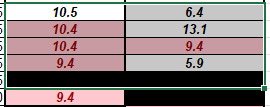
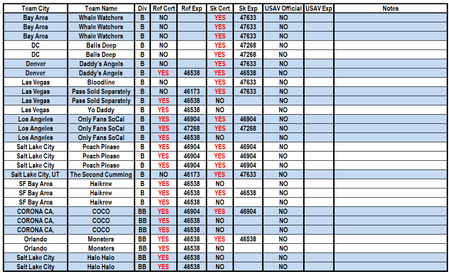
Hello. I created a filter that has 2 conditions. 1. If the Ref Cert or the SK Cert is YES, bit should appear. The problem is that if the columns with Ref Exp or SK Exp is blank, then it gives me a 0 or if it does have a date, then it gives me the number equivalent. The original table, it does have dates. I tried to format the columns so it would give me an actual date, but it doesn't work. It only works for the blank cells. This is the actual formula. =FILTER(C3:N500,((H3:H500)="YES")+((J3:J500)="YES"))&IF(ISBLANK(I3),"",I3) Array is C3 : N500 (This is the table where is information is coming from) Ref Cert is H3 : H500 SK Cert is J3 : J500 This is what the finish product looks like.326Views0likes5Comments






Events
Recent Blogs
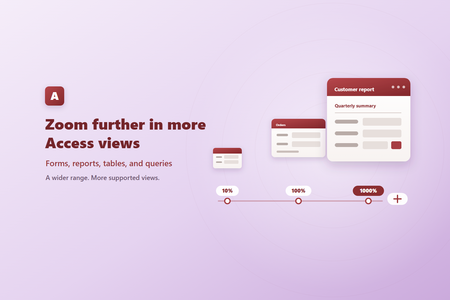
- Zoom from 10% to 1000% Supported Access views can now be zoomed anywhere from 10% to 1000%, expanding the previous range of 50% to 500%. New 10%, 25%, and 1000% choices are available in the Zoom me...Sep 04, 2026188Views2likes0Comments
- We’ve rounded up some of the most popular features to release lately in your favorite apps. It’s not too late to try them out!Sep 03, 2026829Views0likes1Comment