Recent Discussions

Referenced cells do not identify themselves with color
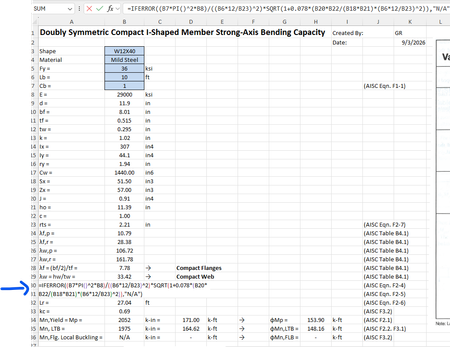
For some reason when I create a formula that references other cells, I cannot get those cells to "identify" themselves with a specific color. For example, in the image below the formula references cells B7, B8, B6, etc but they are just black text and don't show up in color per standard excel documents. Usually they "glow" with a specific color so you can find them easily in big spreadsheets. How do I get the colors back?Solved90Views0likes1Comment
Excel Protected Sheet: Cells Still Editable Even Though They Aren’t in the Unlocked Range
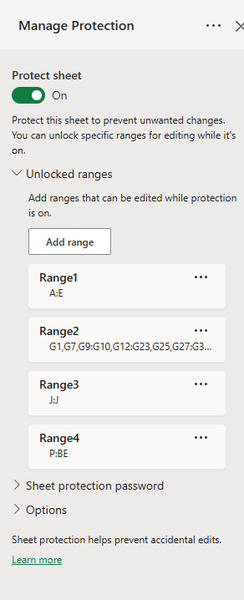
I’m having an issue with sheet protection in Excel where certain cells remain editable even though they are not included in any of my configured Unlocked Ranges. I have sheet protection enabled and have specifically configured the following ranges as editable: A:E G:G J:J P:BE Based on that configuration, I would expect columns F, H:I, and K:O to be protected. However, the behavior is inconsistent: Column F/G is correctly locked and cannot be edited. Columns K:O can still be edited, despite not being included in any of the Unlocked Ranges. I’m trying to understand why F/G are respecting the protection as expected while K:O remain editable under seemingly the same protection configuration.Solved123Views0likes4Comments
how do i bring back just the last update records
hi. i have around 31k records, they all have a company name and unique id. but there in the table multiple times, but all with a date and time stamp. is there a way to bring just the latest updates into a query? thanks in anticipationSolved150Views0likes2Comments
Nested IF function with a checkbox
Hello Excel Gurus, I have a nested IF function that is based on comparing dates and whether a checkbox is selected. It's an 18 month outlook and if the checkbox is selected it should display "O/H" otherwise a "1." It functions perfectly if there is a 1 in all 18 blocks, but if it only has a 1 in some of the blocks, the "O/H" doesn't work properly. I'm trying to put a picture in to better clarify and show how the formula is setup. Thanks for any assistance everyone provides.Solved438Views0likes16Comments
August 2026 RDP font display glitch
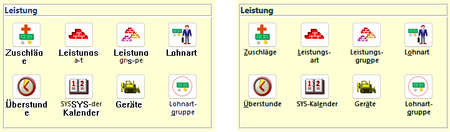
In the last days, we have received two independent reports of font display problems in our MS Access based application. The symptoms are as follows: Some labels or text boxes are shown in a legacy system font instead of the font specified in the control (Segoe UI). Also, the label/text box is shown with a white background instead of transparent. Moving the Access window "fixes" the glitch. It happens at seemingly random places in our application at seemingly random times. Both reports have in common that the Access application is running inside an RDP session. In report 1, a work-from-home user used Remote Desktop to connect to their office Windows 11 PC, and, in report 2, a user executed the application on a Windows Terminal Server. Here are a few screenshots to illustrate the problem. The left side is the glitch, the right side is how it is supposed to look. The first row shows labels, the second row text boxes in a continuous subform. Report 1 is 16.0.20228.20186, 32 bit, M365 SAEC. Report 2 is 16.0.14334.20848, 32 bit, Office 2021 LTSC. Is this a known issue, or shall we continue to collect data about this glitch? Unfortunately, we haven't found a reliable way to reproduce it, so our ability to test it with different versions is limited.Solved760Views0likes5CommentsInserting an A4 image into a page
When I want to insert an A4-sized image onto a blank A4 page, I keep getting an extra blank page, even though all margins are set to 0. How can I configure Word so that the A4 image is placed neatly on the A4 page without creating an extra blank page? Thank you in advance.Solved100Views0likes3Comments
How to look up specific text in a specific column, multiple columns involved
Hello, I am trying to implement a search field for a vertically oriented list, lets name it #1 for reference, looking for the number of results of the desired text within a range in a specific column in separate ranged list, #2, which is horizontally oriented. Neither list are Excel tables. Values in List 1 are automatically obtained and sorted from List 2 via dynamic functions which spill over underneath. For better reference, I have implemented a simple sanitized example as an attachment, both in Workbook screenshot format. Is it possible for this to be implemented, and how could I go about to do so? Thanks in advanceSolved186Views0likes2Comments
Advice needed: Comparing Committed vs Actual Donations in Excel
I would like to compare committed donations versus actual donations received for an NGO. Scenario Every month, quarter, half-year, and year, different groups of people commit to donating a specific amount at different intervals. For example: A number of people donate monthly B number people donate quarterly C number of people donate half-yearly D number people donate yearly The number of donors and the committed amount may vary from person to person. Requirement I want to compare Committed Amount vs Actual Amount Received and analyse the difference for: 1) Monthly 2) Quarterly 3) Half-yearly 4) Yearly I would like the results to be presented both as tables and line graphs. For example: Monthly: X-axis: Month (Jan, Feb, Mar, etc.) Y-axis: Committed Amount and Actual Amount Quarterly: X-axis: 1Q, 2Q, 3Q, 4Q Y-axis: Committed Amount and Actual Amount Half-yearly: X-axis: 1H, 2H Y-axis: Committed Amount and Actual Amount I would also like to see the difference between committed and actual amounts, both in absolute amount and, if possible, as a percentage. My question I need advice on how best to organise the base data in Excel. Specifically: 1. What fields/columns should I maintain in the base data? 2. How should I record donors who donate monthly, quarterly, half-yearly, and yearly? 3. How should I record the committed amount and the actual amount received? 4. How should I handle cases where a donor pays less, more, or does not pay? 5. How can I generate monthly, quarterly, half-yearly, and yearly summary tables from the base data? 6. How can I create the corresponding line graphs? 7. Ideally, I would like the reports to update automatically when new data is added. I am familiar with Excel, but I am not familiar with Power BI or Power Query. Therefore, I would prefer an Excel-only solution, using tables, formulas, PivotTables/PivotCharts, etc., if possible. I would appreciate suggestions for the best base-data structure and reporting approach.Solved117Views0likes5Comments"In-Review" status on my replies.
Hello, I started contributing to this forum a few years ago, but lately I've noticed that every reply I make is placed in the "In-Review" status. This status lasts approximately 24 hours and is then removed. What does this status mean? Why does it happen? Does the same situation happen to other contributors or just me? Thanks in advance to anyone who answers me. IlirUSolved166Views0likes10Comments
Corrupted Timestamp Display in Recent Files View
I am using Office 365 for iPadOS on a 2025 iPad Pro. With an Excel workbook open, the battery died. Ever since, the Recent Files (in List View) displays the timestamp of any workbook opened after the battery death into numbers: 0, 1, 2, 3, etc. The unopened files are not affected until they are reopened. The thumbnail view shows the correct timestamps, as does OneDrive. This carried over into Word as well. A second iPad shows the same corruption, but computer and iPhone are fine. So it is limited to just the iPadOS applications. Since it has propagated to a second iPad, it looks like the problem may exist on the server. The sorting algorithm or the user interface rendering loop may be hitting a fatal mathematical error, and to prevent the entire application from crashing, the app's code panics and falls back to simple numbering. Extensive troubleshooting has been done, including full app deletion/reinstall multiple times with sign-outs, account swap, time zone toggling, calendar format changes, and force restarts and updated/replaced the iPadOS using recovery mode. All settings have been reset. Since a backup to iCloud occurred after the incident, it may have the corrupt data. I have done everything but a full restore as a new iPad, which is impractical due to the number of applications.Solved117Views0likes2CommentsMicrosoft Authenticator & Microsoft Work Accounts
I am moving my data and apps from my previous Android phone to a new Android phone. I have run into a problem with the Microsoft Authenticator app. I have several Microsoft work accounts which Microsoft Authenticator on the new phone says I need a QR code to recover the account. However, when I go to the Security page for the Microsoft work accounts, click on "Add Sign-In Methods", there is no option for an authenticator app. I should point out that I do have Microsoft Authenticator for these accounts installed and working on some tablets and iPads. How do I fix this so I can use my new Android phone? Thank you.Solved272Views0likes5Comments
Access and SharePoint Integration May Be Broken
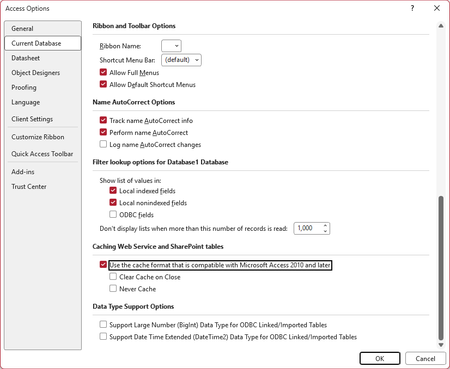
I am posting this here in the hopes that a Microsoft MVP or employee may see it, verify the issue, and report it to the right people at Microsoft. We have a fairly significant LOB application with the front-end hosted in Access and the back-end hosted in SharePoint Online lists. This application has been working well for several years. Sometime in the past few weeks (last known good date was June 23), a change in either Access or SharePoint (or maybe the Windows OneDrive sync client) seems to have broken integration between the products. When the modern cache format is enabled (the default), all SharePoint calculated columns unexpectedly show errors, as shown here (in a fresh database where I imported just one list from our site as a test): Naturally, this completely borks the application, with VB code throwing errors at startup. Using the legacy cache format, or disabling caching altogether, seems to restore functionality--(though this would come at a cost to performance): But there is a major caveat to this. Other functionality is apparently broken. We have straightforward update queries, for example, the hang indefinitely in these modes, rendering this an unacceptable work-around. I have been able to replicate this on several different PCs. Also, on several different SharePoint sites in our tenant. Currently, this is blocking work for us, and we are hoping to see it resolved as soon as possible. If anyone with knowledge of the right people at Microsoft to call attention to this, we would be grateful for any help. I am using the Access forum because the last time I tried to get help from SharePoint Online support for an Access-related query issue using SP list data, they had no idea what I was talking about. (Also, for Access database experts: please do not suggest that we avoid using calculated columns in SharePoint lists. This is a hybrid app with most of our users working with data strictly through SharePoint, and SharePoint views do not support the same features as queries do in Access. Making use of these SharePoint features are essential for these users.) Our Access version: Microsoft® Access® for Microsoft 365 MSO (Version 2607 Build 16.0.20228.20124) 64-bit Thank you in advance for any help.Solved805Views0likes16CommentsNew Entra ID group device criteria scoping is missing from Cloud Update
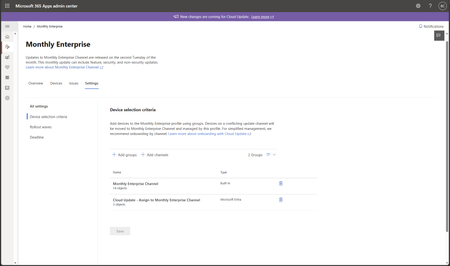
Hi, the New Entra ID group device criteria scoping is missing from Cloud Update. Message center says that it should be GA late July, but here we are and it's still not there. Is there a way to know when should we expect it to rollout for real? Thks in advance and don't hesitate if you have any questionsSolved135Views0likes3CommentsDisplaying Time in hours
I have a spread sheet where I record my work hours. Eg: 0700 (A2) - 1530 (A3) which equals 8 1/2 hours, then I take 30 minutes off for a lunch break, which leaves me with 8 hours. My formula is A3-A2-30 which brings up the result as 800.00. I have tried all different methods and formulas but I can't get the hours to show as 8.00. I then use the 8.00 hours in another formula to work out my pay for the day. Please help.Solved212Views0likes5CommentsAccess Query Problem
Good afternoon. I have been trying to track down a very strange error that my database has thrown for the first time ever... the query performs a complex math equation based on temperature, chlorine residual and pH time to compute the amount of time required to meet disinfection. This month the temerpature of the water has been historically high and the time required historically low. See the screenshot below. The math is evaluating the time required is greater than the time achieved (which it is not). The query is pasted below. I have recreated the math in excel and cannot duplicate this error. It seems exclusive to Access. When the formula evaluates as 10.0 the results are “YES” if the formula evaluates as 9.9 the result becomes “NO” but should be yes… Any advice would be greatly appreciated. Also, this post keeps getting flagged as SPAM... This is attempt number 5.. Fingers crossed.Solved183Views0likes5Comments
Nesting a COUNTIF With IF To Evaluate A Formula
I have a sheet called Employee Training Matrix that I use to lookup data in a tab called Documents to see if there has been a date entered into a range of cells. Depending on how many dates are entered, the sheet will calculate the percentage where a person has been trained for a particular job. For example, the safety training requires three documents, so the formula I use for this lookup is "=COUNTA(Documents!C3:C5)/3". The issue is that some people do not require training in some areas, so I want to have the sheet to return a blank cell that I will format with a conditional format rule. Is there a way to do an IF and COUNTIF formula that will return a blank cell on one sheet when the second sheet has no date and run my COUNTA formula if there is? Or is there another way to address this? Thank you.Solved160Views0likes6CommentsM365, Entra ID, Google Password Manager Passkeys
I went into my tenant, opened the Entra ID Admin, and enabled passkeys (fido2) authentication. I want to use Google Password manager since it will work across al my devices/platforms (Windows, Mac, Android, iOS). I went into the security settings for Microsoft 365 account to add an authentication method. I am happy to say that "passkey" is listed as an option, so I created a new passkey in Google Chrome/Password Manager and named it after my userid in the tenant. To test it, I logged out and attempted to log in using the passkey. The option came up, but Microsoft complained it was not a valid key. I tried again stating that I would my phone for the key and scanned the QR code but my phone said there is no passkey I would need to create one. How do I solve this? BTW: I did add Google's AAGUID in the Entra admin and allowed it but that did not solve the issue.Solved239Views0likes2Comments
Heading Style Misapplied to Body Text
Hi, I'm editing a novel manuscript. Somehow. the author applied the same heading used for the chapter numbering to the last line of text of Chapter 28, so that that short line and the Chapter 29 heading are ... linked? If I try to set the heading for the line of text to normal in the Style pane, the chapter 29 heading goes to "normal," too. If I try to apply the heading style to the chapter heading, the line of text gets that style, too. Chapter 29 has of course disappeared from the Navigation Pane in all this. Any advice is very welcome.Solved63Views0likes3Comments

Events
Recent Blogs
- Zoom from 10% to 1000% Supported Access views can now be zoomed anywhere from 10% to 1000%, expanding the previous range of 50% to 500%. New 10%, 25%, and 1000% choices are available in the Zoom me...Sep 04, 2026188Views2likes0Comments
- We’ve rounded up some of the most popular features to release lately in your favorite apps. It’s not too late to try them out!Sep 03, 2026829Views0likes1Comment