excel on mac
2758 Topics
Excel Nested Arrays: Find the Nesting Depth of Uniform and Ragged Arrays ARRDEPTH() & ISRAGGED()
Hey everyone! I’ve been diving deep into Excel’s new nested arrays features lately, and I absolutely love the flexibility they bring to data structuring. However, managing them can get a bit tricky, so I figured I’d build some specialized tools to handle them seamlessly. Public Interfaces & Arguments =ISRAGGED(array) Argument Description Default Behavior array Target nested structure to validate. Required =ARRDEPTH(array, [is_ragged]) Argument Description Default Behavior array Target nested structure to measure. Required [is_ragged] TRUE: Scans all branches for the deepest path. FALSE: Speed test on the first path only. FALSE (Omitted) TL;DR (What makes it tick): Function Name Type What It Does ARRDEPTH Public UI Returns nesting depth. Supports deep checking or fast linear testing. ISRAGGED Public UI Structural validator. Returns TRUE if array branches have uneven nesting. ANALYZE_NESTING Hidden Core Engine Multi-process recursive parser that tracks tree structure geometries. LINEARDEPTH Hidden Utility High-speed depth checker that evaluates the first element path exclusively. You can get both functions from my GitHub Gist: https://gist.github.com/Medohh2120/9cdf939036942c9672c57ccd6de696d3406Views1like8Comments
2FA popup message persistent on excel for mac
When I sign in to any site that requires a multi factor authentication through sms messaging, the pop up window for the 2FA code appears in the top corner of any excel spreadsheet that I have open. If I try and move up to the spreadsheet corner, I can't. If I tab up to get to cell A1, the popup is activated and I can't access cells it is covering. I can't click and delete the popup message. It may disappear over time, but I am unable to use excel effectively while it is present. Any ways to delete the pop up?36Views0likes2Comments
Formatting depending upon results form a vstack
I have a dynamic VSTACK being displayed. I want to format an adjacent cell in each line of the VSTACK with a boarder that appears or disappears according to changing number of rows in the VSTACK. I would appreciate any help in achieving this.199Views0likes5CommentsUser Forms not displaying correctly in MS365 Excel for Mac
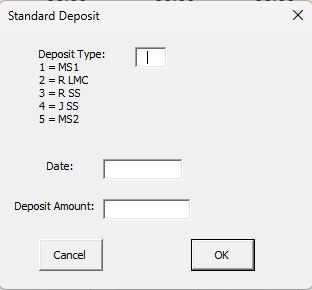
I need some help. I developed a simple budgeting system in Excel many years ago, which revolves around a spreadsheet with sheets for each account. I built three user forms to allow for a Deposit (which is distributed among the accounts based on data in the summary sheet); Single Entry (which can be either a credit to or debit from a specific account), and a Transfer (which takes an amount from one account and transfers it to another. Here are pictures of the three User Forms as displayed on my Windows machines (whether running Office 2019 Excel or MS 365 Excel for Windows): The key is that the Single Entry and Transfer forms display a list of accounts that can be selected from. The problem I am having is that when I try to do this in MS 365 FOR MAC, the lists of accounts are not displayed and cannot be selected from (only a blank box appears). The Deposit form, which has no list to select from, works perfectly fine, so it's not a general problem with macros. Fortunately, even after the file is opened and edited on Mac, it can be reopened back on a Windows machine and still works properly there. I know that there are limitations in Excel for Mac with regard to building User Forms, but I didn't see anything specifically described that would create this situation. I'm wondering if perhaps it might be a font issue?? I built these years ago and have used them for many years without problems. I'm pretty sure I can come up with another way to do this, but I was hopeful that someone out there might have a simple solution for me?? I moved from Office 2019 to MS 365 specifically to allow me to use a Mac, so this is really throwing a monkey wrench in my plans!!! Thanks to all for your consideration!!154Views0likes3Comments
Cannot access excel file now excel installed on iPad
I installed excel on my iPad and set up an outlook account. I can see the file on both my Mac and my iPad but cannot open them. It’s as though they are stuck between my iCloud and outlook one drive. Can anyone suggest how I can retrieve or restore them?163Views0likes1Comment
Add ins have disappeared and unable to add them back
The Add Ins have disappeared. I click the Add In logo then click on the Add button, enter the namer of the Add In I want and I get a message saying it is unable to load any Add Ins. What is happening? How can I get my add ins back? Thanks Steve420Views1like5Comments
What's the simplest way to make a genuinely random name selection system using Microsoft tools?
For example, suppose I have a list of participants in Excel and want to randomly select one winner without manually choosing from the list. Would you use RAND/RANDBETWEEN in Excel, Power Automate, or another Microsoft 365 approach? I'm also interested in preventing the same person from being selected twice when several winners are needed. I'd appreciate an approach that's easy for someone without much Excel or Power Automate experience to understand.419Views0likes5CommentsI'm looking for a practical way to calculate Pakistan salary income tax in Excel.
The goal would be to enter a monthly salary and have the spreadsheet estimate the applicable tax and resulting take-home amount. Ideally, the calculation should be easy to update when the applicable tax slabs or salary-related rules change. For someone building this in Excel, would you recommend keeping the tax slabs in a separate lookup table and using formulas against that table, rather than hard-coding the rates into one large formula? I'm particularly interested in approaches that make the spreadsheet easier to maintain when tax rules change.356Views0likes1Comment
Excel puzzle - can't type into cell, exhausted support steps, need a tech wizard !
Excel desktop app on Mac won't let me edit cells (Word is fine) already tried a full uninstall/reinstall with support MacBook Air, macOS Tahoma 26.2 - Microsoft 365 Premium subscription - Excel for Mac, Version 16.111.1 Problem: In the Excel desktop app I can navigate the sheet and select/highlight cells, but I cannot type into a cell or into the formula bar Already tried with a Microsoft support agent: 1. Confirmed subscription is active 2. Removed the Office license from Keychain Access 3. Fully removed the Office apps, emptied the Trash. 4. Reinstalled Office from account.microsoft.com 5. Result: Excel still won't let me type in a cell or in the formula bar, even in a new book 6. "Allow editing directly in cells" enabled. 8. Confirmed the keyboard itself is fine: Cmd+C works inside Excel, types normally in TextEdit 9. Opened Excel in safe mode (held Shift while launching) and creating a new blank workbook — issue persisted. Microsoft support agent confirmed this isn't a subscription/activation issue and isn't a general keyboard/OS issue, since Word, TextEdit, and Excel's own search box all accept input normally — the problem is specifically isolated to typing into a cell or the formula bar in Excel. Any ideas on what else could be blocking keyboard input specifically in Excel's grid/formula bar (e.g. a stuck editing mode, add-in, or accessibility permission specific to Excel) would be ! VERY ! appreciated.753Views0likes3Comments