display
4 Topics
August 2026 RDP font display glitch
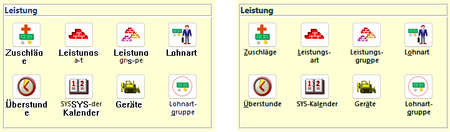
In the last days, we have received two independent reports of font display problems in our MS Access based application. The symptoms are as follows: Some labels or text boxes are shown in a legacy system font instead of the font specified in the control (Segoe UI). Also, the label/text box is shown with a white background instead of transparent. Moving the Access window "fixes" the glitch. It happens at seemingly random places in our application at seemingly random times. Both reports have in common that the Access application is running inside an RDP session. In report 1, a work-from-home user used Remote Desktop to connect to their office Windows 11 PC, and, in report 2, a user executed the application on a Windows Terminal Server. Here are a few screenshots to illustrate the problem. The left side is the glitch, the right side is how it is supposed to look. The first row shows labels, the second row text boxes in a continuous subform. Report 1 is 16.0.20228.20186, 32 bit, M365 SAEC. Report 2 is 16.0.14334.20848, 32 bit, Office 2021 LTSC. Is this a known issue, or shall we continue to collect data about this glitch? Unfortunately, we haven't found a reliable way to reproduce it, so our ability to test it with different versions is limited.Solved1.1KViews0likes5Comments
ACCESS Form does not show all records when Subform is present
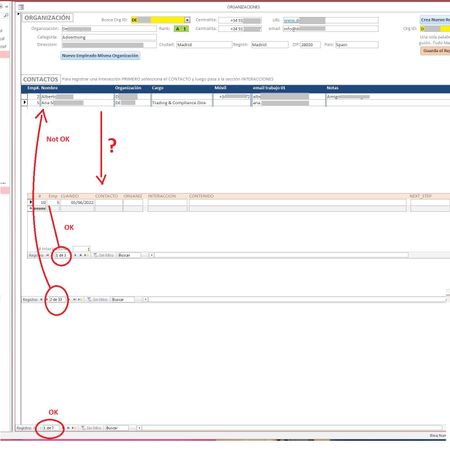
Hi All! I'm suffering a strange quirk with my Access forms/subforms. Whenever I set up a form / subform combo the form does not show all the records it should be showing. I have 3 tables. Table_1 holds the company data. When I select one ORGANIZATION (I have 7 right now) from the yellow dropdown ACCESS should populate the CONTACTS I have in said ORG and show them as a continuous subform (CONTACTOS). I get the list should nor be longer than whatever fits above the next subform (maybe 20+ at the moment?). But it's only showing 2 (out of a possible 33). The lower subform shows all Interactions (call, visit, email, etc.) I had with that person (presently 1) that I selected in the CONTACTOS subform.. Notice there are 33 records in CONCTACTOS, but ACCESS is only showing 2. If I scroll down I can see all 33 just not at the same time. If I remove the last subform or push the window up or down or pull the first form's background up or down the number of records shown grows or shrinks. Any ideas as to why it happens and how I can fix it? I'm sure I'm missing some parameter somewhere in properties but I haven't found it yet. Can I force ACCESS to show a certain number of records? Please help! Miguel2.9KViews0likes1CommentExcel User Interface (UI) Freezing
Hello Excel Community, I am reaching out because I have encountered an issue with an excel file and require some support on how to fix and resolve this problem. The problem I am having is that the Excel user interface appears to be frozen for a specific Macro Enabled Worksheet (.xlsm). The file opens okay, but upon opening, everything is frozen including all excel options and buttons. The keyboard shortcuts do not appear to be working either. The file is 6.93 MB with a reasonable amount of conditional formatting / graphics content and macros. I have read a few previous forum posts and it seems that I am not the only one to encounter this type of problem. Based on reading other people’s solutions, I have tried the following: Running excel in safe mode Disabling all Excel Add-ins through options Disabling all COM Add-ins through Options Disabling macros through Options Installing Office updates Repairing Office Using the Excel “Open and Repair…” option Unfortunately, none of these actions have been successful in resolving the problem. I would greatly appreciate suggestions and help on how to resolve this issue. Many Thanks, Stuart P.S Here is some background information on the specification of my PC and Office / Excel Version: Operating System: Windows 10 Pro Processor: Intel(R) Core(TM) i3-7100U CPU @ 2.40GHz, 2400 Mhz, 2 Core(s), 4 Logical Processor(s) System Type: x64-based PC Installed Physical Memory (RAM): 8.00 GB Excel: Microsoft Office 365 Subscription / 32-bit Excel Version: 1903 / Build 11425.20244 / Click-to-Run3.8KViews0likes3Comments