display
13 Topics
August 2026 RDP font display glitch
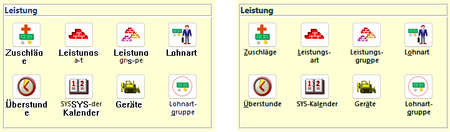
In the last days, we have received two independent reports of font display problems in our MS Access based application. The symptoms are as follows: Some labels or text boxes are shown in a legacy system font instead of the font specified in the control (Segoe UI). Also, the label/text box is shown with a white background instead of transparent. Moving the Access window "fixes" the glitch. It happens at seemingly random places in our application at seemingly random times. Both reports have in common that the Access application is running inside an RDP session. In report 1, a work-from-home user used Remote Desktop to connect to their office Windows 11 PC, and, in report 2, a user executed the application on a Windows Terminal Server. Here are a few screenshots to illustrate the problem. The left side is the glitch, the right side is how it is supposed to look. The first row shows labels, the second row text boxes in a continuous subform. Report 1 is 16.0.20228.20186, 32 bit, M365 SAEC. Report 2 is 16.0.14334.20848, 32 bit, Office 2021 LTSC. Is this a known issue, or shall we continue to collect data about this glitch? Unfortunately, we haven't found a reliable way to reproduce it, so our ability to test it with different versions is limited.Solved1.3KViews0likes5Comments
Remote display not changing to 1920 x 1080
With initial versions of Mixed Reality Link the remote display in the Meta Quest was looking great, crisp and big, but suddenly it stopped doing that. Since the latest update of Mixed Reality Link the display keeps the same resolution from my physical monitor, which makes it look squeezed and with big horizontal black bars in the Quest window. Quest 3 Meta Horizon OS v72 best regards, Ramon453Views1like1Comment
ACCESS Form does not show all records when Subform is present
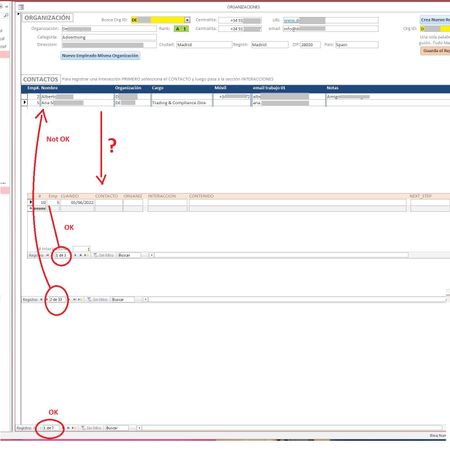
Hi All! I'm suffering a strange quirk with my Access forms/subforms. Whenever I set up a form / subform combo the form does not show all the records it should be showing. I have 3 tables. Table_1 holds the company data. When I select one ORGANIZATION (I have 7 right now) from the yellow dropdown ACCESS should populate the CONTACTS I have in said ORG and show them as a continuous subform (CONTACTOS). I get the list should nor be longer than whatever fits above the next subform (maybe 20+ at the moment?). But it's only showing 2 (out of a possible 33). The lower subform shows all Interactions (call, visit, email, etc.) I had with that person (presently 1) that I selected in the CONTACTOS subform.. Notice there are 33 records in CONCTACTOS, but ACCESS is only showing 2. If I scroll down I can see all 33 just not at the same time. If I remove the last subform or push the window up or down or pull the first form's background up or down the number of records shown grows or shrinks. Any ideas as to why it happens and how I can fix it? I'm sure I'm missing some parameter somewhere in properties but I haven't found it yet. Can I force ACCESS to show a certain number of records? Please help! Miguel3KViews0likes1Comment
Weird text display in Browsers after update
So after the update to Windows 11, Insider Preview, from the start, and right now I am on build # 22000.194 co_release, the fonts on the browsers are very weird. I have not added any custom fonts, these are the default fonts with the browsers. Attaching the images. The same is true for all programs. I have trouble reading what is on the desktop, please help and solve this ASAP. Thanks989Views0likes0CommentsSomething new popped up in Web Capture and PDF viewer | touch writing button
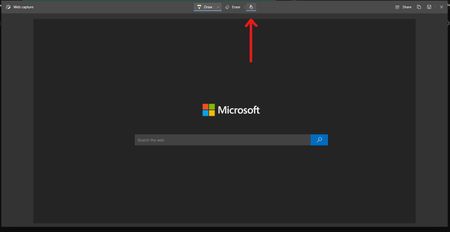
Edge Version 89.0.752.0 (Official build) canary (64-bit) The button doesn't have a tooltip yet but what is does is basically enabling/disabling writing on the screen on touch-based displays. it has no effect if you are using mouse and keyboard, but when you use Edge with a touch screen display, you can only write on the web capture or PDF while that button is toggled, if it's off, you can't write/draw anything. as always, it might only be available to a few insiders.2.1KViews1like1Comment
Screen Redraws Moving Windows
Something has changed in the past update or two where I'm seeing odd behavior with Edge and screen re-draws. 1. If I drag an edge window from monitor 1 to monitor 2, the wallpapers flicker and it redraws the screen. 2. On first launch of Edge, it does the same thing. Subsequent windows don't. It's quite irritating and feels unpolished. Anyone else experiencing it? I do run multiple Ultrawides with DisplayFusion to logically divide the screens, that said nothing on my system has been updated or changed other than the Edge version so it seems more likely to be the culprit. EDIT: I should also add dragging any other application/window between the screens does not exhibit this behavior, just recent versions of Edge Chromium.1.1KViews0likes1Comment