authentication
500 Topics
M365 only admin locked out MFA error 53003
I am learning this the hard way....so here it goes. Currently I am locked out of as the only admin on the tenant with error 53003. I was updating some Microsoft MFA default policy settings in Entra and mistakenly deleted the admin user from the exclusions list, and got locked out. Thankfully I have another tenant, not as big the one locked out. Initiated several support tickets for which everyone calls, and despite of subline mentioning the issue says that they have to assign this ticket to Entra. Then the ticket gets updated and noone has been assigned every since. I have initiated severity A support tickets from Azure portal but no one has called in last 24 hours to help. We area business with Business Premium licenses with over 20 users, and now completely locked out. I have looked almost everywhere online. There is no phone number that takes you to a support agent - PLEASE HELP........480Views0likes3Comments
[URGENT] Sole Global Admin MFA Lockout - No escalation after 7 days (Ticket #2609050040000232)
Hello, I'm dealing with a critical "Sole Global Administrator MFA Lockout" scenario for one week now, and standard ticket support is taking 24h per reply with no effective escalation so far. Ps: I had to use my personnel account to login because my business account is unavailable!! PROBLEM SUMMARY: After switching phones, the only registered MFA method (Microsoft Authenticator) became orphaned. There's no MFA backup method and no working second admin account on the tenant. As a result, I'm locked out of: - Microsoft 365 Admin Center login - Microsoft Entra Admin Center login - Corporate email and Teams access WHAT I'VE ALREADY TRIED (unsuccessfully): - Deleting the broken MFA method (error: "delete operation failed") - Enabling and generating a Temporary Access Pass (blocked - admins cannot generate a TAP for themselves, and the second admin account is also affected by the same broken MFA issue) - Checking for account lockout status (not the case) - Error received during sign-in attempts: Error Code 500121 OPEN TICKET: Ticket #2609050040000232, open for 5 days now, only generic responses received so far. REQUEST: Could someone from the Microsoft team (moderator, MVP, or any direct contact) help escalate this to the Tenant Recovery / Data Protection team? I'm available to prove tenant ownership (domain control, subscription details, billing information). Any guidance on how to expedite this specific type of case would be greatly appreciated. Thank you.106Views0likes1Comment
Microsoft values a hacker's disposable email more than your email linked to Microsoft for 8 years
My Pc was compromised and my session tokens were stolen . I had security info connected with my email and phone number . I also had passkey setup on both my pc (after reset) and my phone . It took one click for the hacker to remove the security features . They setup their own security info and added a disposable email instead of mine . I was somehow able to log in to the account using my pc passkey , as it was already signed in . First I requested to change the hacker's email to my one , which was useless cause the wait time period was 30 days . But in doing so I locked myself out of recovering the account with the mail that notified me that my security info was changed . I went to account recovery which only allowed me to change the password not the email so its still connected to the hacker's email . My frustration is the hacker can 1 click change my forever linked email since accounts creation . But when i try to do so they prevents me to do that stating that "there was recent security information change and the account will not allow for additional change for 30 years" . I opened up "account recovery form" and filled it out , point to be noted there were no fields where I could enter my details of my problem they just ask some basic information . After sometime they send a mail stating provided information is not enough . How am i suppose to provide more information if there are no fields for additional information . I contacted Microsoft agent , they guided me to reply to the account recovery form mail which did not worked as I was not allowed to reply on such email . I contacted Microsoft agent again , this time they told me I will be getting an email with account recovery form and I should mention every details . Well it was the same recovery form I used earlier with limited fields . I still field out the form and after sometime I was mailed by mailto:email address removed for privacy reasons to provide additional details for my identify , I was again requested to submit an account recovery form on https://account.live.com/acsr?cs=1 which was the same link with limited fields to provide information . I proceeded but in the end I was told that I have reached the daily limit for submitting form for this account . Just to be sure I mailed mailto:email address removed for privacy reasons the requested details .41Views0likes0Comments
Trapped in an Authenticator Loop
Dear Community, please help! I am trapped in an Authenticator Loop. I've got a microsoft workplace account, but if I want to log in, I have to type in a code from the microsoft authenticator app. I downloaded the app, but in order to use it, I have to log into my account and in order to do so, I also have to type in a code from the authenticator app, which I don't get, because to get the code I would have to log into the authenticator app, what I would need a code for... No matter which link I click, I can't open anything before I enter the code, which I can't get. I am using teams on mac, either on a firefox browser or on the desktop app and the authenticator on an Iphone. Please don't just tell me "don't use teams on a mac", this wasn't my choice. Unfortunately, my emplyer's IT support also is chronically unavailable. So is here anyone who could help me? I've already gone through the usual deleting the app, using another browser etc. options. Best Lukas1.3KViews0likes5CommentsHow much of your Microsoft 365 environment can you actually see at once?
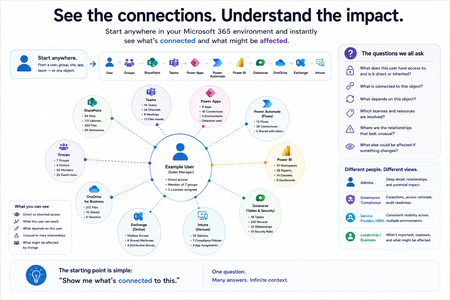
Not how many users you have. Not how many sites, teams, apps or flows you have. How much of it can you actually see connected together? I've been working across Microsoft 365 environments for a while, and I kept running into the same thing. There is no shortage of information. If anything, there is probably too much of it. Users, groups, permissions, SharePoint, Teams, Power Apps, Power Automate, Power BI, Dataverse, OneDrive, Exchange, Intune, licensing, configuration... It's all there. But when you're actually trying to understand how everything fits together, it can be a different story. You open one blade. Find something. Open another. Cross-check it. Go back. Open something else. Before long, you're jumping between different parts of the tenant trying to build the bigger picture in your head. And if you're working with larger environments, that gets difficult pretty quickly. The information isn't necessarily missing. The relationships between the information are what can be difficult to see. That got me thinking about a slightly different question: Instead of "where do I find this information?" "Show me what's connected to this." That's where VisibleState started. Start anywhere. Follow the connections. Imagine starting with a single user. Instead of seeing that user simply as a record with a list of properties, imagine being able to explore the relationships around them: User → Groups → SharePoint → Teams → Power Apps → Power Automate → Power BI → Dataverse → OneDrive → Exchange → Intune Then the questions become different: What does this user have access to? Is that access direct or coming through a group? What resources are connected to them? What depends on something they're associated with? Which licenses are involved? Are there relationships that look unusual? If something changes, what else might be affected? Those questions aren't necessarily about finding another piece of information. They're about putting information that already exists into context. A report can tell you that something exists. A connected view helps you understand what it is connected to. Illustrative example below — not a real customer environment. I'm not suggesting Microsoft 365 doesn't already give us this information Quite the opposite. Microsoft 365 already gives administrators an incredible amount of information and tooling. The thing I've been thinking about is what happens when you want to look across those boundaries. Sometimes I don't want another export. I don't want another list. I don't necessarily want another dashboard. I want to start with something I'm looking at and ask: "What's connected to this?" And then keep following the trail. That's the idea I'm exploring with VisibleState. The interesting part is what happens when you change the viewpoint The same relationships can be useful for completely different reasons. For example: Administrators may want to understand access, permissions and dependencies. Security and governance teams may want to find unusual relationships or exceptions. Compliance teams may need to understand who can access something and why. People managing multiple environments may want a consistent way to understand what's there without rebuilding the picture manually every time. Leadership may not need to see the graph at all. They may simply want to know what's important, what's exposed and what could be affected. It's still the same underlying environment. You're just looking at it from a different angle. And that's where I think things get interesting. Where I'm at with it VisibleState started as something I was building to make my own work easier. I was spending a lot of time investigating environments, tracing access and putting information together for reports. The individual tasks weren't necessarily difficult. It was the jumping between different places and reconstructing the bigger picture that took the time. So I started building something that would let me approach the environment through the relationships instead. It's grown quite a bit from where it started, and I'm continuing to build it. I'm not posting this as a product launch, and I'm not looking for people to sign up. I'm genuinely interested in whether the problem I'm seeing is familiar to other people working with Microsoft 365. So I'm curious... If you could start with any object in your Microsoft 365 environment and immediately see what it's connected to, where would you start? Would it be: Users and access Groups and permissions SharePoint and Teams Power Apps, Power Automate, Power BI and Dataverse Licensing and resources Governance and unusual relationships Something completely different Maybe you've already got a good way of doing this. Maybe you still find yourself jumping between different services and piecing things together manually. Or maybe I'm looking at the problem from the wrong direction. What's the one relationship in your Microsoft 365 environment that you wish you could see instantly?132Views0likes0Comments
Need to Restore PST Files to Office 365 Mailboxes - What's the Best Approach
Hey everyone, I have a task coming up where I need to restore several PST files back into Office 365 mailboxes. Haven't done this before at this scale and honestly not sure where to begin. I've looked at Microsoft's native import service through Purview but I have a few concerns: Some of the PST files are quite large — not sure how well it handles that I need to restore only specific folders for some users, not the entire PST I'm worried about data consistency after the restore Would prefer something that doesn't require too many admin roles or complex setup For those who have done PST to Office 365 restores — what approach worked best for you? Any tools, tips, or things to watch out for that you wish you knew before starting?357Views0likes4CommentsMicrosoft Teams and Authenticator lockdown
I’m having a very frustrating issue with Microsoft Teams. I am able to log in to teams using my normal personal email and account ONLY ON THE WEB BROWSER. From the web browser, I am not able to access the business channel that I am in. When attempting to log in on the downloaded mobile Teams App, I am sent directly to Microsoft Authenticator, which after waiting several hours, waiting even a full day, is still displaying a message about repeated verification attempt and to wait and try again later. I have accessed Microsoft support chat and they had no help for me. I need the authenticator lockdown to refresh and it will not.227Views0likes1Comment
Authenticator não funciona
Tenho um e-mail corporativo (sou o adm único, nao tem ti) que faço login na conta do powerbi, contudo, meu celular com o authenticator foi perdido e já nao tenho mais acesso, por este motivo, nao consigo mais logar na conta pq ele sempre direciona para o authenticador que nao tenho mais acesso e não abre a possibilidade de receber o codigo por outro meio, (sms ou email). ja tentei vários recursos (chat, telefone do suporte) para recuperar a conta e nao consigo. Todas as opções direcionam para o autenticador. solicito a microsoft que dê uma solução, resetando o autenticador anterior para que eu possa acessar a conta e incluir métodos alternativos de desbloqueio, ou sugira outra solução.170Views0likes1CommentNot able to do an account recovory when 2FA is enabled and Passkeey is half set up
I am not able to log into my personal account. I have tried account recovery, but I have 2FA set up so I go a message saying this is ignored. I have rest the password using 2FA but when I try to login the message is that I can not use password to login. I beleive my partern loged me out of the account and tried to log in to her account but instead started Passkey set up. I have needed to login with my company account even to raise this post. Any help would be great.154Views0likes1Comment