authentication
713 Topics
Entra CBA Preview Bug: Issuer Scoping Policy fails group claim (AADSTS500191)
I am deploying a zero-trust, cloud-native Certificate-Based Authentication (CBA) architecture for a break-glass emergency access account in Microsoft Entra ID. I am intentionally bypassing Intune/MDM to prevent circular dependencies during an outage. The PKI is generated via OpenSSL (Offline Root CA -> Client Cert). The cryptography is flawless: - The OpenSSL chain verifies perfectly (openssl verify -CAfile...). - The Root SKI and Client AKI are a perfect 1:1 hex match. - The client cert EKU includes TLS Web Client Authentication. - The client cert SAN includes othername: UPN::[break-glass-UPN]. - The Root CA and CRL are uploaded to Entra and publicly accessible via Azure Blob Storage. The Issue: When I attempt to restrict the Root CA using the "Certificate issuer scoping policy (Preview)" targeted to a specific Security Group (e.g., sg_cba), the TLS handshake drops and Entra throws: Error: AADSTS500191: The certificate authority that issued your certificate has not been set up in the tenant. Troubleshooting Performed: 1. Group Architecture: Verified via Microsoft Graph that the user is a direct, static member of sg_cba (Security Enabled, non-dynamic, not nested). 2. Micro-Group Bypass: Created a brand-new cloud-only micro-group with only the break-glass user. Waited for replication. Same 500191 error. 3. The Control Test (Success): If I completely remove the Preview scoping policy and move the targeting to the Generally Available (GA) tenant-wide trust ("All Users"), the login succeeds immediately. (I am securing this via High-Affinity binding matching the SKI to CertificateUserIDs). The Ask: Because the tenant-wide GA policy works perfectly, it mathematically proves the certificates, CRL, and bindings are correct. The failure is entirely isolated to the Preview scoping engine failing to correlate the incoming certificate to the Security Group claim fast enough. - Has anyone successfully deployed the "Certificate issuer scoping policy (Preview)" using a targeted security group without it dropping the trust? - Are there undocumented constraints on group evaluation during the CBA TLS handshake that cause this Preview feature to fail closed?13Views0likes0Comments
Introducing the Entra Helpdesk Portal: A Zero-Trust, Dockerized ITSM Interface for Tier 1 Support
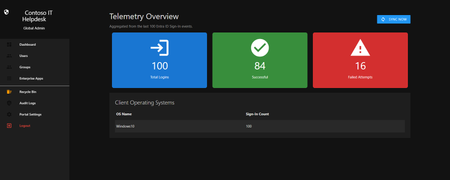
Hello everyone, If you manage identity in Microsoft Entra ID at an enterprise scale, you know the struggle: delegating day-to-day operational tasks (like password resets, session revocations, and MFA management) to Tier 1 and Tier 2 support staff is inherently risky. The native Azure/Entra portal is incredibly powerful, but it’s complex and lacks mandatory ITSM enforcement. Giving a helpdesk technician the "Helpdesk Administrator" role grants them access to a portal where a single misclick can cause a major headache. To solve this, I’ve developed the Entra Helpdesk Portal (Community Edition)—an open-source, containerized application designed to act as an isolated "airlock" between your support team and your Entra ID tenant. Why This Adds Value to Your Tenant Instead of having technicians log into the Azure portal, they log into this clean, Material Design web interface. It leverages a backend Service Principal (using MSAL and the Graph API) to execute commands on their behalf. Strict Zero Trust: Logging in via Microsoft SSO isn’t enough. The app intercepts the token and checks the user’s UPN against a hardcoded ALLOWED_ADMINS whitelist in your Docker environment file. Mandatory ITSM Ticketing: You cannot enforce ticketing in the native Azure Portal. In this app, every write action prompts a modal requiring a valid ticket number (e.g., INC-123456). Local Audit Logging: All actions, along with the actor, timestamp, and ticket number, are written to an immutable local SQLite database (audit.db) inside the container volume. Performance: Heavy Graph API reads are cached in-memory with a Time-To-Live (TTL) and smart invalidation. Searching for users or loading Enterprise Apps takes milliseconds. What Can It Do? Identity Lifecycle: Create users, auto-generate secure 16-character passwords, revoke sign-in sessions, reset passwords, and delete specific MFA methods to force re-registration. Diagnostics: View a user's last 5 sign-in logs, translating Microsoft error codes into plain English. Group Management: Add/remove members to Security and M365 groups. App/SPN Management: Lazy-load raw requiredResourceAccess Graph API payloads to audit app permissions, and instantly rotate client secrets. Universal Restore: Paste the Object ID of any soft-deleted item into the Recycle Bin tab to instantly resurrect it. How Easy Is It to Setup? I wanted this to be universally deployable, so I compiled it as a multi-architecture Docker image (linux/amd64 and linux/arm64). It will run on a massive Windows Server or a simple Raspberry Pi. Setup takes less than 5 minutes: Create an App Registration in Entra ID and grant it the necessary Graph API Application Permissions (e.g., User.ReadWrite.All, AuditLog.Read.All). Create a docker-compose.yml file. Define your feature toggles. You can literally turn off features (like User Deletion) by setting an environment variable to false. version: '3.8' services: helpdesk-portal: image: jahmed22/entra-helpdesk:latest container_name: entra_helpdesk restart: unless-stopped ports: - "8000:8000" environment: # CORE IDENTITY - TENANT_ID=your_tenant_id_here - CLIENT_ID=your_client_id_here - CLIENT_SECRET=your_client_secret_here - BASE_URL=https://entradesk.jahmed.cloud - ALLOWED_ADMINS=email address removed for privacy reasons # CUSTOMIZATION & FEATURE FLAGS - APP_NAME=Entra Help Desk - ENABLE_PASSWORD_RESET=true - ENABLE_MFA_MANAGEMENT=true - ENABLE_USER_DELETION=false - ENABLE_GROUP_MANAGEMENT=true - ENABLE_APP_MANAGEMENT=true volumes: - entra_helpdesk_data:/app/static/uploads - entra_helpdesk_db:/app volumes: entra_helpdesk_data: entra_helpdesk_db: 4.Run docker compose up -d and you are done! I built this to give back to the community and help secure our Tier 1 operations. If you are interested in testing it out in your dev tenants or want to see the full architecture breakdown, you can read the complete documentation on my website here I’d love to hear your thoughts, feedback, or any feature requests you might have!23Views0likes0Comments
M365 only admin locked out MFA error 53003
I am learning this the hard way....so here it goes. Currently I am locked out of as the only admin on the tenant with error 53003. I was updating some Microsoft MFA default policy settings in Entra and mistakenly deleted the admin user from the exclusions list, and got locked out. Thankfully I have another tenant, not as big the one locked out. Initiated several support tickets for which everyone calls, and despite of subline mentioning the issue says that they have to assign this ticket to Entra. Then the ticket gets updated and noone has been assigned every since. I have initiated severity A support tickets from Azure portal but no one has called in last 24 hours to help. We area business with Business Premium licenses with over 20 users, and now completely locked out. I have looked almost everywhere online. There is no phone number that takes you to a support agent - PLEASE HELP........22Views0likes1CommentI built a free, open-source M365 security assessment tool - looking for feedback
I work as an IT consultant, and a good chunk of my time is spent assessing Microsoft 365 environments for small and mid-sized businesses. Every engagement started the same way: connect to five different PowerShell modules, run dozens of commands across Entra ID, Exchange Online, Defender, SharePoint, and Teams, manually compare each setting against CIS benchmarks, then spend hours assembling everything into a report the client could actually read. The tools that automate this either cost thousands per year, require standing up Azure infrastructure just to run, or only cover one service area. I wanted something simpler: one command that connects, assesses, and produces a client-ready deliverable. So I built it. What M365 Assess does https://github.com/Daren9m/M365-Assess is a PowerShell-based security assessment tool that runs against a Microsoft 365 tenant and produces a comprehensive set of reports. Here is what you get from a single run: 57 automated security checks aligned to the CIS Microsoft 365 Foundations Benchmark v6.0.1, covering Entra ID, Exchange Online, Defender for Office 365, SharePoint Online, and Teams 12 compliance frameworks mapped simultaneously -- every finding is cross-referenced against NIST 800-53, NIST CSF 2.0, ISO 27001:2022, SOC 2, HIPAA, PCI DSS v4.0.1, CMMC 2.0, CISA SCuBA, and DISA STIG (plus CIS profiles for E3 L1/L2 and E5 L1/L2) 20+ CSV exports covering users, mailboxes, MFA status, admin roles, conditional access policies, mail flow rules, device compliance, and more A self-contained HTML report with an executive summary, severity badges, sortable tables, and a compliance overview dashboard -- no external dependencies, fully base64-encoded, just open it in any browser or email it directly The entire assessment is read-only. It never modifies tenant settings. Only Get-* cmdlets are used. A few things I'm proud of Real-time progress in the console. As the assessment runs, you see each check complete with live status indicators and timing. No staring at a blank terminal wondering if it hung. The HTML report is a single file. Logos, backgrounds, fonts -- everything is embedded. You can email the report as an attachment and it renders perfectly. It supports dark mode (auto-detects system preference), and all tables are sortable by clicking column headers. Compliance framework mapping. This was the feature that took the most work. The compliance overview shows coverage percentages across all 12 frameworks, with drill-down to individual controls. Each finding links back to its CIS control ID and maps to every applicable framework control. Pass/Fail detail tables. Each security check shows the CIS control reference, what was checked, what the expected value is, what the actual value is, and a clear Pass/Fail/Warning status. Findings include remediation descriptions to help prioritize fixes. Quick start If you want to try it out, it takes about 5 minutes to get running: # Install prerequisites (if you don't have them already) Install-Module Microsoft.Graph, ExchangeOnlineManagement -Scope CurrentUser Clone and run git clone https://github.com/Daren9m/M365-Assess.git cd M365-Assess .\Invoke-M365Assessment.ps1 The interactive wizard walks you through selecting assessment sections, entering your tenant ID, and choosing an authentication method (interactive browser login, certificate-based, or pre-existing connections). Results land in a timestamped folder with all CSVs and the HTML report. Requires PowerShell 7.x and runs on Windows (macOS and Linux are experimental -- I would love help testing those platforms). Cloud support M365 Assess works with: Commercial (global) tenants GCC, GCC High, and DoD environments If you work in government cloud, the tool handles the different endpoint URIs automatically. What is next This is actively maintained and I have a roadmap of improvements: More automated checks -- 140 CIS v6.0.1 controls are tracked in the registry, with 57 automated today. Expanding coverage is the top priority. Remediation commands -- PowerShell snippets and portal steps for each finding, so you can fix issues directly from the report. XLSX compliance matrix -- A spreadsheet export for audit teams who need to work in Excel. Standalone report regeneration -- Re-run the report from existing CSV data without re-assessing the tenant. I would love your feedback I have been building this for my own consulting work, but I think it could be useful to the broader community. If you try it, I would genuinely appreciate hearing: What checks should I prioritize next? Which security controls matter most in your environment? What compliance frameworks are most requested by your clients or auditors? How does the report land with non-technical stakeholders? Is the executive summary useful, or does it need work? macOS/Linux users -- does it run? What breaks? I have tested it on macOS, but not extensively. Bug reports, feature requests, and contributions are all welcome on GitHub. Repository: https://github.com/Daren9m/M365-Assess License: MIT (free for commercial and personal use) Runtime: PowerShell 7.x Thanks for reading. Happy to answer any questions in the comments.506Views1like1CommentNgcSet stays NO despite working WHFB setup - RPC 0x800706ba error
Hi everyone, I need help with a Windows Hello for Business certificate trust deployment that's almost working but stuck on the final step. **What's Working:** - Manual certificate enrollment works perfectly: `certreq -enroll -user -config "MyCA.domain.local\MyCA-CA" "MyWHFBTemplate"` - TPM 2.0 is ready, enabled, and functional - All Group Policies applied correctly (computer and user) - CA server healthy, templates published **What's NOT Working:** - `dsregcmd /status` shows `NgcSet : NO` (should be YES) - `NgcSvc` (Microsoft Passport) service is stopped on client - Getting error: "RPC server is unavailable (0x800706ba)" during automatic certificate enrollment - PIN setup fails because NGC containers won't create **The Strange Part:** Manual certificate enrollment works perfectly, but automatic enrollment fails with RPC errors. Both should use the same communication path to the CA. **Environment:** - On-premises certificate trust deployment (no Azure AD) - Domain-joined Windows 11 clients - Windows Server 2019/2022 infrastructure **Questions:** 1. Should NgcSvc start automatically when WHFB policies are applied? 2. Why would manual cert enrollment work but automatic fail with RPC errors? 3. Is there a difference in how system context vs user context accesses the CA? Has anyone seen this specific combination before? Any ideas what could cause this behavior? Thanks for any help!244Views0likes4Comments
Hotmail to Outlook Migration Broke My Account
A year or two ago, I updated my Microsoft account to try and migrate from hotmail.com to @outlook.com. Since then, my Microsoft account is broken. I log in with my @outlook.com email, but account.microsoft.com displays my hotmail.com email everywhere. Mobile apps will not stay logged in properly and kick me out after a day. On my account info page my @outlook.com email isn't even listed and hotmail.com is listed as primary, but only logging in with @outlook works. I'm pretty sure when I originally tried to migrate my account some exception wasn't handled properly part way through the process and my account is in some sort of database limbo. Is there anyone at Microsoft here that can help with this? Also, sorry if this isn't the right place to post this, but a call with Microsoft support pointed me here and there doesn't seem to be a "Microsoft Account Support" hub or space on this platform. If anyone knows of a better location feel free to suggest that as well. Thanks!33Views0likes0Comments
SMS code is not sent due to blocking
Hi! Sorry, I was using a translator to write this thread. About two weeks ago, I lost access to my Microsoft account. I haven't forgotten my password, and I haven't logged in from a new device—the system simply decided something was wrong and decided to send me an SMS code to verify my identity. I currently live in Russia and have a Russian SIM card. My government has blocked receiving SMS codes from foreign companies (WhatsApp, Telegram, Microsoft, etc.). I enter the last four digits of my phone number and click "Send Code," but then it says "This feature is currently unsupported." I've submitted recovery forms numerous times, but the account is very old and some of the information has simply been lost! I was barely able to contact a live person from Xbox support, and they opened a service request for recovery. The operator handling my issue completely ignores my messages. The only response he gave was that the form I sent him by email couldn't confirm my identity. He didn't even notice that I just needed a security code for the email address I used to REGISTER the account, as I couldn't receive an SMS code due to the political situation in my country. Today, I contacted a real Microsoft employee again, and he told me to write here because engineers often respond to messages and they can send me the code by email. Please help me. This account has no material value other than a copy of Minecraft. This account is precious as a memory and something that helped me through an important period in my life. Thank you for reading this thread.145Views0likes1CommentNot able to logon office 365 account or change it
If I want to logon to my Office 365 account I have to enter my emailaddress. Its is an @.onmicrosoft.com account. Entering password is ok, but then I am have to verify my phone number. The last two digits are shown, but clicking on this phone number I am getting an error like: 399287. There is no way of resetting this. I already contacted helpdesk but they cannot solve this problem. I have a bussniess account and I need some help about this. Every time I want to reset or want to make a change the account I am stuck in this error screen (endless loop). Please help me.619Views0likes5Comments
Microsoft Feedback Portal account is not working
I changed my Microsoft password a year ago, and it updated everywhere other than the Feedback Portal. As a result, I get an error when I try to login, or do anything on the page. Microsoft account support's suggestion was to login to the Feedback Portal which is insane given I'm having issues accessing it. How can I get this issue resolved? I've got three separate support tickets now and they keep asking me to wait 24 hours to get the issue resolved. Can someone from the Feedback Portal team please contact me to resolve this?" This is what Microsoft Support have said: "understand your frustration, and yes—this is an account‑related issue because the Feedback Portal is still tied to your old alias, which causes login conflicts and forces you out. Your Microsoft account itself signs in correctly, but the Feedback Portal is pulling outdated identity data that you cannot update on your own. Since you cannot access the Portal to submit feedback, directing you back there is not a workable solution. What you need is for Support to escalate this to the internal Identity/Feedback Platform engineering team so they can manually correct the outdated alias mapping on the backend. In this situation, the Feedback Portal and Tech Community teams are the ones who manage and maintain that specific platform. Because the issue appears on the Feedback Portal side—even though your Microsoft account is working normally—only their dedicated team can make the necessary corrections on their end. That’s why we are guiding you to connect with them through the links provided: https://techcommunity.microsoft.com/ or https://feedbackportal.microsoft.com/feedback. They will be able to review the portal‑specific account data and assist you further. I understand why this is frustrating. Since you’re unable to stay signed in to the Feedback Portal, I completely see why posting there isn’t possible for you. However, I do need to be transparent: I’m not able to escalate this issue directly to the Feedback Portal team, as they don’t provide internal escalation channels for us and only accept requests through their own platform. "82Views0likes2Comments
Case 2512040040001886 - Cannot Access Account
Since the 4th of December we have been patiently waiting on MS Tech support to assist on resolving our Case with no success endless calls and endless promises with no luck. How do you proceed in using Microsoft for a Business if they don't deliver on the support. My business is taking the brunt of it. I suppose another call holding for hours and another Support person promise a solution. No other methods to log complaints as you cannot log into your Account Portal.113Views0likes2Comments