files
7 Topics
I NEED HUMAN HELP -- I am having issues with my Microsoft business email, I can't access Word
888 319 8920 I am having issues with my Microsoft business email, I can't access Word. I've tried calling multiple numbers and haven't been able to reach a human and the automated machine is no help. If someone would please give me a good number to call or an email address, I'd greatly appreciate it.170Views0likes2Comments
MS Office File Search Not Working
When I "search for a file" under the open command in MS Office, the file search returns everything but the file I'm looking for. I have to type in the entire file name in order to be able to click on the file I want to open, rather than writing part of the name and having the most relevant result stay at the top. For instance, if I start typing a file name like "Spokane Receipts", typing in the beginning of SPOK will start to return the correct result. When I got to click on the file, the search changes to all types of files that are named nothing similar. Sometimes the correct file will be found under (show more results), but often its not. It won't reappear until I type out the entire file name. It doesn't make any sense, why would MS Office file search return results from the data inside of files rather then the file name first? Is there a way to correct this search process? I don't want things tangentially related to the word I'm typing, I'm looking only for the file name. Thanks!324Views0likes1CommentDesign difference between Word in teams and in local app
Hi, I have a design difference between Word in teams and in local app. As I want to use the doc in a power automate flow, and the design is important. Moreover I need to design it in a local Word app as I need to use content control. Can you try and help me find a way to get over the gap?690Views0likes0Comments
Created a live excel document in a Teams Meeting, but it seemed to stop saving after a certain time
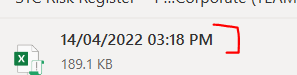
Hi, A week ago, I created a live excel document to track notes in group Teams Meeting call (with external clients). I was taking notes in the live document but it seemed it had stopped registering whatever notes I took in the last hour, so if I go try recover previous versions on OneDrive, it would only provide a version at the latest 3.18pm when I was still writing notes at 4pm (therefore lost an hour worth of notes). I believe Teams syncing is very slow as my notes only came up on other people's screens (in presentation mode) 1 hr later, so this syncing delay may be an issue... Similarly at the end of the meeting, I even had saved a local copy, but upon checking, the local copy seems to be the same as the 3.18pm variant. but doesn't explain why my local copy (done at say 4:30pm) did not keep all the notes and 'instantly' reverted to some 3:18pm version. Would there be a work-around ? Or perhaps reach out to internal company IT and see if they have more versions of saved files?867Views0likes0Comments
Using Excel in Teams vs. the Excel Application
Will it be possible for Excel in Teams to incorporate all capabilities from working within Excel (the actual application) in the near future? Currently not all Excel formatting options are available and not all cell formats are preserved when transferring Excel files into Teams. In particular, not all border types for cells are included in Teams or shown when opening a file in Teams (e.g. the 'slash' border that crosses out a cell).4.3KViews0likes3Comments
Copying in Excel whilst on Teams call locks up Excel
When I copy something in Excel whilst in a call, about 80% of the time it will lock up Excel. This eventually (minutes, not seconds) will free itself, and you can also force it to unlock by copying something else in another programme (I use screengrab program Greenshot) then you supersede the clipboard with the screenshot and you unlock Excel (and lose whatever you copied from Excel). It seems like Excel copying data to the clipboard makes it hang. But ONLY whilst on a teams call. It will unlock when the call ends. This has been happening for months now, it's not every time, but I mainly share Excel sheets in Teams, and I'm on calls all day so this is a game-stopping issue for me. There's another thread here which sounds similar (about sharing files in a call and them locking up) but this is more general than that.775Views0likes0CommentsEmbedded objects query- Help Required!
Hi, I'm wondering if anyone can help me. I have a list of embedded PDF files within a table but I would like to return a specific embedded file based on a cell value. For example I have an embedded PDF for Product 1 in the table which I would like to be pulled through on a summary tab when product 1 is selected from a data validation list. Is this possible? I know it is possible with a vlookup when using hyperlinks to files, however unfortunately I cannot use hyperlinks in this scenario as this file will be going out externally. Any help and suggestions would be appreciated. thanks in advance Luke750Views0likes0Comments