Recent Discussions

Unable to complete Partner Center Enrollment
Hello, I am trying to enroll in the Microsoft AI Cloud Partner Program. I can get through the process (fill out company information, etc.) but when I go to the final acceptance form and click submit, it constantly throws an error: I can sign in to the Partner Center but cannot open a support ticket because the "contact support" dialogue has no entry for workspace and will not let me enter anything: Is there a workaround to submit a ticket on this?
Actual Release Dates for AB-XXX courses
Hello A TSP is asking the actual course release dates with MS Learn material for the following courses: AB-100 AB-730 AB-731 AB-900 The latest courseware title plan (dated January 23, 2026) mentions that AB-730, AB-731 and AB-900 are "released" and I can see MS Learn content for them. The exams are still under beta though. The TSP wants to make sure the exam is completely out of beta, so that when they market the course, people sign up for it, take the course, they can then take exams immediately. I understand AB-100 is only releasing on January 30, 2026 but the courseware title plan says February 6, 2026. Regards Chintan PatelThe Next One - SC200 Courseware unusable
Hi All, we are trying to deliver SC200 course. Out MCTs tell us the courseware is not working at all. Video Links are not working eg. (Playback Error - We are sorry something went wrong) https://www.microsoft.com/en-us/videoplayer/embed/RE4yiO5?rel=0&postJsllMsg=true https://www.microsoft.com/videoplayer/embed/RE4bOeh?rel=0 https://www.microsoft.com/en-us/videoplayer/embed/RE4bGqo?rel=0&postJsllMsg=true AHL Labs are not working because of cloud slice architecture We (the MCts) use hours to find out how the lab should work in ALH Labs. Missing Permissions Wrong Links I cannot find any contact to get answers to these issues? Can anyone give hints how to discuss these topic. Just to play ping-pong between ALH and "Content Creators" (1 Month Feedback Time) and getting no resolution doesn´t help here. Can you please get back to a working environment. (Full Azure Access, Real World Training Situations) Not a Video Here, a Simulation There. Regards, Mario🎤 Save the Date: AMA with the Microsoft Fabric Leadership Team!
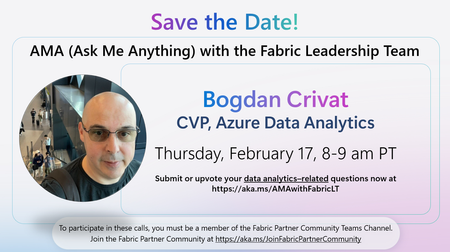
We’re excited to announce an upcoming Ask Me Anything (AMA) session with the Fabric Leadership Team—a unique opportunity for partners to engage directly with the leaders shaping the future of Microsoft Fabric! 🔹 Featured Leader Bogdan Crivat, Corporate Vice President, Azure Data Analytics 🗓️ Date & Time Thursday, February 17 8:00–9:00 AM PT 💬 Ask Your Questions Have topics you want the leadership team to address? Submit or upvote your data analytics–related questions now: 👉 https://aka.ms/AMAwithFabricLT 👥 Who Can Join? This AMA is exclusive to members of the Fabric Partner Community. If you're not yet a member, join here to participate in future calls: 👉 https://aka.ms/JoinFabricPartnerCommunity
The actual reason for 715-123160
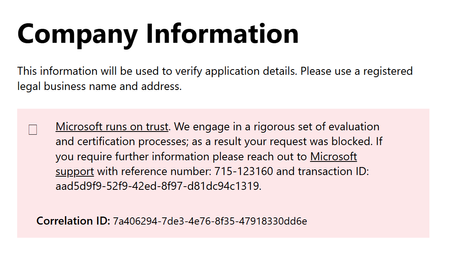
Hello there, I understand that "Microsoft runs on trust" but even after opening a ticket I've not been told what's the trust issue. The only answer I have is: Microsoft runs on trust. We engage in a rigorous set of evaluation and certification processes; as a result your request was blocked I'm a Microsoft Partner since few years, it's not a new enrollment, why can't I know what changed and caused this issue? Honestly, I'm the one who's losing faith in Microsoft. Is there a valid reason? Ok, I accept it but I need to know what's the reason otherwise is just a system error.
Duplicate functionality due to added functionality (1st of July)
In July additional functionality will be added to several Microsoft products, in this case I have a customer that currently has Microsoft 365 E3 and a separate Defender for Office 365 Plan 1 license. Both licenses will be renewed on the 31st of march, therefore an annual subscription until 30th of march 2027. In July the functionality of de Defender for Office 365 Plan 1 will become part of the Microsoft 365 E3 plan. Will it be possible to cancel the remaining months of the Defender for Office 365 Plan 1 license or do we need to accommodate for this and change the Defender for Office license to monthly and then cancel the subscription the 1st of July?
FY26 SAP on Azure Partner Incentives – Community FAQ
1. What is the Azure Accelerate incentives program for SAP in FY26? A: Azure Accelerate (FY26) is Microsoft’s unified partner investment program that rewards partners for driving SAP cloud migration projects on Azure. It merges previous, separate offers into one cohesive program covering all SAP deployment scenarios—whether native SAP on Azure, RISE with SAP (private cloud), or SAP GROW (public cloud SaaS). The goal: accelerate SAP cloud projects by offsetting partner costs and encouraging best practices, making SAP on Azure deals more attractive and profitable. 2. Who is eligible for these incentives? Answer: Partners: Must be enrolled in the Microsoft AI Cloud Partner Program and have achieved the SAP on Microsoft Azure Advanced Specialization. Enrollment in the Microsoft Commerce Incentives (MCI) program is also required. Customers: Commercial customers with significant SAP migration projects. Public sector deals are generally excluded. Extremely large strategic accounts may use custom funding instead. 3. How do partners apply for these incentives? Answer: Nominate the project in Microsoft Partner Center (Incentives > Engagements (MCI)), selecting the relevant Azure Accelerate – SAP offer. Provide customer/project details (including Azure Tenant ID). Customer must approve participation via email. Automatic approval for standard projects; large deals may require manual review. Deliver the engagement within the specified timeframe. Submit Proof of Execution (PoE) in Partner Center (assessment report, customer sign-off, etc.). Microsoft reviews and pays out via your usual partner payout method. Note: The 2.5% sales incentive is claimed via email to gpic@microsoft.com with required documentation. 4. What are the key timelines and deadlines? Answer: Completion Window: Pre-sales assessment: 60–120 days Migration/deployment: ~180 days Claim Submission: Typically within 30 days of completion Program Duration: FY26 (July 1, 2025 – June 30, 2026). All projects and claims must fall within this period. 5. How do these incentives reflect the Microsoft and SAP partnership? Answer: These incentives are part of a broader strategic partnership between Microsoft and SAP aimed at accelerating SAP’s move to the cloud (specifically Azure). The Azure Accelerate (SAP) program is a joint go-to-market effort to encourage cloud adoption, especially for midmarket customers. SAP’s involvement ensures the offers cover scenarios like RISE with SAP (private cloud) and GROW (SaaS ERP) on Azure—so the incentives apply whether the deal is sold by SAP or the partner, as long as Azure is the platform. 6. How can partners leverage these incentives in their go-to-market strategy? Answer: Offer free/low-cost SAP on Azure assessments (funded by Microsoft) to open doors with customers. Reduce customer costs or improve your margins by applying post-sale funding to project pricing. Stack all three incentives on a single deal for maximum ROI. Market the partnership: Highlight Microsoft and SAP’s joint investment in your proposals and marketing. Utilize Microsoft resources: Tap into engineering support, marketing materials, and the Azure Cloud Accelerate Factory. Plan for timelines: Train your team to nominate deals and collect required documentation promptly. 7. Can partners stack multiple incentives on a single deal? Answer: Yes! Partners are encouraged to utilize all applicable incentives for each deal. For example, you can claim pre-sales assessment funding, the 2.5% deal win bonus, and post-sales deployment funding on the same project. Stacking incentives maximizes your ROI and can cover 20–30% (or more) of the project’s first-year Azure value. 8. What documentation is required to claim incentives? Answer: Pre-Sales Assessment: Submit the assessment report or deliverable provided to the customer. Post-Sales Migration: Submit a customer sign-off letter/email confirming successful migration, plus a brief project summary or architecture document. Sales Closure Incentive: Provide the customer contract/order form, evidence that SAP will run on Azure, and the completed incentive claim form (“Attachment A”). For all claims, ensure the customer’s Azure Tenant ID is included and all documentation is clear and complete. 9. What happens if a project is delayed or the claim deadline is missed? Answer: If you anticipate missing a completion or claim deadline, contact Microsoft or your Partner Development Manager as soon as possible. Extensions may be granted in some cases, but if deadlines are missed without communication, the funding reservation may lapse and the claim could be rejected. Always monitor your project timelines and submit claims promptly to avoid losing incentive eligibility. 10. Where can I find more information or support on the incentives and manage my deals? Answer: The Microsoft Partner Center is your central hub for all things related to SAP on Azure incentives. Here’s how to use it effectively: Nominate and Track Deals: Go to Incentives > Engagements (MCI) to nominate new SAP on Azure projects for funding. Use the dashboard to monitor the status of all your nominations, including approval, completion, and payout stages. Submit and Manage Claims: After completing an engagement, upload your Proof of Execution (PoE) directly in Partner Center. The portal will show deadlines for each engagement—keep an eye on these to avoid missing out. Check Payouts and Earnings: View your incentives earnings statements and payment status in the Earnings section. Payment cycles are typically monthly or quarterly; Partner Center will show when funds are disbursed. Access Resources and Support: Find program guides, templates, and FAQs in the Partner Center resource library. For technical issues or questions about eligibility, use the built-in support ticketing system or reach out to your Partner Development Manager. Stay Updated: Partner Center is regularly updated with new program details, deadlines, and documentation requirements. Make it a habit to log in regularly and review notifications. To Learn More: To learn more about Microsoft's SAP Programs and Offers, visit Migrate and Modernize SAP. Tip: Bookmark the Partner Center and ensure your sales and delivery teams have access. Most incentive issues can be resolved quickly if you use the portal as your single source of truth. By leveraging the FY26 SAP on Azure incentives, partners can boost profitability, de-risk projects, and deliver more value to customers—while being backed by Microsoft and SAP.405Views2likes3CommentsNumber of technical support cases for Partner support
Hi everyone, Has anyone noticed that the ASfP (Advanced Support for Partners) included technical support incidents is reduced to around 20–30 cases this year? Many of our past tickets were not partner troubleshooting issues, but Microsoft backend-required requests (e.g., Azure quota increases for high-demand SKUs/regions) where CSP partners must open a support case for approval. Some tickets even take Microsoft internal team months to check and still no solution found. Curious if others see the same and whether Microsoft should separate backend-required requests from actual technical support incidents. Thanks!Solved
How do I know my company TSP status?
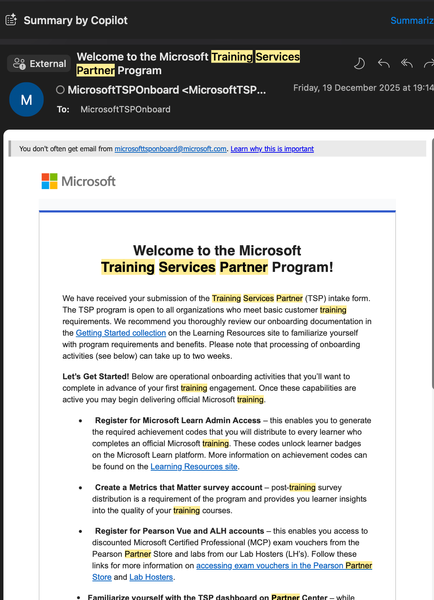
Does the Partnering Centre show the TSP status of a company once it has registered, and is there a way to verify this? Having received the confirmation email below and acted accordingly, can I begin delivering courses using an MCT with the appropriate competencies? This also leads to another question: is the first year of TSP admission primarily intended to build up the required metrics in the dashboard? Still albeit confused, even after going through a similar question in some other thread and onboarding information provided in the email below. Every pointer is much needed and appreciated please. Take note of below I have received the welcome email and acted accordingly: Welcome to the Microsoft Training Services Partner Program! Went through and created below where needed Register for Microsoft Learn Admin Access – Create a Metrics that Matter survey account – Register for Pearson Vue and ALH accounts –(still having issues creating one) Familiarize yourself with the TSP dashboard on Partner Centre Kind Regards Solomon UwagboleIdentity Verification Rejected in Partner Center – What Are the Next Steps?
Hello, our Microsoft Partner Center identity verification was rejected with the following message: 'Based on the information you have provided, your organization does not currently meet the requirements to pass verification. There are no appeals available, and the application has been closed.' We understand that this application is closed and that no appeal is available for this verification attempt. In addition, we are currently unable to create a support ticket in Partner Center for this verification issue, as the option to submit a ticket is not available to us. Could you please clarify: - What are the recommended next steps after receiving this message? - Is reapplying the correct action in this situation, and if so, what is the proper way to proceed? - Is there a required or recommended waiting period before reapplying? Thank you for your guidance.Microsoft 365 Developer Program Eligibility
I was excited to hear all of the buzz around the revamped M365 Dev Program and eligibility for MAICPP participants (https://learn.microsoft.com/en-us/office/developer-program/microsoft-365-developer-program) especially for the sandbox subscription benefit: Eligible MAICPP partner levels include: Azure Expert Managed Service Providers (MSP) Solutions Partners Specialization Partners Managed Partners Microsoft Action Pack Subscribers Partner Success Core Benefits Recipients Partner Success Expanded Benefits Recipients Partner Launch Benefits Recipients Legacy Gold/Silver Partners However, when I log into my dashboard (https://developer.microsoft.com/en-us/microsoft-365/profile), it says "you don't currently qualify for..." instead of the experience outlined in the help docs and announcements. Has anyone been able to provision a new M365 sandbox subscription with the new provisioning method? I have reached out to partner support, but they referred me to the dev program alias and nobody there has replied.FY26 TSP Community Call Thread
We'll use this thread to post updates for TSP Community Calls, including calendar invites to upcoming calls and links to post-call decks and recordings. Please note: the folder linked after each call is a temporary repository while we wait to get the deck and recording uploaded to the Learning Resources site. These links expire after each subsequent call. Instead, you can find the last 12 months of call decks and recordings in our Community Call collection.Tech Talks presents: FTRSA Updates & M365 Copilot in Power Apps: The Future of Side Chat
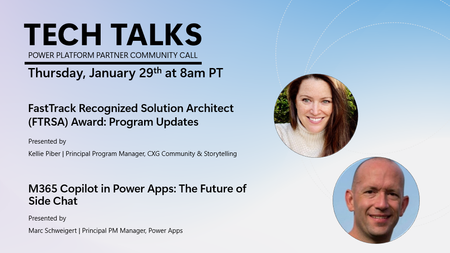
Join us on Thursday, January 29th at 8am PT as Kellie Piber, Principal Program Manager, CXG Community & Storytelling presents 'FastTrack Recognized Solution Architect (FTRSA) Award: Program Updates' and Marc Schweigert, Principal PM Manager, Power Apps presents 'M365 Copilot in Power Apps: The Future of Side Chat'. Join us for our next Tech Talks session, where Kellie Piber will walk through the latest updates to the FTRSA program, including new requirements and changes. This is a great opportunity to get clear, actionable guidance directly from the source. We will also be joined by Marc Schweigert, Principal PM Manager, for an in-depth look at the new M365 Copilot in Power Apps capability. Marc will showcase a live demo, share insights into the roadmap, and explain how customers can transition to this powerful feature. The session will conclude with an interactive Ask Me Anything (AMA) segment. We hope to see you there! Call to Action: Click on the link to save the calendar invite: https://aka.ms/TechTalksInvite View past recordings (sign in required): https://aka.ms/TechTalksRecording
Clarification on Courseware Completions Metric for TSP Qualification
Hi DanDonohue We are seeking clarification on whether Applied Skills learner achievement code redemptions contribute toward the Courseware Completions metric for TSP qualification. Specifically, could you please confirm whether this metric applies only to official Microsoft instructor-led courses mapped to a defined course ID (for example, MS-900) with redeemed achievement codes, or if Applied Skills achievements, individual Microsoft Learn modules, or other Learn-based credentials are also included? Thank you, ArchitTSP Courseware Completions not populating in Partner Center
Hi DanDonohue We are seeing an issue with TSP qualification data in Partner Center. Courseware Completions are not populating. Exam unit purchases and average response score are reflecting correctly. However, Courseware Completions remain at 0/1000, even though learners have redeemed achievement codes for Applied Skills. We would like clarification on the expected behavior of the Courseware Completions metric. First, are completions counted only for official Microsoft instructor-led courses mapped to a specific course ID, such as MS-900, with achievement code redemption. Second, should Applied Skills, Microsoft Learn modules, or other Learn-based achievements also contribute to this metric. Any guidance on whether this is expected behavior or a known issue would be appreciated. We can share screenshots if needed. Thank you, Zaib
Access Issue to Pearson VUE Store – TSP Status Confirmation Needed
Hello Microsoft team, I completed the TSP onboarding form on December 19 and have been a Microsoft Certified Trainer (MCT) since early 2025. I received a confirmation email that my onboarding form was successfully submitted, but I have not yet received an email confirming that my TSP status has been granted. I am now trying to access the Pearson VUE store at https://msstore.pearsonvue.com/but I am unable to log in. I receive an error stating that my Partner ID and Location ID are incorrect, even though they are entered correctly (see attached screenshot). Could you please advise on how to resolve this issue and confirm my TSP status so that I can gain proper access? Thank you for your assistance! Best regards, Jordy SmitsPower Apps per app End of Sale
Hi Microsoft Elevate team Firstly, Happy New Year to you all! I wanted to reach out regarding an important update in the January 2026 Power Platform Licensing Guide. It appears that Power Apps per app licenses have been marked as “End of Sale,” which represents a significant change for nonprofits. Could you please provide clarity on the following points regarding the 10 free/grant Power Apps per app licenses? Until when will nonprofits be able to purchase these licenses? How long will existing licenses remain usable? (Ideally, at least 12 months if not longer.) Once the grant for per app licenses is discontinued, will there be a comparable offering? e.g. grants for Power Apps Premium licenses? This is a significant part of Microsoft's nonprofit offer and a key reason many organisations choose the Power Platform over competing solutions. Nearly all of our nonprofit customers have leveraged this benefit and subsequently invested in additional Microsoft products, including Copilot. Discontinuing this could have a significant impact on both nonprofits and partners who serve them. I appreciate any guidance you can provide on this matter. Thank you, MattMicrosoft AI Office Hours Sessions 2026 (DACH Region)
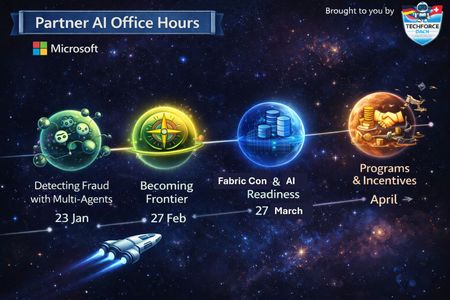
We’re preparing the launchpad for several exciting AI Office Hours sessions in 2026! These sessions are specifically designed for Microsoft partners in the DACH region and will focus on relevant AI topics. 🛰 23 January 11:00-11:45 | Detecting Fraud with Multi-Agents – Agent Framework / MCP A live demo of end-to-end fraud detection using Microsoft’s multi-agent stack, from orchestration to anomaly detection and human-in-the-loop control. Speakers: Benjamin Tokgöz, Florian Follonier, PhD 🔗 https://lnkd.in/eXfZDCrr 🌌 27 February 11:00-11:45 | Becoming Frontier – What it means for Customers and Partners What Frontier Firms look like, how human –agent teams reshape operating models, and how Microsoft partners can help customers on journey and benefit along the way. Speaker: Lutz Jannausch 🔗 https://lnkd.in/ees8U279 🪐 27 March 11:00-11:45 | Microsoft Fabric – FabCon Updates and AI-Readiness Key takeaways from FabCon 26 and practical guidance on preparing data estates for AI-ready Microsoft Fabric architectures. Speaker: Lisa Wolffhugel 🔗 https://lnkd.in/etCeuu_J 🚧 April - Date coming soon | Microsoft Partner Programs and Incentives An overview of partner programs, incentives, and how to align them with AI- and agent-driven opportunities. Speaker: Franziska Schäfer Cascalho Registration link coming soon.Scale sales growth through Microsoft Marketplace
Negotiated deals are one of the most effective growth levers - especially when partners are part of your strategy. Explore how customer private offers, multiparty private offers, and partner led reselling can help you deliver flexible pricing, simplify procurement, and empower your sales ecosystem - all without rebuilding your app or agent. Learn how to choose the right deal structure and scale with negotiated deals. Read more and scale smarter: Scale your sales growth with negotiated deals and reselling with ease | Microsoft Community Hub







Events
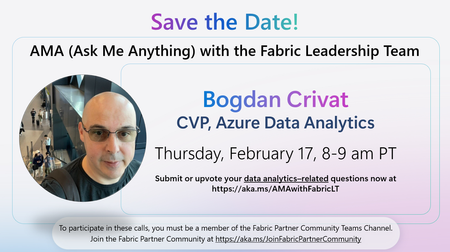
We’re excited to announce an upcoming Ask Me Anything (AMA) session with the Fabric Leadership Team—a unique opportunity for partners to engage directly with the leaders shaping the future of Mi...
Tuesday, Feb 17, 2026, 08:00 AM PSTOnline
0likes
0Attendees
0Comments
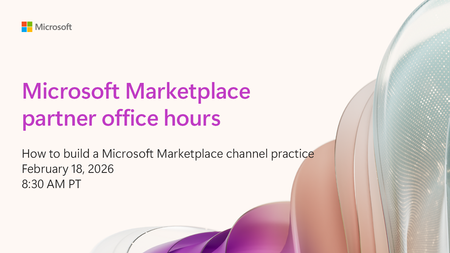
Building a successful Marketplace practice takes more than great offers—you need the right people, processes, and strategy working together. Learn exactly how top‑performing partners organize their t...
Wednesday, Feb 18, 2026, 08:30 AM PSTOnline
1like
7Attendees
0Comments
Recent Blogs
- At Microsoft Ignite in November, we introduced Frontier Transformation — a holistic reimagining of business aligning AI with human ambition to help organizations achieve their highest aspirations and...Jan 28, 202640Views1like0Comments
- Learn about 180 new offers that went live in Microsoft Marketplace, a single destination to find, try, and buy cloud solutions, AI apps, and agents to meet your business needs.Jan 28, 202690Views2likes0Comments