Recent Discussions
PL-100: Microsoft Power Platform App Maker -- WILL BE RETIRING END OF JUNE!
Microsoft Power Platform app makers have new opportunities to demonstrate skills in specific scenarios relevant to the work that they do every day, such as creating and managing automated processes with Power Automate; canvas apps with Power Apps; and model-driven apps with Power Apps and Dataverse with our new Applied Skills credentials. These modular 1-Day ILT courses teaching relevant skills will be available for ILT, that can be combined as desired. As a result, effective June 30th, 2024, the following will be retired: Microsoft Certified: Power Platform App Maker Associate Exam PL-100: Microsoft Power Platform App Maker. PL-100: Microsoft Power Platform App Maker Microsoft Power Platform Applied Skills launching February 12th, 2024 PL-7001: Create and Manage Canvas Apps with Power Apps PL-7002: Create and Manage Automated Processes by using Power Automate PL-7003: Create and Manage Model-Driven Apps with Power Apps and Dataverse Please reach out if you have any questions. Thank you!Repost: Make quick assist run as admin
Question: We need to be able to use Quick Assist in Windows 10 to do some administrative tasks, but if the end user initiates the Quick Assist session then the remote admin is limited to only what the end user has access to. Is there any way we can start Quick Assist as an administrator or elevate it to admin level during the Quick Assist session? Response: Quick Assist is my preferred application to resolve all technical issues remotely. It also allow me to Run as Administrator to install and configure hardware/software but there are few steps required as mentioned below: Run CMD at end-user's computer Type the below command: runas /user:domain\administrator cmd *domain will be any domain of your organization *administrator can be any administrator login. If domain is not available type the below command in cmd. runas /user:local_user cmd Put the admin password. Now you have successfully launched cmd in administrator mode, you can run the below tasks. x:\MicrosoftEdgeSetup.exe (for software installation, where x is any drive letter from your computer). appwiz.cpl for installing or uninstalling program. services.msc (Run or Stop a service) devmgmt.msc (Device Manager, to install/uninstall or upgrade the device driver) diskmgmt.msc (Disk Management) compmgmt.msc (Computer Management) regedit (Registry Editor) Above mentioned are just example, you can use the number of commands as per your requirement.54KViews1like7Comments
ECIF Funding Eligibility
Hello Microsoft Tech Community! We are Serraform a new Microsoft Partner specializing in Security & Compliance and have a question on End Customer Investment Funds (ECIF) funding. Hoping someone can help us. How to we become eligible to accept ECIF funding for our M365 Security & Compliance deployments? Is satisfying the requirements for a Solutions Partner designation sufficient, that is achieving 70 of 100 points in 1 of the 6 partner categories + achieving more than zero points in each of the 4 metrics? We are in talks with a few prospects and they are interested in leveraging ECIF. Any guidance would be super helpful. Thanks! AaronSolved51KViews1like15CommentsHow to appeal a rejected partner profile in the verification process
If your partner profile has been rejected in the verification process you can appeal the deision. Follow these steps45KViews3likes140CommentsRepost: Authenticator app isn't receiving notifications to approve log in on my laptop
Question: I have been trying to log in to my Microsoft account on my new laptop. I have previously used the 2-factor identification method on my old laptop, however, it doesn't seem to be working for my new laptop. When it says it has sent a notification to approve on the authenticator mobile app, nothing is coming up to approve on my mobile so i am making no progress. I also cannot find a code to enter on my laptop from the app. There is no QR code to scan on my laptop using the authenticator app. I don't know what to do and it is extremely frustrating because I cannot access anything, emails etc. Would be very grateful for some help. Response string: This sounds rather like a problem of the Authenticator app on the mobile it is not the laptop which stores any MFA information, the account setting at account.microsoft.com (or the security settings for the Microsoft Accounts set in there) triggers MFA, regardless from which machine you access those. Generally, when the message appears that a notification was send to the mobile device, there should be an option to use different verification method, which allows to also choose to enter a 6 digit token that is displayed for this account in the MS Authenticator app. Also it might show options to use another email address or phone number. Doing a new MFA registration in the authenticator app (showing the AR code) is only possible when you can access account.microsoft.com and log in using MFA - if you can't the dialogue usually also shows an option reset MFA, then you have to enter additional information to verify your identity. This does not sound like a problem specific to CSP Partners where this community is set up for, but more like a problem with a personal Microsoft Account outside of the scope of this forum. You can review guidance on how to set up MFA for personal accounts here: Microsoft account security info & verification codes - and at the end of the article you find links to the correct community and support options. Finally there is also an option to reset password and security information all together: Recover your account (live.com) Response: My MS Authenticator app does not show any 6 digit one-time-tokens. It shows 8 digit one time passwords. Also, my MS Authenticator does not receive any notifications. There is no help available anywhere, and there seems to be no way to "reset" this security information. Response: 8 digit one-time passwords are for personal Microsoft accounts, not work accounts, so you confirmed that your issue is not reg. CSP Partner security requirements where this community is meant for. I would suggest you contact Microsoft support directly - Contact Us - Microsoft Support - if you can't get access to a browser where you can log in to account.microsoft.com and use the available options to reset your authentication methods. Response: Have personal and work Authenticator use. Azure side(work) never sends notification to authenticator. Therefor cannot use any of my work related phone apps which is literally essential to my job. Personal use works every time. Cant text myself the verification code because the phone number is wrong and I have no idea how to change it. I have my new number on Microsoft account for 2 years now and my work have my new number saved in their system for the same period of time so I have no idea why my old number is in there. I guess i've never noticed this as the notifications have just stopped working recently. Any help would be great here also. Response: If you want to change setting for MFA for a work/school account, go to https://aka.ms/mfasetup and log in with your work account. There is both a setting on if a notification will be send or if the 6-digit code should be used (given the admin of the tenant did not disable certain methods) and an option to change the phone number.38KViews0likes0Comments
Is there a way to download the actual ISO(Offline Installer) for MS Visio 2019, not using the ODT?
Did an installation with MS Office 2019 ISO and it completed successfully, trying to do the same with Visio but it seems that the copy of ISO for Visio that was provided to me is corrupted, the installation progress is just stuck at 35%. Now I'm trying to acquire a new ISO over the web I cant seem to find any source for an Offline installer.Solved35KViews0likes2CommentsUsing Azure AI Document Intelligence and Azure OpenAI to extract structured data from documents
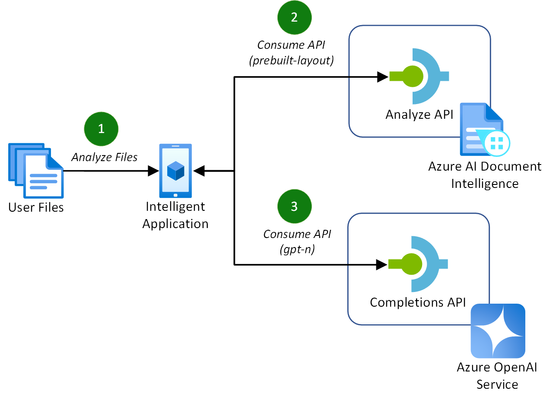
Addressing the challenges of efficient document processing, explore a novel solution to extract structured data from documents using Azure AI Document Intelligence and Azure OpenAI. Context In today’s data-driven landscape, efficient document processing is crucial for most organizations worldwide. Accurate document analysis is essential to provide much needed streamlining of business workflows to enhance productivity. In this article, we’ll explore the key challenges that solution providers face with extracting relevant, structured data from documents. We'll also showcase a novel solution to solve these challenges using Azure AI Document Intelligence and Azure OpenAI. Key challenges of effective document data extraction ISVs and Digital Natives building document data extraction solutions often grapple with the complexities of finding a reliable mechanism to parse their customer’s documents. The key challenges include: Variability in document layout. Documents, such as contracts or invoices, often contain similar data. However, they vary in both layout, structure, and language, including domain jargon. Content in unstructured formats. It is common for pieces of useful information to be stored in unstructured formats, such as handwritten letters or emails. Diversity in file formats. Solutions need to be able to handle a variety of formats that customers provide to them. This includes images, PDFs, Word documents, Excel spreadsheets, emails, and HTML pages. With many Azure AI services to build solutions with, it can be difficult for teams to identify the best approach to resolve these challenges. Benefits of using Azure AI Document Intelligence with Azure OpenAI As solution providers for document data extraction capabilities, the following approach enables these benefits over other approaches: No requirement to train a custom model. Combining these Azure AI services allows you to extract structured data without the need to train a custom model for the various document formats and layouts that your solution may receive. Instead, you tailor natural language prompts to your specific needs. Define your own schema. The capabilities of GPT models enables you to extract data that matches or closely matches a schema that you define. This is a major benefit over alternative approach, particularly when each document’s domain jargon differs. This makes it easier to extract structured data accurately for your downstream processes post-extraction. Out-of-the-box support for multiple file types. This approach supports a variety of document types, including PDFs, Office file types, HTML, and images. This flexibility allows you to extract structure data from a variety of sources without the need for custom logic in your application for each file type. Let’s explore how to extract structured data from documents with both Azure AI Document Intelligence and Azure OpenAI in more detail. Understanding layout analysis to Markdown with Azure AI Document Intelligence Updated in March 2024, the pre-built layout model in Azure AI Document Intelligence gained new capabilities to extract content and structure from Office file types (Word, PowerPoint, and Excel) and HTML, alongside the existing PDF and image capabilities. This introduced the capability for document processing solutions to take any document, such as a contract or invoice, with any layout or file format, and convert it into a structured Markdown output. This has the significant benefit of maintaining the content’s hierarchy when extracted. This is important when we consider the capabilities of the Azure OpenAI GPT models. GPT models are pre-trained on vast amounts of natural language data, which helps them to understand structures and semantic patterns. The simplicity of Markdown’s markup allows GPT models to interpret structures such as headings, lists, and tables, as well as formatting such as links, emphasis (italic/bold), and code blocks. When you combine these capabilities for data extraction with efficient prompting, you can easily and accurately extract relevant data as structured JSON. Combining Azure AI Document Intelligence layout analysis with GPT prompting for data extraction The following diagram illustrates this novel approach, introducing the new Markdown capabilities of Azure AI Document Intelligence’s pre-built layout model with completion requests to Azure OpenAI to extract the data. This approach is achieved in the following way: A customer uploads their files to analyze for data extraction. This could be of any supported file type, including PDF, image, or Word document. The application makes a request to the Azure AI Document Intelligence’s analyze API using the pre-built layout model with the output content format flag set to Markdown. The document data is provided in the request either as a base64 source or a URI. If you are processing many, large documents, it is recommended to use a URI to reduce the memory utilization which will prevent unexpected behavior in your application. You can achieve this approach by uploading your documents to an Azure Blob Storage container and providing a SAS URI to the document. With the Markdown result as context, prompt the Azure OpenAI completions API with specific instruction to extract the structured data you require in a JSON format. With a now structured data response, you can store this data however you require for the needs of your application. For a full code sample demonstrating this capability, check out the using Azure AI Document Intelligence and Azure OpenAI GPT-3.5 Turbo to extract structured data from documents sample on GitHub. Along with the code, this sample includes the necessary infrastructure-as-code Bicep templates to deploy the Azure resources for testing. Conclusion Adopting Azure AI Document Intelligence and Azure OpenAI to extract structured data from documents simplifies the challenges of document processing today. This well-rounded solution offers significant benefits over alternatives, removing the requirement to train custom models and improving overall accuracy of data extraction in most use cases. Consider the following recommendations to maximize the benefits of this approach: Experiment with prompting for data extraction. The provided code sample provides a well-rounded starting point for structure data extraction. Consider experimenting with the prompt and JSON schemas to incorporate domain specific language to capture the nuances in your documents to improve accuracy further. Optimize the document processing workflow. As you scale out this approach to production, consider the host resource requirements for your application to process a large quantity of documents. Optimize this approach by maximizing CPU and memory usage by offloading the loading of documents to Azure AI Document Intelligence using URIs. By adopting this approach, solution providers can streamline their document processing workflows, enhancing productivity for themselves and their customers. Read more on document processing with Azure AI Thank you for taking the time to read this article. We are sharing our insights for ISVs and Startups that enable document processing in their AI-powered solutions, based on real-world challenges we encounter. We invite you to continue your learning through our additional insights in this series. Optimizing Data Extraction Accuracy with Custom Models in Azure AI Document Intelligence Discover how to enhance data extraction accuracy with Azure AI Document Intelligence by tailoring models to your unique document structures. Using Structured Outputs in Azure OpenAI’s GPT-4o for consistent document data processing Discover how to leverage GPT-4o’s Structured Outputs to ensure reliable, schema-compliant document data processing. Evaluating the quality of AI document data extraction with small and large language models Discover our evaluation of the effectiveness of AI models in quality document data extraction using small and large language models (SLMs and LLMs). Further Reading Using Azure AI Document Intelligence and Azure OpenAI GPT-3.5 Turbo to extract structured data from documents | GitHub Explore the solution discussed in this article with this sample using .NET. Azure AI Document Intelligence add new preview features including US 1040 tax forms, 1003 URLA mortgage forms and updates to custom models | Tech Community Read more about the release of the new capabilities of Azure AI Document Intelligence discussed in this article. What's new in Document Intelligence (formerly Form Recognizer) | Microsoft Learn Keep up-to-date with the latest changes to the Azure AI Document Intelligence service. Prompt engineering techniques with Azure OpenAI | Microsoft Learn Discover how to improve your prompting techniques with Azure OpenAI to maximize the accuracy of your document data extraction. Using Azure OpenAI GPT-4 Vision to extract structured JSON data from PDF documents | GitHub Explore another novel approach to document data extraction utilizing only Azure OpenAI's GPT-4 Vision model.31KViews4likes5Comments
Copilot for nonprofits - pricing and offers
With Copilot now announced for release on 1 November, I am wondering if/when pricing and offer details for nonprofit organisations will be released? It would be great to see a grant plus discount offer as Copilot could deliver a lot of value to nonprofits. ThanksSolved29KViews2likes10CommentsMicrosoft 365 Now Can Buy Mix Plan Over 300 Lic ?
Hi I've heard the news that I can't Mix Plan Business that exceeds 300 is it true or not? Currently, I have a customer who buys a Mix Plan Business that exceeds 300, can I still back it up or not? If not, I'd like to request a ref link from Microsoft. For example, buy Microsoft 365 Business Basic 300 Lic And Microsoft 365 Business Standard 300 Lic. Or have to buy any Plan Business Plan but the total amount is not more than 300 Lic ?SolvedREPOST from Old community | OAuth Refresh token has expired after 90 days
PROBLEM: We have encountered an issue on our live environment: The Multi Factor Authentication does not work anymore. We try to authenticate using an OAuth Refresh Token (this authentication mechanism has been recommended by the Yammer group "Partner Center Security Guidance", which now has been closed). But since today, this authentication does not work anymore, but we get the following error message: invalid_grant: AADSTS700082: The refresh token has expired due to inactivity. The token was issued on 2019-01-02T09:19:53.5422744Z and was inactive for 90.00:00:00.: But I am absolutely sure that this refresh token has been successfully used yesterday. The Microsoft documentation https://docs.microsoft.com/en-us/graph/auth-overview says that an OAuth Refresh token should only expired if it has been inactive for 90 days. But our tokens were used. Therefore the tokens should not expire! Why do we now have a live incident? What went wrong? Please not that we are selling in 12 different markets, and therefore have 12 different partner accounts, and therefore 24 different OAuth refresh tokens (one for the live environment and one for the sandbox). Therefore it is not this easy to update the 24 OAuth refresh tokens. What can we do to avoid similar production incidents in the future? We are regularily using the refresh tokens to get new access tokens. We do this using the call "POST /{tenant}/oauth2/token grant_type=refresh_token&refresh_token=..." (see https://docs.microsoft.com/en-us/azure/active-directory/develop/v1-protocols-oauth-code). The response of this call not only contains the access token, but also a new refresh token. At the moment, we ignore the new refresh token that is returned. Should we store and use the new refresh token that is returned by this call, or would the new refresh token also expire at the same time? Does Microsoft offer a way to find out the expiry time or the issued-at-date of a refresh token? RESPONSE TO USER: Please check that you store your token(cache) also after AquireTokenSilent. You will get a new refresh token which you schould use in sequential requests. In my case I did not (correctly) store it, so I used the refresh token which I aquired the first time when I used AquireTokenInteractive. That token will expire after 90 days. There are two authentication flows: a confidentialclient which authenticates the application. The application has access to the resources of your organisation, but you have little control over who uses the software. This is, even for background processes, not workable when you develop your own software for multiple customers (you cannot guarantee that customer 1 might never access data from customer 2). In that case you develop a Public Client where you get access via a user's account via AquireTokenInteractive (that method also supports multifactor authentication and it shows any consentscreen necessary). Once you have access you can use AquireTokenSilent to renew the token. Note that AcquireTokenSilent DOES return a refresh token (valid for 90 days), and you should make sure you store this after every request. The refreshtoken is not visible if you look in the debugger, but it is visible if you use Fiddler to view the raw data (and decode the token). That was in hindside my problem: I created a daemon process for which the interactive flow does not seem logical, and since I had token issues I went for the confidential flow. But there you do not get the consent screens and it does not work with multifactor authentication. My conclusion: if you are developing 3rd party software then even for background (daemon) processes you could (should) use the publicclient flow. There is no problem with the token process: it will continue to work forever once you aquire a token. Only when your software is 'down' for more than 90 days you will need to log in again (and when access for your app is changed from the client's azure account) Relevant links: https://docs.microsoft.com/nl-nl/azure/active-directory/develop/msal-client-applications https://docs.microsoft.com/nl-nl/azure/active-directory/develop/msal-net-acquire-token-silently29KViews0likes0CommentsRepost: change region and language settings using group policy
Question: Please share the steps for configuring "region and language settings" using group policy. Response: Something here may help. http://dennisspan.com/configuring-regional-settings-and-windows-locales-with-group-policy/ Response: To set up the Regional settings for multiple users, use the group policy and to the following steps: Launch Group Policy Management, create a new GPO or configure the one you have. See the screenshots. Make all needed settings, and use F6 to confirm the configuration from red to green. Consider having a trustworthy Microsoft office 365 backup software from NAKIVO, as you can never predict a ransomware attack or other issues.24KViews0likes1CommentAnnual/monthly price increase per 1st of April 2025
Hi Microsoft, Besides the discussion on the price increase itself: November 2024 announcements - Partner Center announcements | Microsoft Learn I'm wondering how this "standardizing the billing structure" works for triannual subscriptions. The post only states that Annual subscriptions with Monthly payment term will undergo a +5% price increase. But how will this affect multi-year subscriptions? Eg. Triannual subscription with annual payment term. Cheers, Martijn23KViews2likes9Comments
New MCPP Subscription in Azure
Hi, Apologies if this is the wrong forum. Earlier this year I renewed my Action Pack subscription and had to link my billing profile at the same time. Once that had gone through, I noticed that I had a new Azure subscription called 'MCPP Subscription' I still also have my Microsoft Partner Network subscription which has all my resource groups etc in. My query is what is this new subscription? Should I start using it? My credits are linked to the old MPN subscription. I've not been able to find anything so far about it either on general internet searches or this community. many thanks22KViews2likes19CommentsATTENTION DP-500 WILL BE RETIRING APRIL 30TH, 2024!!
DP-500 for ILT will be retiring on April 30th, 2024 Find out how certification and exam retirements make way for new opportunities. Microsoft Fabric—the all-in-one analytics solution that covers everything from data movement to data science—has enabled the role of enterprise data analyst to evolve into that of analytics engineer. As a result, effective April 30, 2024, we’ll retire the Microsoft Certified: Azure Enterprise Data Analyst Associate certification and Exam DP-500: Designing and Implementing Enterprise-Scale Analytics Solutions Using Microsoft Azure and Microsoft Power BI. Enterprise data analysts can now earn the Fabric Analytics Engineer Associate certification by taking DP-600 and also passing Exam DP-600. Please see the blog posted on MS Learn for further information regarding this found here: Microsoft Credentials roundup: In-demand news for in-demand skills - Microsoft Community Hub Thank you!SolvedQuestion: How to allow multiple users on Azure VM
Some partners followed the below article and were able to resolve their issue: https://community.dynamics.com/365/b/dynamics365enterprisecloudfronts/posts/setup-simultaneous-remote-login-for-multiple-users Here are a few other responses from community influencers: Comment: This sounds like a scenario where you are hosting an application/service for end customers, e.g. a SaaS offering, but as rich client where RDP protocol is required. The solution is to enable Remote Desktop Services to allow multiple users working simultaneous on a VM. You could either build a RDS farm in Azure yourself, or you use Windows Virtual Desktop as Gateway/broker Service to publish the application, which I would recommend. You need to use WVD with Windows Server-based session hosts though, not WVD with Windows 10 Multi-Session - this is because of licensing reasons. Since you are providing a hosted service, the access of the end customers would need to be licensed via RDS Subscriber Access Licenses (RDS SALs) obtained via SPLA, for hosted scenarios like this there is no other option then to use SPLA licenses because usage of RDS role is not covered with the Windows VM license that Azure offers. Comment: Does not change that you need RDS and the licenses (RDS CALs - or RDS SALS via SPLA when it is about a hosted solution like described by the OP). Since this thread was revived via the new post, and since there were changes, some additional information: You can now also offer Windows Client OS (Windows 10/11 Multisession) in Azure Virtual Desktop as basis for your hosted, custom services/apps, not only Windows Server how I described. This is possible because there is a new licensing options - AVD remote app streaming: What is Azure Virtual Desktop remote app streaming? - Azure | Microsoft Docs21KViews0likes0CommentsMicrosoft 365 Business Premium grant is being discontinued
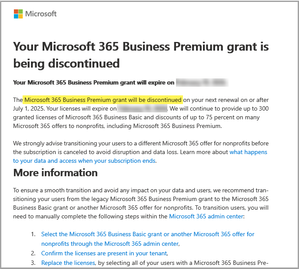
UPDATED: Microsoft sent affected nonprofit organisations an email similar to the below on Wednesday/Thursday 14/15th May announcing that Microsoft 365 Business Premium grant is being discontinued. A similar message was sent out regarding the end of the Office 365 E1 grant offer. Microsoft have provided the following further information: Partner FAQ: https://partner.microsoft.com/en-AU/asset/collection/microsoft-365-business-premium-and-office-365-e1-grant-discontinuation#/ Partner office hours: ANNOUNCEMENT: Microsoft 365 Business Premium & Office 365 E1 grant discontinuation | Microsoft Community Hub Blog: Transitioning from Microsoft 365 Business Premium to Business Basic: What Nonprofits Need to Know | Microsoft Community Hub A small Canadian-based nonprofit has set up a change.org petition asking Microsoft to reconsider the decision: https://www.change.org/p/urge-microsoft-to-continue-grant-program-for-nonprofits Information about the difference between Microsoft 365 Business Basic, Standard and Premium can be found here: Visual: https://m365maps.com/files/Microsoft-365-Business-All.htm Checklist: https://m365maps.com/matrix.htm#000111000000000000000Solved20KViews15likes90CommentsAzure Information Protection Premium P1
Hi, What type of license should be bought instead of Azure Information Protection Premium P1? The license can no longer be bought, so what is a good new alternative that gives you the same features? Thanks in advance.Solved20KViews0likes5Comments
Microsoft E3 and Windows 10/11 E3 CSP Licenses and VDA Rights
Does a user licensed with a Microsoft E3 or Windows 10/11 E3 licensed through CSP, have VDA Rights for an onprem VDI server? My understanding is that this was recently changed to allow these rights through a CSP Agreement, whereas before it was only allowed through an EA or MPSA agreement. Here is the documentation I have found on this that I am hoping you can verify. I’ve attached the presentation from Microsoft that announced this change. Please go to slide 21 where you can see that you can run Windows hosted desktops on a server through the CSP model. I have attached the Licensing Brief for licensing for Virtual Desktops. If you look at Page 8, you will find the Summary Table, that shows that with a Microsoft E3, you have the ability to run the Microsoft E3 (or Windows E3) on an on-prem server. Thank you!19KViews0likes18CommentsHOW TO RETRIEVE MY MCP ID
Good day, I passed my Microsoft E-Learning exam long time ago and I've lost all document that my MCP Id number is suppose to be on. Kindly help me. I need my document. Also the company email that I've used before is no longer available. Is there a way I can get my certificate again? Thanks in advanceSolved19KViews0likes3CommentsDynamics 365 Partner Sandbox – Operations Application
Does anyone know what is this exactly? Before we used to have Customer Engagement plan which was CRM bundle with project operations, field service and a few other things. There is zero documentation to explain what this plan is, Microsoft designation partner documentation also has zero information about it. What is the case here? I don't understand how difficult can it be to create documentation to explain changes. Extremely frustrating!Solved19KViews0likes6Comments








Events
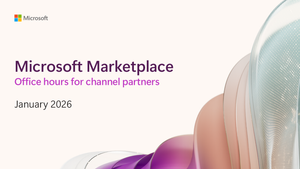
Tune in for updates, insights, and live Q&A to help you sell through the Microsoft Marketplace. Learn how to bring your innovations to businesses, organizations, and government agencies around the wo...
Wednesday, Jan 21, 2026, 08:30 AM PSTOnline
0likes
1Attendee
0Comments
Tune in for updates, insights, and live Q&A to help you sell through the Microsoft Marketplace. Learn how to bring your innovations to businesses, organizations, and government agencies around the wo...
Wednesday, Feb 18, 2026, 08:30 AM PSTOnline
0likes
0Attendees
0Comments
Recent Blogs
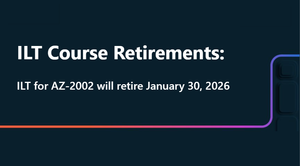
- 1 MIN READAZ-2002 will be retiring for ILT on January 30, 2026.Dec 22, 202545Views0likes0Comments
- 1 MIN READAccess the latest Instructor-Led Training (ILT) updates anytime at: http://aka.ms/Courseware_Title_PlanDec 19, 2025140Views1like2Comments