isv
20 TopicsEarn the badge built for Frontier AI leaders
The next wave of AI transformation needs more than ambition. Customers need partners with the skills and proven capabilities to deliver real outcomes. The Frontier Transformation Engineer badge recognizes partners building the capabilities to design, implement, and deliver Microsoft Frontier AI solutions. Earn the badge to demonstrate validated skills, strengthen customer confidence, and differentiate your practice in a rapidly evolving AI market. With the Frontier Transformation Engineer journey, your team can: Validate Frontier AI engineering capabilities. Strengthen credibility in customer conversations. Build readiness for AI transformation engagements. Bring greater credibility to customer conversations. Differentiate your practice with demonstrated expertise. Qualify for a flagship Frontier Partner specialization recognition. The journey combines certifications, hands-on training, and project readiness to help your team build the capabilities needed to lead Frontier AI transformation. Don’t just prepare for the future of AI. Build the expertise to deliver it. Earn the Frontier Transformation Engineer badge1KViews1like3Comments
ISV Offering SaaS vs On-Prem
Hi all, We are a partner and have some apps on the marketplace (appsource) for customers to download. We would like to offer the same apps for on-premise deplyments as well. How would we go about object numbers and customers' licenses? How do we add our object id range we develop in to be part of the customers' license? Thanks in advance!From Copilot to Catalyst: How MSPs Turn AI Readiness Into Recurring Revenue
AI interest is surging—but most customers aren’t ready to scale it securely or successfully. Gaps in device management, identity hygiene, data governance, and operational consistency often stall AI initiatives before they deliver real value. For Managed Service Providers, this challenge creates a powerful opportunity. In this webinar, you’ll learn how MSPs are using Microsoft Intune as the foundation for helping manage and secure devices, and extending it with AvePoint Confidence Platform: Elements Edition to standardize, automate, and scale AI-ready environments across customer tenants. Together, they enable MSPs to move beyond one-off AI projects and deliver AI readiness as a repeatable, revenue-generating managed service. This session focuses on turning AI demand—starting with Copilot—into a long-term services motion that improves margins, reduces operational friction, and positions your MSP as a trusted AI partner. In this webinar, you will learn how to: Turn AI readiness into recurring revenue Learn how MSPs are packaging AI readiness—starting with Copilot—into repeatable, high-margin managed services customers renew and expand. Scale securely without adding overhead See how Microsoft Intune, extended with AvePoint Confidence Platform: Elements Edition, enables standardized, automated delivery across multiple customer tenants. Move from AI pilots to real outcomes Get a practical blueprint to replace one-off AI projects with scalable services that position your MSP as a trusted AI partner. Register now: From Copilot to Catalyst: How MSPs Turn AI Readiness Into Recurring Revenue214Views0likes0CommentsAPAC Fabric Engineering Connection call
Are you a Microsoft partners that is interested in data and analytics? Be sure to join us for the next Fabric Engineering Connection calls! 🎉 The APAC call is Thursday, October 23, from 1-2 am UTC/Wednesday, October 2, from 5-6 pm PT. Tamer Farag and Trilok Rajesh will be presenting on Modernizing Legacy Analytics & BI Platforms.93Views0likes0CommentsAmericas & EMEA Fabric Engineering Connection call
Are you a Microsoft partners that is interested in data and analytics? Be sure to join us for the next Fabric Engineering Connection calls! 🎉 The Americas & EMEA call will take place Wednesday, October 22, from 8-9 am PT and will feature presentations from Teddy Bercovitz and Gerd Saurer on Fabric Extend Workload Developer Kit, followed by a presentation on Data Protection Capabilities from Yael Biss.105Views0likes0CommentsPartner experience using Microsoft ECIF Funding for Federal sector?
Looking for some general feedback from ISV, SI, MSP community... We're a mid-sized ISV with some enterprise services capability focused on deployments, cloud migration of both our own and some Microsoft security workloads. We've never used ECIF, but have a few targets where it would be valuable. I'm getting great support from Microsoft program team to onboard to the program and expect to have us activated shortly. Scope-wise, we have a handful of targets and would probably be pleased to execute with them in upcoming year. Question - what are your experiences with ECIF for Fed? What's the "operational lift" to manage a program and capture this benefit? Has this worked well for you? Has it been cumbersome? Any particular areas we should especially focus attention to ensure smooth execution? Any general guidance appreciated.160Views1like0CommentsUsing Azure AI Document Intelligence and Azure OpenAI to extract structured data from documents
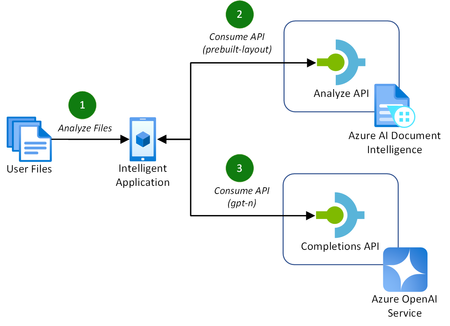
Addressing the challenges of efficient document processing, explore a novel solution to extract structured data from documents using Azure AI Document Intelligence and Azure OpenAI. Context In today’s data-driven landscape, efficient document processing is crucial for most organizations worldwide. Accurate document analysis is essential to provide much needed streamlining of business workflows to enhance productivity. In this article, we’ll explore the key challenges that solution providers face with extracting relevant, structured data from documents. We'll also showcase a novel solution to solve these challenges using Azure AI Document Intelligence and Azure OpenAI. Key challenges of effective document data extraction ISVs and Digital Natives building document data extraction solutions often grapple with the complexities of finding a reliable mechanism to parse their customer’s documents. The key challenges include: Variability in document layout. Documents, such as contracts or invoices, often contain similar data. However, they vary in both layout, structure, and language, including domain jargon. Content in unstructured formats. It is common for pieces of useful information to be stored in unstructured formats, such as handwritten letters or emails. Diversity in file formats. Solutions need to be able to handle a variety of formats that customers provide to them. This includes images, PDFs, Word documents, Excel spreadsheets, emails, and HTML pages. With many Azure AI services to build solutions with, it can be difficult for teams to identify the best approach to resolve these challenges. Benefits of using Azure AI Document Intelligence with Azure OpenAI As solution providers for document data extraction capabilities, the following approach enables these benefits over other approaches: No requirement to train a custom model. Combining these Azure AI services allows you to extract structured data without the need to train a custom model for the various document formats and layouts that your solution may receive. Instead, you tailor natural language prompts to your specific needs. Define your own schema. The capabilities of GPT models enables you to extract data that matches or closely matches a schema that you define. This is a major benefit over alternative approach, particularly when each document’s domain jargon differs. This makes it easier to extract structured data accurately for your downstream processes post-extraction. Out-of-the-box support for multiple file types. This approach supports a variety of document types, including PDFs, Office file types, HTML, and images. This flexibility allows you to extract structure data from a variety of sources without the need for custom logic in your application for each file type. Let’s explore how to extract structured data from documents with both Azure AI Document Intelligence and Azure OpenAI in more detail. Understanding layout analysis to Markdown with Azure AI Document Intelligence Updated in March 2024, the pre-built layout model in Azure AI Document Intelligence gained new capabilities to extract content and structure from Office file types (Word, PowerPoint, and Excel) and HTML, alongside the existing PDF and image capabilities. This introduced the capability for document processing solutions to take any document, such as a contract or invoice, with any layout or file format, and convert it into a structured Markdown output. This has the significant benefit of maintaining the content’s hierarchy when extracted. This is important when we consider the capabilities of the Azure OpenAI GPT models. GPT models are pre-trained on vast amounts of natural language data, which helps them to understand structures and semantic patterns. The simplicity of Markdown’s markup allows GPT models to interpret structures such as headings, lists, and tables, as well as formatting such as links, emphasis (italic/bold), and code blocks. When you combine these capabilities for data extraction with efficient prompting, you can easily and accurately extract relevant data as structured JSON. Combining Azure AI Document Intelligence layout analysis with GPT prompting for data extraction The following diagram illustrates this novel approach, introducing the new Markdown capabilities of Azure AI Document Intelligence’s pre-built layout model with completion requests to Azure OpenAI to extract the data. This approach is achieved in the following way: A customer uploads their files to analyze for data extraction. This could be of any supported file type, including PDF, image, or Word document. The application makes a request to the Azure AI Document Intelligence’s analyze API using the pre-built layout model with the output content format flag set to Markdown. The document data is provided in the request either as a base64 source or a URI. If you are processing many, large documents, it is recommended to use a URI to reduce the memory utilization which will prevent unexpected behavior in your application. You can achieve this approach by uploading your documents to an Azure Blob Storage container and providing a SAS URI to the document. With the Markdown result as context, prompt the Azure OpenAI completions API with specific instruction to extract the structured data you require in a JSON format. With a now structured data response, you can store this data however you require for the needs of your application. For a full code sample demonstrating this capability, check out the using Azure AI Document Intelligence and Azure OpenAI GPT-3.5 Turbo to extract structured data from documents sample on GitHub. Along with the code, this sample includes the necessary infrastructure-as-code Bicep templates to deploy the Azure resources for testing. Conclusion Adopting Azure AI Document Intelligence and Azure OpenAI to extract structured data from documents simplifies the challenges of document processing today. This well-rounded solution offers significant benefits over alternatives, removing the requirement to train custom models and improving overall accuracy of data extraction in most use cases. Consider the following recommendations to maximize the benefits of this approach: Experiment with prompting for data extraction. The provided code sample provides a well-rounded starting point for structure data extraction. Consider experimenting with the prompt and JSON schemas to incorporate domain specific language to capture the nuances in your documents to improve accuracy further. Optimize the document processing workflow. As you scale out this approach to production, consider the host resource requirements for your application to process a large quantity of documents. Optimize this approach by maximizing CPU and memory usage by offloading the loading of documents to Azure AI Document Intelligence using URIs. By adopting this approach, solution providers can streamline their document processing workflows, enhancing productivity for themselves and their customers. Read more on document processing with Azure AI Thank you for taking the time to read this article. We are sharing our insights for ISVs and Startups that enable document processing in their AI-powered solutions, based on real-world challenges we encounter. We invite you to continue your learning through our additional insights in this series. Optimizing Data Extraction Accuracy with Custom Models in Azure AI Document Intelligence Discover how to enhance data extraction accuracy with Azure AI Document Intelligence by tailoring models to your unique document structures. Using Structured Outputs in Azure OpenAI’s GPT-4o for consistent document data processing Discover how to leverage GPT-4o’s Structured Outputs to ensure reliable, schema-compliant document data processing. Evaluating the quality of AI document data extraction with small and large language models Discover our evaluation of the effectiveness of AI models in quality document data extraction using small and large language models (SLMs and LLMs). Further Reading Using Azure AI Document Intelligence and Azure OpenAI GPT-3.5 Turbo to extract structured data from documents | GitHub Explore the solution discussed in this article with this sample using .NET. Azure AI Document Intelligence add new preview features including US 1040 tax forms, 1003 URLA mortgage forms and updates to custom models | Tech Community Read more about the release of the new capabilities of Azure AI Document Intelligence discussed in this article. What's new in Document Intelligence (formerly Form Recognizer) | Microsoft Learn Keep up-to-date with the latest changes to the Azure AI Document Intelligence service. Prompt engineering techniques with Azure OpenAI | Microsoft Learn Discover how to improve your prompting techniques with Azure OpenAI to maximize the accuracy of your document data extraction. Using Azure OpenAI GPT-4 Vision to extract structured JSON data from PDF documents | GitHub Explore another novel approach to document data extraction utilizing only Azure OpenAI's GPT-4 Vision model.33KViews4likes5CommentsEvaluating the quality of AI document data extraction with small and large language models
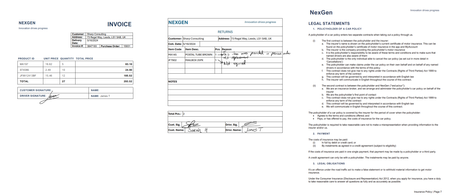
Evaluating the effectiveness of AI models in document data extraction. Comparing accuracy, speed, and cost-effectiveness between Small and Large Language Models (SLMs and LLMs). Context As the adoption of AI in solutions increases, technical decision-makers face challenges in selecting the most effective approach for document data extraction. Ensuring high quality is crucial, particularly when dealing with critical solutions where minor errors have substantial consequences. As the volume of documents increases, it becomes essential to choose solutions that can scale efficiently without compromising performance. This article evaluates AI document data extraction techniques using Small Language Models (SLMs) and Large Language Models (LLMs). Including a specific focus on structured and unstructured data scenarios. By evaluating models, the article provides insights into their accuracy, speed, and cost-efficiency for quality data extraction. It provides both guidance in evaluating models, as well as the quality of the outputs from models for specific scenarios. Key challenges of effective document data extraction With many AI models available to ISVs and Startups, challenges arise in which technique is the most effective for quality document data extraction. When evaluating the quality of AI models, key challenges include: Ensuring high accuracy and reliability. High accuracy and confidence are crucial, especially for critical applications such as legal or financial documents. Minor errors in data extraction could lead to significant issues. Additionally, robust data validation mechanisms verify the data and minimize false positives and negatives. Getting results in a timely manner. As the volume of documents increases, the selected approach must scale efficiently to handle large document quantities without significant impact. Balancing the need for fast processing speeds with maintaining high accuracy levels is challenging. Balancing cost with accuracy and efficiency. Ensuring high accuracy and efficiency often requires the most advanced AI models, which can be expensive. Evaluating AI models and techniques highlights the most cost-effective solution without compromising on the quality of the data extraction. When choosing an AI model for document data extraction on Azure, there is no one-size-fits-all solution. Depending on the scenario, one may outperform another for accuracy at the sacrifice of cost. While another model may provide sufficient accuracy at a much lower cost. Establishing evaluation techniques for AI models in document data extraction When evaluating AI models for document data extraction, it’s important to understand how they perform for specific use cases. This evaluation focused on structured and unstructured scenarios to provide insights into simple and complex document structures. Evaluation Scenarios Structured Data: Invoices A collection of assorted invoices with varying simple and complex layouts, handwritten signatures, obscured content, and handwritten notes across margins. Unstructured Data: Vehicle Insurance Policy A 10+ page vehicle insurance policy document containing both structured and unstructured data, including natural, domain-specific language with inferred data. This scenario focuses on extracting data by combining structured data with the natural language throughout the document. Models and Techniques This evaluation focused on multiple techniques for data extraction with the language models: Markdown Extraction with Azure AI Document Intelligence. This technique involves converting the document into Markdown using the pre-built layout model in Azure AI Document Intelligence. Read more about this technique in our detailed article. Vision Capabilities of Multi-Modal Language Models. This technique focuses on GPT-4o and GPT-4o Mini models by converting the document pages to images. This leverages the models’ capabilities to analyze both text and visual elements. Explore this technique in more detail in our sample project. Comprehensive Combination. This technique combines both Markdown extraction with vision capable models to enhance the extraction process. Additionally, the layout analysis of Azure AI Document Intelligence will ease the human review of a document if the confidence or accuracy is low. For each technique, the model is prompted using either Structured Outputs in GPT-4o or with inline JSON schemas for other models. This establishes the expected output, improving the overall accuracy of the generated response. The AI models evaluated in this analysis include: Phi-3.5 MoE, an SLM deployed as a serverless endpoint in Azure AI Studio GPT-4o (2024-08-06), an LLM deployed with 10K TPM in Azure OpenAI GPT-4o Mini (2024-07-18), an LLM deployed with 10K TPM in Azure OpenAI Evaluation Methodology To ensure a reliable and consistent evaluation, the following approach was established: Baseline Accuracy. A single source of truth for the data extraction results ensures each model’s output is compared against a standard. This approach, while manually intensive, provides a precise measure for accuracy. Confidence. To demonstrate when an extraction should be raised up to a human for review, each model provides an internal assessment on how certain it is about its predicted output. Azure OpenAI provides these confidence values as logprobs, while Azure AI Document Intelligence returns these confidence scores by default in the response. Execution Time. This is calculated based on the time between the initial request for data extraction to the response, without streaming. For scenarios utilizing the Markdown technique, the time is based on the end-to-end processing, including the request and response from Azure AI Document Intelligence. Cost Analysis. Using the average input and output tokens from each iteration, the estimated cost per 1,000 pages is calculated, providing a clearer picture of cost-effectiveness at scale. Consistent Prompting. Each model has the same system and extraction prompt. The system prompt is consistent across all scenarios as “You are an AI assistant that extracts data from documents”. Each scenario has its own extraction prompt, including the output schema. Multiple Iterations. 10 variants of the document are run per model technique. Every property in the result compares for an exact match against the standard response. This provides the results for accuracy, confidence, execution time, and cost. These metrics establish the baseline evaluation. By establishing the baseline, it is possible to experiment with the prompt, schema, and request configuration. This allows you to compare improvements in the overall quality by evaluating the accuracy, confidence, speed, and cost. For the evaluation outlined in this article, we created a Python test project with multiple test cases. Each test case is a combination of a specific use case and model. Additionally, each test case is run independently. This is to ensure that the speed is evaluated fairly for each request. The tests take advantage of the Python SDKs for both Azure AI Document Intelligence and Azure OpenAI. Evaluating AI Models for Structured Data Complex Invoice Document Model Technique Accuracy (95th) Confidence (95th) Speed (95th) Est. Cost (1,000 pages) GPT-4o Vision 98.99% 99.85% 22.80s $7.45 GPT-4o Vision + Markdown 96.60% 99.82% 22.25s $19.47 Phi-3.5 MoE Markdown 96.11% 99.49% 54.00s $10.35 GPT-4o Markdown 95.66% 99.44% 31.60s $16.11 GPT-4o Mini Vision + Markdown 91.84% 99.99% 56.69s $18.14 GPT-4o Mini Vision 79.31% 99.76% 56.71s $8.02 GPT-4o Mini Markdown 78.61% 99.76% 24.52s $10.41 When processing invoices in our analysis, GPT-4o with Vision capabilities stands out as the most ideal combination. This approach delivers the highest accuracy and confidence scores, effectively handling complex layouts and visual elements. Additionally, it handles this at reasonable speeds at significantly lower costs. Accuracy in our evaluation shows that overall, most models in the evaluation can be regarded as having high accuracy. GPT-4o with Vision processing achieves the highest scores for invoices. While our assumptions that providing the additional document text context would increase this, our analysis showed that it's possible to retain high accuracy without it. Confidence levels are high across models and techniques, demonstrating that combined with high accuracy, these approaches perform well for automated processing with minimal human intervention. Speed is a crucial factor for scalability of a document processing pipeline. For background processing per document, GPT-4o models can process all techniques in a quick timescale. In contrast, small language models like Phi-3.5 MoE are took longer which could impact throughput for large-scale applications. Cost-effectiveness is also essential when building a scalable pipeline to process thousands of document pages. GPT-4o with Vision stands out as the most cost-effective at $7.45 per 1,000 pages. However, all models in Vision or Markdown techniques offer high value when also considering their accuracy, confidence, and speed. One significant benefit of using GPT-4o with Vision processing is its ability to handle visual elements such as handwritten signatures, obscured content, and stamps. By processing the document as an image, the model minimizes false positives and negatives that can arise when relying solely on text-based Markdown processing. Phi-3.5 MoE is a notable highlight when it comes to the use of small language models. The analysis demonstrates these models are just as capable at processing documents into structured JSON outputs as the more advanced large language models. For this Invoice analysis, GPT-4o with Vision provides the best balance between accuracy, confidence, speed, and cost. It is particularly adept at handling documents with complex layouts and visual elements, making it a suitable choice for extracting structured data from a diverse range of invoices. Evaluating AI Models for Unstructured Data Complex Vehicle Insurance Document Model Technique Accuracy (95th) Confidence (95th) Speed (95th) Est. Cost (1,000 pages) GPT-4o Vision + Markdown 100% 99.35% 68.93s $13.96 GPT-4o Markdown 98.25% 89.03% 134.85s $12.24 GPT-4o Vision 97.04% 98.71% 66.24s $2.31 GPT-4o Mini Markdown 93.25% 89.04% 99.78s $10.12 GPT-4o Mini Vision + Markdown 82.99% 99.16% 101.89s $15.71 GPT-4o Mini Vision 67.25% 98.73% 83.01s $5.67 Phi-3.5 MoE Markdown 64.99% 88.28% 102.89s $10.16 When extracting structured data from large, unstructured documents, such as insurance policies, the combination of GPT-4o with both Vision and Markdown techniques proves to be the most ideal solution. This hybrid approach leverages the visual context of the document's layout alongside the structured textual representation, resulting in the highest degrees of accuracy and confidence. It effectively handles the complexity of domain-specific language and inferred fields, providing a comprehensive and precise extraction process. Accuracy is spread across all models when extracting data from larger quantities of unstructured text. GPT-4o utilizing both Vision and Markdown demonstrates the effectiveness of combining visual and textual context for documents containing natural language. Confidence varies also in comparison to the Invoice analysis, with less certainty from the models when extracting from large blocks of text. However, analyzing the confidence scores of GPT-4o for each technique shows that building on them towards a comprehensive approach yields higher confidence. Speed of execution will naturally increase as the number of pages, complexity of layout, and quantity of text increases. These techniques for large, unstructured documents are likely to be reserved for background, batch processing than real-time applications. Cost varies when utilizing multiple Azure services to perform document data extraction. However, the overall cost for GPT-4o with both Vision and Markdown demonstrates where utilizing multiple AI services to achieve a goal can yield exceptional accuracy and confidence. This leads to automated solutions that require minimal human intervention. The combination of Vision and Markdown techniques can offer a highly efficient approach to structured document data extraction. However, while highly accurate, models like GPT-4o and 4o Mini are bound by their maximum context window of 128K tokens. When processing text and images in a single request, you may need to consider chunking or classification techniques to break down large documents into smaller document boundaries. Highlighting the specific capabilities of Phi-3.5 MoE, it falls short in accuracy. This lower performance indicates limitations in handling large, complex natural language that requires understanding and inference to extract data accurately. While optimizations can be made in prompts to improve accuracy, this analysis highlights the importance of evaluating and selecting a model and technique that aligns with the specific demands of your document extraction scenarios. Key Evaluation Findings Accuracy: For most extraction scenarios, advanced large language models like GPT-4o consistently deliver high accuracy and confidence levels. They are particularly effective at managing complex layouts and accurately extracting data from both visual and text context. Cost-Effectiveness: Language models with vision capabilities are highly cost-effective for large-scale processing, with GPT-4o demonstrating costs below $10 per 1,000 pages in all scenarios where vision was used solely. However, the cost-benefit of using a hybrid Vision and Markdown approach can be justified in certain scenarios where high precision is required. Speed: The time of execution for document varies depending on the number of pages, layout complexity, and quantity of text. For most scenarios, using language models for document data extraction demonstrates the capabilities for large-scale background processing, rather than real-time applications. Limitations: Smaller models, like Phi-3.5 MoE, indicate limitations when handling complex documents with large unstructured text. However, they excel with minimal prompting for smaller, structured documents, such as invoices. Comprehensive Techniques: Combining both text and vision techniques provides an effective strategy for highly accurate, highly confident data extraction from documents. The approach enhances the extraction, particularly for documents that include complex layout, visual elements, and complex, domain-specific, natural language. Recommendations for Evaluating AI Models in Document Data Extraction High-Accuracy Solutions. For solutions where accuracy is critical or visual elements must be evaluated, such as medical records, legal cases, or financial reports, explore GPT-4o with both Vision and Markdown capabilities. Its high performance in accuracy and confidence justifies the investment. Text-Based or Self-Hosted Solutions. For text-based document extractions where self-hosting a model is necessary, small open language models, such as Phi-3.5 MoE, can provide high accuracy in data extraction comparable to OpenAI's GPT-4o. Adopt Evaluation Techniques. Implement a rigorous evaluation methodology like the one used in this analysis. Establishing a baseline for accuracy, speed, and cost through multiple iterations and consistent prompting ensures reliable and comparable results. Regularly conduct evaluations when considering new techniques, models, prompts, and configurations. This helps in making informed decisions when opting for an approach in your specific use cases. Read more on AI Document Intelligence Thank you for taking the time to read this article. We are sharing our insights for ISVs and Startups that enable document intelligence in their AI-powered solutions, based on real-world challenges we encounter. We invite you to continue your learning through our additional insights in this series. Optimizing Data Extraction Accuracy with Custom Models in Azure AI Document Intelligence Discover how to enhance data extraction accuracy with Azure AI Document Intelligence by tailoring models to your unique document structures. Using Azure AI Document Intelligence and Azure OpenAI to extract structured data from documents Discover how Azure AI Document Intelligence and Azure OpenAI efficiently extract structured data from documents, streamlining document processing workflows for AI-powered solutions. Using Structured Outputs in Azure OpenAI’s GPT-4o for consistent document data processing Discover how to leverage GPT-4o’s Structured Outputs to ensure reliable, schema-compliant document data processing. Further Reading Phi Open Models - Small Language Models | Microsoft Azure Learn more about the Phi-3 small language models and their potential, including running effectively in offline environments. Prompt engineering techniques with Azure OpenAI | Microsoft Learn Discover how to improve your prompting techniques with Azure OpenAI to maximize the accuracy of your document data extraction. Samples demonstrating techniques for processing documents with Azure AI | GitHub A collection of samples that demonstrate both the document data extraction techniques used in this analysis, as well as techniques for classification.20KViews2likes2CommentsAzure Virtual Machine: Centralized insights for smarter management
Introduction Managing Azure Virtual Machines (VMs) can be challenging without the right tools. There are several ways for monitoring, some of which extend beyond the platform's native capabilities. These may include options like installing an agent or utilizing third-party products, though they often require additional setup and may involve extra costs. This workbook is designed to use the native platform capabilities to give you a clear and detailed view of your VMs, helping you make informed decisions confidently without any additional cost. To get started, check out the GitHub repository. Why do you need this Workbook? When managing multiple VMs, understanding usage trends, comparing key metrics, and identifying areas for improvement can be time-consuming. The Azure Virtual Machine Insights Workbook simplifies this process by centralizing essential data into one place from multiple subscriptions and resource groups. It covers inventory to provide you with a clear overview of all your VM resources and platform metrics to help you monitor, analyze, compare, and optimize performance effectively. Scenarios to use this Workbook Here are a few examples of how this workbook can bring value: Management Centralized Inventory Management Easily view all your VMs in one place, ensuring a clear overview of your resources. Performance and Monitoring Performance monitoring Analyze metrics like CPU, memory, network, and disk usage to identify performance bottlenecks and maintain optimal application performance. Performance trends Examine long-term performance trends to understand how your VMs behave over time and identify areas for improvement. Comparing different VM types for the same workload Compare the performance of various VM types running the same workload to determine the best configuration for your needs. Virtual Machines behind a load balancer Monitor and compare the performance of VMs behind a load-balanced to ensure even distribution and optimal resource utilization. Virtual Machines farm Assess and compare the performance of VMs within a server farm to identify outliers and maintain operational efficiency. Cost Cost Optimization Detect and compare underutilized VMs or overprovisioned resources to reduce waste and save on costs. Analyse usage trends over time to determine if an hourly spend commitment through Azure savings plans is feasible. Understand the timeframes for automating the deallocation of non-production VMs, unless Azure Reservations cover them. Independent software vendors (ISVs) ISV managing VMs per customer Compare performance across all customer VMs to identify trends and ensure consistent service delivery for each customer. Trends and Planning Resource Planning Track usage trends over time to better predict future resource needs and ensure your VMs are prepared for business growth. Scalability Planning Utilize insights from trends and metrics to prepare for scaling your VMs during peak demand or business growth. Examples from the workbook Conclusion The Azure Virtual Machine Insights Workbook helps you manage your VMs by bringing key metrics and insights together in one place, using native Azure features at no extra cost. It lets you analyze performance, cut costs, and plan for future growth. Whether you are investigating performance issues, analyzing underused resources, or predicting future needs, this workbook helps you make smart decisions and manage your infrastructure more efficiently. For any queries or to contribute, feel free to connect via the GitHub repo or submit feedback!715Views0likes0CommentsUsing Structured Outputs in Azure OpenAI’s GPT-4o for consistent document data processing
When using language models for AI-driven document processing, ensuring reliability and consistency in data extraction is crucial for downstream processing. This article outlines how the Structured Outputs feature of GPT-4o offers the most reliable and cost-effective solution to this challenge. To jump into action and use Structured Outputs for document processing, get hands on with our Python samples on GitHub. Key challenges in consistency in generating structured outputs ISVs and Startups building document data extraction solutions grapple with the complexities of ensuring that language models generate a consistent output inline with their defined schemas. These key challenges include: Limitations in inline JSON output. While some models introduced the ability to produce JSON outputs, inconsistencies still arise from them. Language models can generate a response that doesn’t conform to the provided schema. This requires additional prompt engineering or post-processing to resolve. Complexity in prompts. Including detailed inline JSON schemas within prompts increases the overall number of input tokens consumed. This is particularly problematic if you have a large, complex output structure. Benefits of using the Structured Outputs features in Azure OpenAI’s GPT-4o To overcome the limitations and inconsistencies of inline JSON outputs, GPT-4o’s structured outputs enables the following capabilities: Strict schema adherence. Structured Outputs dynamically constrains the model’s outputs to adhere to JSON schemas provided in the response format of the request to GPT-4o. This ensures that the response is always well-formed for downstream processing. Reliability and consistency. Using additional libraries, such as Pydantic, combined with Structured Outputs, developers can define exactly how data should be constrained to a specific model. This minimizes any post-processing and improves data validation. Cost optimization. Unlike inline JSON schemas, Structured Outputs do not count towards the total number of input tokens consumed in a request to GPT-4o. This provides more overall input tokens for consuming document data. Let’s explore how to use Structured Outputs with document processing in more detail. Understanding Structured Outputs in document processing Introduced in September 2024, the Structured Outputs feature in Azure OpenAI’s GPT-4o model provided much needed flexibility in requests to generate a consistent output using class models and JSON schemas. For document processing, this enables a more streamlined approach to both structured data extraction as well as document classifications. This is particularly useful when building document processing pipelines. By utilizing a JSON schema format, GPT-4o constrains the generated output to a JSON structure that is consistent with every request. These JSON structures can then easily be deserialized into a model object that can be processed easily by other services or systems. This eliminates potential errors often caused by inline JSON structures being misinterpreted by language models. Implementing consistent outputs using GPT-4o in Python To take full advantage and simplify the schema generation with Python, Pydantic is the ideal supporting library to build out class models to define the desired structure for outputs. Pydantic offers built-in schema generation for producing the necessary JSON schema required for the request, as well as data validation. Below is an example for extracting data from an invoice demonstrating the capabilities of a complex class structure using Structured Outputs. from typing import Optional from pydantic import BaseModel class InvoiceSignature(BaseModel): type: Optional[str] name: Optional[str] is_signed: Optional[bool] class InvoiceProduct(BaseModel): id: Optional[str] description: Optional[str] unit_price: Optional[float] quantity: Optional[float] total: Optional[float] reason: Optional[str] class Invoice(BaseModel): invoice_number: Optional[str] purchase_order_number: Optional[str] customer_name: Optional[str] customer_address: Optional[str] delivery_date: Optional[str] payable_by: Optional[str] products: Optional[list[InvoiceProduct]] returns: Optional[list[InvoiceProduct]] total_product_quantity: Optional[float] total_product_price: Optional[float] product_signatures: Optional[list[InvoiceSignature]] returns_signatures: Optional[list[InvoiceSignature]] The JSON schema supported by the Structured Outputs feature requires that all properties be required. In this example, using the Optional shorthand notation will still ensure that the property adheres to the required nature of the JSON schema. However, it defines the type for the property as anyof for both the expected type and null. This ensures that the model can generate a null value if the data can't be found in the document. With a well-defined model in place, requests to the Azure OpenAI chat completions endpoint are as simple as providing the model as the request’s response format. This is demonstrated below in a request to extract data from an invoice. completion = openai_client.beta.chat.completions.parse( model="gpt-4o", messages=[ { "role": "system", "content": "You are an AI assistant that extracts data from documents.", }, { "role": "user", "content": f"""Extract the data from this invoice. - If a value is not present, provide null. - Dates should be in the format YYYY-MM-DD.""", }, { "role": "user", "content": document_markdown_content, } ], response_format=Invoice, max_tokens=4096, temperature=0.1, top_p=0.1 ) Best practices for utilizing Structured Outputs for document data processing Schema/model design. Use well defined names for nested objects and properties to make it easier for the GPT-4o model to interpret how to extract these key pieces of information from documents. Be specific in terminology to ensure the model determines the correct value for fields. Utilize prompt engineering. Continue to use your input prompts to provide direct instruction to the model on how to work with the document provided. For example, include the definitions for domain jargon, acronyms, and synonyms that may exist in a document type. Use libraries that generate JSON schemas. Libraries, such as Pydantic for Python, make it easier to focus on building out models and data validation without the complexities of understanding how to convert or build a JSON schema from scratch. Combine with GPT-4o vision capabilities. Processing document pages as images in a request to GPT-4o using Structured Outputs can yield higher accuracy and cost-effectiveness when compared to processing document text alone. Summary Leveraging Structured Outputs in Azure OpenAI’s GPT-4o provides a necessary solution to ensure consistent and reliable outputs when processing documents. By enforcing adherence to JSON schemas, this feature minimizes the chances of errors, reduces post-processing needs, and optimizes token usage. The one key recommendation to take away from this guidance is: Evaluate Structured Outputs for your use cases. We have provided a collection of samples on GitHub to guide you through potential scenarios, including extraction and classifications. Modify these samples to the needs of your specific document types to evaluate the effectiveness of the techniques. Get the samples on GitHub. By exploring this approach, you can further streamline your document processing workflows, enhancing developer productivity and satisfaction for end users. Read more on document processing with Azure AI Thank you for taking the time to read this article. We are sharing our insights for ISVs and Startups that enable document processing in their AI-powered solutions, based on real-world challenges we encounter. We invite you to continue your learning through our additional insights in this series. Optimizing Data Extraction Accuracy with Custom Models in Azure AI Document Intelligence Discover how to enhance data extraction accuracy with Azure AI Document Intelligence by tailoring models to your unique document structures. Using Azure AI Document Intelligence and Azure OpenAI to extract structured data from documents Discover how Azure AI Document Intelligence and Azure OpenAI efficiently extract structured data from documents, streamlining document processing workflows for AI-powered solutions. Evaluating the quality of AI document data extraction with small and large language models Discover our evaluation of the effectiveness of AI models in quality document data extraction using small and large language models (SLMs and LLMs). Further reading How to use structured outputs with Azure OpenAI Service | Microsoft Learn Discover how the structured outputs feature works, including limitations with schema size and field types. Prompt engineering techniques with Azure OpenAI | Microsoft Learn Discover how to improve your prompting techniques with Azure OpenAI to maximize the accuracy of your document data extraction. Why use Pydantic | Pydantic Docs Discover more about why you should adopt Pydantic for using the structured outputs feature in Python application, including details on how the JSON Schema output works.7.7KViews4likes0Comments