Recent Discussions
Regression in v2606: continuous forms redraw/flicker on main form
As soon as I installed Version 2606 (Build 16.0.20131.20012), all of my continuous subforms on parent forms began constantly redrawing and flickering, making the application almost unusable. Reverting to Version 2605 (Build 16.0.20026.20140) immediately resolved the issue without any changes to the database. I have since disabled automatic updates and am remaining on Version 2605 until this issue is addressed. Has anyone else experienced this problem with Version 2606? Is this a known bug, or has Microsoft acknowledged the regression?5Views0likes0Comments
Full account lock (Error 0x80004005) on multiple devices and networks. Automated support fails.
Greetings to the community and the Microsoft support team, I am turning to this forum because the automated support system and bots keep me in a closed loop, preventing me from reaching a human agent to resolve a critical lockout on my account. Currently, I am unable to sign in to my Xbox Live account under any circumstances. The system constantly throws the following error: Error code: 0x80004005 Message: "We couldn't sign you in to Xbox Live. Sorry, something went wrong. Try again in a while." As a technician, I have rigorously isolated the variables and can confirm the following to save time on diagnostics: It is not a local hardware failure: The exact same error replicates when trying to sign in from my Xbox console, my PC, and the mobile app. It is not a local connectivity (ISP) issue: I have tested this through my home Wi-Fi and different cellular data networks, getting the exact same access denial. All diagnostics point to the failure being directly at the server level: a token generation issue with my profile, an invisible security lock, or an internal synchronization failure. I kindly request that a Microsoft Agent or moderator send me a Private Message (DM) here so I can provide the affected email address and have this case escalated to Tier 2 support. I need the internal status of my profile to be checked. My Xbox Gamertag is: #Non9969 I look forward to your help. Thank you very much.9Views0likes1Comment
Text Truncation in Access Report Controls
Around May 14, 2026, we began experiencing text truncation on the right side of text box controls in Access (Office 365) reports. Approximately 2–4 characters are cut off whenever font size is below 10pt. All reports in our environment are affected and the problem was not present prior to May 14. We ruled out layout as a contributing factor by verifying page size, margins, report width, control dimensions, padding, and layering were all correctly set. No layout changes resolved the issue. The problem does not occur when font size is set to 10pt or higher, suggesting the update affected font metric calculations for small font sizes. Steps taken without resolution include adjusting all report and control sizing properties, testing multiple default printer configurations including Microsoft Print to PDF and Adobe PDF, and verifying Windows display scaling was set to 100%. If anyone has any solutions, please let me know! Thank you for your time.15Views0likes1Comment
Salesforce Case fields missing
Added Salesforce as a data source via Microsoft search. Not seeing the Account Name or Case Closed Date in the search results. Therefore, Copilot isn't able to answer questions like how many open cases does Company X have? I made sure every profile has access to these 2 fields. Account Name is actually AccountID which does show in Graph Explorer, but the ID isn't very helpful.73Views0likes1Comment
Issue with Teams Transcript Trigger in Power Automate / Copilot Studio
Hey everyone, I’m currently trying to automate the retrieval of my Microsoft Teams meeting transcripts using an automation flow (Power Automate / Copilot Studio / similar tools). However, the trigger related to transcripts (e.g., “When a transcript is available”) doesn’t seem to work properly on my end. Has anyone here successfully set this up? Have you managed to use this trigger reliably? I did find a workaround to retrieve the transcripts, but it’s clearly less optimal than using a native trigger. Curious to hear if others have run into the same issue or found a better approach. Thanks! 🙏9Views0likes0CommentsDeclined meetings in MS Bookings - no notifications
Hi there We're investigating using MS Bookings at our law firm. We have our lawyers set up as "services", and we do not allow clients to book their own meetings. Our intake team will create a booking that then shows up in the Bookings page calendar, as well as the lawyers personal calendar. However in testing, we've seen that if the lawyer later declines the meeting, that meeting will be removed from the lawyers' calendar, but nothing is indicated on the Bookings page on that meeting. Further, a meeting declined notification is not sent to the Page admin. Am I missing a step here? Do we have to license the Booking page "user" account in admin center to create a mailbox so it can receive the declines and delegate/share the mailbox so people can read them? Any help would be appreciated Thank you!23Views0likes2CommentsPrimer: Finding Sensitivity Labels with PowerShell
Three cmdlets exist to fetch sensitivity labels. One is in the Exchange Online module; the others are powered by Graph APIs. What are the differences between each method and how can you make sure that the set of sensitivity labels fetched by PowerShell is the full set of available labels? These and other questions are investigated in this article. https://office365itpros.com/2026/06/11/sensitivity-label-ps/13Views0likes0CommentsSorting dataentries but keeping separation between subheadings
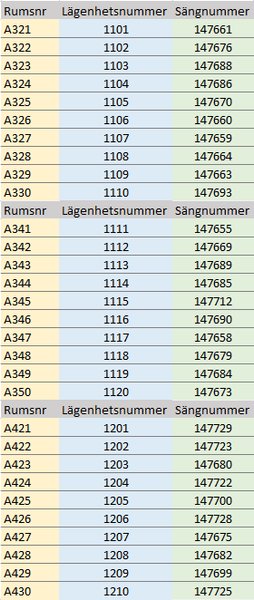
Hello! I would like to sort datasets with three columns, but keep the sets separate with different subheadings, but sort them all within themselves. I find it difficult to explain further with words but will attach images. In the first images the datasets are shown as entered and by default are sorted by the leftmost column, as that's how they're entered. I would however like to be able to sort by the right most column, but keep all the datasets separate. I have made a mockup in the second picture to show what I mean. Is this possible? Thank you in advance!60Views0likes2Comments
File Failed to Upload
Hi, We have a form that we use for overtime, where an excel (.xls) template is uploaded and submitted via MS Forms. For some users, when they try to add the form to the upload question, they get a error response saying upload failed. For other users (exactly the same licenses and privileges) it works just fine. It should be noted that its a group form feeding into a SharePoint, which the user does not have access to (only the managers do, so that they can see the request details) - but the majority of users submitting the form also do not have access to the SharePoint, so that cannot be the issue. Thank you in advanced!1.4KViews1like2CommentsOffice 365 Mailbox Export to PST - Third Party Tools: What’s Your Experience?
Exporting Office 365 mailboxes to PST is still a common requirement in many Microsoft 365 environments, especially for backup, compliance, and migration scenarios. While Microsoft offers native options like Purview eDiscovery and Outlook export, many administrators also consider third-party tools when dealing with large mailboxes or bulk export requirements. In real-world scenarios, factors like speed, ease of use, permission handling, and consistency of exported data often influence the choice of tool. Some teams prefer native methods for compliance control, while others explore third-party solutions to simplify large-scale or repeated export tasks. For those working with Microsoft 365, what has your experience been with third-party PST export tools? Have they helped in your environment, or do you still rely mainly on Microsoft’s native options?69Views1like2Comments
Add-in Error: We could't connect to the '{0}' catalog server for this add in
For the past month every time I try to use an Add-In in word I get the following error "we couldn't connect to the '{0}' catalog server for this add in." I have tried from multiple computers, Safari, Chrome, different accounts, etc. and nothing is working. It is a personal account and I use word online. It happens for multiple add-ins and I have reached out to the companies directly and they said it was a Microsoft issue.204Views0likes7CommentsForms Governance
Is there any plan to improve Forms governance for administrators and users at large organizations? It feels like several of the back-end underpinnings of Forms are still living in the "consumer product" governance model, versus an "enterprise product" one. Such as: Giving admins more than 30 days to recover an orphaned form from a terminated employee before it's gone. Currently after this time period the best-effort approach seems to be to do an e-discovery hoping to find the results file so at least previous answers and a roadmap for re-creation of the form questions can be provided. Actually https://feedbackportal.microsoft.com/feedback/idea/8f957a1e-7bbd-ed11-83ff-000d3a1ab7d1 users during the Form creation process to make a form group-owned if it's intended for something more than personal use cases. Allowing the https://feedbackportal.microsoft.com/feedback/idea/7516877b-4abe-ed11-83ff-000d3a1f8608. https://feedbackportal.microsoft.com/feedback/idea/7ae16276-4abe-ed11-83ff-000d3a1ab5c3, prompt user when they're approaching the limit, and give users a bulk way to delete old forms/quizzes/polls to get back under the ceiling. Allowing https://feedbackportal.microsoft.com/feedback/idea/6c9cc40a-7bbd-ed11-83ff-002248273995. Improving the types of survey questions and integration into Powerpoint to come closer to the capabilities of 3rd party products like Slido. Many of these capabilities/features/management tools have been being asked for for years. Quite frankly, we administrators are much more interested in these kinds of nuts and bolts core functions than integrating animated backgrounds/sounds and other window-dressing bells and whistles. Would love to hear others' perspectives and hopefully this will catch the eye of someone with the product group. Thanks!2Views0likes0Comments
Migrate from Dropbox to Google Drive: Simplifying Cloud File Management
As organizations seek more integrated collaboration platforms, many are choosing to Migrate from Dropbox to Google Drive. While Dropbox remains a popular file-sharing solution, Google Drive offers seamless integration with the broader Google Workspace ecosystem, enabling teams to collaborate, communicate, and manage files from a single platform. Why Businesses Are Making the Switch Modern workplaces rely on real-time collaboration and centralized access to information. By choosing a Dropbox to Google Drive migration, organizations can take advantage of Google Docs, Sheets, Slides, Meet, and other productivity tools that work directly with stored files. In addition to enhanced collaboration, Google Drive provides flexible storage options, simplified sharing controls, and streamlined administration for businesses managing large volumes of data. Planning a Successful Migration Before beginning the migration process, organizations should assess their existing Dropbox environment, including folder structures, file permissions, shared content, and storage requirements. Understanding these elements helps ensure that data is transferred accurately and remains accessible after the move. A successful migration from Dropbox to the Google Drive project should also include user mapping, permission validation, pilot testing, and post-migration verification. Proper planning minimizes disruptions and helps users adapt quickly to the new platform. Supporting Collaboration in a Cloud-First Environment After migration, teams can collaborate on documents in real time, securely share files with internal and external users, and access content from virtually any device. The integration between Google Drive and Google Workspace applications creates a more connected and productive work environment. For organizations looking to streamline file management and improve collaboration, Apps4Rent assists with migrating from Dropbox to Google Drive projects, helping ensure secure data transfers, minimal downtime, and a smooth transition to Google's cloud-based platform.18Views1like0CommentsRestricting Access is The Most Important Step in a Microsoft 365 Copilot Deployment
I was asked what the most important step is in the deployment of Microsoft 365 Copilot. It’s a good question. Put simply, restricted access is the answer. That is, restricting Copilot access to information stored in Microsoft 365 locations until your tenant is ready for unrestricted Copilot search and retrieval. The fortunate thing is that tools exist today to make it relatively easy to establish guardrails for Copilot, which is exactly what you need to do. https://office365itpros.com/2026/06/10/microsoft-365-copilot-prep/20Views0likes0CommentsOneNote Searching (Indexing ?) Problem (Bug)
This seems to be some sort of bug in the OneNote Search feature (or maybe me). [By the way, I LOVE the Search feature - OneNote is rather useless (for me) without it.] My research into the problem leads me to believe it has something to do with Indexing. Anyway, anything I enter into OneNote now (except for the Title) cannot be found by the OneNote Search feature. My recent problem is in searching for a name (Scott). Search can find old entries with the name Scott and can even find a Scottsdale entry - and Search can find Scott in the Title of a recent entry but cannot find any of the other recent Note entries with Scott in the body (3 of them as a test). I also note that if I manually go to the page with a recent Scott entry, the word Scott is highlighted - but the Notes' containing Scott in it does not appear in the list of notes containing Scott. My OneNote file is huge, probably hundreds of notes (if not thousands) and the Search feature has always worked flawlessly, until now. Can OneNote get too big for Search to work? I really need this feature to work - anyone know what is going on here. ron in shawneeSolved1.6KViews1like6CommentsWelcome to the Excel Community
The Excel Community is a place we've built for all of you. You can learn more about how to do something with Excel, discuss your work, and connect with experts that build and use the product. With over half a billion Excel customers, we want to engage with you in fundamentally different ways and the community is a starting point for that. Our community helps answer your product questions with responses from other knowledgeable community members. We love hearing feedback and feature requests from you which helps us build the best version of Excel ever. If you have found an outage or a bug please post at our Answers forum. We look forward to getting to know you! Sangeeta Mudnal & Olaf Hubel on behalf of the Excel Team65KViews30likes97CommentsAutomatically resizing and moving workbooks.
Hello, When I am juggling several documents on my monitor screen, the darned windows for excell or word will automatically resize and move off to the side. The new size doesn't leave a place to grab and move it back. I basically have to close down and start over. Very exasperating. How do I turn it off and just move things around as I want?10KViews0likes7Comments
LAMBDA : function generating #NAME error
Hie, I juste discovered Lambda function, and i have a problem. I created a lambda function that compute a cubiqual polynomial with the code : Poly3:=LAMBDA(_a, _b, _c, _d, _x, ((_a*_x+_b)*_x+_c)*_x+_d) Excel accepte de function, but when putting the function in a cell, it generate a #NAME error. I Debug the Cell, and it seems that de fith argument is refused, with #NAME error ! but the data pasted to the function is a basic computed value ! I don't see anithing rong in my function. Does anyone have an idear, or explaine me what rong in this code ?69Views0likes4Comments





Events
Recent Blogs
- Microsoft 365 Archive and Syskit Point can help your organization address stale content and improve Copilot results.Jun 11, 202660Views0likes0Comments
- Pin, Snooze, Sweep, and more features can help you organize your inbox and work more efficiently.Jun 05, 20261KViews0likes0Comments