reports
49 Topics
Text Truncation in Access Report Controls
Around May 14, 2026, we began experiencing text truncation on the right side of text box controls in Access (Office 365) reports. Approximately 2–4 characters are cut off whenever font size is below 10pt. All reports in our environment are affected and the problem was not present prior to May 14. We ruled out layout as a contributing factor by verifying page size, margins, report width, control dimensions, padding, and layering were all correctly set. No layout changes resolved the issue. The problem does not occur when font size is set to 10pt or higher, suggesting the update affected font metric calculations for small font sizes. Steps taken without resolution include adjusting all report and control sizing properties, testing multiple default printer configurations including Microsoft Print to PDF and Adobe PDF, and verifying Windows display scaling was set to 100%. If anyone has any solutions, please let me know! Thank you for your time.331Views0likes1Comment
DLP Alert Received, but no report.
Hi, I have received the following alert, but I am unable to locate the report in Compliance Centre. Can anyone give me guidance on where to look specifically? I only have default policies applied, but would like to look into this alert in more detail to understand what is happening and check it's legitimate. Many thanks, Pete A match of one or more of your organization’s policy rules has been detected. Report Id: xxxxxxx-0906-4c2e-887b-85cd0e68e117 Person who last modified document: Severity: High False positive: No Override: No Condition matched: External recipients Condition matched: Contains sensitive information4.1KViews1like2Comments
Outlook Desktop (windows) usage not showing in Usage Report!
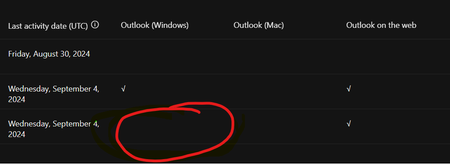
I have an M365 E3 license and use Outlook Desktop (new) on windows. However, in the m365 admin portal, it says i dont use outlook (desktop) but only outlook (web). This is a problem when we try to decide which users need an M365 license that includes desktop usage!444Views0likes2Comments
I am unable to get the User Usage details for the Microsoft VISIO and Microsoft Project
In my Organization we have purchased the Microsoft VISIO and Microsoft Project licensed version and my management wants to know the users usage details of those apps but I am unable to get those details in audit log and anywhere. Please advise where will I get those details.3.2KViews0likes5CommentsOffice 365 Anti-Spam IP Delist Portal NOT WORKING
I m trying to delist a new server of our company and the Anti-Spam delist is not working. This is the message: Step 1: Our messaging service has experienced a temporary issue, please resubmit your information below. I tryed several times. Can anyone tell me if there is another way. Microsoft Please Fix this. thanks4.8KViews1like10CommentsAudit Log start-date into past not possible. How getting group members added date 2 years ago?
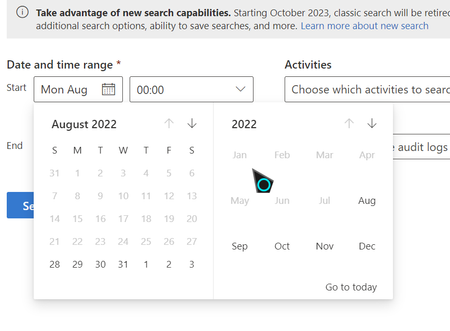
I cant take start date into past. In Classic Search it is greyed out. In New Search I can go into year 2021 but it said if I take it... "Start/end date shoulbe in valid format and the start date is earlier than end date." How is it possible to make audit-log in the past ?? My Groups are created on early 2021 but I cant make an Audit for this year.Solved815Views0likes1CommentSign up for Windows known issue email alerts on Microsoft 365 admin center
Good day, everyone! Today, Microsoft is announcing the availability of email alerts for Windows known issues, on the Microsoft 365 admin center. These alerts are designed to help you quickly learn about the disclosure of known issues, as well as important updates such as new workarounds or resolutions. You can sign up today on the Windows release health section of the Microsoft 365 admin center. This feature is available to IT admins with a Windows or Microsoft 365 tenant, a volume licensing subscription which provides access to Windows release health in the Microsoft 365 admin center, and an eligible admin role. To sign up, visit the Windows release health section in the Microsoft 365 admin center. Once there, select Preferences > Email and select Send me email notifications about Windows release heath. Additional options provide the ability to select which Windows versions to receive alerts about. You can also add up to 2 additional email addresses to receive alert notifications, allowing you to keep colleagues informed of issues even if they don’t have access to the admin center. Take a closer look in the new blog post New feature: Sign up for Windows known issue email alerts. You can also watch this short video for a quick step-by-step on how to subscribe: How to sign up for Windows known issue email alerts | Microsoft 365 admin center. Have a great day!1.4KViews1like0CommentsOffice 365 - Username in usage reports is incomprehensible
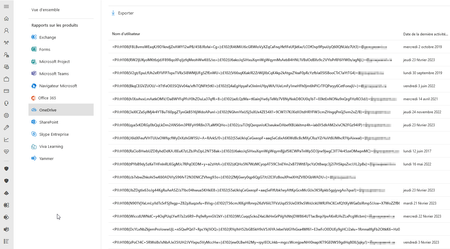
Hello, In many tenant the OneDrive and SharePoint Usage reports on Office 365 Admin Center is displaying the username with uncomprehensible data : The fault persists despite Show hidden user, group, and site names in all reports setting is unchecked Do you have any idea about this error? Regards,1.6KViews1like1Comment