bookings
46 Topics
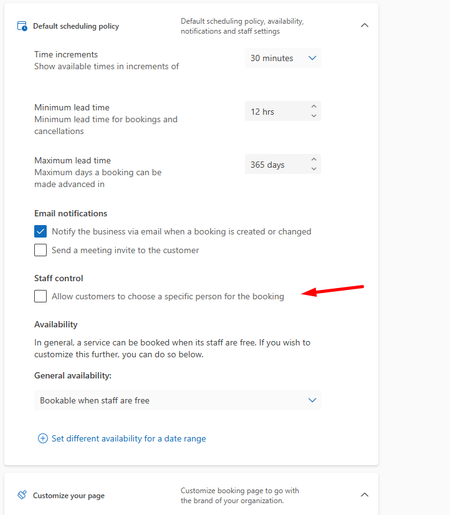
option: "allow customer to choose a specific person for the booking" option does not seem to work
Would like to discuss a problem in bookings (bookings.cloud.microsoft) option: "allow customer to choose a specific person for the booking" Even if i have it unclicked it still allows person to choose a person (it says optional in the booking page but still allows person to choose one person). Expected result would be that visitor could NOT choose a specific person if this is unchecked in settings. I have tried changing it, and saving - but it does not effect anything. See pictures below - it does seem that this choice does not seem to work.34Views0likes1Comment
Adding staff to multiple shared Bookings pages with approval required
Hi, We are building an interview scheduling solution using shared Bookings pages. We have around 2,000 hiring managers who could be involved over time, and we need to add them to different booking pages depending on the recruitment. We have the setting Require staff approvals before sharing free/busy information enabled, and we need to keep it enabled. Is there a way for a manager to approve sharing their availability once, and then have an admin add them to other shared Bookings pages without the manager having to accept a new invitation for each page? We are looking at automating this with Graph or Power Automate. Would a Bookings super user or Exchange admin have any options to manage this? Or is there a way for the manager to approve multiple pages at the same time? If not, how would you recommend handling this when staff need to be added and moved between pages over time? Thanks!53Views0likes1Comment
Bookings - No more notes or extra fields available
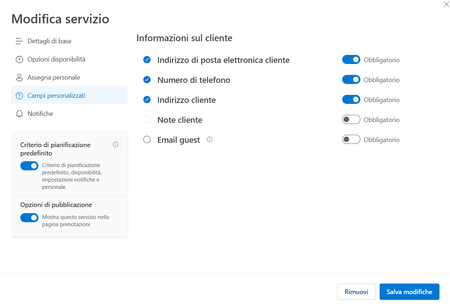
Hi there and happy new year to all. Starting from mid-december, we are facing an issue with our company Microsoft Bookings: basically the custom fields (like address, notes and so on). The book page will just ask for Name & Surname, E-mail Address and Phone Number. On our Administration back-end, the Customer Notes fileds is greyed out (you cannot enable it), and all the custom fields disappeared, you have just the standard ones. We have this issue in all our different booking pages, and all the services are affected. Any hint about this? Thanks!2.2KViews0likes6Comments
Booking Error Message
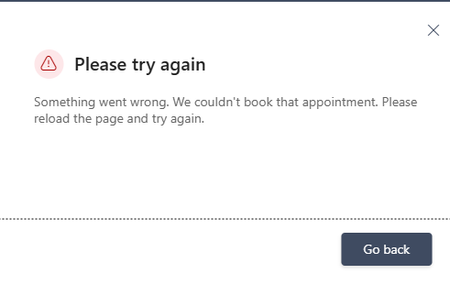
Microsoft Bookings public booking page displays “Something went wrong. We couldn't book that appointment,” but the appointment is actually created in the Bookings/Outlook calendar. The issue occurs even when using different browsers and Incognito mode. I checked availability and other things, everything looks fine. How to fix this?707Views0likes3Comments
"We couldn't book that appointment. Please try again." Error Message
We are receiving this error message when bookings are made. The booking request is still sent to the staff calander and shows on our bookings page. The issue is that the customers will not be able to confirm that their booking has been completed successfully .2.7KViews0likes3Comments
Microsoft Bookings: Already booked slots remain visible and selectable for some time
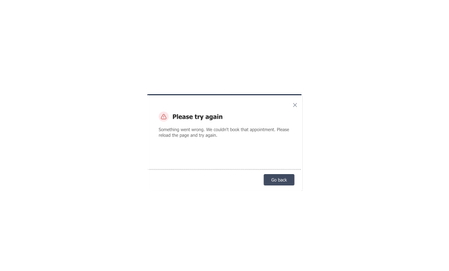
Hello everyone, I am experiencing an issue with Microsoft Bookings and would like to understand whether this is expected behavior, a configuration issue, or a known product limitation. The issue: When a user books a slot, the booking is created successfully. However, if another user opens the booking page shortly afterwards, the same slot is still shown as available for at least 5 minutes and can be selected. Only when they try to complete the booking, they receive a weird error message that asks them to "please try again" (see screenshot). Has anyone else experienced this? Is there a known caching or synchronization delay in Bookings, or are there any settings that can improve the refresh of available slots? How can I fix this? Any help or insights would be greatly appreciated. Thank you!193Views0likes1CommentIssues with Creating of Shared Booking Page in MS Bookings
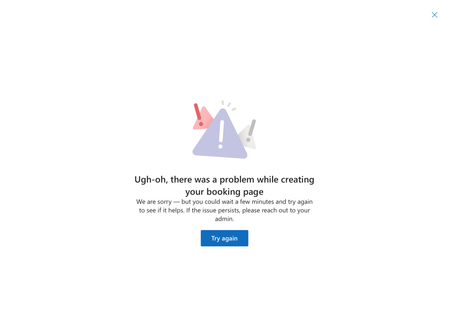
Hey everyone, Can you please advise us on our latest problem? I wanted to create a new Shared booking page in Bookings, and after I finished the creation process and the screen was loading, an error window showed up with information that there was a problem while creating a booking page.1.2KViews1like7CommentsMicrosoft Places individual desk booking is not working
Hi, Following the documentation, https://learn.microsoft.com/en-us/microsoft-365/places/configure-desk-booking, I successfully ran the shared command lines without any errors. However, on Microsoft Places, I am unable to see individual desks appear; only desk pools are visible. Has anyone managed to get this to work? Thanks,2.9KViews2likes20Comments
Bookings 2026, Cannot Find or Edit "Staff" Configs
Whenever a staff member goes to bookings, they can share their 15- and 30-minute times, but they do not see Staff or anything on the left side of the window like if the menus were available. I am a global admin and even I don't see those left pane options. We made a user the Virtual Visits Admin and they also don't see those options. So how do we get Bookings to consider other calendar appointments already in place so there is no double booking? There is also not a three lines icon to open the pane to see the left side menus.379Views0likes2CommentsMulti-day all-day event in Bookings calendar does not block staff availability (single-day works)
I've found a reproducible issue with Microsoft Bookings staff availability blocking. Scenario: One of my staff members went on vacation. To block her availability without removing her hours, I created an all-day event directly in the Bookings calendar covering her entire vacation week. Problem: - When I create a single-day all-day event → her time slots are correctly removed from the booking page. - When I create a multi-day all-day event (covering the full week) → her time slots still appear as available on the booking page. Expected behavior: A multi-day all-day event should block availability the same way a single-day event does. Is this a known bug? Is there a fix or ETA?318Views0likes1Comment