microsoft purview
53 TopicsMicrosoft to Retire the Search-UnifiedAuditLog Cmdlet in 2027
MC1505599 covers two big announcements. First, the AuditLogQuery Graph API is GA. Second, Microsoft will retire the heavily used Search-UnifiedAuditLog cmdlet in October 2027. Microsoft hasn’t said why they want to retire Search-UnifiedAuditLog and have tenants convert their PowerShell scripts to use the AuditLogQuery API but reducing engineering cost and complexity are probably at the heart of the matter. In any case, the conversion will cost Microsoft 365 development effort and money between now and October 2027, and that’s a bad thing. https://office365itpros.com/2026/10/19/search-unifiedauditlog-retirement/90Views0likes0CommentsI built a free, open-source M365 security assessment tool - looking for feedback
I work as an IT consultant, and a good chunk of my time is spent assessing Microsoft 365 environments for small and mid-sized businesses. Every engagement started the same way: connect to five different PowerShell modules, run dozens of commands across Entra ID, Exchange Online, Defender, SharePoint, and Teams, manually compare each setting against CIS benchmarks, then spend hours assembling everything into a report the client could actually read. The tools that automate this either cost thousands per year, require standing up Azure infrastructure just to run, or only cover one service area. I wanted something simpler: one command that connects, assesses, and produces a client-ready deliverable. So I built it. What M365 Assess does https://github.com/Daren9m/M365-Assess is a PowerShell-based security assessment tool that runs against a Microsoft 365 tenant and produces a comprehensive set of reports. Here is what you get from a single run: 57 automated security checks aligned to the CIS Microsoft 365 Foundations Benchmark v6.0.1, covering Entra ID, Exchange Online, Defender for Office 365, SharePoint Online, and Teams 12 compliance frameworks mapped simultaneously -- every finding is cross-referenced against NIST 800-53, NIST CSF 2.0, ISO 27001:2022, SOC 2, HIPAA, PCI DSS v4.0.1, CMMC 2.0, CISA SCuBA, and DISA STIG (plus CIS profiles for E3 L1/L2 and E5 L1/L2) 20+ CSV exports covering users, mailboxes, MFA status, admin roles, conditional access policies, mail flow rules, device compliance, and more A self-contained HTML report with an executive summary, severity badges, sortable tables, and a compliance overview dashboard -- no external dependencies, fully base64-encoded, just open it in any browser or email it directly The entire assessment is read-only. It never modifies tenant settings. Only Get-* cmdlets are used. A few things I'm proud of Real-time progress in the console. As the assessment runs, you see each check complete with live status indicators and timing. No staring at a blank terminal wondering if it hung. The HTML report is a single file. Logos, backgrounds, fonts -- everything is embedded. You can email the report as an attachment and it renders perfectly. It supports dark mode (auto-detects system preference), and all tables are sortable by clicking column headers. Compliance framework mapping. This was the feature that took the most work. The compliance overview shows coverage percentages across all 12 frameworks, with drill-down to individual controls. Each finding links back to its CIS control ID and maps to every applicable framework control. Pass/Fail detail tables. Each security check shows the CIS control reference, what was checked, what the expected value is, what the actual value is, and a clear Pass/Fail/Warning status. Findings include remediation descriptions to help prioritize fixes. Quick start If you want to try it out, it takes about 5 minutes to get running: # Install prerequisites (if you don't have them already) Install-Module Microsoft.Graph, ExchangeOnlineManagement -Scope CurrentUser Clone and run git clone https://github.com/Daren9m/M365-Assess.git cd M365-Assess .\Invoke-M365Assessment.ps1 The interactive wizard walks you through selecting assessment sections, entering your tenant ID, and choosing an authentication method (interactive browser login, certificate-based, or pre-existing connections). Results land in a timestamped folder with all CSVs and the HTML report. Requires PowerShell 7.x and runs on Windows (macOS and Linux are experimental -- I would love help testing those platforms). Cloud support M365 Assess works with: Commercial (global) tenants GCC, GCC High, and DoD environments If you work in government cloud, the tool handles the different endpoint URIs automatically. What is next This is actively maintained and I have a roadmap of improvements: More automated checks -- 140 CIS v6.0.1 controls are tracked in the registry, with 57 automated today. Expanding coverage is the top priority. Remediation commands -- PowerShell snippets and portal steps for each finding, so you can fix issues directly from the report. XLSX compliance matrix -- A spreadsheet export for audit teams who need to work in Excel. Standalone report regeneration -- Re-run the report from existing CSV data without re-assessing the tenant. I would love your feedback I have been building this for my own consulting work, but I think it could be useful to the broader community. If you try it, I would genuinely appreciate hearing: What checks should I prioritize next? Which security controls matter most in your environment? What compliance frameworks are most requested by your clients or auditors? How does the report land with non-technical stakeholders? Is the executive summary useful, or does it need work? macOS/Linux users -- does it run? What breaks? I have tested it on macOS, but not extensively. Bug reports, feature requests, and contributions are all welcome on GitHub. Repository: https://github.com/Daren9m/M365-Assess License: MIT (free for commercial and personal use) Runtime: PowerShell 7.x Thanks for reading. Happy to answer any questions in the comments.5.7KViews2likes4CommentsWhy Some Purview DLP Policies Need Days to Start Working
While testing the new DLP capabilities to block sharing to users and domains and stop Copilot from using external email, it was noticeable how long it took before policies became active. DLP policy synchronization to workloads is reasonably work (and getting faster), but these policies have a new retrospective effect that requires workloads to process files and messages to stop them being available. It’s a new twist to the DLP story. https://office365itpros.com/2026/09/11/dlp-policies-take-time/137Views1like0CommentsNew Archiving Capability for Purview Data Lifecycle Management
Tenants with Microsoft 365 Archive configured can incorporate an archiving step in how Purview retention policies and labels process SharePoint Online and OneDrive for Business files. It makes perfect sense to move inactive files to lower-cost archive storage as an intermediate point some time before their final deletion. You’ll save on storage and stop AI tools processing the digital debris that invariably accumulates in SharePoint. https://office365itpros.com/2026/08/20/microsoft-365-archive-retention/202Views0likes0CommentsPurview DLP Blocks Sharing Files with Specific Domains or Users
A new DLP rule is available to control sharing of SharePoint and OneDrive files with selected domains and email addresses. The new rule supports an allow list (permit sharing) and can also specify a deny list (block sharing). The user interface takes a little getting used to, but when everything is configured and SharePoint has had a chance to respond to the block, the rule works and any attempt by a blocked user to use a sharing link is refused. https://office365itpros.com/2026/07/22/block-sharing-dlp-sharepoint/585Views0likes4CommentsSharePoint Online Expands Sensitivity Labels to OneNote and Video Files
Microsoft has updated SharePoint Online to provide full support for sensitivity labels assigned to OneNote and MP4 files. Full support means that SharePoint Online can decrypt and encrypt file content, which then allows SharePoint to protect the content while storing it in a way that’s accessible to Purview services like Data Loss Prevention and eDiscovery, and of course, accessible to Copilot. https://office365itpros.com/2026/08/12/sensitivity-label-mp4-onenote/174Views0likes0Comments
Office 365 Mailbox Export to PST - Third Party Tools: What’s Your Experience?
Exporting Office 365 mailboxes to PST is still a common requirement in many Microsoft 365 environments, especially for backup, compliance, and migration scenarios. While Microsoft offers native options like Purview eDiscovery and Outlook export, many administrators also consider third-party tools when dealing with large mailboxes or bulk export requirements. In real-world scenarios, factors like speed, ease of use, permission handling, and consistency of exported data often influence the choice of tool. Some teams prefer native methods for compliance control, while others explore third-party solutions to simplify large-scale or repeated export tasks. For those working with Microsoft 365, what has your experience been with third-party PST export tools? Have they helped in your environment, or do you still rely mainly on Microsoft’s native options?535Views1like3CommentsPrimer: Finding Sensitivity Labels with PowerShell
Three cmdlets exist to fetch sensitivity labels. One is in the Exchange Online module; the others are powered by Graph APIs. What are the differences between each method and how can you make sure that the set of sensitivity labels fetched by PowerShell is the full set of available labels? These and other questions are investigated in this article. https://office365itpros.com/2026/06/11/sensitivity-label-ps/44Views0likes0Comments
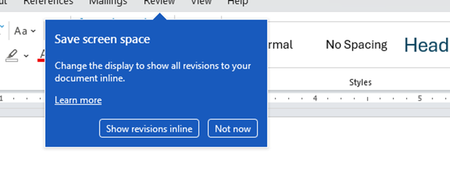
Disable incessant nagware popups
I don't know about everyone else, but I am sick and tired of the nagware pop ups in Word, Excel, PowerPoint, Outlook, etc. Every single product harasses me with pop ups trying to tell me "hey, did you know this feature was here?", "you can do this if you click that", "let me hold your hand through using products you've used for decades even though you don't want daddy Microslop to do that". This is a prime example. I keep getting the same ones again and again and again and everything I've read indicates they should only appear once. But they don't. They keep coming back like a psychotic stalker ex who wants alimony even though you were never married. How do I get this nagware to stop?!390Views1like1Comment