Recent Discussions

Regression in v2605: Subform with overlapping controls breaks timer in unrelated form
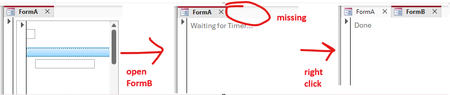
I found another issue (sorry) which might be caused by the zoom-related changes in 2605. The following repro example works fine in 2604 (Monthly Enterprise Channel) but breaks in 2605 (Current Channel). Again, this issue is unrelated to zooming itself. Prepare database The repro requires three forms and a few controls. Since those are tedious to get right manually, I wrote some VBA code to do that for us. Execute BuildRepro() in the Immediate Window to create the forms and controls. Option Compare Database Option Explicit Public Sub BuildRepro() CreateFormASubform CreateFormA CreateFormB End Sub Private Sub CreateFormASubform() Dim frm As Form Dim ctl As Control Set frm = CreateForm() Set ctl = CreateControl(frm.Name, acTextBox, acDetail, , , 345, 1140, 1746, 260) ctl.TabStop = False Const textBoxTop = 260 Set ctl = CreateControl(frm.Name, acTextBox, acDetail, , , 56, textBoxTop, 270, 270) ctl.TabStop = False Set ctl = CreateControl(frm.Name, acImage, acDetail, , , 56, 0, 270, 270) Set ctl = CreateControl(frm.Name, acCommandButton, acDetail, , , 60, 795, 5895, 260) SaveAndClose frm, "FormA_Subform" End Sub Private Sub CreateFormA() Dim frm As Form Dim ctl As Control Set frm = CreateForm() Set ctl = CreateControl(frm.Name, acSubform, acDetail, , , 100, 100, 3000, 3000) ctl.SourceObject = "FormA_Subform" SaveAndClose frm, "FormA" End Sub Private Sub CreateFormB() Dim frm As Form Dim ctl As Control Set frm = CreateForm() frm.TimerInterval = 1 Set ctl = CreateControl(frm.Name, acLabel, acDetail, , , 100, 100, 5000, 1000) ctl.Name = "my_label" ctl.Caption = "Waiting for Timer..." frm.HasModule = True frm.Module.InsertText _ "Private Sub Form_Timer()" & vbCrLf & _ " Me.TimerInterval = 0" & vbCrLf & _ " Me.my_label.Caption = ""Done""" & vbCrLf & _ "End Sub" frm.OnTimer = "[Event Procedure]" SaveAndClose frm, "FormB" End Sub Private Sub SaveAndClose(ByVal frm As Form, ByVal newname As String) Dim oldname As String oldname = frm.Name DoCmd.Save acForm, oldname DoCmd.Close acForm, oldname DoCmd.Rename newname, acForm, oldname End Sub Run repro 1. Open FormA. 2. Open FormB (while FormA is still open). Expected result: FormB opens completely, the timer runs and the label reads "Done". Actual result: FormB opens "halfway" (it's visible, but it's tab is still missing, see screenshot below) and the label still shows "Waiting for Timer...". As soon as you right-click anywhere, the form finishes opening and the timer runs, changing the label to "Done". Notes: I tried to make the repro as simple as possible. If you remove one of the controls from FormA_Subform (or enable TabStops), the problem disappears. It might have something to do with overlapping controls: If you change textBoxTop from 260 to 280, so that it no longer overlaps with the image, the problem also disappears. We need the overlapping controls because in our real code the subform is continuous and displays data at different indentation levels (like a treeview).32Views0likes1Comment
Outlook Cached Mode Repeatedly Re-syncs Mailbox After Restart (Starts Again Around 3.99 GB)
Hi everyone, I’m experiencing a strange Outlook Cached Exchange Mode issue with a Microsoft 365 mailbox after a recent Windows rebuild and wanted to see if anyone has seen similar behavior. Environment: Microsoft 365 mailbox (Exchange Online) Outlook for Microsoft 365 Version 2605 Build 16.0.20026.20076 64-bit Windows 11 25H2 Fresh OS rebuild performed twice New Outlook profile created Office completely reinstalled OST recreated multiple times Issue: When Cached Exchange Mode is enabled, Outlook starts downloading/synchronizing mail normally, and the OST file continues to grow correctly. However, after every reboot or Outlook restart, Outlook again shows “Downloading…” starting from around 3.99 GB. Important observations: Online Mode works perfectly OUTLOOK.EXE closes properly after exit OST file is NOT deleted and continues growing Sync slider changes (1 month, 1 year, all mail) make no difference Disabling Outlook indexing did not help New Outlook profile did not help Reinstalling Office did not help Problem only started after OS rebuild Before rebuild, same mailbox worked normally in Cached Mode No pending office or windows update. It does not appear to actually re-download the mailbox from scratch because the OST size keeps increasing, but Outlook repeatedly processes/downloads from around the same 3.99 GB point after restart. Has anyone seen: Cached Mode replaying synchronization repeatedly after restart? Similar behavior on recent Current Channel builds? Security/EDR products interfering with OST synchronization state? Any known regressions with Outlook Version 2605 Build 16.0.20026.20076? Any suggestions or similar experiences would be appreciated.78Views0likes2Comments
sort by column then by numbers in a row
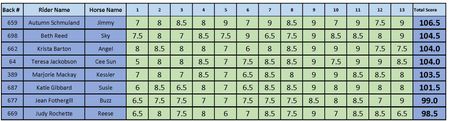
HI all I have a table of results pictured here. Once the results are in, I sort the table by the Total Score Column. When we have a tie (as in line 3 & 4, I need to sort by who has the most highest score... so, who has the most 9 (equal here), then by most 8.5 (line 4 wins the tiebreaker, 4 over 2) Can I do this so it doesn't affect the order of the columns but just the rows involved.159Views0likes6CommentsForcing Gridlines to print through shaded cell formatting
I know how to force gridlines to print but if any cells are formatted with a fill shading in them, the gridlines will not print through them. Is there a way to print gridlines in formatted cells which are filled? No gridlines will print through the shaded cells.21Views0likes1Comment
Employee performance management tools in Microsoft 365?
So we are a relatively large organization and in drastic move, we've decided to shift from Google Workspace to Microsoft, primarily centering our employees around Microsoft Teams while trying to encourage them to use Copilot as effectively as possible. In this transition, one of the platforms we will be saying goodbye to will be our performance management software. Are there any Microsoft native performance management tools that can help us go through goal-setting, performance reviews, and feedback? Third party suggestions would also be good but only if they fit into the whole Microsoft workflow well.11Views0likes1Comment
Text get cut off on page switch if table spans across pages
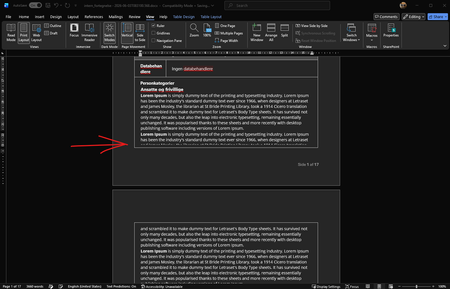
I have some code that creates a docx document that includes tables. At first i used some other code that could create doc files, through html, but to update it i now use docx instead, which is build differently. But the problem Im facing after the switch is that text gets cut off through the middle when the table spans across a page. See screenshot below. The only thing I've found to work, is if i change the table theme when the document is opened in word, but I cant find a way to do this via xml. It is also worth noting that the document is generated via code, that creates a html file holding the main content, and loaded via the <altChunk> tag in the xml If i upload the document to word online there is however no issue I've tried lots of things in the xml which is used in the docx generation, like padding, spacing, line-height etc. but haven't found anything yet that works, and at this point im out of ideas, hence why i reach out to the community.21Views0likes1Comment
Power Query Editor - Unpivot Multiple Delimited Columns
Hello- I'm looking for the most efficient way to unpivot multiple columns that have delimited data. For example, I have the following data: Date User Product Position Job 1/1/2026 1234 ABC Position 1 | Position 2 Job 1 | Job 2 1/1/2026 5678 DEF Position 3 Job 3 And I'm looking for the data to be as follows: Date User Product Position Job 1/1/2026 1234 ABC Position 1 Job 1 1/1/2026 1234 ABC Position 2 Job 2 1/1/2026 5678 DEF Position 3 Job 324Views0likes0CommentsIs Office 365 E3 Developer free
Hi, My tenant had a license named "Office 365 E3 Developer" which allowed us to use Outlook / Exchange (among other Microsoft Office products). This license isn't from the Microsoft 365 Developer Program, which come with free licenses. This license costed CA$11.60 a month per user when we initially purchased it. On May 2, 2026 it still costs $11.60, but when I received my monthly invoice for this tenant, this license was free. I searched around to see whether this license became free recently, but I couldn't find any info on this. The links I found all say it's a paid license. I was wondering if there's any info on this to see why it became free? Or is it a mistake and Microsoft'll be charging us the next billing cycle? Jason24Views0likes1Commentvlookup error
i used vlookup in my spreadsheet, but doesnt work ... case: i have a column a of 151 vehicle number , now i have to find principal outstanding from two column b & c table containing 196 vehicle number with principal outstanding , as i insert formula of =vlookup(a1,b1:c196,2,false) and it gives the desired result but then the problem occurs whhen i drageed formula, the dragged formula also dragged the table_array cell (like in a9,b9:c207,false), and when the vehicle number is store before the table_array it shows #N/A, i.e. if a9 contain vehicle number x and if x is at b4, then formula doesnt work... pl help23Views0likes1CommentExcel table not using updated formula in new rows
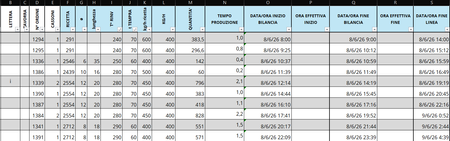
I have an Excel spreadsheet that keeps giving me the same issue with the formulas in column O. Originally, column O contained the following formula: Original formula: =IF(R4<>"", R4, Q4) + IF(ABS(I5-I4) < 30, 25/1440, IF(ABS(I5-I4) <= 50, 40/1440, IF(ABS(I5-I4) <= 150, 60/1440, IF(ABS(I5-I4) <= 250, 80/1440, IF(ABS(I5-I4) <= 300, 100/1440))))) The formula has since been updated to: Current formula: =IF(R4<>"", R4, Q4) + IF(ABS(I5-I4) < 30, 25/1440, IF(ABS(I5-I4) <= 50, 40/1440, IF(ABS(I5-I4) <= 150, 60/1440, IF(ABS(I5-I4) <= 250, 80/1440, IF(ABS(I5-I4) <= 300, 100/1440))))) + C5/24 However, whenever I insert a new row, Excel automatically fills it with the original formula instead of the updated one, even though I have been using the updated formula for quite some time now. How can I make Excel recognize and use the updated formula when new rows are inserted?26Views0likes0Commentsneed exchange se for hybrid environment
We have a hybrid Office 365 environment with an Exchange Server 2016 that no longer performs any role. It does not host any mailboxes and is not used as an SMTP relay. We would like to keep an Exchange installation solely for administrative purposes through the GUI. Questions: 1. Can we keep Exchange Server 2016 installed? 2. If we need to install Exchange Server Subscription Edition (SE), do we need licenses for this installation, considering that all our Office 365 licenses are Business licenses? Thank you.19Views0likes0CommentsMicrosoft Launches Container Management Support for Security Groups
A recent blog from the Microsoft Digital (IT department) discusses the preview implementation of container management labels for security groups. The implementation is limited because it encompasses just one control: the ability to have guest accounts in the membership of security groups. However, just that limited control is sufficient to stop unintended access to sensitive information by guest accounts, and that’s a very good thing. https://office365itpros.com/2026/06/03/security-groups-labels/
Excel Ctrl + Up Arrow and Ctrl + Down Arrow Not Working
I've looked through the other posts in the forum, but still cannot get this working in my Excel for some reason. Ctrl + left arrow or right arrow works, taking me to end of the horizontal data set, yet the ctrl + up arrow or down arrow is not working. Things I've already tried: I don't have scroll lock selected, either on the keyboard or on the onscreen keyboard. I've already enabled sticky keys from the control panel. I've disabled all add-ins. I've tried restarting Excel and restarting the computer. If anyone has any thoughts on the issue here it would be much appreciated.Solved171KViews2likes23Comments
How do I creating a drop down list in Microsoft Form 365
Hello guys Please I need assistance in creating a drop-down list in Microsoft Form. I have a long list of options for my responders to pick from and I want them do be able to use a drop down list for selection. How do I do this?128KViews0likes11CommentsPeer recognition program in M365. Has anyone done this without a third-party tool?
HR wants to launch a peer recognition program where employees can give kudos to each other. They want it visible to the team, maybe tied to company values, and ideally something that feeds into performance reviews at year end. I looked at Viva Engage but its more of a social feed and theres no way to categorize recognitions by company values or pull them into reviews. Has anyone built something like this using M365 tools or found an app that handles it?75Views0likes3Comments
Access selecting specific date on a calendar
I'm pulling my hair out because everything I've found through my research says my VBA code should work, but it doesn't! Here's the story. I have a calendar (form) that shows events going on for each month. What I want is for a person to click on a specific day and have a pop-up form appear showing more details of the events for whatever day they clicked on. I used the below code, which mostly works... When I click on a date, the month and year will be correct, but not the day of the month. The day of the month is always today's day. For example, let's say I click on the day Feb. 2, 2024 and today's date is May 21, 2026. My pop-up form will show the events for Feb. 21, 2024. This is the code I have: Private Sub lblTue3_Click() Dim txtSelectDate As Date (probably don't need this) Dim iDayOfMonth As Integer Dim iMonth As Integer Dim iYear As Integer Dim dSelectDate as Date iDayOfMonth= Format(Me.txtSelectDate.Value, "d") iMonth = Format(Me.txtSelectDate, "mm") iYear = Format(Me.txtSelectDate, "yyyy") dSelectDate = CDate(iMonth & "/" & iDayOfMonth & "/" & iYear) DoCmd.OpenForm "frmThatContainsMyData", acNormal, , "[DateOnFormUsedForFilter]=#" & dSelectDate & "#", , acDialog Update: I think I figured out where the problem is. When the calendar form is loaded, that's where txtSelectDate is defined. However, I don't know how to define txtSelectDate to whatever date I click on in the calendar. It defaults to today's date when I load the form. When I change the month or year, those number change in the txtSelectDate box, but not the day. This is the code I currently have. (DisplayMonthName displays the month and year; don't think it's part of my issue) Private Sub Form_Load() Me.txtSelectDate = Date Call DisplayMonthName End Sub Any help is greatly appreciated!176Views1like11Comments
Names in Excel Name Manager
I have a spreadsheet ( I will call it spreadsheet "A") driven by macros that creates a new worksheet each month. I am developing a second spreadsheet I will call it spreadsheet "B") that links to it for a monthly summary. I have given all the cells names that are to be linked. The issue I am dealing with is when a new monthly tab is created on "A", I want the links from "B" to be updated to the new month. The approach I am taking is to delete all of the names in "A" and recreate them for the new month. (The reason I want to delete the older names is because over time, the Names list would grow into a very large list of obsolete names). The problem I am encountering is that when a name is deleted, a dialog box appears that the user has to acknowledge that, Yes, I want to delete this name. I want to make this process transparent to the user. So, my question is: Can I delete a name without generating this dialog box?Solved82Views0likes1CommentCopilot icon missing in Excel Ribbon
Hello. I have a problem where the Copilot icon is missing from my ribbon in Excel. It showed up before on one of my accounts but then it disappeared the same day. I was wondering if anyone could please help me fix this and get the Copilot icon back in the ribbon. Thank you.57Views0likes2CommentsOffice Help Your organizations administrator turned off the service required to use this feature
Hello. I have just installed Office 365 on a new laptop.~I have a family plan. When I click on help I get this error; The command isn't available. Your organizations administrator turned off the service required to use this feature. Please can anyone help. thanksSolved32KViews1like14Comments

Events
Recent Blogs
- Bug Name Issue Fixed Edge Browser Control didn't render PDFs on some machines When the Edge Browser Control was used to display a PDF, on some machines the PDF would not render...Jun 03, 2026104Views2likes1Comment
- One of the biggest barriers to enterprise adoption is the lack of centralized controls. Before deploying an agent broadly, organizations need clear answers: What is this agent allowed to do? What dat...Jun 02, 2026507Views1like0Comments