Recent Discussions
Transfer MS Office 365 Business ownership from MSP to own MS Business account
Hello Everybody I need to transfer my clients MS Office 365 Business from current MSP to their own MS Business account. Current MSP very bad service. So, at the end they want to manage their Emails\Licenses on MS Admin Center. What are the steps on doing this?25Views0likes0Comments 53Views1like3Comments
[DataFormat.Error] We received a malformed web response and credentials issue
Hi team :) Happy Friday !! There is an excel spreadsheet being connected with data sources and shared with users. Upon, hitting data refreshes it asks every user to edit credentials every time they hit data refresh or shows dataformat.error with malformed web response. There is no data format error though. Can anyone please assist here or know how to solve this issue ?? Thanks Happy38Views0likes1Comment
How to change the password of a workbook in Excel for Microsoft 365
Hello, I want to use a stronger password for an (entire) Excel file (i.e., a workbook) than the one I installed a year ago. I am aware of these articles: https://support.microsoft.com/en-us/office/protection-and-security-in-excel-be0b34db-8cb6-44dd-a673-0b3e3475ac2d https://support.microsoft.com/en-us/office/protect-an-excel-file-7359d4ae-7213-4ac2-b058-f75e9311b599 I need to remove the first password for the workbook, and then enter the new password. For some reason, it doesn't work as outlined in the article. Any idea how I can do this? Thank you!8.9KViews0likes4CommentsOffice.com “All Apps” unreachable on mobile until you “Request Desktop Version”
Title: Unable to Access “All Apps” on [Office.com] from a Mobile Browser Summary: When signing in to [Office.com] on a mobile device, users may be redirected to the App Store or Microsoft 365 mobile app page. Returning to the browser results in a mobile‑only version of [Office.com] where the standard navigation menu (including the “All Apps” option) is not available. Additional steps are required to force the desktop version so the full app launcher can be reached. --- Symptoms No 9‑dot “waffle” app launcher icon appears on [Office.com] when using a mobile browser. After signing in, [Office.com] displays a simplified mobile page with no left navigation bar. Selecting “All Apps” (once desktop mode is enabled) fails to redirect. • Users are unable to browse or launch the full list of Microsoft 365 apps. --- Cause [Office.com] detects a mobile device and forces a mobile‑optimized experience. Mobile redirection also occurs after being sent to the App Store or Microsoft 365 app download page during authentication. This prevents access to the desktop navigation UI, including the full “Apps” menu. --- Resolution / Workaround Follow the steps below to force the full desktop version of [Office.com] and successfully access the “All Apps” list. Step 1 — Sign in normally Open your mobile browser. Navigate to https://office.com/. Sign in with your Microsoft 365 account. If redirected to the App Store/Microsoft 365 app page, return to your browser. Step 2 — Open the browser’s site‑options menu In your address bar, tap the puzzle‑piece icon located beside the URL. Inside that menu, tap the three dots ( … ) to expand options. Select Request Desktop Version. Step 3 — Re‑authenticate [Office.com] will reload and may require you to sign in again. After signing in, the mobile site may still appear. Step 4 — Request the desktop version again Tap the puzzle‑piece menu a second time. Select Request Desktop Version again. This time, [Office.com] will load the full desktop interface, including the left navigation bar. Step 5 — Access the full apps list In the left sidebar, select Apps. The All Apps link in this menu may fail to redirect. This is expected. Step 6 — Use a direct URL to reach All Apps In the address bar, manually enter: https://office.com/apps The page will load successfully. Selecting All Apps from this page now works as expected.22Views0likes0Comments
MISSING FUNCTIONS THAT I PREVIOUSLY HAD ACCESS TO
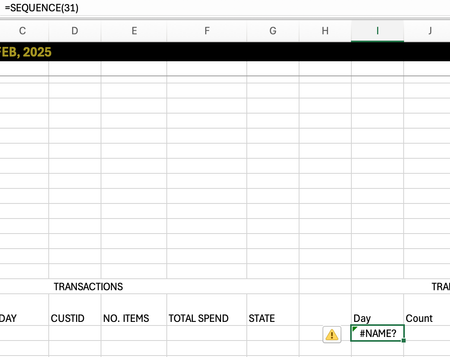
I just switched macbooks and opened my excel to discover I had a few missing functions: MAXIFS, SEQUENCE. This is not a problem regarding the software as mine is MICROSOFT365 and I used the same account previously. Is there any way I can gain these functions back! Thank you!75Views0likes1CommentImproving How Outlook Classic Handles Reactions
A fix due in May 2026 will make sure that the Outlook classic client will handle Outlook reactions properly if the reactions are blocked. Of course, if tenants don’t like responding to email with an emoji, they can create a transport rule to insert the x-ms-reactions header. Detecting the header is an instruction to Outlook clients to suppress reactions that Outlook classic has been ignoring up to now. https://office365itpros.com/2026/04/17/outlook-reactions-classic/12Views0likes0CommentsConditional formatting for a whole column, based on same-row-cells, but in one single rule
I need conditional formatting, where the color of the cell in column F is changed based on the value in the cell in column W in the same row: I have done it like this: The cell F119 changes colour to orange if this is true: =OG($W$119<>"x";$W$119<>"CNG") This works fine. But I have not been able to find a way to make one rule do this for the entire column. So I have set an individual rule for each cell in column F and I have 376 rows so far. When I need to change the rule, or troubleshoot the rule, this is not operable. Also a lot of the cells have been edited with copy-paste, and now the conditional formatting is all over the place 😒 I would prefer one single rule, that checks the cell in column W in each row, and changes the colour in cell F in the same row, if the conditions are true.Solved49Views0likes2Comments
Counting non identical columns
Could anyone explain how to count how many, or remove non-identical entries there are in a set of columns? e.g. In this table, in lines 1- 4 column A and B are identical, but lines 5 - 9, column A is the same in each but column B has a different value in line 9 than in lines 6-8. I want to find a way to count lines 1-5 as one entry and lines 5 - 9 as two entries (i.e. same code in all five lines but different date in one of them.) so the number of unique entries is 3. Line A B 1 G123456 01/01/2026 2 G123456 01/01/2026 3 G123456 01/01/2026 4 G123456 01/01/2026 5 H123456 03/01/2026 6 H123456 03/01/2026 7 H123456 03/01/2026 8 H123456 03/01/2026 9 H123456 05/01/202657Views1like2CommentsDefault search scope in "find and replace"
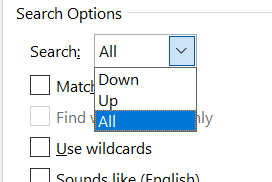
Hi all, is there any way to make the search scope in the "fine and replace" menu (under "more") default to "all"? I have files with text boxes and the only way to make sure they are included is with "all", so every time I have to change it manually... Many thanks ahead!25Views0likes1Comment
Bad registrar on 365 side
Hello, We created a Microsoft 365 tenant several years ago but never used the online email services. We added and verifed our domain, which was registered with Orange at the time, and then created some users manually to use PowerBI. Today, we begin to migrate to Exchange Online. We have installed AD Connect and synchronized some users. Since creating the tenant, we have changed registrars (to Gandi), but I've noticed that the registrar hasn't been updated in the tenant 365. An `nslookup` correctly identifies Gandi as our current registrar. Microsoft has remained with Orange... and this is causing errors in the hybrid Exchange configuration assistant due to bad autodiscover. How can we "refresh" the registrar on the Microsoft 365 side ? Thanks for your advises Nicolas25Views0likes0Comments
Large text which repeats more than 500 times in a document - how can I delete it?
Hi all, I have a Word 365 document - 1170 pages, where I have one and the same text repeating more than 500 times. This repetitive text contains several paragraphs and a table and I want to remove it from all its instances. Is there any way to remove it quickly? I am not a word advanced user and cannot use macros.25Views0likes1CommentTwo days of edits inexplicably disappeared
I have a 2021 MacBook Pro and two days ago I updated my OS to Tahoe 26.4.1. The update seemed to work fine, and I continued working on a Word document I had been editing for the next two days. I always save after every line I write, and I use the auto-backup feature. There was no indication that my saves were not going through. Just now, however, I opened up the document to discover that all my edits (as well as the "last saved" time) had reset to what they were two days ago, around the time of the OS update. This is the case both in Finder and when I go to the Dropbox website, which I use to automatically upload everything I work on to the cloud. This is very alarming. Why has this happened, and is there a way to recover the lost edits? When I try to do "File -> Browse Version History" the menu item is dimmed and I can't click on it. Help!34Views0likes2CommentsDifferences in Word for Mac and Word for Windows
I've been using Word on Windows for many years but recently have purchased a Mac mini and am trying to get used to Word for Mac. So far I've noticed one super annoying feature of Word for Mac: the spaces, tabs, paragraph symbols, etc., show up in blue instead of in the same color as the text. This is going to create a real problem when I start working on documents where I'm tracking changes, since the paragraph symbols might look like they've been inserted during an edit if the edits are being shown in blue--something I have no control over since other people will have already worked on the document before I get it. As far as I can tell, there's no way to change this. So I staretd wondering : How many other things are this vastly different on Word for Mac? Are there still keyboard equivalents of all the usual functions (like toggling Tracking on and off, adding a comment, saving, etc.)? Are there any functions completely missing from Word for Mac that are on Word for Windows? I still have time to return the Mac I got and try to find a Windows pc that meets other requirements I have. Thanks for any info you might have. I've done a lot of searching on the internet for this and have found very little detailed info.49Views0likes3CommentsExcel changes multiple series colors at once
I have a simple X-Y chart with five series of markers, no lines. When I change the color of the markers on Series 5, Series 1 also changes to the same color, and when I change Series 1 back to the color it was, Series 5 also changes. It's like they've been linked somehow. Has anyone else seen this issue?27KViews0likes11Comments





Events

You’re passionate about what you do, and we’re passionate about empowering your potential. Microsoft 365 Community Conference - is your chance to keep up with AI, build game-changing skills, and take...
Tuesday, Apr 21, 2026, 08:00 AM PDTIn-Person
0likes
7Attendees
0Comments
Recent Blogs
- Learn how we are leveraging AI to modernize our approach to change management and give you the tools, information, and processes you need to fully realize value from Microsoft 365.Apr 16, 20264.6KViews3likes0Comments
- Building in the era of AI can get very challenging. That’s exactly why we’re here to help you debug, refactor, and level up at the Microsoft 365 Community Conference, happening April 21–23, 2026 in O...Apr 15, 2026112Views0likes0Comments