Recent Discussions

Can same-tenant meeting bots be routed through lobby approval like external bots?
Hello! As far as I understand, external third-party meeting bots are now detected by Teams and routed to the lobby via RequireApprovalWhenDetected; the organizer must admit them. Same-tenant bots bypass this entirely. Is there currently a way to apply lobby approval to same-tenant bots so it does not appear as a participant until explicitly let into the room? If not, is this on the roadmap? Could for example be a per-app flag on the Entra app registration or a Graph API parameter on the join call. All the best, Harald22Views1like1CommentWhat the DragonForce Attack Against Teams Is All About
Recent reports from security companies and others about an attack by the DragonForce ransomware group against a U.S. services company highlighted the use of Teams. It’s true that Teams was involved in this very artful attack, but the most critical point is that the network was compromised well before the attackers went near Teams. And when your network is compromised, all sorts of bad things happen. Stop account and other compromises and stay safe! https://office365itpros.com/2026/06/26/dragonforce-attack-teams/8Views0likes0Comments
Microsoft Teams Error Code 0xcaa80000
0xcaa80000 Hi, Has any come across this error code for Teams 0xcaa80000? Seem to be a lot of forum post about Outlook on various forums, but nothing for Teams. I have tried from a different Windows account on the same machine and can login fine. Tried deleting the cache etc. Made sure the time is correct and is auto updating. Teams was signing in previously for the user, but has stopped working today. They can log to the Teams web app fine from the same windows account. Our authentication goes via a local ADFS server. Full message is: We can't connect you It looks like we can't connect to one of our services at the moment. Please try again later, or contact your helpdesk if the issue persists. 0xcaa80000 adfs.domain.comSolved206KViews0likes9CommentsMirror My Video Apparently Means Mirror Everything?
Most users expect Mirror My Video to mirror only their camera video, while leaving the virtual background exactly as they uploaded it. However, when Mirror My Video is enabled, Microsoft Teams also mirrors uploaded background image. So someone on MS Teams Team really thought: "The user will anticipate this and manually reverse their background images, then upload the backwards image so Teams can reverse it again!" We wait in earnest to find out if the next Teams patch will drop all pretenses and just mirror the entire display, including on screen text, menus, and the Windows Start bar.8Views0likes0Comments
Add Location to a Webinar
Hello! I appreciate Webinars are designed to be online - but does anyone know if it's possible to be able to add the Location field to Webinars? We often have hybrid meetings and it would be great to include Location. I have tried to add Location within Outlook after it's published, but this location does not then transfer down to those who register for the webinar. If I created a custom template (which I know requires Teams Premium) can I include Location on a custom template?9Views0likes0Comments
Microsoft Teams API Capabilities
Good morning, We are contacting you to find out whether it is possible to achieve the following functionalities through the Microsoft Teams API: Start a scheduled meeting automatically Through a voice command, a meeting scheduled in a room's calendar is automatically started, and all the necessary equipment and services are activated without any user intervention. Automatically answer an incoming call in a meeting room When a call is placed to a specific account, the room automatically answers the call without requiring any user action. Add participants to an ongoing call or meeting Allows new attendees to be added to an active meeting or call in progress. Thank you in advance for your assistance. Kind regards,21Views0likes1CommentHow to Use PowerShell to Identify Inactive Teams Channels
It’s common to find that tenants have many inactive channels in their Teams deployment. Becoming inactive is a natural side-effect of time eroding interest in the topics people discuss in channels. And if you don’t go looking for inactive channels, they’ll remain silently in place doing nothing except acting as a container for potentially obsolete long-over discussions. But we can find inactive channels with PowerShell. What you next is up to you! https://office365itpros.com/2026/06/24/find-inactive-channels/10Views0likes0Comments
How are you handling performance review data across Teams, Outlook, and SharePoint?
We just wrapped up our mid-year review cycle and it was a mess. Managers had to go through old Teams chat messages to find feedback they gave or go through our sharepoint documents to see where everyones goals were. You think there is a way I can use copilot inside Microsoft Teams to somehow parse through all of this before reviews? I saw this app performance 365 or something like that in the app store but I dont think its an official Microsoft app. Any ideas?14Views0likes0Comments1:1 meeting notes keep getting lost. I need a better system
So we have about 40 managers who are supposed to do weekly 1:1s with their reports. Most of them take notes in random OneNote notebooks and Ive even seen some use Teams chat as some pseudo-notebook. Is there anything that lets people take notes inside the actual Teams meeting and keeps those notes attached to that meeting in Teams?8Views0likes0CommentsSpeaker diarisation help!
Hi! Is there a way to get speaker diarisation in Microsoft Teams meetings? This is a situation where all speakers are in the same room, and the meeting is joined through a Teams enabled device. I am aware of programs like WhisperX, however I do not know how to do any coding-based stuff, and would prefer to have as much as possible within the Copilot 'universe'14Views0likes0Comments
Still Cannot Bulk Add People or Groups in Team/Channel in 2026
It's 2026, still same issue. As a regular user/leader of a large team (hundreds of people), we still cannot bulk add people in Team/Channel. It's frustrating to add one people at a time. This has been brought up in 2020, 6 years after, same issue. teams and bulk adding of members | Microsoft Community Hub No real resolution.15Views0likes0Commentsteams and bulk adding of members
When I set up a new team or a channel under a team, I noticed that I have to add each name one at a time. It's really tedious, and it seems like an easy add just to cut and paste a bunch of emails from a spreadsheet into this (you can do this in outlook to send to a large distro). Why are bulk adds in teams so difficult?Solved458KViews9likes32CommentsWhat if post adaptive card and wait for a response timeout
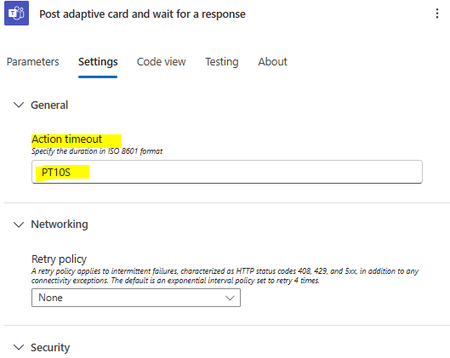
Hi Team, Scenario: Post the adaptive card to the team chat. If the user doesn't respond after 2 hours, the adaptive card should be updated as "Expired"with a new design on the same conversation. In an attempt to comply with this, I used a "Post adaptive card in char and wait for response." Challenges: What would happen if I posted an adaptable card and waited for a response timeout? I wouldn't get a response. An error is being thrown. Expectations include waiting for a response after receiving an adapted card. In any case, your card has already produced a message ID and posted. This action should to return a Message Id in the event that a timeout occurs. Would you kindly respond if you have discovered a solution?4.1KViews3likes14Comments
Adding teachers as students for Demo class
Hi I am new to MS Teams and I want to create a Class Teams with Assignment feature and add 'Teachers' as Students for Demo purposes. Is there a possibility of doing this or it will interfere if the teachers want to create their own class?Solved2.5KViews1like2CommentsMCA tenant - ported toll-frees blocked by billing config - 'not set up to use this feature'
Need urgent help. Teams Phone toll-free ports completed today, MCA tenant, billing config blocking inbound calls. Ticket open for hours with no response. Customer-impacting outage. Tenant ID available in DM.19Views0likes0CommentsCommunities tab in Teams
Hi there I've recently had the Communities tab pop up in my Teams alongside the Teams and Channels tab. No one else in my organisation can see this yet and we aren't sure why. I know it's being rolled out on a timeline but I was also wondering if it might be because I'm the only one in the org who has an Microsoft Viva Employee Communications and Communities licence? Does anyone have any insights into this? We'd like to make a bit of a roll out plan once this appears in our colleagues Team's set ups.92Views0likes2CommentsStruggling to get managers to actually use 1:1 meeting agendas in Teams
We've been trying to get our managers to run structured 1:1s with their direct reports using Teams. Right now they just hop on a call with no agenda and wing it. HR wants there to be a documented agenda, talking points from both sides, and some kind of record of what was discussed. We tried using Loop components and OneNote but managers find it clunky to set up every time and most of them just stopped doing it after a few weeks. Is there a better way to handle recurring 1:1 meeting agendas directly in Teams?36Views0likes2CommentsUsing Teams for employee availability dashboard
Hi, We use teams extensively for employee communication. I know that Teams offers a lot of additional functionality through add-on apps, but I don't really have any experience in this area, and was hoping that someone could offer advice. Our issue is as follows; currently when an employee becomes available for a work assignment they message one of the project-managers. Their are many employees, multiple Project-managers, and we have no good way of keeping on-top of who is currently working, who is waiting for work, and who has just been assigned work. We would like some sort of dashboard that will show project-managers employee status; busy, available, available soon (and perhaps more info.) We could use a sharepoint excel table, or loop component, but we don't want the employees to see the status of all other employees, this info. should only be visible to the managers. The employee should only be able to update their own status. Their are probably many ways to create this (including a custom-built solution), but is their any way to use existing functionality built into teams to implement this? As mentioned, we are already using Teams all the time, so it would be real efficient for us to have this integrated instead of bringing in a whole new platform. Any advice appreciated.Solved29KViews0likes12Comments




Events
Recent Blogs
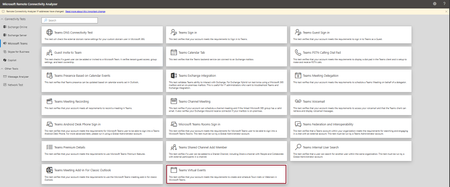
- Hi Teams Community, We're excited to share another addition to Support Diagnostics for Microsoft Teams. The Teams Support team has added a new diagnostic to the Microsoft Remote Connectivity Analyz...Jun 18, 2026101Views0likes0Comments
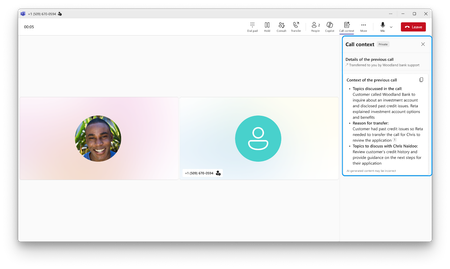
- It’s often difficult for businesses to serve every customer right away during surges in call volumes. Callers sit on hold while staff race to work through the backlog. Meanwhile, agentic voice A...Jun 17, 20261.9KViews0likes0Comments