accessibility
20 Topics
Allow muting a person only for me
Sometimes I am in a meeting where one of the persons in the meeting is actually near me in the world outside the screen. In this case the sound is a bit maddening since there is a small delay between the sound from the person and the sound through the teams interface. In these cases, I would like to mute the person only for me since I am sitting near and can hear the person fine without headphones. Right now I need to takeoff headphones when the person is talking and putting it back as the person finishes talking.133KViews218likes162Comments
Inaccessible colour contrast for high text in Microsoft Teams in Dark mode on desktop
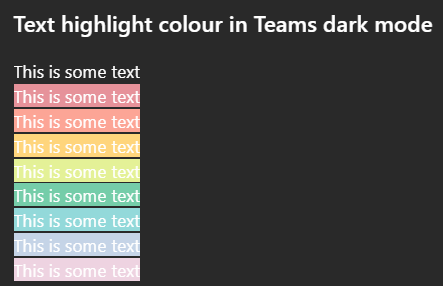
Issue: All highlighted text in Teams has poor colour contrast when in Dark mode on desktop. While some may be readable, none of the highlight colour options meet WCAG colour contrast minimums. How to reproduce Go to MS teams app on Win 11 and set appearance to dark mode. Create any default coloured text (this is white in dark mode) and apply any text highlight colour The result is inaccessible: it does not meet WCAG colour contrast thresholds and is very hard to read. Notes on behaviour On mobile (android MS Teams app) - the text colour changes to black which does meet the colour contrast minimum. This behaviour (illegible white text) on light backgrounds is also found on high contrast mode. This is different behaviour from MS word, which meets colour contrast minimum in a different way. Here highlight colours in dark mode are adjusted (e.g. the background highlight ffff00 --> is shifted to 393900 when dark mode is selected), and the text colour remains unchanged so there is enough contrast between the highlight and the white text colour. What happens next This needs a fix in make this accessible to users in dark mode so content can be read if another user has highlighted text. I'm not sure if this is the right place to post this but I was unable to register my MS account on the https://learn.microsoft.com/en-gb/answers/253Views1like0Comments
Photo Preview instead of Icons for Teams file on Mobile Phone
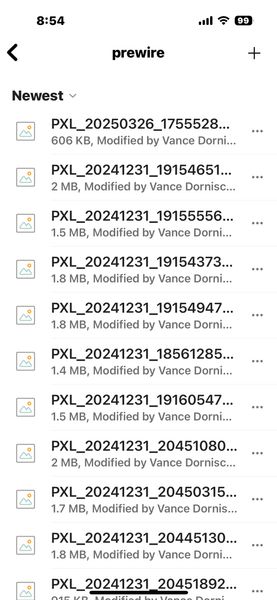
We just recently converted from the Google suite over to MS and Teams. We have guys out in the field that take photos of job sites and upload them to the Channel within the specific Team. When we go in and create a folder under the files tab, the technicians will upload photos of prewires or job site images. Is there a way on MOBILE devices to have these as tiles with image previews rather than just the description of the photo like in the pictures? Is there a different app that I can create a tab for better visibility for our techs?157Views0likes0Comments
enable Accessibility Tree on macOS in the new Teams (work or school)
hello! so i build apps for macOS that use the AX Tree exposed by other apps. in the old Teams, i was able to expose the AX Tree by sending a call to Teams (see https://www.electronjs.org/docs/latest/tutorial/accessibility#macos for more info). it doesn't work anymore in the new Teams. there's another flag that can be sent to apps, but it doesn't work either. the new Teams doesn't expose its AX Tree to my calls. but i **KNOW** it is possible to expose it, because i've found at least one third party app that is able to do so. so, my question, what needs to be done to the new Teams so that i can have access to the AX Tree with my own apps? thank you!1.8KViews1like9Comments
Keyboard shortcut for new Teams to resume calls
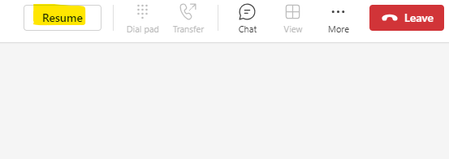
There seems to be an oversight when it comes to the New Microsoft Teams. You used to be able to press ctrl+shift+s to resume the call in the old Teams but now this now longer works in New Teams. Apart from tabbing to the resume button are their any alternative options - I can't seem to use voice accessibility options in Windows 11 to achieve this either. Thanks in advance for any suggestions.410Views0likes0CommentsDeep links through a Teams tag to initiate a conversation.
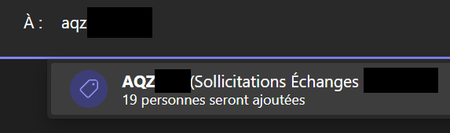
Hello, I'm looking for a solution to initiate a Teams conversation via a deep link on a Teams tag/balises (label). I've found all the information for initiating a conversation via emails, groups, or channels, but it seems impossible to start a conversation via a Teams tag/balises (label). Did I misread the documentation? Or does this functionality not exist ? And if it doesn't exist, is it possible to implement it in a future update ? Thanks in advance.690Views1like2CommentsIs there a way I can get teams app version info programmatically from a custom tab app in teams?
I personally tried with JavaScript client SDK for accessing client version information or making requests to the Microsoft Graph API within a tab app but sadly I couldn't able to get a standard way to get that. Does anyone think there is a standard way to find this programmatically from within the teams tab app?1.3KViews0likes2CommentsMs Teams - Designate a group of signers for the entire company (Accessibility)
Hello team, As Microsoft is slowly introducing "Sign Language View for Teams Meetings", I wonder if we could have an additional option such as "Designate a group of signers for the entire company" on top of the fourth identified so far below. Assign interpreters before a meeting. Assign interpreters during a meeting from the Accessibility tab. Assign interpreters during a meeting from the Participants list or participant context menu. Designate a signer for everyone in the meeting. Doing so would help increase the usage of the functionality if signers jump into meetings where they are not necessarily added as meeting signers. Is this in the pipeline? If not, I will submit one feedback. Thank you Resources: https://support.microsoft.com/en-gb/office/use-sign-language-view-in-microsoft-teams-c6c11f67-0747-4598-ac27-c90801b94434 https://support.microsoft.com/en-gb/office/accessibility-tools-for-microsoft-teams-2d4009e7-1300-4766-87e8-7a217496c3d52.3KViews0likes2CommentsURL Shortener for Tasks by Planner
A URL shortener for links to Tasks would be very useful. Currently the URLs are incredibly long, cumbersome and not conducive to easy sharing. URLs from Task by Planner currently appear like this: https://teams.microsoft.com/l/entity/com.microsoft.teamspace.tab.planner/mytasks?tenantId=[REDACTED]&webUrl=https%3A%2F%2Ftasks.teams.microsoft.com%2Fteamsui%2FpersonalApp%2Falltasklists%26context%3D%7B%22subEntityId%22%3A%22%2FtaskListType%2FteamTaskList%2Fteam%2F%5BREDACTED%5D%2Fchannel%2F%5BXX%5D%3A%5BREDACTED%5D%40thread.tacv2%2Fplan%2F%5BREDACTED%5D%22%7D This is unacceptably long and not easy to share. Something like Bit.Ly or similar URL shortening would be much appreciated for ease of sharing Task links.3KViews4likes2Comments