admin
13 TopicsMicrosoft Teams Takes Center Stage at the 2026 Microsoft 365 Community Conference
Microsoft Teams is where people, Microsoft 365 Copilot, and agents come together to collaborate, communicate, and get work done—before, during, and after every interaction. Contributing to and benefiting from Work IQ, Copilot in Teams understands the context, relationships, and signals behind real work, bringing meetings, calling, chat, and collaboration into a single, connected experience across Microsoft 365. At the 2026 Microsoft 365 Community Conference, Teams will be front and center with a broad set of sessions that reflect how teamwork is evolving. From everyday collaboration and meetings to frontline communications, external collaboration, and Copilot‑powered workflows, Teams is designed to help organizations move work forward with clarity and confidence. Register for the M365 Conference today and save $150 with code SAVE150. #M365Con26 Across the Teams sessions at the conference, you’ll see how AI‑powered capabilities—like intelligent meeting recap, real‑time language interpretation, AI‑assistance for calling, and collaborative agents—help teams stay aligned whether work happens in the office, on the front line, or across time zones. What to Expect from the Teams Track The Teams track at the M365 Community Conference offers a practical, end‑to‑end view of how Teams supports new ways work gets done and how organizations can continue their journey toward becoming a Frontier Firm by connecting communication, collaboration, intelligence, and governance in one AI-powered platform. Sessions span key areas including: Collaboration across meetings and events, chats and channels AI-powered communications and modern calling Enabling frontline teams Seamless and secure external collaboration Workplace collaboration and management Operational excellence for IT admins Protection against modern and evolving threats How Teams integrates across Microsoft 365 and contributes to Work IQ for Copilot Whether you’re deploying Teams, managing it at scale, building on it, or using it to drive business outcomes, the Teams track is designed to meet you where you are and help you plan what’s next. You can find the full list of sessions here. Start Here: The Teams Track Session You Shouldn’t Miss To set strategic context for the Teams track, start with Your Guide: What’s New in Teams — Collaboration, Communication, and Copilot. Led by Ilya Bukshteyn, Corporate Vice President, Microsoft Teams, and Chandra Chivukula, Vice President, Microsoft Teams Engineering, this session sets the foundation for the Teams track. You’ll get a high‑level view of where Teams is headed—how it’s becoming more intelligent, easier to manage, and increasingly shaped by Copilot across collaboration, meetings, and calling—before diving deeper into the rest of the Teams sessions throughout the conference. Women in Tech and Allies Lunch: featuring Lan Ye and Sumi Singh Lan Ye and Sumi Singh will join this year’s Women in Tech and Allies Lunch as featured panelists. As Corporate Vice Presidents leading Microsoft Teams product and engineering, they’ll share insights, experiences, and advice on fostering diversity and empowerment in technology. Their participation promises a dynamic and engaging discussion you won’t want to miss. Exclusive: Executive Teams Pre-Day Microsoft Teams will host an exclusive Teams Pre‑Day on Monday, April 20, 2026, in Orlando, FL., the day before the conference begins. This full‑day experience is designed for executive IT and business decision makers who shape productivity, collaboration, and communications strategy within their organizations. The day features direct engagement with Microsoft Teams leaders and product experts, with a focus on what’s next across Teams, including Copilot and AI within Teams, and how to maximize value across meetings, calling, devices, and collaboration. Space is limited, and attendance will be aligned to the intended audience for the day. If you’re interested in attending, connect with your Microsoft account team to see if there is still availability. Explore 1:1 Strategic Discussions at the Conference A limited number of 1:1 side meetings will be available during the conference for customers looking to discuss Teams strategy, roadmap alignment, and organizational priorities. These conversations are designed for higher‑level planning discussions and complement the technical depth available across breakout sessions and the Teams booth. Availability is limited. Connect with your Microsoft account team to explore options. Experience Teams Beyond the Sessions In addition to breakout sessions and lightning talks, visit the Microsoft Teams product demos in the Microsoft Innovation Hub on the show floor. It’s a great opportunity to see the latest Teams capabilities in action, explore real‑world scenarios, and connect directly with the product experts behind the experiences. Register for the M365 Conference today and save $150 with code SAVE150. We hope to see you there!2KViews1like2Comments
How to disable reactions in a Team
Hello! I'm being harassed by a colleague who keeps clicking reactions like 🤮or 🤦♂️when I post messages in a Team, therefore creating a hostile work environment, not only for me, but everyone in the Team. When I reported it to HR, they talked to our IT Admin who said it was not possible to disable reactions in a Team. Does anyone know anything about how to turn off reactions? Did Microsoft really make a product that has the potential to hurt people, and not design a way to eliminate it when its abused? (Or does my IT Admin just need some direction on how to do it?)Solved3.3KViews1like4Comments
Meeting Options are limited
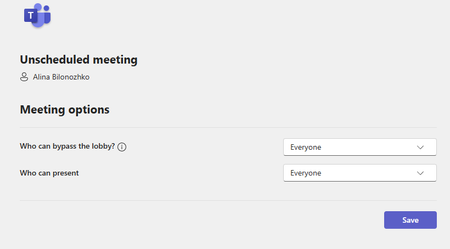
Hello, I have run into a problem of not having a full access to meeting options. I would like to schedule meetings for other people in the office where I do not necessarily have to attend. I would also like to assign other people as co-hosts so that they are able to admit people and have more control of the meeting. There should be settings of being able to let people come in without waiting in the waiting room as well, but I cannot seem to find it anywhere. Here is the attached screenshot: These are the only two options I get when clicking "Meeting Options". Additionally, whenever I set up a meeting, some people are not able to respond to it because they get an error of undeliverable response: "delivery has failed to these recipients or groups". What is the issue here? Does it have to do with how Outlook is set up? How can I change these limitations and errors? Thank you so much!495Views1like1Comment
Bot App Deployment to MS Teams by Admin
Hi, I have developed a bot application for Microsoft Teams and am looking for an enterprise-level solution to deploy it. The goal is to allow an admin to install the app across all chats and channels without requiring users or team owners to manually add the bot. Specifically, I want to know: Is there a way to achieve this deployment through the Teams Admin Center or another native Microsoft Teams feature? Can the app be added automatically to all chats (personal and group) and channels across the tenant? If not directly possible, what alternatives or automation solutions, such as Microsoft Graph API, can be used for this purpose? I am looking for the most efficient approach, suitable for large-scale enterprise environments, without requiring manual interaction from individual users or team owners. Any insights, examples, or guidance on best practices would be greatly appreciated! Thanks.273Views0likes1CommentHow to Deploy a Bot Application to All Chats and Channels in Microsoft Teams for Enterprise?
Hi, I have developed a bot application for Microsoft Teams and am looking for an enterprise-level solution to deploy it. The goal is to allow an admin to install the app across all chats and channels without requiring users or team owners to manually add the bot.By chat and channels I mean adding bot as a member in all chats and all channels. Specifically, I want to know: Is there a way to achieve this deployment through the Teams Admin Center or another native Microsoft Teams feature? Can the app be added automatically to all chats (personal and group) and channels across the tenant? If not directly possible, what alternatives or automation solutions, such as Microsoft Graph API, can be used for this purpose? Is it possible to add my bot application to private, shared and standard channels? I am looking for the most efficient approach, suitable for large-scale enterprise environments, without requiring manual interaction from individual users or team owners. Does MS Teams provides such a way. Any insights, examples, or guidance on best practices would be greatly appreciated! Thanks344Views0likes1Comment
Hi Guys In our Organization we facing some issue Related to MS Teams Shift
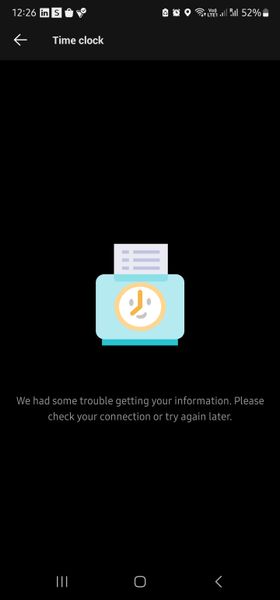
Our Users has some issue with the clock which stated 56 hours working can't stop that by the clock-out then we Uninstalled the app and again installed the app to see the changes but now can't Access the Clock-in feature On their mobile which shows the error "we had some trouble getting your information. Please check your connection or try again later" It's Initially thought it will be fine in some hours and try the next day but it's still the same I change the phone and the network is still the same. when we tried it on the PC the clock-in feature just loads endlessly. Is there any Glitch in MS Teams, I have attached the Screenshot for reference.2.6KViews0likes8CommentsIntroducing Microsoft Teams Real-time Call Quality Analytics
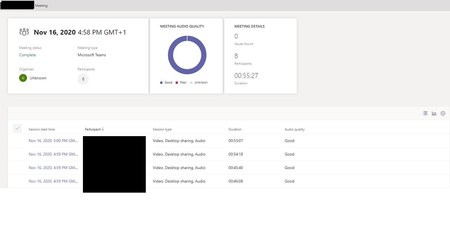
The purpose of this article is to provide the reader insights on using the Microsoft Teams Real Time Analytics Dashboard. An overview and walk through on using the RTA tool is detailed along with real world example scenarios that the reader can use as foundational knowledge when beginning to troubleshoot conferences within their own environments.56KViews28likes16Comments
Bulk remove all RSS app posts ?
We've added the RSS app a few months ago to get news. But we don't use it and find it over (or under) whelming. Way too noisy, not configurable, etc. Please tell me there's a smarter/quicker way to get rid of all these countless posts in one shot (or some workaround). We haven't posted much yet and wouldn't mind re-starting from scratch.1.2KViews0likes1Comment