Recent Discussions

How to explicitly state an external org is trusted
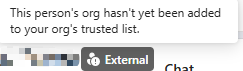
We have a B2B relationship with our parent company. They manage their own M365 we manage ours, but we added each others' domains as instructed in Cross-Tenant Access Settings and allowed access to each other's directory and calendar. However, on our Teams, their users pop up with a grey "external" badge stating "This person's org hasn't yet been added to your org's trusted list" even though Team's External Access Settings is set to Allow all External Domains, which means there is no trust list to begin with. Do the trusted domains have to be specified explicitly if so, is there a way to set this external domain as trusted without having to change "Allow all External domains" to "Allow only specific external domains"?Solved682Views0likes1Comment
Get all AA/CQ with Resource Accounts
Hello Is it possible to have a script that pulls out all AA/CQ with resource accounts. I would like to pull it to find out which of the AA/CQ do not have resource account. If there is no resource account the field would be empty. Regards JFM_12Solved179Views0likes4Comments
Auto-saving transcription files in a folder?
I'm currently working in a project which requires the usage of meeting transcription files (not recordings!), and I couldn't find a foulder at OneDrive, or Sharepoint that contains the transcription files (.vtt), I know I can manually download it at the meeting recap but manually downloading it would make my project kinda pointless, is there any way that I can configure it to automatically save the transcription file at a folder like it happens with recordings? Thank you!Solved1.5KViews0likes2Comments
When I install my app to a second channel in Teams, the this.onMessage will nto trigger
I have a bot which when installed to a channel will read messages using this.onMessage, if I add another channel to the same team it will also read the messages without installing the bot on that channel. However if a user installs the bot again, to the second channel which some users do, the second channel will not trigger the onMessage listener except when using the @botname command. I cant log errors anything because it just wont trigger. I feel like the context gets screwed up, all the other listeners fire on other channel Any help please?Solved135Views0likes3Comments
eNPS Surveys inside Teams?
Hi everyone, We've been wanting to start conducting eNPS surveys inside Microsoft Teams for a while now but we've struggled with the built in Polls tool. We also couldn't figure out how to create an eNPS tool with Power Apps. Any recommendations?Solved75Views0likes1CommentWhats the best Practise for on-call duty via teams external calling?
Hey community, I'm a bit in a struggle when setting up our Teams Operator Connect Phone system. We have an Auto attendence which is offering different menus (Press 1..., etc) We're planning on setting up a twentyfour x seven on-call duty where customers can call and are getting redirected to the mobile phones of our technician. I saw the option to forward to one number, but there isn't an option to forward to multiple numbers. How do you guys solve such a scenario, where you have to wake up colleagues mid night? We are changing shifts weekly, always 2 guys, sometimes 3 ppl. on shift. Thank in advance, SchnittlauchSolved222Views0likes3Comments
How do you track 1-on-1 meeting notes anywhere in Microsoft Teams?
Hey everyone! How are you all keeping track of your meeting notes? Are you using the built in meeting features? Are you using a seperate app? I've noticed most of our employees are just using their Teams chats as a notepad and it doesn't seem very efficient...Solved269Views0likes3CommentsPowershell adding a existing holiday to Auto Attendant
Hello I have to add an existing Holiday to Auto Attendant and have this script # Connect to Microsoft Teams # Connect-MicrosoftTeams # Variables - Replace with your actual values $autoAttendantName = "AA_Test" $holidaySetName = "Holiday" #$audioFilePath = "Paht\test.wav" # Path to your audio file # 1. Upload Audio File as Prompt $content = [System.IO.File]::ReadAllBytes('Path\test.wav') $audioFile = Import-CsOnlineAudioFile -ApplicationId "OrgAutoAttendant" -FileName "test.wav" -Content $content $audioPrompt = New-CsAutoAttendantPrompt -AudioFilePrompt $audioFile # 2. Create Holiday Call Flow with Disconnect Option $holidayCallFlow = New-CsAutoAttendantCallFlow -Name "Holiday Call Flow" ` -Greetings @($audioPrompt) ` -MenuOptions @( New-CsAutoAttendantMenuOption -Action Disconnect -DtmfResponse Automatic ) # 3. Get existing Auto Attendant and Holiday Set $aa = Get-CsAutoAttendant -Namefilter $autoAttendantName $holidaySet = Get-CsAutoAttendantHolidaySet -Name $holidaySetName # 4. Link Holiday Set and Call Flow to Auto Attendant Set-CsAutoAttendant -Identity $aa.Identity ` -HolidaySets @($holidaySet.Identity) ` -HolidayCallFlow $holidayCallFlow.Identity # 5. Verify Get-CsAutoAttendant -Identity $autoAttendantName | Select-Object Name, HolidaySets, HolidayCallFlow I do get following error Microsoft.Teams.ConfigAPI.Cmdlets.internal\Import-CsOnlineAudioFile : Expected '{' or '['. Was String: Exception. At C:\Program Files\WindowsPowerShell\Modules\MicrosoftTeams\7.5.0\custom\Merged_custom_PsExt.ps1:7245 char:13 + $internalOutput = Microsoft.Teams.ConfigAPI.Cmdlets.inter ... + ~~~~~~~~~~~~~~~~~~~~~~~~~~~~~~~~~~~~~~~~~~~~~~~~~~~~~~~~~ + CategoryInfo : NotSpecified: (:) [Import-CsOnlineAudioFile_ImportExpanded], ParserException + FullyQualifiedErrorId : Microsoft.Teams.ConfigAPI.Cmdlets.Generated.Cmdlets.ImportCsOnlineAudioFile_ImportExpanded Where is the mistake Thanks and have a great day JFM_12Solved270Views0likes4CommentsNo desktop app, no app button on Teams
I'm on an MS365 personal account. I tried to add the "apps" to Teams. I've tried changing permissions, running it as administrator, and changing the settings. So, I find out "If the Apps button is missing, it may be due to policy settings or the user's account type. For instance, the button is not available for personal Microsoft Teams accounts. Users can try using the web version of Teams or check for updates to the desktop app." I tried the web version and it's not there either. No apps button. So, I uninstalled and reinstalled the Teams desktop app. Now, I'm prompted the Store couldn't open the app and directed me to go to the Start menu. I did. Teams does not show up. I can't use the desktop version at all. Why can't I reinstall Teams? How do I fix this? And why is MS not allowing the "Apps" function on personal accounts? Is there a workaround?Solved1.1KViews0likes2CommentsTwo different Delete-Only Retention Policies for Microsoft Teams chat
I have created two different delete-only retention policies for Microsoft Teams chat. Four of us use a 90-day deletion policy and the rest of our staff use a 30-day deletion policy. My question is: If I am using the 90-day policy and I chat with someone who uses the 30-day policy, will my chats remain visible for 90 days and theirs for 30? Or will the most restrictive policy take over and delete the chats from both sides after 30 days?Solved222Views0likes1CommentHow do you handle rewards & recognition in MS Teams?
I'm curious to learn how other organizations are managing rewards and recognition programs within Microsoft Teams. Are you using built-in features like praise badges and announcements, third-party apps from the Teams store, or custom solutions integrated through Power Platform?Solved453Views0likes2Comments
Best survey tool for Microsoft Teams?
Because Forms isn't cutting it anymore! What would you recommend as the best employee survey tool to use inside Microsoft Teams. We definitely need a survey solution that functions inside Teams because the second our team has to open another app, survey completion rates drop fast. Forms was a simple rudimentary solution but now I think we need a more sophisticated tool with better anlytics. Any thoughts?Solved598Views0likes2Comments
How can I remove Power Automate workflows from the Teams right click menu ?
Hello, Some time ago I created a Power Automate workflow which allowed me to set a reminder via the right click menu on Teams chat message so I could follow-up on it later. I have now deleted these workflows from Power Automate but they are still visible in the right click menu in Teams chat. I already restarted Teams and my computer but they remain visible although they do not exist anymore. When I select the workflow I receive an error because it does not exist anymore and can't be executed. Does anyone has an idea where I can remove these so they do not show in the right click menu in Teams chat anymore ? Thanks in advance !Solved111Views0likes2CommentsRecommendations for employee engagement app in Microsoft Teams?
I work in HR and we’ve moved a lot of our processes into Microsoft Teams. Curious what others are using for employee engagement inside Teams. We’re trying to avoid external tools if possible and just keep everything in the flow of work. We need something that covers areas like: Kudos Rewards Engagement surveys News Feed, Intranet functionality Any suggestions?Solved124Views0likes2CommentsBest performance management software for Microsoft 365?
We are on the lookout for a new performance management app for our HR department. I think we really need something that lives inside Microsoft Teams and isn't going to be another extra app for people to check on. I've gone through the app store and have a small list but I would love some suggestions.Solved87Views0likes1Comment


Events
Recent Blogs
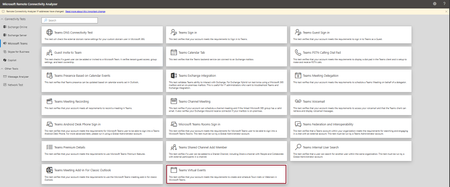
- Hi Teams Community, We're excited to share another addition to Support Diagnostics for Microsoft Teams. The Teams Support team has added a new diagnostic to the Microsoft Remote Connectivity Analyz...Jun 18, 2026103Views0likes0Comments
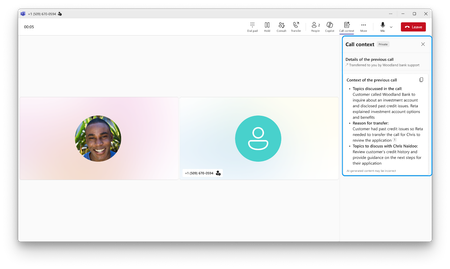
- It’s often difficult for businesses to serve every customer right away during surges in call volumes. Callers sit on hold while staff race to work through the backlog. Meanwhile, agentic voice A...Jun 17, 20261.9KViews0likes0Comments