messaging
786 TopicsTeams Clamps Down on MOERA-Only Tenants
The latest restriction on tenants using MOERA (service domain) addresses in production is that Teams will restrict external collaboration from September 2026. At this point, there is zero sense in any organization using a MOERA-only tenant for production purposes. Restrictions in Exchange Online and Teams should drive that point home, and the likelihood is that further clampdowns will follow in the future. https://office365itpros.com/2026/09/02/moera-only-tenants-external-collab/50Views0likes0Comments
Teams Copying text includes persons name
Hello, sometimes at my work we send each other links to files/folders on our internal server. The only problem is in teams when you do that you get the persons name instead of the link. So they sent me a link to a folder, I select the link in the text and copy it. However if past that into windows explorer I just get the time and their name. [15:12] Firstname Lastname Is there a way to get it to not include the Firstname Lastname when you copy a message? kind regards, AndrewSolved48KViews17likes61CommentsWhat if Teams isn’t too complicated — but simply being compared to the wrong product?
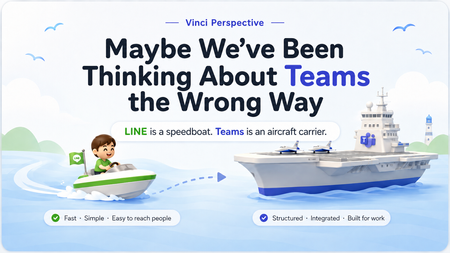
Many users first experience Microsoft Teams through meetings, chat, and file sharing. So it feels natural to compare Teams with messaging apps. But I’ve started to wonder whether that comparison itself shapes how people experience Teams. In markets such as Taiwan, Japan, and Thailand, LINE is deeply embedded in everyday communication. For those unfamiliar with it, LINE is a widely used consumer messaging app in these markets. When users bring that same mental model into Teams, a familiar question appears: “Why does Teams have to be so complicated?” But what if that isn’t quite the right question? I explored the idea in this short interactive page: Maybe We've Been Thinking About Teams the Wrong Way https://teams-vs-line-vinci.vinciwang.chatgpt.site/en/teams-vs-line One analogy sits at the center of it: LINE is like a speedboat. Teams is more like an aircraft carrier. I’m particularly interested in whether people here agree — or think this analogy actually proves the opposite. Is the problem mainly Teams itself, or the mental model we use to judge it?80Views0likes0Comments
Teams calls reporting as potentially scams incorrectly
Hey Teams Community, In the past 5 days I am seeing callers from external tenants that are trusted and in mto showing as suspected scam callers when they call me. They see.me as a suspected scam also when I call. These tenants are all trusted and most of them are.members of the same MTO. This only started happening in the last 7 days. What is causing this? Does anybody else see this happening recently with a similar setup?173Views0likes2Comments
Why someone cannot see/chat after leaving the meeting?
Hi folks, My company has some vendors. I setup the Teams meetings with all of them. They all called in using their company domain emails. After the call ends, one of the vendor always got kicked out and it displays the message saying [Name] no longer has access to the chat. However, other users from other vendors still remain in the chat and can communicate. The settings from that vendor company is as attachment. And I confirmed they use their company email, not a personal email or join as Guest. Does anyone know what the issue is?Solved132KViews5likes33Comments
Tams chat - everyone losing access after meeting ends
Hi All, I have a lot of regular Scrum meetings and lately people have started to complain that after call ends they see "no longer has access to the chat" message and can't write to the chat. Googling the solution showed that the problem is relevant and related to the invited external people, but we are all from the same organization - there are no external participants in the initial invitation. My first guess was that I'm sending an invitation via Outlook to a Distribution List that contains a lot of participants, so I tried to re-create series with direct emails, but that didn't work. Right now I'm guessing the reason is that I sent out the meeting request with "Request Responses" button disabled... Maybe someone here had the same problem and can suggest the correct way to solve it instead of trying all the possible options?8.2KViews1like6Comments
No function to clear my own chat history like others
Hi, There are "Remove chat history" functionality for others. But There is no way of one shot clear all history of my Own chat history. This should be added to new feature. We can not delete one by one of each notes of our own chat dialog.95Views0likes1CommentTeams PowerShell Embraces Web Account Manager and Imposes Control Over Federated Chat
Teams released a new version of their PowerShell module on July 19. The new module contains WAM support and cmdlets to limit federated chat for specific users and tenants. The new controls are welcome, but it’s a sad state of affairs that to configure the settings you must install a new version of a module that doesn’t work so well alongside other Microsoft 365 modules. https://office365itpros.com/2026/07/24/federated-chat-controls/42Views0likes0CommentsAutomatic initials are taking my business
Hello everyone, I'm a software developer, mostly based in Germany. I have a M365 Business Account and am using Teams as part of it. Since automatic initials, instead of generic profile pictures, became a thing, I'm constantly in a hurry to change my profile picture as soon as possible. This is because my initials are SS, which in the German culture is the abbreviation of the company responsible for the death camps during Nazi Germany. People are so upset about it that I even had customers not do business with me. They saw the SS initials in calls and thought I was using this on purpose to make a political stand, i.e. being in favour of the industrial scale mass murder of several million people. I'm not. So here is where my frustration is with Teams, which I'm paying for, and which is taking my business away with its stupid initials: I cant change the initials without changing my name I cant populate my picture to outside orgs preventing the initials from being shown This leads me to the incredibly uncomfortable situation that every time I connect to a new client, I need to discuss my distancing of the genocide 80 years ago before actually being able to commence a meeting. Not a very happy topic and as mentioned before I have lost business because of it. Is there please, any solution to this, that doesn't involve having to change my name? Kind Regards Sebastian167Views1like4CommentsThe Misleading Teams Remove External Chat from User View API
The Graph removeAllAccessForUser API is supposed to remove external chat messages from the view of a tenant user when the chat contains some objectionable material. Unless the documentation is erroneous, the API doesn’t work as advertised and the results are disappointing. All of which means that blocking content for external chats isn’t really possible. If someone gets to start an external chat, they can pump some horrible stuff into your tenant. https://office365itpros.com/2026/07/02/external-chat-api/81Views0likes1Comment