Recent Discussions

Student Behaviour Tracker
This is a very cheeky request for help. Now approaching 70 I've forgotten most of what I knew about Excel. I'm a Chair of Governors at an 11-16 school. I receive notifications about pupils who have been suspended (also known as fixed term exclusion). Roughly I have about 200 individual suspensions over 1 year. I want to record and analyse these. The information to record is Name: Last and First (about 30-40 students) Reason for exclusion (usually 1 or possibly 2 out of about 8 categories) Length of exclusion 1 - 15 days Flags e.g. SEND; PP, Year group: 7, 8 , 9 10, 11 Date As many of the students are repeat offenders I'd like to set the spreadsheet up so by either by typing the name or through an editable drop down list the name appears once and then the reason for the suspension and date is entered (as opposed to multiple entries appearing on the same page). I'd then like the spreadsheet to report, using an editable date range: By pupil name; the number of suspensions; total number of days and total number of days for each category of exclusion By suspension category: number of suspensions; total number of days for each category By flag: number of suspensions; total number of days for each category Year group: 7, 8 , 9 10, 11: number of suspensions; total number of days for each category I've looked at some cheap packages e.g. at Etsy but I cant see anything that does this. There are commercial packages, intended for whole school, but cost several hundred - thousand plus, pounds. Thanks in advance if you are interested and my apologies to you if you feel this is an inappropriate request. Regards NickSolved125Views2likes4Comments
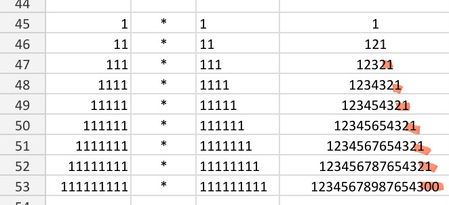
Excel returns incorrect answer to simple multiplication.
I'm saving a few favourite math examples, and ran into a problem - the last of the calculations came back with an incorrect answer. I'm using a simple =cell1*cell2 formula. It should end with 21. Please help I'm using android app. All cells formatted as numbers.Solved92Views0likes2Comments
Removing a possible user selection from a slicer
I have a column field in Excel with 4 possible values. My slicer shows all 4, as it should. Three of the possible vales are alphabetic strings. One of the possible values is a blank field indicated by (blank) on the slicer. A blank is a valid value for this field in some situations, so I don't want to just ignore the rows where this field is a blank. But I would like to eliminate it as a user selection in the slicer itself. I thought checking the slicer setting, "Hide items with no data" would do the trick, but it doesn't appear to do so. Any tips on how that setting is supposed to work and/or why it might not be? (Maybe it has to actually be a 'null'?? No idea....)Solved75Views1like2Comments
Trying to create a form field that uses images (but not a simple one!)...
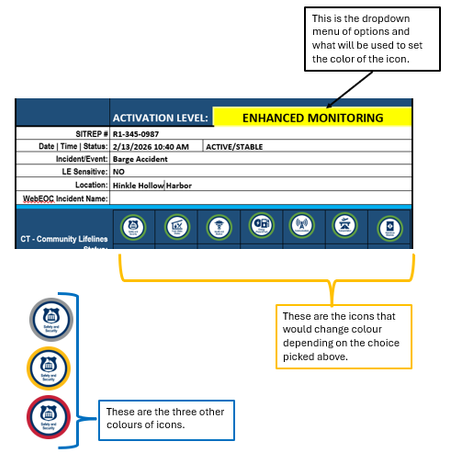
I have a Word form that uses a https://www.fema.gov/emergency-managers/practitioners/lifelines-toolkit/lifelines-icons used in the public safety community. For each icon, there are four different border colours, indicating a certain level of urgency, using the TLP model - green, yellow, red, grey. What I would like to do is create a dropdown (elsewhere on the form) where someone chooses an option in that field, and depending on the choice, the icon with the corresponding colour displays. Example: Any assistance is appreciated!Solved53Views0likes4CommentsLink 2 sheets, then sort column A on sheet 2 alphabetically and match correct data
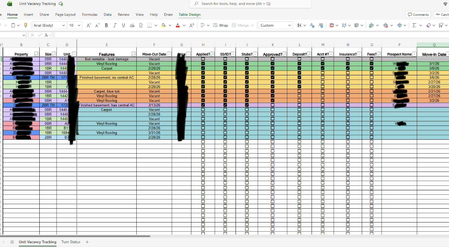
I have two sheets on the same spreadsheet, and I want to pull in the data from 4 different columns to the second sheet and have it automatically update when there are changes or additions to the first sheet. I have a couple issues making this happen - the main one is that the data in my first sheet is custom sorted by color, but I want the new sheet to take the data from column B on sheet 1 and sort it alphabetically, and take the other columns and match them correspondingly to the correct values they match to from column B on the first sheet. Secondly, for blank cells, I want it to leave them blank instead of inputting zero, or any dates. I don't know if this is all even possible, or if I should just remove my custom filters from sheet 1 by cell color and just link it that way. I've spent hours trying to find formulas that work. Please see attached images for reference on what I've tried, and for more clarification as to exactly what I'm requesting. Sorry for the copious redacting, I wanted to be safe rather than sorry with identifiable info regarding this. Any help would be greatly appreciated.Solved175Views0likes7Comments
Cancelling Microsoft Customer Agreement (MCA)
I'm a Microsoft CSP provider. My customer wants to cancel their subscriptions because they want to leave the Microsoft. Do I need to cancel their MCA or will it be cancelled automatically? If it is necessary to cancel the MCA, where should this be done? Thank you very much!Solved46Views0likes1Comment
Search and replace can't seem to delete \o or \t in URLs
I am trying to delete specific text that has been added to all of the URLs in a Word document. The added text follows a specific format: "random characters" \t "_blank" \o protect" Using search and replace (with wildcards) and show field codes (so I can see the URLs) hasn't been successful. This approach -- searching for "random*protect" and replacing it with [blank] -- does nothing. Trying to delete just the \t and \o entries by surrounding them with parentheses deletes all the t's and o's in the document. Any help getting rid of these additions would be greatly appreciated. pjsSolved44Views0likes2Comments
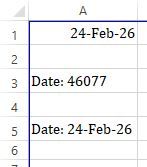
Excel auto-truncating timestamps sub milliseconds
I would like to leave feedback. It is very frustrating that when I try to look at logged data csv in excel, I cannot open it by double clicking, because Excel date-time format is so limited. It truncates sub millisecond data (don't save that file - or the data is lost!), so that any graphs start looking like stairs. And the work-around, to import the csv data and change the timestamp column format to text , and then convert it to a number, is very clunky. It forces me to other programs, like Matlab, which many people do not have. Example data: Timestamp,V-Output ,I-Output ,V-Normal ,I-Normal ,V-Emergency,I-Emergency,VGND ,IN , 2025-12-18 00:08:46.730845, Is it possible that you improve your product?Solved73Views0likes5Comments
Link doesn't work
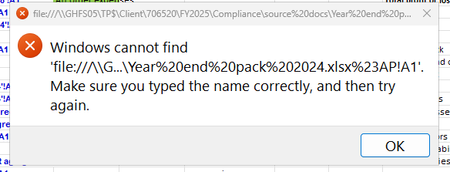
We have recently started experiencing an issue when opening links within Excel on Azure Virtual Desktop. Our AVD environment is currently running the Version 2601, but the behaviour is very inconsistent, only a couple of users are affected, and the issue appears completely random. Interestingly, it works fine for most users both inside AVD and outside AVD. Affected users are receiving the following error message (screenshot below). So far, I have tried the following without success: Clearing the Excel cache Deleting the Excel container from the registry: HKEY_CURRENT_USER\Software\Microsoft\Office\16.0\Excel Is anyone else experiencing the same issue, or aware of a fix/workaround? Any help would be greatly appreciated.Solved102Views0likes3CommentsDoes Microsoft have an employee directory?
Hi everyone, Quick question for the group. My company uses Microsoft Teams every day, and people are constantly trying to find the right person internally, who owns what, who reports to who, who sits in which team/department, etc. Teams search and profile cards help a bit, but we’re really looking for a proper employee directory, specifically: A clean employee directory experience (not scattered across different places). Rich employee profiles (photo, title, department, manager, contact info, location, etc.). Strong employee search (by name, department, role, location, ideally more) Is there a native employee directory in Microsoft 365 that does this well out of the box. If not, what are people using instead, SharePoint, Viva, custom build, or a third-party directory that pulls from Entra ID / M365? Would love to hear what’s working in real life.Solved99Views1like1CommentLocked Out of Global Admin – Lost Authenticator – Case 2602060010000939 – Need Escalation
I am locked out of my Global Administrator account because my phone broke on February 5, 2026 and I no longer have access to Microsoft Authenticator. There is no alternative authentication method configured. Case ID: 2602060010000939. I contacted support on February 6 and the ticket was set as Severity C with an 8-hour response expectation. After several days, I have only received generic replies and no contact from an engineer. This account is critical for my business operations, and I have now been without access for five days. I understand it was my responsibility to maintain backup methods, but I urgently need help from Microsoft to recover access. Please contact me. Samuel LeoSolved104Views0likes1Comment
OneNote Searching (Indexing ?) Problem (Bug)
This seems to be some sort of bug in the OneNote Search feature (or maybe me). [By the way, I LOVE the Search feature - OneNote is rather useless (for me) without it.] My research into the problem leads me to believe it has something to do with Indexing. Anyway, anything I enter into OneNote now (except for the Title) cannot be found by the OneNote Search feature. My recent problem is in searching for a name (Scott). Search can find old entries with the name Scott and can even find a Scottsdale entry - and Search can find Scott in the Title of a recent entry but cannot find any of the other recent Note entries with Scott in the body (3 of them as a test). I also note that if I manually go to the page with a recent Scott entry, the word Scott is highlighted - but the Notes' containing Scott in it does not appear in the list of notes containing Scott. My OneNote file is huge, probably hundreds of notes (if not thousands) and the Search feature has always worked flawlessly, until now. Can OneNote get too big for Search to work? I really need this feature to work - anyone know what is going on here. ron in shawneeSolved296Views0likes4Comments
Excel AND Formula displaying FALSE when it should be TRUE
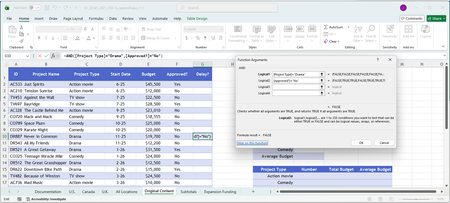
I'm doing the CENGAGE Excel Assignment 2. I'm supposed to use the AND Formula like this: AND([Project Type]="Drama",[Approved?]="No" in the newly created "Delay?" column. But all the results are FALSE even when both conditions are met. Can someone explain to me why the logic is not adding up?Solved240Views0likes3CommentsINDEX MATCH with VLOOKUP
This is my first time posting here, as I hit a roadblock that I'm sure is simple enough. I am using the following formula, but the source data ('FY26 Income Statement Data'!$A$4:$A$2158) has several rows with the same criteria on 'Cash Flow'!$A7. I think I need to include a VLOOKUP formula but I don't know how to do this. Any help will be appreciated. =INDEX('FY26 Income Statement Data'!$A$4:$AB$2158,MATCH('Cash Flow'!$A7,'FY26 Income Statement Data'!$A$4:$A$2158,0),MATCH('Cash Flow'!C$1,'FY26 Income Statement Data'!$A$4:$AB$4,0))Solved196Views0likes5CommentsReturn a value based on different parameters
Not sure if my title is describing my issue correctly. I have one column where each cell contains the same drop down list from which I can choose one of six options, and depending on what option is chosen, I want the cell in another column to return certain value: Option Chosen Return Value Not Started 0% Started 25% In Progress 50% Nearly There 75% Complete 100% I found this example formula online, which is only repeated once but works perfectly for two parameters: =IF(ISNUMBER(SEARCH("Not Started",F3)),"0%",IF(ISNUMBER(SEARCH("Started",F3)),"25%")) However, when I start to extend/repeat the formula more than once for the remaining parameters I cannot get it to work. I've extended it as follows... =IF(ISNUMBER(SEARCH("Not Started",F3)),"0%",IF(ISNUMBER(SEARCH("Started",F3)),"25%",IF(ISNUMBER(SEARCH("In Progress",F3)),"50%",IF(ISNUMBER(SEARCH("Nearly There",F3)),"75%",IF(ISNUMBER(SEARCH("Complete",F3)),"100%")) ... and it returns the error 'the formula is missing an opening or closing parenthesis' Please can anyone help with this. Thank you in advance.Solved78Views0likes4Comments
How to unlink cells in Format Control
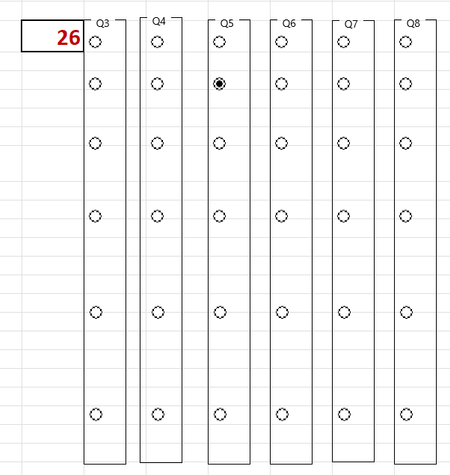
I am developing a survey in excel (because the questions are complicated and long and do not format well in e.g. MS Forms) and using option buttons to choose responses. Each question has 6 potential responses. In developer I have inserted a group box, into which I placed 6 option buttons. After formatting the buttons so that they snap to the excel grid I then linked them to a cell to make calculating responses easier. On-line advice then suggested that I could copy and paste these to each new question. However, by doing this, I am only able to choose 1 option as they are ALL linked to the same cell. How do I unlink each group box of 6 option buttons so that I can link each group individually to a different cell for each question? Or - do I have to create a group box and option boxes from scratch for each question set? I have removed the questions for simplicity of view (note that there are 6 in Q1 and Q2 not visible) and highlighted the linked cell from Q1. As you can see - for Q5 this has given an answer of 26 (the 26th option button) rather than 2 (the 2nd button in Q5)Solved162Views0likes6CommentsFormat Data Labels - Value from Cells
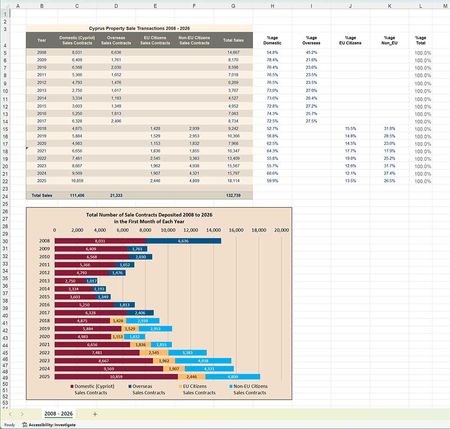
I have a spreadsheet (below) that I wish to show in two different ways: The actual numbers in each of the cells Domestic, Overseas, EU, and Non-EU as shown. The percentage values as shown in the %age domestic, %age overseas, etc.. Using the Format Data Labels and selecting Value From Cells, I can do this for any 2 of the 4 columns. However, when I try to select Value From Cells from the third and/or fourth column, nothing appears in the bar chart - it's completely blank (apart from the background colour.) I have uploaded the failing sheet, which can be downloaded by https://c3a-cyprus.org/test-work.xlsx. I'd appreciate any thoughts TIA NigelSolved167Views1like4Comments

Events

You’re passionate about what you do, and we’re passionate about empowering your potential. Microsoft 365 Community Conference - is your chance to keep up with AI, build game-changing skills, and take...
Tuesday, Apr 21, 2026, 08:00 AM PDTIn-Person
0likes
3Attendees
0Comments
Recent Blogs
- 2 MIN READWelcome to the February 2026 update. This month we are excited to announce expanded availability for Agent Mode in Excel, as well that you can now query modern Excel workbooks (like .xlsx, .xlsb, .xl...Feb 24, 2026303Views0likes0Comments
- We are continuing to streamline the ways people engage with Copilot in Excel, and we've heard your feedback that working across multiple Copilot entry points can feel fragmented. To address this, Cop...Feb 24, 2026245Views0likes0Comments