vba
77 Topics
Access 365 Runtime 2605+: MsgBox in Click event stops responding (Zoom related)
Starting with Access 365 Runtime version 2605 (build 20026.20168), MsgBox called within a Click event stops responding under specific conditions. We have confirmed that the issue is related to the Access Zoom feature. Microsoft 365 support advised us to report this issue in the community, so we are posting it here. ■ Affected Versions No issues confirmed prior to May 2026 Version 2605 (build 20026.20168) and later → Affected ■ Reproduction Environment Access 365 Runtime Resolution: 1920×1080 (Full HD), Text size: 100% Issue does NOT reproduce at text size 125% or 150% ■ Sample File We have a minimal sample database (Db1.accdb) that reliably reproduces this issue. It contains two forms (Form A and Form B). We can provide it on request. ■ Steps to Reproduce Open the sample database → Form A opens Click Button A on Form A → Form B opens Click Button B on Form B → MsgBox appears (works as expected) Click “No” in the MsgBox Click the Close button on Form B → Form B closes Click Button A on Form A again → Form B opens Click Button B on Form B → MsgBox should appear, but Access stops responding instead Pressing the Alt key resumes execution and MsgBox appears Note: MsgBox displays correctly the first time Form B is opened (step 3). The issue occurs after Form B has been closed and reopened (step 7). ■ Findings Enabling “Disable zoom” in File → Options → Current Database prevents the issue. This option is available in version 2608 and later. The issue also does not occur if Form A is moved to the far left of the screen, or down to approximately the vertical center of the screen, before performing the steps. ■ Temporary Workaround for Versions 2605–2607 The “Disable zoom” option is not available in these versions. Adding the following code immediately before the MsgBox call avoids the issue: Application.Echo False DoEvents Application.Echo True However, this workaround causes side effects in some forms of our application, such as unexpected termination and unexpected parameter prompts for record sources, so it is not a suitable long-term solution. ■ Request This issue began occurring around May 2026 in an existing application whose code has not been changed. We kindly ask the Access team to investigate and fix this issue so that it does not occur when Zoom is enabled. If anyone else is experiencing the same issue, please let us know. We can share the sample file on request.24Views0likes0Comments
Word Mail Merge->PDF->Auto Name
I am trying to think of a way to automate a process. Part of this is in word and part with Adobe. Basically, here is the scenario. Every year all the staff in the company (about 350-400 employees) get evaluated and then their compensation is recalculated and an employment contract sent to them for the next year. The contract is in PDF form which they digitally sign and return to the company. Right now the process is like this: A spreadsheet is created with all the employee specific information. The spreadsheet data is merged with the standard employment agreement based on their title. The merge creates a different document for each employee which must then be saved (named with the employee name), converted to a PDF, and then a digital signature is requested via Adobe. I would like to automate this whole procedure. I would like to mail merge, save each document as a Word Doc and then a PDF under the employee's name. Once I have all of that, I would like to get PDF to send out all the documents via email (which will be in the spreadsheet too). I am a programmer so code does not scare me in the least. I am just not sure of the approach to take. Any thoughts? Thanks in advance.4.8KViews0likes3Comments
Free 200-page Advanced Microsoft Word Tutorial for Theses, Reports and Publications
I am a professor at Ghent University in Belgium and I have written a free tutorial (200+ pages) on advanced Microsoft Word. The tutorial is useful for everybody who is writing larger documents, such as technical reports, MSc or PhD theses, publications, law documents, etc. Topics include: Paragraph styles Field codes (SEQ, STYLEREF, REF) Bookmarks and cross-references Equation numbering Multi-level lists Headers and footers Sections VBA macros Reference management Word XML structure PDF/A export The document is freely available and feedback is welcome. Here is the download link: https://composites.ugent.be/downloads.html Best regards, Wim VAN PAEPEGEM390Views2likes1Comment
Access selecting specific date on a calendar
I'm pulling my hair out because everything I've found through my research says my VBA code should work, but it doesn't! Here's the story. I have a calendar (form) that shows events going on for each month. What I want is for a person to click on a specific day and have a pop-up form appear showing more details of the events for whatever day they clicked on. I used the below code, which mostly works... When I click on a date, the month and year will be correct, but not the day of the month. The day of the month is always today's day. For example, let's say I click on the day Feb. 2, 2024 and today's date is May 21, 2026. My pop-up form will show the events for Feb. 21, 2024. This is the code I have: Private Sub lblTue3_Click() Dim txtSelectDate As Date (probably don't need this) Dim iDayOfMonth As Integer Dim iMonth As Integer Dim iYear As Integer Dim dSelectDate as Date iDayOfMonth= Format(Me.txtSelectDate.Value, "d") iMonth = Format(Me.txtSelectDate, "mm") iYear = Format(Me.txtSelectDate, "yyyy") dSelectDate = CDate(iMonth & "/" & iDayOfMonth & "/" & iYear) DoCmd.OpenForm "frmThatContainsMyData", acNormal, , "[DateOnFormUsedForFilter]=#" & dSelectDate & "#", , acDialog Update: I think I figured out where the problem is. When the calendar form is loaded, that's where txtSelectDate is defined. However, I don't know how to define txtSelectDate to whatever date I click on in the calendar. It defaults to today's date when I load the form. When I change the month or year, those number change in the txtSelectDate box, but not the day. This is the code I currently have. (DisplayMonthName displays the month and year; don't think it's part of my issue) Private Sub Form_Load() Me.txtSelectDate = Date Call DisplayMonthName End Sub Any help is greatly appreciated!323Views1like11CommentsAccess fixes released in Version 2603 (Build 19822.20114)
Here's a summary of bug fixes in the latest version of Access: Bug Name Issue Fixed Edge Browser Control didn't navigate from code when inside a tab control When the Edge Browser control was hosted in a tab control, calls to the Navigate method from VBA succeeded, but the control didn’t refresh to show the new page. Switching tabs forced the refresh. The control now refreshes automatically after navigation, even when it’s hosted in a tab control. Some Unicode characters displayed incorrectly in Quick Import Certain extended Unicode characters were displayed as squares when importing data using Quick Import. These characters are now displayed correctly. Modern Chart titles truncated in Print Preview When viewing a report containing Modern Charts in Print Preview, chart titles might be truncated. Chart titles now render correctly in Print Preview. Some Unicode characters displayed incorrectly in exported object names When exporting an object whose name contained certain extended Unicode characters, the sheet name in the exported file displayed the characters incorrectly. These characters are now preserved correctly during export. Some Unicode characters displayed incorrectly in error messages for long object names When renaming a database object to a name that was too long, the error message displayed certain extended Unicode characters incorrectly. These characters now display correctly in error messages. Standard colors in Access didn't match other Office apps The standard color palette in Access used different color values than other Office applications like Word and Excel. For example, the standard red in Access was #ED1C24 instead of the updated Office standard red #EE0000. The color palette has been updated to match the rest of Office. Field.Properties("Precision") and Properties("Scale") on a query column caused the query to execute Accessing the Precision or Scale properties of a field in a query's Fields collection caused the query to execute. This was a regression that broke add-ins and code that enumerate field properties, since query execution can be expensive and have side effects. These properties are now returned without executing the query. Toggle filter button in status bar didn't work when no records were displayed When a form filter resulted in no matching records, clicking the Toggle Filter button in the status bar to remove the filter had no effect. The button now properly removes the filter even when the filtered result set is empty. PDF files with capitalized extension didn't render in Edge Browser Control When navigating to a PDF file using the Edge Browser control, if the file extension was capitalized (e.g., ".PDF" instead of ".pdf"), the file contents were rendered as raw text instead of as a formatted PDF document. The extension comparison is now case-insensitive. Monaco SQL editor inserted blank lines in multi-line comments When switching between Design View and SQL View, the Monaco SQL editor inserted blank lines between each line inside /* multi-line comment */ blocks. This affected both local and passthrough queries. The editor now preserves the original comment formatting. Please continue to let us know if this is helpful and share any feedback you have.926Views2likes2CommentsVBA concern: support for macros or controls not installed when software was installed
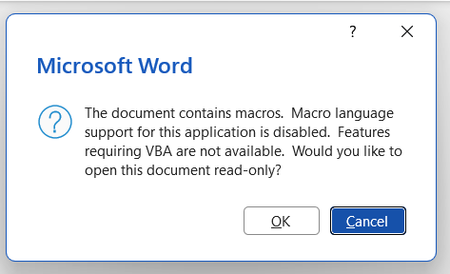
Background: I want to use Zotero, a citation manager, on Word but it uses macros. I get an error message every time I open Word saying VBA wasn't installed at the time I downloaded Office. Image of the error message screen shotted below. I have tried a number of different things: Macros are enabled in the trust centre VBA are enabled in the trust centre I have ran rapid and online repair on Office on the control panel I have attempted 'change' office on my control panel to access the 'expand/add features' with the hopes of getting VBA but this does not appear as an option for me. When I select 'change' in the Control Panel the follow pop up appears: My current impression is that I must download VBA to be able to use VBA. I appreciate that VBA is supposed to automatically download with Office but this does not seem to have happened in my case. Please advise on what I should do next. Thanks in advance.200Views0likes1Comment
Search and replace can't seem to delete \o or \t in URLs
I am trying to delete specific text that has been added to all of the URLs in a Word document. The added text follows a specific format: "random characters" \t "_blank" \o protect" Using search and replace (with wildcards) and show field codes (so I can see the URLs) hasn't been successful. This approach -- searching for "random*protect" and replacing it with [blank] -- does nothing. Trying to delete just the \t and \o entries by surrounding them with parentheses deletes all the t's and o's in the document. Any help getting rid of these additions would be greatly appreciated. pjsSolved193Views0likes2Comments
Office v2508 feature update (new vbe7.dll) breaks library compatibility with LTSC VL versions
Since the Jan 2026 updates, some `accde` or `mde` libraries built with the semi-annual enterprise channel (v2508, Build 19127.20484) can no longer be used with the volume-licensed version of Office LTSC (tested with the Jan 2026 release of Office 2024 LTSC VL, v2408, Build 17932.20638). The reason for this seems obvious: The v2508 feature update contains an updated vbe7.dll. Apparently, this change is backwards-compatible (code compiled with the old dll will run with the new dll) but not completely forwards-compatible (code compiled with the new dll might not run with the old dll, even if the new RegExp class is not used). That's a problem for us. We can't just tell our customers to upgrade, because those with an Office 2024 LTSC volume license already use the latest version available to them. Does Microsoft consider this a bug or "by design"? If the latter, what is Microsoft's recommendation for software vendors who want to build software that runs on all currently-supported versions of Access? We currently plan to work around this issue by installing v2502 of the semi-annual enterprise channel on our "build VMs" (32 and 64 bit) and use those to build our software. (Reverting dev machines to an old Office version is not an option for obvious security reasons.) Repro On a PC with v2508 or newer: 1. Create a new mylibrary.accdb with a module with the following code: Public Function GetColorCode() As Long GetColorCode = vbRed End Function 2. File/Save as/Create accde. 3. Copy mylibrary.accde to a PC with v2507 or older (for example, with the current version of Office 2024 LTSC volume license). On a PC with v2507 or older: 4. Create a new database. 5. Create/Module/Tools/References 6. Add a reference to mylibrary.accde 7. Add the following code to the module: Sub Test() Debug.Print GetColorCode() End Sub 8. Debug/Compile Expected result: The database compiles. Actual result: "Compile error: Can't find project or library". The "references" window opens automatically and highlights "mylibrary". Notes We are not library developers, but we are still impacted by this issue, since the software we ship consists of a (modifiable) startup mdb referencing an (unmodifiable) mde containing the business logic. If you want to try to reproduce this issue but don't have a volume license of Office 2024 LTSC lying around (we certainly don't), you can install a trial version with the Office Deployment Tool and the following configuration file: <Configuration> <Add OfficeClientEdition="64" Channel="PerpetualVL2024"> <Product ID="ProPlus2024Volume"> <Language ID="en-us" /> </Product> </Add> </Configuration>810Views0likes5CommentsAccess Releases 6 Issue Fixes in Version 2209 (Released September 26)
Our newest round of Access bug fixes was released on September 26. In this blog post, we are highlighting some of the fixed issues that our Access engineers released in the current monthly channel build 2209.7KViews4likes1Comment