Online Archive Not Working for One User
Hi, I am experiencing an issue with the online archive for one of my users. The online archive has been working correctly for this user for years, but it has not archived any emails for the past six months. I have checked the licensing, retention tags, and retention policy, and everything appears to be correctly configured. I have also tried running the Start-ManagedFolderAssistant cmdlet multiple times, but it has not resolved the issue. Other users in my organization have the same retention policy and their online archives are working correctly. I have also tried changing the retention policy for the affected user to one that is known to work for other users, but this did not resolve the issue. I have tried running several cmdlets to gather more information about the issue, including Get-Mailbox | FL RetentionPolicy, Export-MailboxDiagnosticLogs -Identity -ExtendedProperties, Get-RetentionPolicy | FL Name, Get-RetentionPolicyTag, Get-ComplianceTag, Get-Mailbox | fl *hold*, Get-MailboxStatistics | fl ManagedFolderAssistantLastRunTime, Get-Mailbox -Archive | fl *, and Get-MailboxFolderStatistics -Archive | fl *. However, none of these cmdlets have helped me identify the cause of the issue. The output from these cmdlets appears to be normal and does not indicate any issues with the mailbox or the archive mailbox. One thing I noticed is that the Get-MailboxStatistics | fl ManagedFolderAssistantLastRunTime cmdlet does not return any output for any of my users, even though I have run the Start-ManagedFolderAssistant cmdlet multiple times. I am at a loss as to what could be causing this issue and would appreciate any suggestions or guidance on how to troubleshoot it further. Thank you29KViews0likes10Comments
Microsoft 365 Outlook Classic Latest Update Copilot issues
Hello to all, we are currently using the Microsoft 365 Outlook Classic, using version Version 2604 Build 16.0.19929.20172 (Current Channel) Copilot works as expected; However ever since the next update was released (Version 2605 (Build 20026.20076)) some users including me, have been getting the below error: I have tried uninstalling and installing the latest version directly, with the same issue. Scanned for any corrupted system files with no issues,but still get the error; I have tried the update Licence from the Outlook application, with no issues but the copilot something went wrong error keeps on persisting. Internet searches are very vague and the I have found some registry suggestions which I have also tried with no solution. The only way to get Copilot working on Outlook Classic was to revert to a previous working version, only then Copilot works as expected. This only happens in Outlook Classic; Copilot works fine on the latest version of Microsoft Office 365 with Word, Excel, etc. For those that maybe might ask why not switch to the New Outlook, we have had issues with it and it has been recommended to use the Classic Outlook for the time being. Has anyone been experiencing such issues please? Thanks for any help.4.7KViews5likes14Comments
Can't sign in to microsoft account
I'm locked out of my microsoft account simply because I don't have access to the Authenticator App. I recently performed a factory reset on my phone with the Authenticator App on and now I can't sign in to my account. I have tried the self help forums and I got a response email saying: "It looks like you just used the Microsoft account recovery form (account.live.com) to request a password reset for e**************email address removed for privacy reasons. Because you've turned on two-step verification for your account, we ignore these requests but wanted to let you know. If you're having trouble signing in, go to (account.live.com/ResetPassword) and reset your password using security info such as your phone, alternate email address, or authenticator app." It won't let me use my phone number when I select it as a sign in option. I have tried the recovery forms to no avail.57Views0likes1Comment
Google Workspace sender stuck at SCL=5 to all Microsoft-hosted recipients
Sending email from a new domain via Google Workspace. All mail to Microsoft-hosted recipients (both Outlook.com consumer accounts and Microsoft 365 Exchange Online tenants) is being routed to junk. Authentication passes perfectly on every message. This appears to be a domain reputation cold-start issue and I am looking for guidance on how to resolve it without waiting 2-4 weeks. Affected recipients are all Microsoft-hosted recipients tested (Outlook.com consumer + Microsoft 365 Exchange Online tenants). Please help me!!! Confirmed via X-MS-Exchange-Organization-SCL: 5 and delivery header dest:J;OFR:SpamFilterAuthJ;RF:JunkEmail on all test emails including ones with normal subject lines and body text. Content makes zero difference to the score. What has already been done: SPF hardened from ~all to -all DMARC upgraded from p=none to p=quarantine IP confirmed not listed on Microsoft's delist portal (sender.office.com) Domain confirmed not listed on Spamhaus DBL or SURBL Domain registered with Google Postmaster Tools JMRP enrollment attempted — not available to Google Workspace senders as SNDS requires IP ownership Outlook.com Postmaster support request submitted218Views0likes2CommentsPrevent Microsoft 365 meeting invites from automatically appearing in users’ calendars
Hi All, We are trying to prevent Microsoft 365 meeting invites from automatically appearing in users’ calendars as Tentative until the user explicitly accepts the invite. Setting for Outlook Classic, New Outlook and Windows or Outlook Web. Need Microsoft recommendation on this one.843Views1like4Comments
Has anyone migrated from one Google Workspace to another after a company merger?
Hi all, Our company recently went through a merger and we now have two separate Google Workspace accounts that need to be consolidated into one. I need to move everything across, emails, contacts, calendars and tasks, for all users without anything getting lost in the process. Honestly not sure where to begin. Google's native tools seem limited for something like this and I don't want to start without a solid plan. Has anyone gone through a similar consolidation? How did you handle it and is there anything you wish you had known before starting?357Views0likes3CommentsTurning off email notifications about new comments in one certain file
Hi All! I found a solution to turn off all email notifications on new comments in my shared files (through settings on SharePoint), but it doesn't really solve my problem. In project files I work on with my colleagues, email notifications are helpful for monitoring workflows and streamline the process. At the same time, I'm an owner of yearly excel files shared with a big team in order to monitor the work on all clients and automate the visualization of it, but it gets commented on a lot and I don't need to get all of that on my Outlook. Is there any way to turn off email notifications about new comments for just one file without turning them off on all my shared files? Kind regards, Jakub Banasik21KViews4likes6Comments
Outlook Inbox not updating
Hello, when using the Mail & Calender App on Win 10, everything works fine. But now Windows forces me to use the new Outlook App. When using Outlook my Inbox is not updating, it shows me 2 months old mails on top of the list. Same goes for using the web version outlook.com. My inbox is not updating even though I get new mails everyday. I have to search new mails by using the search bar. I tried to do some research and found blog and forum posts about deleting the Outlook cache. I tried it, I could't find the folder so I went and deinstalled Outlook and installed the old Mail App. Everything worked fine for 2 days. I received new mails like I should. But then again I got forced to move to the new Outlook App. Now it shows me my 2 months old Mails again. What confuses me is why the web version is not working correctly too? My local cache files shouldn't have any influence on the web version. Anybody here that can help me? Thanks in advance.Solved240KViews1like14Comments
Subject: Need help reaching support for a compromised account where the email was changed
Greetings! My gamertag is sakhigaming2. My account was compromised a few months ago, and the hacker changed my login email completely. Because of this, the standard recovery system says my gamertag does not exist. I am currently locked out of my home Xbox console. I have my physical console Serial Numbers and hardware data for both of my household Xboxes to prove I am the original owner.Since the automated recovery forms do not recognize my old email anymore, I need a way to contact a live support agent who can escalate this to the account investigation team to track down my profile's backend ID. If anyone knows the correct path to get a live chat or callback for an alias-changed account, please let me know. Thank you, and have a great day!199Views0likes2CommentsHacked please help
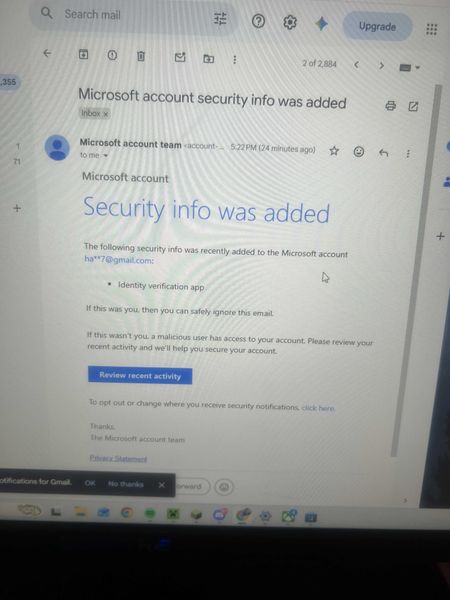
My Microsoft account was hacked today. The attacker changed my sign-in alias to a random Outlook address, removed my phone number, added their own Authenticator app, and changed the recovery email. My original email now says the Microsoft account doesn’t exist. I have the Microsoft security emails proving the changes. I also have other forms of proof. If there is any moderator or anyone who can help me recover my account I had some important stuff on there I would like to get back. It wasn't this email but another one I made this so I can ask for help. When I tried to recover the email they changed it as provided in the screenshots down below. I tried to call support and fill out recovery stuff but since they changed the email for the account there is not much I can do.269Views0likes2Comments