Recent Discussions

What causes downtime or server errors for websites hosted on Microsoft Azure?
Websites hosted on Microsoft Azure may experience downtime due to configuration errors, traffic spikes, or limited server resources. For example, if AH Bonus faces hosting issues, it could be caused by high traffic exceeding CPU or RAM limits. Misconfigured deployment settings or incorrect database connections can also trigger server errors like 500 or 503. Additionally firewall or security rules may block access. To resolve this for https://bonus-ah.nl/, monitor performance in Azure enable autoscaling review logs optimize database queries, and check network security settings to ensure stable website performance and reduce downtime.10Views0likes0Comments
The future of Windows 11 on x86-64 based systems
First of all, I love the design and modernisation approach Microsoft first had with the idea of Windows 11, and i'm sure we all know what's been happening lately with the latest OS Patches, so here's my question: Is Windows 11 on x86 fundamentally repairable from the ground up, or are its stability issues baked into legacy architecture? Why does Windows 11 on ARM appear so much more stable compared to the current x86 experience, and what concrete steps are being taken to close that gap? And what is Microsoft's strategy to bring back trust from long time users who've switched over to other platforms? Also, to finish my question, let's say that Microsoft will hopefully fix and improve the overall experience with Windows 11, will the user in the future have more flexibility and freedom over customisation, telemetry and privacy options, and even account options in future improved Windows 11 updates?7Views0likes0Comments
Word Writing Problem
Hello, I am experiencing a problem with the web version of Microsoft Word on my Android phone and tablet. For about a week, I have noticed issues when typing in Word. After typing something and pressing the Enter key, the text I wrote sometimes disappears. In some cases, even though I press Enter, the cursor does not move to the next line and the words start overlapping each other. This issue occurs both when I use the on-screen keyboard and when I use a physical keyboard. I have tried several different browsers and devices, but the problem still persists. I also tested it with a different Microsoft account and the same issue occurred. What could be causing this problem, and how can I fix it?4Views0likes0CommentsSharePoint Online Drops One Time Passcodes for External Access
From July 2026. SharePoint Online and OneDrive for Business will use Entra B2B Collaboration (guest accounts) to control external access to shared files. This change has been coming since 2021, but it takes time for organizations to get their heads around changing the way to grant external access. It’s time to embrace guest accounts, and that means doing some work to manage guest accounts on an ongoing basis. https://office365itpros.com/2026/03/06/guest-accounts-spo/78Views0likes0CommentsHow to Test a File Against DLP Sensitive Information Types
Sensitive Information types (SITs) are definitions of data like credit card numbers used by DLP rules to detect potential external sharing violations. Knowing what SIT to use in a DLP rule is often difficult, which is why the Purview developers have added a test option to allow tenants to test files against individual SITs or all SITs to see what happens. https://office365itpros.com/2026/03/04/sensitive-information-type-test/22Views0likes0Comments
200 answers instead of 1000
The helpdesk has confirmed that I have an m365 family subscription. This would allow me to receive 1000 responses in Forms. However, when I log in to Forms with my details, only 200 answers are accepted. In addition, I get a "buy button" on the screen. In other words, Forms "thinks" that I have a free plan. Who can solve this for me?7Views0likes0CommentsInvitation to March 9 Frontier Transformation event
Join us for a special event with Jared Spataro, Charles Lamanna, and Sumit Chauhan to learn how Microsoft delivers AI built for work. The live stream starts at 8 AM Pacific Time on March 9. aka.ms/MicrosoftFrontierTransformation2026278Views0likes0CommentsMicrosoft Celebrates SharePoint 25th Anniversary with a Bunch of Announcements
Microsoft celebrated the 25th anniversary of SharePoint with a batch of announcements, including AI in SharePoint, intended to help administrators to manage all aspects of SharePoint Online through natural language. Other interesting announcements included department-level payments for Microsoft 365 Backup and the renaming of the Connections app in Teams as the SharePoint app. Well, the last wasn’t that interesting… https://office365itpros.com/2026/03/03/ai-in-sharepoint/42Views0likes0CommentsSharePoint 2013 Workflow Retirement: What It Means for Your Business
Microsoft has officially entered the final chapter of SharePoint 2013 workflows, and for many organizations, this update is more than just another lifecycle announcement — it’s a wake-up call. The retirement of SharePoint 2013 workflows in SharePoint Online marks a decisive shift away from legacy automation toward modern, cloud-first workflow platforms. For businesses that still rely on approval flows, notifications, and automated processes built years ago, the message is clear: those workflows will stop working, and planning can no longer be postponed. This updated news article explains what the retirement means, what changes technically after the deadline, and — most importantly — how organizations can migrate and modernize their workflows step by step. https://dellenny.com/sharepoint-2013-workflow-retirement-what-it-means-for-your-business/53Views0likes0Comments
unpivot data and handle merged cells without using Power Query (Unpivot_Toolkit)
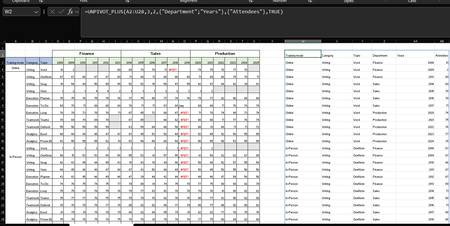
Hey, guys!! I’ve been working on a set of functional Excel Lambdas to solve a common headache: transforming "Wide" human-readable data into "Long" database formats without having to open Power Query every time. =UNPIVOT_PLUS(table, [no_of_cols], [no_of_headers], [attribute_names], [value_name], [remove_errors], [remove_blanks],[pad_blanks_with],[pad_errors_with]) Don’t worry about the full list, most use cases only require 5 arguments. I've included a table of default values at the end. Merged Cell Support: Automatically handles fill-down/fill-right logic for merged headers/columns. Bonus Helper: SPLIT_INJECT =SPLIT_INJECT(array, target_indices, delimiter, [ignore_empty], [match_mode], [pad_with]) It targets specific columns, splits them by a delimiter (like TEXTSPLIT), and expands the entire table horizontally while keeping all other columns perfectly stable. Optional arguments match TEXTSPLIT defaults. Feel free to tear this apart or adapt it for your own edge cases. I’d love to hear how you end up using it! You can grab both functions from my GitHub Gist https://gist.github.com/Medohh2120/f8553c149684e39bb499249e39f01017. Argument Description Default Behavior table The array or range of data to unpivot. Required argument (no default) [no_of_cols] Fixed left columns to keep as identifiers. 1 [no_of_headers] Top rows used as headers, handling merged cells. 1 [attribute_names] Header name for the unpivoted attributes . "Attribute" [value_name] Header name for the unpivoted values. "Value" [remove_errors] Excludes grid rows with formula errors. FALSE [remove_blanks] Removes grid empty cells and empty strings. TRUE [pad_blanks_with] Value to substitute for empty cells. Leaves cell blank [pad_errors_with] Value to substitute for errors. Leaves error as-is227Views0likes0CommentsPlanner’s Newly Redesigned Interface
Microsoft has launched a redesigned user interface for the Planner app. The big news is the inclusion of task chat. Goals are also available, but only to people with a Microsoft 365 Copilot or Planner Premium licenses. Task Chat is a nice feature, and I am sure that it will be popular. UX redesigns often disappoint. At least this one offers new features. https://office365itpros.com/2026/02/27/planner-new-ux/34Views0likes0CommentsExtending Protection for Confidential SharePoint Online Files
Sensitivity labels offer great protection against unauthorized access, but sometimes files that aren’t encrypted escape from a document library. SharePoint Online can now use sensitivity labels configured with user-defined permissions (UDP) to extend protection to downloaded files. The magic works by configuring permissions on download based on the membership of the user who downloads a file. https://office365itpros.com/2026/02/26/sensitivity-label-extend-protection/31Views0likes0CommentsHow to Use Scoped Graph Permissions with SharePoint Lists
This article explains how to use scoped Graph permissions to restrict app access to lists and list items in SharePoint Online and OneDrive for Business sites. It's a follow-up to other articles covering how to restrict app access to SharePoint Online sites and files. Scoping app access to specific objects is important because otherwise apps can access everything in SharePoint Online, and that isn't good. https://office365itpros.com/2026/02/25/scoped-graph-permission-lists/23Views0likes0CommentsMicrosoft Extends DLP Policy for Copilot Protection to All Storage Locations
Microsoft has enhanced the DLP policy for Copilot to cover Office files held in any storage location instead of only Microsoft 365 locations like SharePoint Online and OneDrive for Business. The change is made in the Office augmentation loop, a little-known internal component that coordinates use of connected experiences by apps. Extending the DLP policy to cover all locations makes perfect sense. https://office365itpros.com/2026/02/24/dlp-policy-for-copilot-storage/137Views0likes0Comments
Excel workbooks keep breaking
Hi All, Sorry if this is not the right place to ask, I'm new here. Since a couple of days, my Excel workbooks keep breaking. When opening specific files, Excel states the file needs to be repaired. Everytime certain formulas are being deleted and the values are just pasted as is. I haven't had any issues with these files in the past. Previously I used a license which I bought online via a third party. It seems the issues started after an update. I switched to a license which I bought directly from Microsoft. I did a clean installation, removed all the previous versions files but the issue still exists. For a couple of days I can open the files without problems. And then yesterday excel showed an update was available and excel had to be reopened. After doing so, the issues came up again. I have a Office Home 2024 License, Excel version 16.106.1, on macOS Tahoe 26.2. T.I.A65Views1like0CommentsMicrosoft Takes Aim at ChatGPT
Microsoft would very much like Microsoft 365 tenants to use Copilot instead of ChatGPT. A recent comparison between Copilot and ChatGPT outlines some areas that Microsoft thinks are important when deciding which AI tool to use. Microsoft has a point because Copilot is embedded into Microsoft 365 whereas ChatGPT is more of an add-on. The competition for hearts and minds is very intense in the AI space. https://office365itpros.com/2026/02/20/copilot-and-chatgpt/60Views0likes0CommentsUsing Dev Proxy with the Microsoft Graph PowerShell SDK
Dev Proxy is a Microsoft tool built to help developers figure out the most effective way of using Microsoft Graph API requests. On the surface, Dev Proxy doesn’t seem like a tool that would interest people who use the Microsoft Graph PowerShell SDK to write scripts for Microsoft 365. But all tools have some use, and Dev Proxy can help. https://office365itpros.com/2026/02/19/dev-proxy-graph-sdk/30Views0likes0CommentsHow to Use Scoped Graph Permissions to Access SharePoint Files
Scoped permissions grant apps granular access to files and folders in SharePoint Online and OneDrive for Business sites using the Files.SelectedOperations.Selected Graph permission. The permission allows apps to access specific files or all the files in a folder. It’s a great way to make sure that apps don’t have unfettered access to confidential documents. Not that any app would try to have that kind of access… https://office365itpros.com/2026/02/18/scoped-access-files-and-folders/39Views0likes0Comments




Events
Learn more about the capabilities of Agent 365 in this live 'Ask Microsoft Anything' with product and engineering team experts! Get your questions answered about capabilities for agent observability,...
Wednesday, Mar 18, 2026, 09:00 AM PDTOnline
0likes
116Attendees
0Comments

You’re passionate about what you do, and we’re passionate about empowering your potential. Microsoft 365 Community Conference - is your chance to keep up with AI, build game-changing skills, and take...
Tuesday, Apr 21, 2026, 08:00 AM PDTIn-Person
0likes
3Attendees
0Comments
Recent Blogs
- Microsoft Most Valuable Professionals (MVPs) are the heartbeat of the Microsoft ecosystem—and at Microsoft 365 Community Conference 2026, your impact takes center stage. Imagine connecting face-to-...Mar 06, 2026254Views0likes0Comments
- Edit images directly in PowerPoint to enhance, refine, and perfect visuals without leaving your deck.Mar 06, 20263.2KViews5likes1Comment