Recent Discussions
Did you know that a local HTML file can be embedded in a SharePoint Online modern page ?
Hello SharePoint community, I recently tested something that surprised me. I created a simple HTML file containing custom HTML, CSS and JavaScript and uploaded it to the Site Assets library of a SharePoint Online site. Instead of converting the file to ASPX or developing an SPFx web part, I used the file URL in the Modern Embed web part. The result was successful: HTML rendered correctly CSS styles were applied JavaScript executed correctly The page was displayed inside a modern SharePoint page This was tested with a basic dashboard containing cards, custom styling and JavaScript interactions. One limitation I found is that when using a sharing URL, SharePoint may display the file viewer toolbar (Open, Share, etc.) above the content. I am currently investigating whether a direct file URL provides a cleaner experience. Has anyone used this approach in production? I'd be interested in learning about: - Security considerations - Governance implications - Browser compatibility - Microsoft recommendations for this scenario Thank you.77Views0likes0Comments
Power Automate - don't trust the green tick too much
There isn't actually any HTML tag in the text you pasted. The issue is most likely caused by special characters or formatting that Microsoft Tech Community's editor is interpreting incorrectly. The most suspicious part is: Request submitted -> SharePoint item created -> Approval sent -> Status updated -> Notification sent. If you're copying this from another editor, hidden formatting characters can sometimes get carried over. Also, Markdown formatting such as: Succeeded What happened? Input validation may not always paste cleanly depending on where you're posting it. For Microsoft Tech Community, I'd use a plain-text version with simple formatting: A green tick in Power Automate doesn't always mean the process succeeded. This is something I understood better after working with business-critical flows. Imagine a flow like this: Request submitted → SharePoint item created → Approval sent → Status updated → Notification sent. The flow run shows "Succeeded". Looks good. But what if the notification didn't reach the user? Or the approval is still pending after three days? Or the flow was triggered twice and created duplicate records? Or the process stopped after updating the status but before completing the next business step? From Power Automate's point of view, individual actions may have completed successfully. But from the business user's point of view, the process may still be stuck. That's where I think automation design becomes more important than simply knowing which connector or action to use. For important processes, I usually think about: Input validation • Duplicate handling • Timeout scenarios • Error handling • Retry • Logging • Notifications • Recovery • Monitoring Especially with flows running hundreds or thousands of transactions, you can't depend on someone opening the run history every time something goes wrong. The flow should give you enough information to answer: What happened? Where did it fail? Which transaction was affected? Can we safely run it again? For me, that's the difference between a flow that simply works and an automation that can actually be supported in production. What is one Power Automate issue you've faced where the run showed "Succeeded", but the business process wasn't actually completed?29Views0likes0CommentsUnattended RPA — the real problem isn't starting the bot
Unattended RPA is not just about running a bot without a user I was working on an unattended desktop automation recently, and one thing that stood out to me was that making the bot run automatically is actually the easier part. The real question is: What happens when nobody is there to fix it? For example, the bot starts processing invoices at night. The machine is available. The user session is ready. The desktop flow starts normally. But halfway through the process, the legacy application shows a popup that wasn't there during development. The bot stops. There is no person sitting in front of the machine. Now the problem is no longer just a failed desktop flow. The question becomes how the automation is going to recover. This made me look at unattended RPA a little differently. Before moving a desktop automation to production, I think we should consider things like: What if the machine is unavailable? What if someone is already logged in? What if the target application is down? What if the application UI changes? What if credentials expire? What if the bot fails after completing 50% of the transactions? How do we know which transactions were completed? Can the process be restarted without processing the same transaction twice? For me, an unattended automation is not really unattended if someone from the support team has to keep checking it manually. The automation needs a proper failure and recovery strategy as well. The interesting part of RPA isn't making the happy path work. It's deciding what should happen when the happy path doesn't happen. What has been your experience with unattended desktop flows in production? #PowerAutomate #PowerAutomateDesktop #RPA #UnattendedRPA #PowerPlatform50Views0likes0Comments
Hub Site association approval request fails with 403 Forbidden (previously working, regression)
Sites configured to require approval before joining our Hub Site are failing the association request with an HTTP 403 Forbidden error[browser DevTools Network tab}. This same workflow was functioning correctly as of [early August 2026]. Hub sites that do not require join approval continue to associate successfully — the failure is isolated specifically to the approval-required path. Steps to Reproduce As a site owner, go to Site Settings → Site Information (or Site Contents → hub association) on a site that is not yet associated with the hub. Attempt to associate it with [Hub Site URL], which has RequiresJoinApproval set to $true. Observe that the request fails immediately (or fails when the approver attempts to approve it — specify which point in the workflow fails). Repeat the same steps against a hub site that does not require approval — association succeeds without error. Expected Behavior The association request should be submitted and routed to the configured approver(s) for review, consistent with behavior observed as recently. Actual Behavior Request fails with HTTP 403 Forbidden. [browser DevTools Network tab - attached the HAR file for reference] Error Details HTTP Status: 403 Forbidden [browser DevTools Network tab - JoinHubSite(@v1)?@v1] Troubleshooting Already Performed Confirmed association without approval works (isolates the issue to the approval workflow specifically)66Views0likes0Comments
SPMT Needs True Mirror Mode and Resource Throttling
Subject: SPMT Needs True Mirror Mode and Resource Throttling SPMT incremental migration does not behave like a true synchronization or mirror operation. New and modified files are copied, but deleted, renamed, or moved files are not reconciled at the destination, often resulting in orphaned content and duplicates. Microsoft has previously confirmed this as expected behavior. Administrators have had reliable mirror-style functionality available since the circa 1990s through tools such as Robocopy. In comparison, SPMT's incremental migration capability feels incomplete for modern enterprise migration scenarios. Requested enhancements: Optional mirror mode similar to robocopy /MIR Delete destination content that no longer exists in the source Detect and process renames Detect and process moves Pre-migration analysis and dry-run reporting Configurable safeguards for deletions Additionally, SPMT appears to consume storage resources aggressively. During migrations, disk I/O activity can become saturated and disk idle time can fall close to zero regardless of migration batch size. This behavior can negatively impact file servers and production workloads. Requested performance controls: I/O throttling CPU throttling Concurrency controls Bandwidth limits Scheduling and business-hours policies Dynamic backoff based on source-server load Current behavior requires administrators to perform manual cleanup and reconciliation after incremental migrations while also managing significant infrastructure impact during migration runs. A modern migration tool should provide both synchronization intelligence and resource governance controls. Frankly, from an infrastructure perspective, your complaint about the I/O behavior is probably the stronger one. Many migration tools deliberately maximize throughput, but not providing an obvious way to cap I/O, threads, or overall system impact can be problematic in production environments. The lack of mirror semantics combined with aggressive scanning/copy behavior is what tends to frustrate admins the most.119Views0likes0CommentsStrengthening Security in SharePoint Document Libraries: 5 Essential Best Practices
SharePoint Online has become a critical platform for storing, managing, and collaborating on documents across Microsoft 365 environments. Its flexibility and ease of access make it invaluable to modern organisations. However, if document libraries are not properly managed, businesses can face risks such as unauthorised access, accidental sharing of sensitive data, and compliance challenges. Effective SharePoint security is not about restricting productivity. It is about creating a secure framework that allows teams to collaborate confidently while ensuring business information remains protected. This article was written by https://www.bridgeall.com/a leading https://www.bridgeall.com/microsoft-365-consultancy/sharepoint/offering https://www.bridgeall.com/microsoft-365-consultancy/sharepoint/sharepoint-document-management-systems-implementation/ Five Ways to Improve SharePoint Document Library Security Limit Access Using Role-Based Permissions One of the most effective ways to secure SharePoint is by restricting access to only those who genuinely need it. Many organisations grant broad permissions across sites, creating unnecessary exposure. Following a least-access approach ensures users receive only the permissions required for their responsibilities. Rather than assigning permissions to individual files and folders, consider using Microsoft 365 Groups or SharePoint Security Groups to manage access centrally. This not only improves governance but also makes ongoing administration significantly easier. Review and Restrict External Sharing External collaboration is often necessary, but it can also become a source of data leakage if not controlled appropriately. Review sharing settings at both the tenant and site level to ensure they align with your organisation's security requirements. Good practices include: Preventing anonymous sharing links for libraries containing confidential information. Allowing access only to verified external users where appropriate. Applying expiry dates to shared links so access is automatically revoked after a defined period. Regularly auditing active external sharing relationships. By tightening these controls, organisations can reduce the likelihood of sensitive information being exposed outside the business. Protect Content with Sensitivity Labels Protecting the library itself is important, but protecting the documents within it adds another layer of security. Microsoft Purview Sensitivity Labels enable organisations to categorise content according to its sensitivity and automatically apply protection measures. Depending on the classification, labels can: Encrypt files. Restrict downloading, printing, or copying. Display visual markings such as headers, footers, or watermarks. Maintain protection even when a document is shared or moved outside SharePoint. This approach helps ensure security travels with the information rather than relying solely on where it is stored. Strengthen User Authentication Document-level security should always be backed by strong identity protection measures. Multi-Factor Authentication (MFA) remains one of the most effective ways to prevent unauthorised access resulting from compromised credentials. Combining MFA with Microsoft Entra Conditional Access policies provides even stronger protection. For example, organisations can: Block access from unmanaged devices. Restrict downloads on non-compliant endpoints. Trigger additional verification requirements for sign-ins from unfamiliar locations. Apply risk-based access controls based on user behaviour. These safeguards help ensure only trusted users and devices can access critical information. Continuously Monitor and Review Access Security is not a one-off project. Permissions and risks evolve over time, making ongoing monitoring essential. Microsoft Purview auditing capabilities provide visibility into activities such as file sharing, downloads, edits, deletions, and permission changes. Regular access reviews help identify: Outdated permissions. Dormant guest accounts. Excessive access rights. Unnecessary group memberships. Routine governance reviews help maintain a secure SharePoint environment and reduce the risk of privilege creep. Building a Secure and Collaborative SharePoint Environment A well-secured SharePoint platform should balance protection with usability. Organisations that invest in strong governance, identity controls, information protection, and ongoing monitoring are better positioned to support collaboration without compromising sensitive business data. By implementing these best practices, businesses can significantly reduce security risks while ensuring employees continue to work efficiently within Microsoft 365. At Bridgeall we offer a range of https://www.bridgeall.com/microsoft-365-consultancy/sharepoint/sharepoint-document-management-systems-implementation/ that help you build and maintain a secure platform of SharePoint document librarires.180Views0likes0CommentsNew List Version History broken
Microsoft has updated how version history is displayed for SharePoint Lists. In my tenant the changes are not showing for changes made by a power automate flow. SharePoint did create a version but no changes are showing. There must have been changes or else a new version would not have been created.113Views0likes0CommentsFeedback : building the foundations for AI adoption with AI itself
I would like to share some feedback on the recent SharePoint Copilot improvements. As a consultant, trainer, and Microsoft MVP working daily with Microsoft 365 Copilot customers, I am genuinely impressed by the direction SharePoint is taking. For years, we have told customers that successful AI adoption requires strong information architecture, metadata, governance, content organization, and naming conventions. What I find particularly interesting today is that SharePoint Copilot is starting to help organizations build these foundations instead of simply depending on them. Features that assist with site creation, page creation, content organization, metadata generation, metadata enrichment, and automation significantly reduce the effort required to establish a well-structured SharePoint environment. This is a meaningful shift. AI is no longer only consuming well-organized knowledge. It is increasingly helping users create and maintain that organization. From my perspective, this may become one of the most important accelerators for Microsoft 365 Copilot adoption because many organizations struggle more with content structure than with AI itself.77Views0likes0CommentsSP SE Migration: Test-SPContentDatabase reports missing Access Services feature with Null Locations
We are migrating our farm from SharePoint Server 2019 to SharePoint Server Subscription Edition (SE) using the Database Attach method. When running Test-SPContentDatabase against our content database (WSS_Content), we receive missing feature errors for deprecated Access Services: 744b5fd3-3b09-4da6-9bd1-de18315b045d and d2b9ec23-526b-42c5-87b6-852bd83e0364. The Locations : field in the output is completely blank/null. We already deactivated the Access features. The SharePoint Configuration Wizard crashes. How we can completely get rid of it.55Views0likes0Comments
Web invoke in power automate says unauthorized but can browse from browser
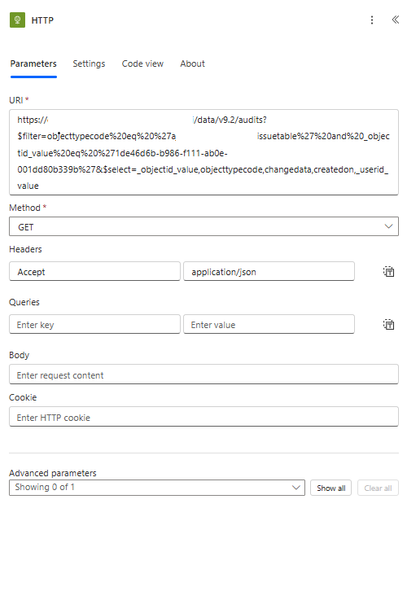
I am able to browse to this url directly from browser https://my365.crm9.dynamics.com/api/data/v9.2/audits?$filter=objecttypecode%20eq%20%27myissuetable%27%20and%20_objectid_value%20eq%20%271de46d6b-b986-f111-ab0e-001dd80b339b%27&$select=_objectid_value,objecttypecode,changedata,createdon,_userid_value but when i use the invoke http from power automate it says unauthorized. i am using the same account. What is the issue is there anything i need to do so that it works?57Views0likes0CommentsSharePoint Multi-geo: accessing a user's home-geo custom SharePoint properties from a different geo
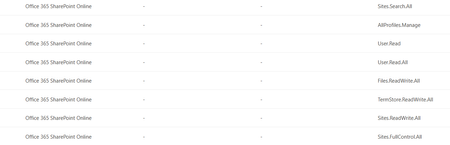
Setup M365 tenant, multi-geo (NAM + EMEA). SharePoint custom user profile properties are synced only in the user’s home geo (their Preferred Data Location). SPFx webparts running on the NAM tenant, using PnP/SP or AadTokenProvider. Goal: when an EMEA user opens a NAM page, read their SharePoint custom properties from the EMEA tenant. Issue 1 — Can’t read profile properties from a different geo-tenant What I’m doing const sp = spfi(emeaTenantUrl).using(SPFx(webpartContext), SPFxToken(webpartContext)); const result = await sp.profiles.getPropertiesFor(basicInfo.data.LoginName); Error Access Denied: This application does not have the required permissions to access profile information. The core problem — token is missing my approved scopes Approved Scopes in webApiPermissionManagement (Office 365 SharePoint Online) in SharePoint Admin Center: Sites.Search.All, AllProfiles.Manage, User.Read, User.Read.All, Files.ReadWrite.All, TermStore.ReadWrite.All, Sites.ReadWrite.All, Sites.FullControl.All. Token issued for the SharePoint resource only contains: Files.ReadWrite.All, M365BillingPlatform.Read.All, Sites.FullControl.All, Sites.ReadWrite.All, TermStore.ReadWrite.All. So AllProfiles.Manage, User.Read.All, Sites.Search.All are not in the token and an unexpected M365BillingPlatform.Read.All is. Also tried calling the SharePoint REST API directly with a token from AadTokenProvider → same Access Denied. Questions Why is the issued token missing my approved scopes (and where is M365BillingPlatform.Read.All coming from)? Is there a supported way to read a user’s SharePoint profile custom properties from a different geo-tenant from an SPFx webpart? Approved Scopes in Admin center Issue 2 — Search query template {User.*} properties not resolving cross-geo What I’m doing A SharePoint Search query in the webpart uses a query template that pulls custom user properties dynamically: {|owstaxidmetadataalltagsinfo:{User.customProperty1}} OR {|owstaxidmetadataalltagsinfo:{User.customProperty2}} The SP object is created the same way as in Issue 1. What’s not working When an EMEA user loads the webpart on the NAM tenant, the {User.*} tokens don’t resolve — the query modification shows the static property name itself instead of the user’s values from EMEA. Question How do I get the query template to resolve {User.customProperty} using the user’s home-geo (EMEA) profile values?75Views0likes0CommentsSharePoint @mentions limited to random users
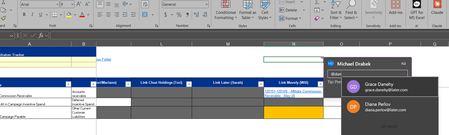
Hi everyone, We are hitting a strange issue with SharePoint @mentions where an affected user can only tag themselves and a few random employees, instead of the actual members of the site. I’ve attached a screenshot of what they see when trying to tag colleagues. The Details: The Glitch: Typing @ only populates a tiny fraction of the directory (see screenshot). The affected user (Michael Drabek) can tag me and himself, but none of the other 14 active members of this 16-member SharePoint site. Cross-Testing: Another user on that exact same shared site is able to tag Michael successfully, so his profile is discoverable to others—he just can't see them. Environment: This happens identically on both the web browser and desktop apps. Verified: Michael has the correct SharePoint site permissions and full Microsoft 365 licensing. It feels like a hidden Entra or User Profile Service sync glitch rather than a standard permissions issue, as his directory lookup seems completely restricted. Has anyone seen the person-picker index get broken like this for a single user? Any tips would be appreciated. Thanks!48Views1like0Comments
SharePoint Learning Resources
I've been a SharePoint Trainer for 15 years, and have created lots of custom materials. I'm assessing whether there is a gap in SharePoint learning resources that I can fill. I've found lots of how-to articles, but few why-to (or why-not-to), best practices, and a lack of site creation support from IA to launch. Am I missing something, or is something missing from the marketplace? Would you like to read a why-to and best practices book for no-code sites that provide high business value? Would you be interested in a subscription to a help centre to outsource your in-house training? Is your key audience end users (how to find & follow things, navigate libraries, etc.), content contributors (best practices for documents/pages), site owners (site design, structured content presentation), or your corporate trainers (train the trainers)? How many end users or site developers would you anticipate licensing? Are you a site owner, corporate trainer, or other role? What pain points are you facing that you would love new resources for? Thank you, Carole87Views2likes0CommentsSharePoint permission change notifications not working
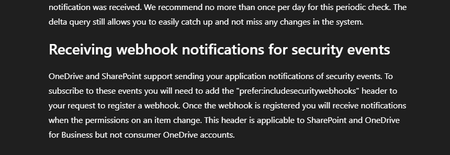
Problem: Trying to get Microsoft Graph change notifications when permissions change on SharePoint/OneDrive drive items (sharing, inheritance breaks, access grants/revocations). Using Prefer: includesecuritywebhooks on subscription creation as documented subscription creates successfully, but the header appears to be silently ignored (notificationQueryOptions is always null in response, Preference-Applied header is always empty). What works: Regular content change notifications fire fine. What doesn't: Zero security notifications on any permission change. Subscription request: POST https://graph.microsoft.com/v1.0/subscriptions Prefer: includesecuritywebhooks { "changeType": "updated", "notificationUrl": "https://...", "resource": "drives/{driveId}/root", "expirationDateTime": "2026-06-12T00:00:00Z" } Permissions (all with admin consent): Files.Read.All, Files.ReadWrite.All, Sites.Read.All, Sites.FullControl.All, Directory.Read.All Already tried: Both v1.0 and /beta endpoints same result Every relevant permission combination But the official document says it should work: Link to documentation: https://learn.microsoft.com/en-us/onedrive/developer/rest-api/concepts/scan-guidance?view=odsp-graph-online#receiving-webhook-notifications-for-security-events Any working example or confirmation of current status would be extremely helpful. Happy to share more details or test specific configurations.74Views0likes0Comments
SharePoint 2019 Crawler not working on one site.
I have a 2019 on prem SharePoint server running. I've not had an issue with crawling until recently. For some reason all crawling quit working after a reboot of the server so I just deleted the Search Service app and created a new one. No issues doing that. After assigning permissions and making sure the service was running. I checked the Crawl log. We have 3 SharePoint Sites that are listed in the Content Sources for Crawling. http://servername:2121 - site2 http://servername:17195 - mysites http://servername:39064 - site1 Crawling works perfect for site2 and mysites. The issue is with site1 I get the following warning for it Item not crawled due to one of the following reasons: Preventive crawl rule; Specified content source hops/depth exceeded; URL has query string parameter; Required protocol handler not found; Preventive robots directive. ( This item was deleted because it was excluded by a crawl rule. ) I've searched and tried just about everything I can find. Site1 and Site2 are almost identical so I don't understand why it works for one but not the other. I can browse to either just fine. Any suggestions on what else to look at? Things I've Tried: I made sure there are no crawl rules I created a new crawl rule to include the affected URL No Robots.txt file at all Created new content source with just site1 in it to test104Views0likes0CommentsGet SharePoint list attachment images in Power BI
I have a SharePoint Online list with attachments. I am connecting to this list as a data source in Power BI using the SharePoint Online List option. When the list loads in Power BI, the Attachments column shows the number of attachments rather than a Table that can be expanded to get the URL. There are multiple YouTube videos that demonstrate this but I am not seeing a table. Is this a change in functionality? Is there another approach. I have also seen option of using the SharePoint Folder connector but this works only for document libraries. Any help will be greatly appreciated. Thanks in advance.86Views0likes0Comments
Modern Employee Directory
Hi Team I’ve built a Modern Employee Directory web part and would really appreciate your feedback and suggestions for new features. It’s an open-source project. Feel free to share your thoughts in the GitHub Discussions section. If anyone is interested in collaborating, you’re more than welcome to join and contribute. https://www.wrvishnu.com/modern-employee-directory-sharepoint/58Views0likes0CommentsNEW SharePoint & Purview Feature: Protect Files After Download!
🚀 New in SharePoint + Microsoft Purview: Extend Permissions Beyond the Cloud One of the biggest challenges in Microsoft 365 has always been this: 👉 What happens to your data when it leaves SharePoint? With this new feature, Microsoft finally closes that gap. You can now use Sensitivity Labels to extend SharePoint permissions to downloaded files — meaning protection doesn’t stop when a document is downloaded. 🔐 Here’s what that enables: Files remain protected even outside SharePoint Access is still enforced based on SharePoint permissions Changes in permissions are reflected in real-time Access can be revoked — even after download 💡 In other words: Your SharePoint security model now travels with the file This is a huge step forward for: ✅ Data Loss Prevention (DLP) ✅ Compliance & Governance ✅ Secure external collaboration ⚠️ Especially relevant if you're working with: Sensitive documents, external sharing, or regulated environments. 📖 I’ve just published a video where I break it all down: 👉 https://youtu.be/G6XvyU5GAqk Curious to hear your take: 👉 Would you trust this model over traditional access control? 👉 Where do you see the biggest impact in your organization? #Microsoft365 #SharePoint #MicrosoftPurview #DataProtection #CyberSecurity #Compliance #InformationProtection #M365 #ITSecurity #CloudSecurity103Views0likes0Comments
Populating word template stored in Organizational Asset Library (OAL) using Power Automate
The objective is to implement an automated document generation solution that leverages the Microsoft SharePoint Organizational Asset Library (OAL) to provide users with standardized Word templates. These templates must dynamically self-populate with real-time identity data (Name, Email, Job Title, and Department, for now which can be extended) sourced from Microsoft Entra ID (formerly Azure Active Directory) upon instantiation. In other words, how to use a Word Template stored in Microsoft SharePoint Organizational Asset Library to populate with his or her own user information like Name, Email, Job Title, Department etc getting fetched from Azure Active Directory, whenever that user opens the template by going to File -> New -> Selecting Organization Tab and selecting the template. How can we populate this template using Power Automate?121Views0likes0Comments404 error downloading file versions via CSOM (SharePoint 2013 On-Prem)
I need to download historical versions of a document from a SharePoint 2013 On Premises document library using a C# console application, so I can migrate them chronologically to SharePoint Online along with their column properties. While downloading the current latest version works perfectly, downloading older historical versions always fails. Standard CSOM methods fail because ListItem.Versions does not exist in the SharePoint 2013 v15 SDK. Reverting to direct HTTP endpoints consistently throws an error. Here is the exact exception message I receive: System.Net.Http.HttpRequestException: Response status code does not indicate success: 404 (Not Found). Below is the minimal reproducible code example demonstrating how the connection is initialized, how properties are loaded, and where the download fails on historical versions: using System; using System.IO; using System.Net.Http; using Microsoft.SharePoint.Client; using SP = Microsoft.SharePoint.Client; class Program { static void Main() { string siteUrl = "https://example.com"; using (ClientContext sourceCtx = new ClientContext(siteUrl)) { sourceCtx.Credentials = System.Net.CredentialCache.DefaultCredentials; List sourceList = sourceCtx.Web.Lists.GetByTitle("MyLibrary"); CamlQuery query = CamlQuery.CreateAllItemsQuery(); ListItemCollection items = sourceList.GetItems(query); sourceCtx.Load(items, ic => ic.Include( item => item.Id, item => item.File, item => item.File.Versions, item => item.File.ServerRelativeUrl )); sourceCtx.ExecuteQuery(); foreach (ListItem item in items) { if (item.File == null || !item.File.Exists) continue; foreach (FileVersion ver in item.File.Versions) { string absoluteVersionUrl = siteUrl.TrimEnd('/') + "/" + ver.Url.TrimStart('/'); using (var handler = new HttpClientHandler { Credentials = sourceCtx.Credentials }) using (var client = new HttpClient(handler)) { client.DefaultRequestHeaders.Add("X-FORMS_BASED_AUTH_ACCEPTED", "f"); client.DefaultRequestHeaders.Add("User-Agent", "Mozilla/5.0"); // CRITICAL FAILURE HERE: Always throws 404 Not Found HttpResponseMessage response = client.GetAsync(absoluteVersionUrl).Result; response.EnsureSuccessStatusCode(); using (Stream fileStream = response.Content.ReadAsStreamAsync().Result) { // Upload logic to SPO goes here } } } } } } The version URL returned inside the property matches the following virtual folder layout format: _vti_history/512/Folder/Doc.docx My specific environment queries are: Why does navigating to the absolute history folder URL over an authenticated HttpClient trigger a 404 Not Found error in SharePoint 2013 on premises, even though the path token is extracted directly from the version url metadata property? Is there an alternative legacy REST endpoint routing structure or an alternative file stream extraction method available in the SharePoint 2013 (v15) SDK that allows an external client application to fetch older version binaries successfully?83Views0likes0Comments







Events

in 1 day
💡Copilot, Microsoft 365 & Power Platform product updates call concentrates on the different use cases and features within the Microsoft 365 and in Power Platform. Call includes topics like Microsoft...
Tuesday, Sep 15, 2026, 08:00 AM PDTOnline
0likes
2Attendees
0Comments

in 2 days
💡 Power Platform monthly community call focuses on different extensibility options for builders, makers and developers within the Power Platform. Typically demos are from our awesome community membe...
Wednesday, Sep 16, 2026, 08:00 AM PDTOnline
0likes
2Attendees
0Comments
Recent Blogs
- SharePoint AI page authoring is getting an updated experience with on-canvas selection. Authors can select a web part or section, describe the intended change in natural language, and review the...Sep 10, 2026907Views0likes0Comments
- SharePoint News can now be cross-posted directly to a Viva Engage storyline or community. The original post retains its full SharePoint experience, while comments, replies, and reactions stay sy...Sep 03, 20261.9KViews10likes9Comments