usage
899 Topics
SPMT Needs True Mirror Mode and Resource Throttling
Subject: SPMT Needs True Mirror Mode and Resource Throttling SPMT incremental migration does not behave like a true synchronization or mirror operation. New and modified files are copied, but deleted, renamed, or moved files are not reconciled at the destination, often resulting in orphaned content and duplicates. Microsoft has previously confirmed this as expected behavior. Administrators have had reliable mirror-style functionality available since the circa 1990s through tools such as Robocopy. In comparison, SPMT's incremental migration capability feels incomplete for modern enterprise migration scenarios. Requested enhancements: Optional mirror mode similar to robocopy /MIR Delete destination content that no longer exists in the source Detect and process renames Detect and process moves Pre-migration analysis and dry-run reporting Configurable safeguards for deletions Additionally, SPMT appears to consume storage resources aggressively. During migrations, disk I/O activity can become saturated and disk idle time can fall close to zero regardless of migration batch size. This behavior can negatively impact file servers and production workloads. Requested performance controls: I/O throttling CPU throttling Concurrency controls Bandwidth limits Scheduling and business-hours policies Dynamic backoff based on source-server load Current behavior requires administrators to perform manual cleanup and reconciliation after incremental migrations while also managing significant infrastructure impact during migration runs. A modern migration tool should provide both synchronization intelligence and resource governance controls. Frankly, from an infrastructure perspective, your complaint about the I/O behavior is probably the stronger one. Many migration tools deliberately maximize throughput, but not providing an obvious way to cap I/O, threads, or overall system impact can be problematic in production environments. The lack of mirror semantics combined with aggressive scanning/copy behavior is what tends to frustrate admins the most.90Views0likes0Comments
Recycle Bin and Site Content Hidden for Site Members and Site Visitors
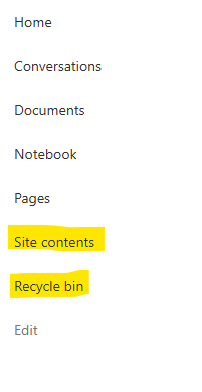
I posted this before but made a mistake with my write up, so I am reposting. I have a requirement that the Recycle bin and Site Contents should be be hidden from the Site Members and Site Visitors. Please how can I achieve this because the Server Infrastructure activation is not working for me. Any workarounds? Please help254Views0likes1Comment
Custom Formatter for Read-Only Fields conditional based on other columns
Hello! Does anyone know if it's possible with the fieldsettings, readonly formatting, to make it conditional based on a Person field? It's a multi people field if that makes a difference? I ideally want to make certain fields read only based on who is viewing it (without having to use a Power App customised form!). This is what I want (but I know the syntax is likely all wrong!) but not sure if it's possible to use an IF statement with boolean statements? { "sections": [ {} ], "fieldsettings": [ { "name": "Comments", "readonly": "=if([$People.email] == me, false, true)" } ] }373Views0likes2Comments
SharePoint Permissions Management
Over the last 3 years of managing permissions across a suite of sites, I have uncovered more new issues with the way SharePoint permissioning is designed at every turn. A few examples, before the question: If I "Share" a file or folder somewhere on the site (breaking permissions inheritance), it is very inconvenient to find it again. If I "copy link" in this one particular way, permissions inheritance is broken. When looking at site-level permissions, I see site-level permissions groups, but there could be hundreds of other users who have been added to my site(s) without my knowing. If I want to reset permissions in an area (set of folders or library), I have to do it file-by-file or folder-by folder. If I want to get an excel snapshot of - anything really - IT has to pull it and it takes a couple days. Not to mention the permissions interface is incredibly clunky. All-in-all, there seem to be a million ways to break permissions inheritance, creating an access tracking and security nightmare. AND there's no easy way to truly see and understand who has access to what or what is broken, without spending hours with IT to pull a bunch of narrow-visibility reports. So my question is: what is the best way to navigate full permissions visibility? Am I doing something wrong? Is anyone else experiencing these issues? We have resorted to having a very strict "no outsides besides a few exceptions" policy and only managing permissions at the site-level, which really hampers on the collaboration benefits that SharePoint is trying to enable. It is also very administratively intensive. One of the benefits to SharePoint is that users don't really need to understand how it works to use it, but that's becoming less and less true with the increasing lack of security we feel in the platform.527Views3likes4Comments
SHAREPOINT online performance monitoring tool, audit, backup and migration
Hi, I am looking for a tool forSHAREPOINT online which does performance monitoring ( to track details of slow pages, user hits etc.) tool, audit, backup and custom classic publisher sites migration. Pls suggest.2.4KViews0likes8Comments
SharePoint Template Gallery
Hey everyone, I'm running into an issue with the new SharePoint site page template gallery. Some of my templates are showing up consistently, while others appear intermittently — even though all the metadata is identical across them. I've been troubleshooting but can't pinpoint what's causing the inconsistency. For context: I have over 100 templates in the gallery. A template I just created is displaying fine, but one I made last week isn't showing up at all, so I don't think it's a template count issue. Any insights would be really appreciated!Solved248Views1like3CommentsDynamic Mandatory Fields
In a SharePoint library, I have folders which are = a. Admin b. Events c. Furniture and Moves d. Janitorial and Maintenance e. Parking and Transportation f. Shipping and Receiving g. Supplies and Equipment h. Waste and Recycling I have Meta data across the library whose data type are all choices and are: a. Document Type = Contract, Financial, planning b. Building = Gym, Garage, Heating c. Asset Category = Office, Playground d. Fiscal Year = FY23, FY24, FY25, FY26, FY27 e. Vendor = Maple Leaf, Canadian Tire, Home Depot f. Status = Active, Pending, Not Active g. Retention Label = 3 years, 5 years h. Service Type = Admin, Events, Furniture and Moves, Janitorial and Maintenance, Parking and Transportation, Shipping and Receiving, Supplies and Equipment, Waste and Recycling Service Type and Retention Label are mandatory fields, with the Rule below for all the files in the various folders: IF Folder Name = Admin, then Service Type = Admin and Retention Label = 5 years; the mandatory fields should be Document Type, Status and Fiscal Year IF Folder Name = Events, then Service Type = Events and Retention Label = 3 years; the mandatory fields should be Document Type, Status and Fiscal Year, Building and Vendor IF Folder Name = Furniture and Moves, then Service Type = Furniture and Moves and Retention Label = 3 years; the mandatory fields should be Document Type, Status and Building IF Folder Name = Janitorial and Maintenance, then Service Type = Janitorial and Maintenance and Retention Label = 3 years; the mandatory fields should be Document Type, Status and Fiscal Year IF Folder Name = Parking and Transportation, then Service Type = Parking and Transportation and Retention Label = 3 years; the mandatory fields should be Document Type, Status and Fiscal Year IF Folder Name = Shipping and Receiving, then Service Type = Shipping and Receiving and Retention Label = 3 years; the mandatory fields should be Document Type, Status IF Folder Name = Supplies and Equipment, then Service Type = Supplies and Equipment and Retention Label = 3 years; the mandatory fields should be Document Type, Status and Fiscal Year IF Folder Name = Waste and Recycling, then Service Type = Waste and Recycling and Retention Label = 3 years; the mandatory fields should be Document Type, Status and Vendor I have used Column Default Value Settings for SharePoint to display Auto-Display the Service Type and Retention Label, but I cannot seem to perform the conditional mandatory fields using Validations setting for the other requirements. Please help369Views0likes1Comment
SharePoint: site Quota threshold exceeded, but no notifications received
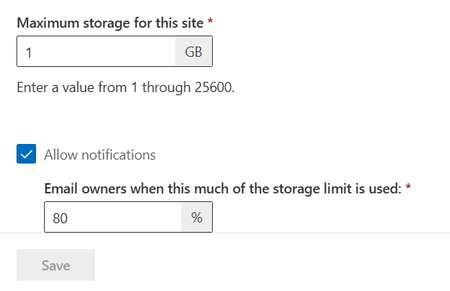
I am looking at setting site quotas across our tenancy, to control storage growth by prompting users to think about what they're uploading, and whether old files can be deleted. I set a low quota (1GB) on a test site, with "Allow notifications" checked, and a threshold set. I then stared copying files to the site. The site is currently shown to be at 87% of its quota in SP Admin centre, and above 98% according to the storage metrics, with the threshold set at 80%. If I go to Site Settings, I see a very narrow banner informing me that the site is out of storage space. This is not displayed anywhere else, though, I (as site owner and primary site admin) haven't received any email notifications, nothing is shown outside the settings pages - I can upload another file with no warning. It is now over 72 hours since I started the testing. If site owners need to go to a settings page to see a warning, it is unlikely to achieve the desired effect and will be disruptive to users when sites do unexpectedly run out of space. Is there something else we can (or need to) do to enable notifications to site owners?220Views0likes1Comment