apis
552 Topics
SPFx Web Part Not Visible for External User in Client Tenant
Hi everyone, One of our team members has developed an SPFx web part that we have deployed and published in our client's SharePoint tenant using a service account. The web part is working as expected when we access the client tenant using the service account. However, when I access the same client tenant using my external/guest user account, I cannot see or use the SPFx web part. Current setup: The SPFx web part was developed by one of our team members. The solution has been deployed and published in the client's SharePoint tenant using a service account. The service account can see and use the web part successfully. My account has also been added to the client tenant as an external/guest user. However, when I access the same SharePoint site using my external account, the SPFx web part is not visible/available. I would like to understand whether this is expected behavior for SPFx web parts when accessed by external/guest users, or if we are missing some configuration. Could this be related to SharePoint permissions, Entra ID guest-user settings, the App Catalog, API permissions, or the SPFx solution deployment configuration? Are there any specific permissions or tenant-level settings that we should check to allow external users to access the SPFx web part? Is there any Microsoft-side restriction that prevents external/guest users from accessing SPFx web parts? Any guidance on what could be causing this issue and how we can troubleshoot or resolve it would be greatly appreciated. Thanks in advance!52Views0likes0Comments
Invoke-PnPSiteTemplate AND Set-PnPDefaultColumnValues error since this morning
Since this morning we experience a blocking issue with Invoke-PnPSiteTemplate cmdlet which is failing as soon as there are lists included in a pnp site template (which is pretty much every template in our case). We see this behaviour on all of our own tenants and all customer tenants. This is a very important part of our provioning engine so it's blocking all new sites & teams in all tenants. Context We have a provisioning engine that runs in Azure. It automatically creates SharePoint-sites and applies a configured PnP site template (either .pnp or .xml) Expected behavior Normally, the template gets applied correctly without any error Actual behavior An error occurs in our logging, also visible when reproducing this locally: Error applying default column values Microsoft.SharePoint.Client.ServerException: Exception of type 'Microsoft.SharePoint.Client.ServiceUnavailableException' was thrown. Microsoft.SharePoint.Client.ClientRequest.ProcessResponseStream(Stream responseStream) StackTrace: at Microsoft.SharePoint.Client.ListExtensions.SetDefaultColumnValuesImplementation(List list, IEnumerable1 columnValues) at Microsoft.SharePoint.Client.ListExtensions.SetDefaultColumnValues(List list, IEnumerable1 columnValues, Boolean overwriteExistingDefaultColumnValues) at PnP.Framework.Provisioning.ObjectHandlers.ObjectListInstance.ProvisionObjects(Web web, ProvisioningTemplate template, TokenParser parser, ProvisioningTemplateApplyingInformation applyingInformation) at PnP.Framework.Provisioning.ObjectHandlers.SiteToTemplateConversion.ApplyRemoteTemplate(Web web, ProvisioningTemplate template, ProvisioningTemplateApplyingInformation provisioningInfo, Boolean calledFromHierarchy, TokenParser tokenParser) at CallSite.Target(Closure , CallSite , Object , Object , Object , Object ) Steps to reproduce behavior Create a PnP template Apply the template, using invoke-pnpsitetemplate -Path "..." We also see the same error happening when executing this cmdlet: Set-PnPDefaultColumnValues -List "Documents" -Field Status -Value "MyDefaultValue" -Connection $pnpConnTargetSite So it seems related... anyone getting the same issues?798Views6likes10Comments
SharePoint Multi-geo: accessing a user's home-geo custom SharePoint properties from a different geo
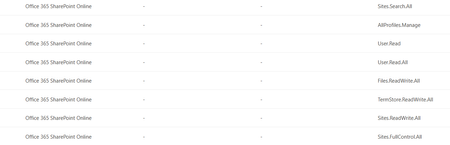
Setup M365 tenant, multi-geo (NAM + EMEA). SharePoint custom user profile properties are synced only in the user’s home geo (their Preferred Data Location). SPFx webparts running on the NAM tenant, using PnP/SP or AadTokenProvider. Goal: when an EMEA user opens a NAM page, read their SharePoint custom properties from the EMEA tenant. Issue 1 — Can’t read profile properties from a different geo-tenant What I’m doing const sp = spfi(emeaTenantUrl).using(SPFx(webpartContext), SPFxToken(webpartContext)); const result = await sp.profiles.getPropertiesFor(basicInfo.data.LoginName); Error Access Denied: This application does not have the required permissions to access profile information. The core problem — token is missing my approved scopes Approved Scopes in webApiPermissionManagement (Office 365 SharePoint Online) in SharePoint Admin Center: Sites.Search.All, AllProfiles.Manage, User.Read, User.Read.All, Files.ReadWrite.All, TermStore.ReadWrite.All, Sites.ReadWrite.All, Sites.FullControl.All. Token issued for the SharePoint resource only contains: Files.ReadWrite.All, M365BillingPlatform.Read.All, Sites.FullControl.All, Sites.ReadWrite.All, TermStore.ReadWrite.All. So AllProfiles.Manage, User.Read.All, Sites.Search.All are not in the token and an unexpected M365BillingPlatform.Read.All is. Also tried calling the SharePoint REST API directly with a token from AadTokenProvider → same Access Denied. Questions Why is the issued token missing my approved scopes (and where is M365BillingPlatform.Read.All coming from)? Is there a supported way to read a user’s SharePoint profile custom properties from a different geo-tenant from an SPFx webpart? Approved Scopes in Admin center Issue 2 — Search query template {User.*} properties not resolving cross-geo What I’m doing A SharePoint Search query in the webpart uses a query template that pulls custom user properties dynamically: {|owstaxidmetadataalltagsinfo:{User.customProperty1}} OR {|owstaxidmetadataalltagsinfo:{User.customProperty2}} The SP object is created the same way as in Issue 1. What’s not working When an EMEA user loads the webpart on the NAM tenant, the {User.*} tokens don’t resolve — the query modification shows the static property name itself instead of the user’s values from EMEA. Question How do I get the query template to resolve {User.customProperty} using the user’s home-geo (EMEA) profile values?135Views0likes0Comments
Clarification on SharePoint Macro Consent Flow and Permissions
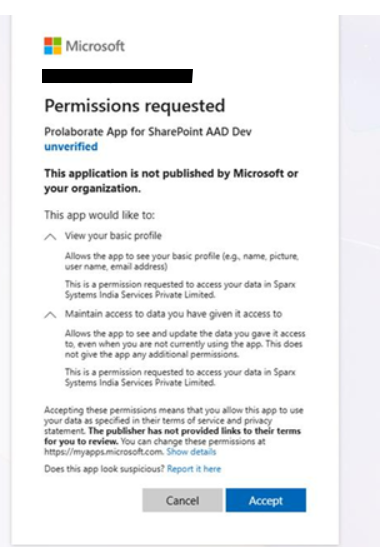
Hi Team, We have a customer using SharePoint in a secure environment. While configuring the Prolaborate SharePoint Macro on their site, a consent popup is displayed during the approval process. Previously, our macro implementation used the Admin Consent flow. Based on the customer’s security and approval requirements, we have modified the consent to use the User Consent flow instead. The customer has requested additional clarification regarding the consent process. Specifically, they would like to understand: The exact API calls triggered for these two consents View your basic profile Maintain access to data you have given it access to The permissions being requested from Microsoft Graph or SharePoint Whether the application requests any tenant-wide or high-privilege permissions Whether minimal permissions such as Sites.Selected can be used instead of broader scopes Current concern: The customer feels the current permission request is too broad for approval within their secure environment (Banking customer). Reason: Their internal approval process requires clear visibility into the exact API and permission scopes being requested, as different permissions are reviewed and approved by different internal teams (for example, User.Read is managed by the Identity team). From our implementation side, we are using only custom APIs and are not directly calling Microsoft Graph APIs. This information will help us provide a clear response to the customer and support their internal approval process.295Views0likes1CommentRetrieve Term Navigation Properties using REST API
I've set up a Term set in the global term store and enabled Navigation so I can add URLs for each of the Terms. Note that I'm not going to use the Term set navigation in my site - it's only there to try and retrieve it from my SPFx webpart. Note that I can get all the terms under my Term set - just not the navigation properties. Below is what I'm trying to get the navigation properties: https://TENANT.sharepoint.com/_api/v2.1/termStore/sets/TERMSETGUID/terms/TERMGUID/properties But I get: "The property 'properties' is null or does not exist". Also, expand doesn't seem to work at all. I'm not looking to use pnpjs or even graph if I can help it. Any ideas welcome.945Views2likes8Comments
Is Creating Multiple ClientContext Instances Efficient in CSOM for one Site Url?
Is it efficient to create a new ClientContext for each site URL and for each query, such as getting site users, lists, groups, and group members from the Web object? These queries can return a very large number of items, and CSOM does not support paging when retrieving data from Web properties. Because of this, there is a risk of memory issues. In this case, is creating multiple ClientContext objects a good approach? Also, how does ClientContext work internally, and how does it handle memory and performance?95Views0likes0CommentsAudience Ids returning null | SharePoint REST API
Hi, On hitting the SharePoint REST API in the endpoint "_api/Web/Navigation/GetNodeById(2019)/AudienceIds", I am getting a NULL response as seen below But I have added SharePoint groups as audience on the below Can you look into the above matter and help ? Regards, Nebu Thomas Mathew545Views0likes1Comment
Origin and Synchronization of User Profile Properties in SharePoint Online
Hi everyone, I’m trying to understand exactly where the User Profile properties in SharePoint Online come from and how (or if) they are synchronized from Microsoft Entra ID (formerly Azure AD). I’ve extracted a complete list of the properties I see in my tenant, for example: AboutMe AccountName ADGuid Assistant CellPhone Country DelveFlags Department Fax FirstName HomePhone LastName Manager msOnline-ObjectId Office ... SPS-Responsibility SPS-Interests SPS-PictureExchangeSyncState SPS-UserPrincipalName WorkEmail WorkPhone I would like to understand: Which of these come from Microsoft Entra ID, Which are automatically synchronized to the User Profile Application (UPA), And which are local SharePoint or Delve properties, not connected to Entra. So far, I’ve only found this official documentation: About user profile synchronization in SharePoint Online However, it only lists a limited subset of properties (“The following Microsoft Entra user attributes are synced to the UPA…”), and it does not cover all the properties present in the UPA schema. I’m looking for a more complete or up-to-date reference — or at least an official explanation as to why there isn’t a public, full mapping between Entra ID and UPA. Does anyone know if there is an official complete list or a way to verify the actual source of each property (Entra ID, Exchange, Delve, local SharePoint, etc.)? Thanks in advance for any clarification or useful resources!346Views0likes3Comments
Cannot find Sharepoint Online API endpoints
Hi Team, My team is working on SharePoint Online, and are not able to find APIs related to the following entities: 1. All List APIs 2. All files and folders APIs 3. All Link APIs 4. All Event APIs 5. All Page APIs. When we say 'all', we mean endpoints to create, update, get, delete and perform other operations on the above listed entities. We found a few APIs related to files and folders here - https://learn.microsoft.com/en-us/sharepoint/dev/sp-add-ins/working-with-folders-and-files-with-rest It would be very helpful if you could share rest of the endpoints with us. Thank you.240Views0likes2CommentsSharepoint SitePage
Using Graph API . I want to access a specific Sitepage , I need to know the Sitepageid, based on /pages it will return all Page id within the Site, Is there a way to get the Sitepage id directtly based on the Sitepage name.aspx ? I want to detect files changes on that Sitepage and be able to downlaod the files from the sitepage ? How can we do that using Graph API I know we can detect files changed at the drive level within a site. I am looking for Sitepage can we do the same ?what API can be used ?85Views0likes0Comments