microsoft365
290 Topics
Hub Site association approval request fails with 403 Forbidden (previously working, regression)
Sites configured to require approval before joining our Hub Site are failing the association request with an HTTP 403 Forbidden error[browser DevTools Network tab}. This same workflow was functioning correctly as of [early August 2026]. Hub sites that do not require join approval continue to associate successfully — the failure is isolated specifically to the approval-required path. Steps to Reproduce As a site owner, go to Site Settings → Site Information (or Site Contents → hub association) on a site that is not yet associated with the hub. Attempt to associate it with [Hub Site URL], which has RequiresJoinApproval set to $true. Observe that the request fails immediately (or fails when the approver attempts to approve it — specify which point in the workflow fails). Repeat the same steps against a hub site that does not require approval — association succeeds without error. Expected Behavior The association request should be submitted and routed to the configured approver(s) for review, consistent with behavior observed as recently. Actual Behavior Request fails with HTTP 403 Forbidden. [browser DevTools Network tab - attached the HAR file for reference] Error Details HTTP Status: 403 Forbidden [browser DevTools Network tab - JoinHubSite(@v1)?@v1] Troubleshooting Already Performed Confirmed association without approval works (isolates the issue to the approval workflow specifically)33Views0likes0Comments
I don't want 100 different SharePoint sites. How to create private teams w/o a new site?
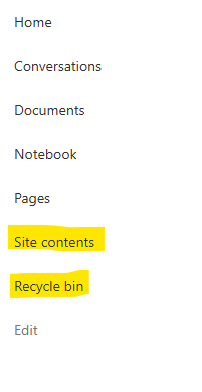
Guys. WTF. I've inherited a problem where a company of 50 people has 100 sharepoint sites - because users created different Teams for different projects, and Microsoft makes it incredibly opaque what this actually means. Now we have 100 SharePoint sites, many of which are unused, but all of which appear in the list of sites in 365AC. The structure we WANT is 1 Sharepoint site for our 1 org, but multiple locations within that site, and multiple groups for multiple projects. I THOUGHT what could work was converting the excess Teams into Private Channels. But I have now learned that private channels ALSO create SharePoint sites, because _______. Most confusingly, all of these sharepoint 'sites' DO exist within our main SharePoint website - they're just pages (but not 'pages') pretending to be a fresh sharepoint website. This confuses the **** out of people, the way they've redefined what a 'site' is, what a 'team' is, etc. This is genuinely hot garbage, and it's suddenly clear to me why people always push back on using SharePoint over OneDrive. Recommendations for... not having this disaster? Making a structure that is intuitive and doesn't redefine what a site and page are, and allows you to have private locations for management or projects, but DOESN'T create a 'site' within the main 'site', with it's OWN 'documents', and it's own 'Notebook' (which isn't a document) and it's own 'Conversations' (which are NOT conversations), and it's own 'pages'? I don't work with dumb people - these are very technical people. But even our main SharePoint guy is mystified by these interactions. Does it make more sense in another language? If anyone at Microsoft is reading - the english term 'site', comes from the word 'website', which generally refers to a distinct web service with a distinct domain name. These contained different webPAGES.. When websites started existing off a shared domain name, like company1.sharepoint.com and company2.sharepoint.com - this confused people, but they put up with it, because it was relatively easy to explain the tech behind this - having websites under a single site, that wasn't too hard to understand. But what SharePoint seems to do, is extend this practice into absolute hysteria, where a particular webPAGE of a webSITE is ALSO a site, but also is a TEAM, or COULD be a CHANNEL. OR it could be a PAGE - WHO knows? If it's a TEAM, that TEAM could have CONVERSATIONS, which aren't actually Team Conversations - they're EMAILS. But this is fine, because all CONVERSATIONS of a TEAM done in TEAMS are actually stored as EMAILS so really those, CONVERSATIONS should be CONVERSATIONS... So why aren't these conversations in Teams between a Team that are stored as Emails not showing in the Conversations which show emails within that Team? aefggaddadsfasd728Views4likes7Comments
PowerPoint Brand Images: folders appear as tabs, but images only show under “All”
Hi, I’m testing PowerPoint Brand Images with a SharePoint Organizational Asset Library and I’m seeing unexpected behaviour with folders. The image library is registered correctly as an ImageDocumentLibrary. PowerPoint detects the library and all images are visible under All. I created several first-level folders in SharePoint, for example: Photos Icons Logos Test PowerPoint correctly reads these folders and shows them as separate tabs in Insert > Pictures > Brand Images. The issue: the tabs remain empty. For example, I created a completely new folder called Test directly in SharePoint and uploaded a new PNG directly into that folder. Result: Test appears as a tab in PowerPoint the PNG appears under All the PNG does not appear under Test I see exactly the same behaviour in PowerPoint Desktop and PowerPoint for the web. I have already checked: OrgAssetType: ImageDocumentLibrary Private CDN: enabled library registered as Private CDN origin CopilotSearchable: enabled SharePoint Online Management Shell: 16.0.27515.12000 PowerPoint Microsoft 365 Beta Channel, version 2609, build 16.0.20416.20004, 64-bit direct upload through SharePoint instead of OneDrive/File Explorer completely new folder and image manual reindexing of the SharePoint library So PowerPoint finds both the folder names and the images, but the folder-to-image relationship does not seem to work in Brand Images. Has anyone successfully used first-level SharePoint folders as working tabs in the new PowerPoint Brand Images experience? Is there an additional configuration step required, or could this be an issue with folder-scoped retrieval in the current rollout?356Views0likes2Comments
Recycle Bin and Site Content Hidden for Site Members and Site Visitors
I posted this before but made a mistake with my write up, so I am reposting. I have a requirement that the Recycle bin and Site Contents should be be hidden from the Site Members and Site Visitors. Please how can I achieve this because the Server Infrastructure activation is not working for me. Any workarounds? Please help254Views0likes1CommentSharePoint Permissions Management
Over the last 3 years of managing permissions across a suite of sites, I have uncovered more new issues with the way SharePoint permissioning is designed at every turn. A few examples, before the question: If I "Share" a file or folder somewhere on the site (breaking permissions inheritance), it is very inconvenient to find it again. If I "copy link" in this one particular way, permissions inheritance is broken. When looking at site-level permissions, I see site-level permissions groups, but there could be hundreds of other users who have been added to my site(s) without my knowing. If I want to reset permissions in an area (set of folders or library), I have to do it file-by-file or folder-by folder. If I want to get an excel snapshot of - anything really - IT has to pull it and it takes a couple days. Not to mention the permissions interface is incredibly clunky. All-in-all, there seem to be a million ways to break permissions inheritance, creating an access tracking and security nightmare. AND there's no easy way to truly see and understand who has access to what or what is broken, without spending hours with IT to pull a bunch of narrow-visibility reports. So my question is: what is the best way to navigate full permissions visibility? Am I doing something wrong? Is anyone else experiencing these issues? We have resorted to having a very strict "no outsides besides a few exceptions" policy and only managing permissions at the site-level, which really hampers on the collaboration benefits that SharePoint is trying to enable. It is also very administratively intensive. One of the benefits to SharePoint is that users don't really need to understand how it works to use it, but that's becoming less and less true with the increasing lack of security we feel in the platform.527Views3likes4CommentsSharePoint security broken between Microsoft 365 group and SharePoint group
Hi, Users are giving Member privilege through Teams, which gave them Member privilege in the Member SharePoint group. All good for 99% of the company. PROBLEM : I have 4 users without access to the SharePoint by this method. Security is not broken between Microsoft 365 Group and SharePoint group and is working fine for everybody else. Strangely, I saw that these 4 users are members of more than 1500+ Microsoft 365 Group, since they have been in the business for a long time and touch many projects here). I heard the limit is 7000 but they still have problem. Using the "Check permission", I got "None" for these people, but "Edit - Given through the XYZ Member group" for every other people in the Microsoft 365 Group. Any advice ? Thanks ! Patriccote304Views1like4CommentsFeedback : building the foundations for AI adoption with AI itself
I would like to share some feedback on the recent SharePoint Copilot improvements. As a consultant, trainer, and Microsoft MVP working daily with Microsoft 365 Copilot customers, I am genuinely impressed by the direction SharePoint is taking. For years, we have told customers that successful AI adoption requires strong information architecture, metadata, governance, content organization, and naming conventions. What I find particularly interesting today is that SharePoint Copilot is starting to help organizations build these foundations instead of simply depending on them. Features that assist with site creation, page creation, content organization, metadata generation, metadata enrichment, and automation significantly reduce the effort required to establish a well-structured SharePoint environment. This is a meaningful shift. AI is no longer only consuming well-organized knowledge. It is increasingly helping users create and maintain that organization. From my perspective, this may become one of the most important accelerators for Microsoft 365 Copilot adoption because many organizations struggle more with content structure than with AI itself.70Views0likes0Comments
Posting news article not sending notification to Teams activity feed
Hello I am trying to troubleshoot why when posting a news article it is not coming up in people's Teams activity feed. We have a hub of sites branded as the intranet but they are not news organisation sites. When news posts are published from any site in this hub, people are receiving notifications of news posts in their Teams activity feed. Eg. 'Joe Blogs published news'. On a stand alone communication site, I publish a news post, for the members of that site they do not receive the notification in their Teams activity feed. Some facts We are not using Viva Connections - so there is no home site (no Viva license yet) No sites are news organisation sites Internet sites are not necessarily followed (most people do not follow) so this has no bearing on receiving notification in Teams Notification settings in Teams are not disabled for test users What other steps can I take to investigate why this site not connected to the internet hub is not pushing notifications? It is one example of a site, there are many that do not push notifications as well. Thank you.185Views0likes2Comments
Storing and organizing performance review data - SharePoint lists or something else?
My team has been asked to move our performance review records from a legacy HR system into something within M365. Someone suggested SharePoint lists but I'm worried about permissions (employees shouldnt see each others reviews), workflow complexity, and whether it'll scale. We have about 400 employees. Is SharePoint the right tool for this or should I be looking at something purpose-built that integrates with our M365 environment?325Views1like4CommentsPrivate drafts stay private even after publishing
If one of our authors makes a private draft and sends it for approval for publishing, it remains private even after approving. The only workaround I can find is to create a new page from scratch, copy the content across and delete the private draft. Surely this isn't how it's meant to work? Am I doing something wrong or is something broken? We are using https://support.microsoft.com/en-gb/office/approval-flow-for-modern-pages-a8b2e689-d4a1-4639-8028-333c0ece30d9.1.2KViews1like4Comments