sharepoint server
2079 Topics
Did MS disable access to SharePoint through File Explorer today?
Just prior to 1:00 PM Eastern today, my entire company lost the ability to access our SharePoint server through File Explorer - in unison. Our IT dept. claims that MS has been threatening to disable the feature for a while. But I'm not finding any alerts, questions, or discussions about it anywhere online; and we can't be the only ones who would have noticed if this is a Windows-wide change.275Views0likes1Comment
Will SharePoint patch update break all Nintex Workflow instances?
Dear Folks looking for your help based on your experience. In my case I have a production SharePoint 2019 environment which is EOL, we were in process to implement another system well ahead based on business users requirements; however, it got delayed from the planned timeline. In continuation to EOL we have Nintex for SharePoint which is also EOL and there is no way to procure new licenses for it. I want to check if someone have patched (new patch released in Aug 2026) SharePoint when its EOL and Nintex production licenses are expired without failing the existing or new workflow instances. Currently our workflows in production are working fine without giving error from Nintex about expired license; however, I seen this in our test environment where nothing is working now, i.e. new workflow creation, managing existing workflows or new instances of existing workflows, is there any difference how Nintex license works on different environment? Also, would like to emphasize that the Nintex version on production is 5.1.X whereas 5.2.X for test. While checking online, it was mentioned that production might be working as services must not be started after EOL, but of course, I verified servers were restarted at least once since EOL. Hence, looking for someone who can share their experience about the same scenario.256Views0likes2Comments
Recycle Bin and Site Content Hidden for Site Members and Site Visitors
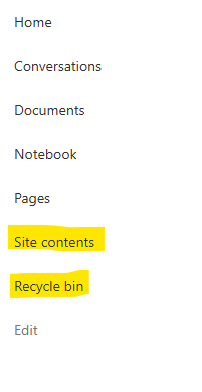
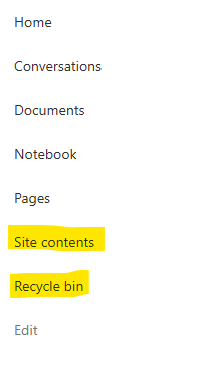
I posted this before but made a mistake with my write up, so I am reposting. I have a requirement that the Recycle bin and Site Contents should be be hidden from the Site Members and Site Visitors. Please how can I achieve this because the Server Infrastructure activation is not working for me. Any workarounds? Please help762Views0likes1CommentStruggling to fix 2013 workflows
I build a new farm. I installed 2013 worfklows. I cannot get them to run. I can't find a fix. I'm exhausted from trying with SharePoint. :( I need a consitent way to make sharepoint work. It's terrible. Anyone have a current checklist of things to do to reverse engineer all the problems? I can only go so far as follow the flipping instructions. Ugg.252Views0likes1CommentWhat is the maximum length of a Check-In Comment in a SharePoint document library?
We are using SharePoint document libraries with versioning enabled and users provide comments when checking in documents. Is there a maximum number of characters allowed in the Check-In Comment field, and is this limit documented by Microsoft?Solved653Views0likes1CommentChanging the License Type and Key of a SharePoint Subscription Farm
Hi everyone, I need some assistance with a licensing issue on a brand new SharePoint Subscription Edition farm. I have 6 servers total 4 Application/Search servers + 2 Web Front End/Distributed Cache servers and current state of farm is Fresh installation no custom code or solutions, no production content web apps configured yet. The Problem: During setup, our systems team accidentally provided a SharePoint Standard Edition product key, which I used during farm creation. We actually require Enterprise Edition, but I am unable to convert the license type through Central Administration. Issue 1: When I go to Central Administration > Upgrade and Migration > Convert farm license type, the Product Key text field and the OK button are both completely grayed out and disabled. Issue 2: When I go to Central Administration > Upgrade and Migration > Enable Enterprise Features and enter our Enterprise key, the process fails with an Unknown Error / SkuUpgradeJob timer job exception ("Post setup configuration failed when attempting post setup configuration task -cmd services -install -cmd installfeatures"). What I Have Tried So Far: Running PSConfig CLI: Ran psconfig.exe -cmd sku -upgrade -key from an elevated Command Prompt. It fails during the installfeatures phase. PowerShell Feature Activation: Attempted to run Enable-SPFeature -Identity PremiumFarm -Force in the SharePoint Management Shell, but feature provisioning fails because the underlying SKU definition hasn't switched. Service Account Privilege Adjustments: Tried restarting the SharePoint Timer Service (SPTimerV4) and changing its logon account to Local System / Local Admin to rule out file permission issues on the 16-Hive directory, but hit SQL permission/authentication blocks. Clearing Timer Jobs and Restarts: Cleared stuck or failed SkuUpgradeJob instances under Timer Job Status, restarted the SharePoint Administration Service and Timer Service across all servers, and performed iisreset. Since this is a completely fresh farm with no customization or data loss risk, what is the cleanest way to force the farm to accept the Enterprise product key without having to completely unjoin and rebuild the 6 servers? Any suggestions or workarounds would be greatly appreciated!348Views0likes1CommentDynamic Mandatory Fields
In a SharePoint library, I have folders which are = a. Admin b. Events c. Furniture and Moves d. Janitorial and Maintenance e. Parking and Transportation f. Shipping and Receiving g. Supplies and Equipment h. Waste and Recycling I have Meta data across the library whose data type are all choices and are: a. Document Type = Contract, Financial, planning b. Building = Gym, Garage, Heating c. Asset Category = Office, Playground d. Fiscal Year = FY23, FY24, FY25, FY26, FY27 e. Vendor = Maple Leaf, Canadian Tire, Home Depot f. Status = Active, Pending, Not Active g. Retention Label = 3 years, 5 years h. Service Type = Admin, Events, Furniture and Moves, Janitorial and Maintenance, Parking and Transportation, Shipping and Receiving, Supplies and Equipment, Waste and Recycling Service Type and Retention Label are mandatory fields, with the Rule below for all the files in the various folders: IF Folder Name = Admin, then Service Type = Admin and Retention Label = 5 years; the mandatory fields should be Document Type, Status and Fiscal Year IF Folder Name = Events, then Service Type = Events and Retention Label = 3 years; the mandatory fields should be Document Type, Status and Fiscal Year, Building and Vendor IF Folder Name = Furniture and Moves, then Service Type = Furniture and Moves and Retention Label = 3 years; the mandatory fields should be Document Type, Status and Building IF Folder Name = Janitorial and Maintenance, then Service Type = Janitorial and Maintenance and Retention Label = 3 years; the mandatory fields should be Document Type, Status and Fiscal Year IF Folder Name = Parking and Transportation, then Service Type = Parking and Transportation and Retention Label = 3 years; the mandatory fields should be Document Type, Status and Fiscal Year IF Folder Name = Shipping and Receiving, then Service Type = Shipping and Receiving and Retention Label = 3 years; the mandatory fields should be Document Type, Status IF Folder Name = Supplies and Equipment, then Service Type = Supplies and Equipment and Retention Label = 3 years; the mandatory fields should be Document Type, Status and Fiscal Year IF Folder Name = Waste and Recycling, then Service Type = Waste and Recycling and Retention Label = 3 years; the mandatory fields should be Document Type, Status and Vendor I have used Column Default Value Settings for SharePoint to display Auto-Display the Service Type and Retention Label, but I cannot seem to perform the conditional mandatory fields using Validations setting for the other requirements. Please help633Views0likes1CommentRecycle Bin and Site Content Hidden for Site Members and Site Visitors
I have a requirement that the Recycle bin and Site Contents should not be be hidden from the Site Members and Site Visitors. Please how can I achieve this because the Server Infrastructure activation is not working for me. Any workarounds? Please help597Views0likes2CommentsClarification on SharePoint Macro Consent Flow and Permissions
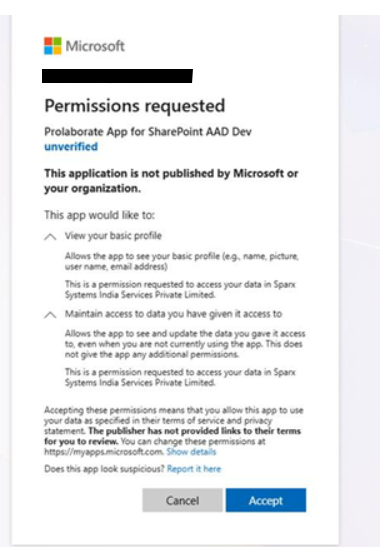
Hi Team, We have a customer using SharePoint in a secure environment. While configuring the Prolaborate SharePoint Macro on their site, a consent popup is displayed during the approval process. Previously, our macro implementation used the Admin Consent flow. Based on the customer’s security and approval requirements, we have modified the consent to use the User Consent flow instead. The customer has requested additional clarification regarding the consent process. Specifically, they would like to understand: The exact API calls triggered for these two consents View your basic profile Maintain access to data you have given it access to The permissions being requested from Microsoft Graph or SharePoint Whether the application requests any tenant-wide or high-privilege permissions Whether minimal permissions such as Sites.Selected can be used instead of broader scopes Current concern: The customer feels the current permission request is too broad for approval within their secure environment (Banking customer). Reason: Their internal approval process requires clear visibility into the exact API and permission scopes being requested, as different permissions are reviewed and approved by different internal teams (for example, User.Read is managed by the Identity team). From our implementation side, we are using only custom APIs and are not directly calling Microsoft Graph APIs. This information will help us provide a clear response to the customer and support their internal approval process.303Views0likes2Comments
SharePoint on-prem issue with OneNotes
Hello guys, have you experienced the same issue? I’m on the Current Channel of M365 desktop apps (build 20026.20182), and the OneNote desktop app is not syncing notebooks from either a SharePoint 2016 on-prem farm or a SharePoint Subscription Edition farm. The OneNote app crashes after 10 seconds while trying to sync. Microsoft OneNote desktop error: We couldn’t open that location. It might not exist, or you might not have permission to open it. (However, I do have sufficient permissions.) It was working perfectly fine on the previous build (20026.20166).305Views0likes1Comment