onedrive
734 Topics
Did MS disable access to SharePoint through File Explorer today?
Just prior to 1:00 PM Eastern today, my entire company lost the ability to access our SharePoint server through File Explorer - in unison. Our IT dept. claims that MS has been threatening to disable the feature for a while. But I'm not finding any alerts, questions, or discussions about it anywhere online; and we can't be the only ones who would have noticed if this is a Windows-wide change.222Views0likes1Comment
"Your organization's policies do not allow you to share with these users" error when sharing an item
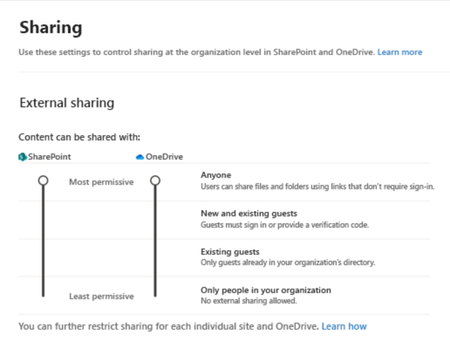
Hi, I have a OneDrive folder that contains multiple subfolders. Each of these subfolders needs to be shared to different people and I would like those people to be able to share those folders as well without me having to add each new email address myself. A person to whom I shared "folder A" with tried to share it with an external email address and got the following error: "Your organization's policies do not allow you to share with these users" error when sharing an item or site in SharePoint Online or OneDrive for Business" I followed the steps provided in https://learn.microsoft.com/en-us/sharepoint/troubleshoot/sharing-and-permissions/organization-policies-do-not-allow-you-to-share-with-users-error but my organisation external sharing parameters were already set to "Anyone" as seen below. Does this mean that people in the organisation can not share folders that require a log in? Thank you in advance for the help. Pedro1.3KViews0likes2CommentsSites with long file path length
I have a big problem to solve with SharePoint online Teams sites where data was migrated from On-Prem file shares and there are more items with a long file path length than we are able to fix. In some directories, it has gotten better but employees didn't listen to us when we told them to start creating less nested folders, shorter file and folder name and to try and fix older directories. In the beginning around 2 years ago, we migrated everything and turned on OneDrive sync and found out quickly how that wasn't going to work for one department, so we then told them to work out of the browser which seemed to solve the problem. Well, not everyone kept working from only the browser and more and more people continued to get OneDrive sync issues. Now I have ran some reports to get the actual file path length for some of the sites. For the biggest site, I show the largest file path length at 397, and I figured 220 would give a good starting point to have OneDrive successfully sync without errors given that OneDrive and File Explorer will add extra characters in the path. Starting at 220 characters, there are more than 61,000 affected files with a path ranging from 220 - 397, and more than 107,000 starting at 200 characters. The first problem to solve is to get the department to stop naming files in this way and stop creating all the nested folders. They need to establish a better naming convention. The second problem to solve is fixing as many of these as possible, but with this many items to correct it seems impossible. Has anyone worked on a SP online site to programmatically fix something like this to reduce the path length? Even trying this with a script sounds impossible, but there has to be something that can be done to help? Right??318Views0likes1Comment
Error accessing SharePoint Online & OneDrive
Hello, I'am facing an issue in my tenant with OneDrive and SharePoint. Since the renewal of my hosting (OVH) all users (admin included) on the tenant can no logner access SharePoint or OneDrive (all other services are accessible). Even the sharepoint admin center is inaccessible. It seems like the adress XXXX-my.sharepoint.com is no longer there (I also have this message "DNS_PROBE_FINISHED_NXDOMAIN"). I looked all Microsoft Support discussions and nothing seem to tack to work. Note that DNS entrees are good on my domain host (Exchange is working). I tried to contact Microsoft Support, its taking a long time. And I need the issue fixed by monday.. Best regards,2.1KViews1like5Comments
SPMT Needs True Mirror Mode and Resource Throttling
Subject: SPMT Needs True Mirror Mode and Resource Throttling SPMT incremental migration does not behave like a true synchronization or mirror operation. New and modified files are copied, but deleted, renamed, or moved files are not reconciled at the destination, often resulting in orphaned content and duplicates. Microsoft has previously confirmed this as expected behavior. Administrators have had reliable mirror-style functionality available since the circa 1990s through tools such as Robocopy. In comparison, SPMT's incremental migration capability feels incomplete for modern enterprise migration scenarios. Requested enhancements: Optional mirror mode similar to robocopy /MIR Delete destination content that no longer exists in the source Detect and process renames Detect and process moves Pre-migration analysis and dry-run reporting Configurable safeguards for deletions Additionally, SPMT appears to consume storage resources aggressively. During migrations, disk I/O activity can become saturated and disk idle time can fall close to zero regardless of migration batch size. This behavior can negatively impact file servers and production workloads. Requested performance controls: I/O throttling CPU throttling Concurrency controls Bandwidth limits Scheduling and business-hours policies Dynamic backoff based on source-server load Current behavior requires administrators to perform manual cleanup and reconciliation after incremental migrations while also managing significant infrastructure impact during migration runs. A modern migration tool should provide both synchronization intelligence and resource governance controls. Frankly, from an infrastructure perspective, your complaint about the I/O behavior is probably the stronger one. Many migration tools deliberately maximize throughput, but not providing an obvious way to cap I/O, threads, or overall system impact can be problematic in production environments. The lack of mirror semantics combined with aggressive scanning/copy behavior is what tends to frustrate admins the most.210Views0likes0Comments
Recycle Bin and Site Content Hidden for Site Members and Site Visitors
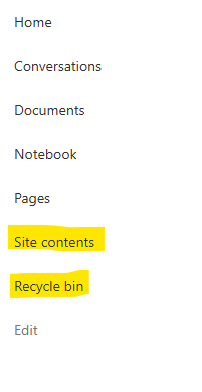
I posted this before but made a mistake with my write up, so I am reposting. I have a requirement that the Recycle bin and Site Contents should be be hidden from the Site Members and Site Visitors. Please how can I achieve this because the Server Infrastructure activation is not working for me. Any workarounds? Please help603Views0likes1Comment
Guest user | recent change in the authentication method
Hi, due to the recent change MC1243549 - retirement of OTP for guest users in SharePoint/OneDrive, we are having a big impact with external collaboration. The external users who do not have company-managed devices and are reluctant to install work-related software or authentication applications on their personal devices are unable to meet the new access requirements, this is significantly impacting business activities. Any suggestion on this topic will be helpful. Do any of you have a similar issue? Thanks!319Views0likes1CommentDynamic Mandatory Fields
In a SharePoint library, I have folders which are = a. Admin b. Events c. Furniture and Moves d. Janitorial and Maintenance e. Parking and Transportation f. Shipping and Receiving g. Supplies and Equipment h. Waste and Recycling I have Meta data across the library whose data type are all choices and are: a. Document Type = Contract, Financial, planning b. Building = Gym, Garage, Heating c. Asset Category = Office, Playground d. Fiscal Year = FY23, FY24, FY25, FY26, FY27 e. Vendor = Maple Leaf, Canadian Tire, Home Depot f. Status = Active, Pending, Not Active g. Retention Label = 3 years, 5 years h. Service Type = Admin, Events, Furniture and Moves, Janitorial and Maintenance, Parking and Transportation, Shipping and Receiving, Supplies and Equipment, Waste and Recycling Service Type and Retention Label are mandatory fields, with the Rule below for all the files in the various folders: IF Folder Name = Admin, then Service Type = Admin and Retention Label = 5 years; the mandatory fields should be Document Type, Status and Fiscal Year IF Folder Name = Events, then Service Type = Events and Retention Label = 3 years; the mandatory fields should be Document Type, Status and Fiscal Year, Building and Vendor IF Folder Name = Furniture and Moves, then Service Type = Furniture and Moves and Retention Label = 3 years; the mandatory fields should be Document Type, Status and Building IF Folder Name = Janitorial and Maintenance, then Service Type = Janitorial and Maintenance and Retention Label = 3 years; the mandatory fields should be Document Type, Status and Fiscal Year IF Folder Name = Parking and Transportation, then Service Type = Parking and Transportation and Retention Label = 3 years; the mandatory fields should be Document Type, Status and Fiscal Year IF Folder Name = Shipping and Receiving, then Service Type = Shipping and Receiving and Retention Label = 3 years; the mandatory fields should be Document Type, Status IF Folder Name = Supplies and Equipment, then Service Type = Supplies and Equipment and Retention Label = 3 years; the mandatory fields should be Document Type, Status and Fiscal Year IF Folder Name = Waste and Recycling, then Service Type = Waste and Recycling and Retention Label = 3 years; the mandatory fields should be Document Type, Status and Vendor I have used Column Default Value Settings for SharePoint to display Auto-Display the Service Type and Retention Label, but I cannot seem to perform the conditional mandatory fields using Validations setting for the other requirements. Please help582Views0likes1Comment
SharePoint Online Site Deletion blocked by Retention Policy although no content is retained
Hi everyone, I'm trying to understand whether this behavior is expected or if other organizations are experiencing the same issue. Environment SharePoint Online (Microsoft 365) Microsoft Purview Retention Policy Retention duration: 180 days Trigger: based on last modified date After retention period: Do nothing The intention of the policy is not to automatically delete content. We only want to prevent deletion for 180 days and allow deletion afterwards. Microsoft previously explained to us that retention applies to the content/items, not to the container (the SharePoint site itself). Problem We are currently unable to delete SharePoint sites. When attempting to delete a site from the SharePoint Admin Center we receive the following message: This site can't be deleted at this time because it is blocked by a compliance policy. What we already checked For the affected site: CompliancePolicyIds = empty ArchiveStatus = NotArchived SensitivityLabel = empty The Preservation Hold Library is empty: Preservation Hold Library => Items = 0 We also inspected the internal DLC properties of the site and found entries such as: dlc_sitehaspolicy dlc_sitehasexpirationpolicy dlc_webhasexpirationpolicy Even after clearing these values for testing purposes, the site still could not be deleted. Important Observation If we explicitly exclude the site from the retention policy, deletion becomes possible. This makes it appear that the retention policy is blocking deletion of the site container itself, even though our understanding was that retention should only protect retained content and not permanently prevent deletion of the entire SharePoint site. Has anyone else observed this behavior? Additional OneDrive Issue We are seeing a similar problem with unlicensed OneDrive accounts. Many of these OneDrive sites: are already archived are shown as blocked by retention/compliance cannot be deleted remain present for years For example: ArchiveStatus = FullyArchived CompliancePolicyIds = empty The accounts appear in the list of unlicensed OneDrive accounts, but we are unable to permanently remove them while the retention policy is in effect. Has anyone found a practical way to clean up or remove these orphaned/unlicensed OneDrive sites when a tenant-wide retention policy is configured? Questions Has anyone seen a situation where: CompliancePolicyIds is empty the Preservation Hold Library is empty but site deletion is still blocked by a compliance policy? Does a retention policy configured as: Retain for 180 days Then Do nothing intentionally block deletion of the entire SharePoint site container? Is it expected that excluding a site from the retention policy immediately makes deletion possible? How are other organizations handling site lifecycle management when tenant-wide retention policies are enabled? Has anyone experienced similar issues with unlicensed OneDrive accounts that cannot be deleted because of retention/compliance requirements? Any experiences, recommendations, or explanations would be greatly appreciated. Thanks!286Views0likes2Comments
Upcoming change: Retirement of noise suppression capability for ODSP video
We're writing to inform you of an upcoming change to video playback features in OneDrive and SharePoint. What's changing: Starting July 1, 2026, the noise suppression feature for video playback on OneDrive and SharePoint will be retired. This feature, which reduces background noise during video playback, will no longer be available in the web playback experience. Based on usage data and our ongoing effort to streamline the video experience on OneDrive and SharePoint, we've made the decision to deprecate this capability. Please share your feedback through Noise Suppression Feature Survey so we can continue to improve the video experience on OneDrive and SharePoint. What this means for your content: Your video content is not affected. No original files will be modified or re-encoded – this change only impacts the playback experience. Noise suppression will no longer be available as a playback toggle option when viewing videos stored on OneDrive or SharePoint. No changes to other video and audio playback features – including playback speed controls, captions, and transcripts – remain available and are unaffected by this change. What administrators need to know: No admin action is required. The noise suppression option will be removed automatically after the retirement date. There are no tenant-level settings to manage for this change. Alternative options: If noise suppression is important to your workflow, please consider these alternatives: Pre-process your audio using a dedicated noise removal tool before uploading to OneDrive or SharePoint. Record in a quieter environment or use a directional microphone to minimize background noise at the source. We value your feedback: We understand this change may affect some of your workflows, and we want to hear from you. Please share your feedback through Noise Suppression Feature Survey so we can continue to improve the video experience on OneDrive and SharePoint. All other video playback capabilities on OneDrive and SharePoint remain fully available. We're committed to continuing to invest in features that help you get the most out of your video content.1.3KViews0likes1Comment