Recent Discussions

Not able to do an account recovory when 2FA is enabled and Passkeey is half set up
I am not able to log into my personal account. I have tried account recovery, but I have 2FA set up so I go a message saying this is ignored. I have rest the password using 2FA but when I try to login the message is that I can not use password to login. I beleive my partern loged me out of the account and tried to log in to her account but instead started Passkey set up. I have needed to login with my company account even to raise this post. Any help would be great.9Views0likes0Comments
Authenticator não funciona
Tenho um e-mail corporativo (sou o adm único, nao tem ti) que faço login na conta do powerbi, contudo, meu celular com o authenticator foi perdido e já nao tenho mais acesso, por este motivo, nao consigo mais logar na conta pq ele sempre direciona para o authenticador que nao tenho mais acesso e não abre a possibilidade de receber o codigo por outro meio, (sms ou email). ja tentei vários recursos (chat, telefone do suporte) para recuperar a conta e nao consigo. Todas as opções direcionam para o autenticador. solicito a microsoft que dê uma solução, resetando o autenticador anterior para que eu possa acessar a conta e incluir métodos alternativos de desbloqueio, ou sugira outra solução.16Views0likes0Comments
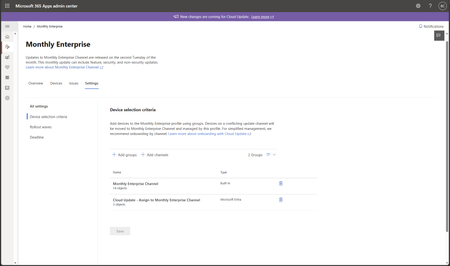
New Entra ID group device criteria scoping is missing from Cloud Update
Hi, the New Entra ID group device criteria scoping is missing from Cloud Update. Message center says that it should be GA late July, but here we are and it's still not there. Is there a way to know when should we expect it to rollout for real? Thks in advance and don't hesitate if you have any questions15Views0likes2CommentsAzure Tops $100 Billion As Microsoft Reports FY26 Q4 Results
On July 29, Microsoft released their FY26 Q4 results. We learned that Microsoft 365 Copilot has 30 million paid seats, but that’s still less than 7% of the Microsoft 365 installed base, so there’s lots of room for Copilot to grow. Microsoft didn’t provide a number for Teams monthly active users, which is strange because no new data has appeared for 11 quarters. Among all the numbers, one thing’s for sure. The Microsoft Cloud makes lots of money. https://office365itpros.com/2026/07/30/fy26-q4-microsoft-results/37Views0likes0Comments
Using the FILTER Function
I have a spreadsheet with a long list that I need to search to determine if a specific word or term is included in the list. In some cases, I want to search for part of the word or term, e.g., I may want to search for "Asset" but want to know all the terms where "Asset" is included, e.g., "Asset Management" would show up in my results as "Asset" is included in the term. I don't want to have to use FIND every time I need to search. I tried to set it up using the FILTER function, but I must not understand how it works, as I continue to get errors. Can you please suggest a way to best approach this? Is the FILTER function the best way, or can you suggest another option? Thank you.58Views0likes6Comments
Is it possible to do this?
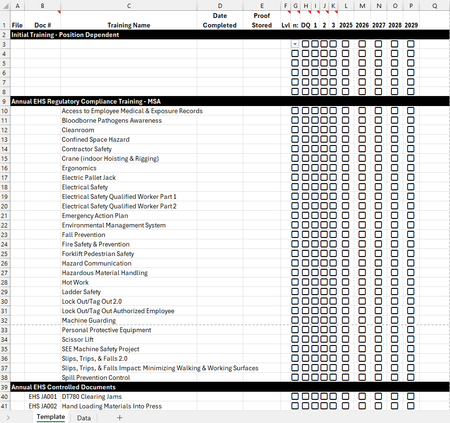
Hey all! I currently use Smartsheet to track my trainees' progress and I love the way I can use Conditional Formatting in that program. Unfortunately, my company is going away from using Smartsheet, so I need to move all the information I have to an Excel document. I'm struggling with getting the Conditional Formatting to work the same way I have it in Smartsheet and I'm curious if it's even possible. Here is an image of the Template I will be using for each employee. My plan is to have a tab for each employee, just duplicating the template and renaming it to their name and adding their information. Here are the two things I'm struggling with getting set-up with Conditional Formatting: 1. In the Lvl column, I have a drop down that is linked to the Data tab where the icons on the left are images. I want to be able to select the "Assigned" option and have the A icon show up (this is currently set up) and then have the fill of the box turn to red. I'm struggling to get that to work properly. Currently, when I select the "Assigned" option in the drop-down menu, it just shows the "A" icon. 2. I also want to be able to have the "Date Completed" column change to a specific color if one of the checkbox columns (G, H, I, J, K) are checked (i.e. if G is checked, it turns a light brown, if H is checked, it's gray, if I is checked, then it's red, etc.). This is what it looks like in Smartsheet and how I'm hoping to get it to look in Excel: Thank you!3Views0likes0CommentsComplete Microsoft 365 Security Checklist: Protect Your Business from Modern Cyber Threats
Microsoft 365 has become the backbone of modern businesses. From emails and file sharing to collaboration and cloud storage, organizations rely on it every day. However, as Microsoft 365 adoption grows, cybercriminals increasingly target it through phishing attacks, credential theft, ransomware, business email compromise (BEC), and data leaks. https://dellenny.com/complete-microsoft-365-security-checklist-protect-your-business-from-modern-cyber-threats-2026-guide13Views0likes0Comments
Microsoft Customer Agreement created without Billing Profile after CSP deauthorization
I am the Global Administrator of a Microsoft 365 tenant that previously had an Exchange Online Plan 1 subscription supplied through Endurance International Holding B.V. (Bluehost). This is not a mailbox migration issue. My mailbox already resides in Exchange Online within my existing Microsoft 365 tenant. The only intended change is to move from the former Cloud Solution Provider (CSP) to direct Microsoft billing after the CSP was deauthorized. The Partner Relationships page now displays: Endurance International Holding B.V. (Netherlands)'s account is closed. Find a new partner using Partner app finder or buy from Microsoft directly. Following Microsoft's guidance, I have: Created a Microsoft Customer Agreement (MCA) Created a Billing Account ("Pecten Development") Added and verified a SEPA payment method Updated the Sold-to and Technical Contact details However: Purchasing Exchange Online Plan 1 continually requests a Billing Profile. Completing the Billing Profile workflow never creates one. My Billing Account contains no Billing Profile or Billing Scope. Azure Cost Management reports that there is no supported billing account or subscription. I therefore cannot purchase Exchange Online Plan 1 directly from Microsoft before the existing subscription expires. I have also confirmed that: The former reseller account is closed. There are no delegated partner roles remaining. Microsoft support repeatedly directs me back to the former CSP. Bluehost have confirmed they can no longer escalate through Microsoft CSP channels because their reseller relationship has ended. My current diagnosis is that the Microsoft Customer Agreement has been created successfully, but the associated Billing Profile/Billing Scope was never provisioned. This leaves the tenant unable to purchase services directly from Microsoft despite the former CSP relationship having been closed. Has anyone encountered this after a CSP deauthorization? Does this require intervention by the Microsoft Commerce team, or is there another way to force creation of the missing Billing Profile? If a Microsoft moderator requires my tenant ID or billing account details, I would be happy to provide them by private message. Thank you.2Views0likes0CommentsDLP Prevents Microsoft 365 Copilot from Processing External Email
A new (preview) DLP capability allows Microsoft 365 tenants to block Microsoft 365 Copilot from processing the content of external email. When set, any message coming from a domain that’s not in a tenant’s accepted domain list is blocked for Copilot for grounding, referencing, or summarization. It’s an effective way of blocking threat like prompt injections transmitted in email too, but some people might not like blocking all their external email. https://office365itpros.com/2026/07/29/dlp-external-email-copilot/9Views1like0CommentsExtreamly frustrated that I cannot get help for a serious problem
What the devil do I have to do to get help with a serious problem with the cloud for our non-profit business account for our small charity. I have 'lost' sight of a large number of documents from the cloud since we had to start paying for our subscription. After many chats with ai and emails and the problem being escalated I have now been told to go back to where I started at Non-profit support and put a support ticket in. Doesnt matter what machine I use, what browser I use, what network I use, I cannot get past the submit form page and keep getting an error message - this has been going on for weeks now. Ive tried ringing and the call keeps dropping while on hold - no one, no-one will call me about the problem and no one seems interested in dealing with the problem and its not just affecting me on our system either. Please will someone tell me how to get to a human for support without using an AI help system,18Views0likes1Comment
Office Scripts does not refresh Power BI Query live connections in Excel Online
Hello everyone, I've got the following problem and am nearly going insane because it's causing so much problems 🥲 Summary The Office Scripts method workbook.refreshAllDataConnections() no longer refreshes a live connection to a Power BI Semantic Model in Excel Online. Environment Excel Online Office Scripts Power Automate ("Recurrence" + "Run Office Script") Live connection to a Power BI Semantic Model (Analyze in Excel) Expected behavior Calling workbook.refreshAllDataConnections(); should trigger the same refresh as manually selecting Data → Refresh All in Excel Online. Actual behavior The script completes successfully without any error, but the workbook does not requery the Power BI Semantic Model. Additional observations The same workbook worked correctly for approximately two years. The issue started around mid-July 2026. Manual Data → Refresh All in Excel Online refreshes successfully. Refreshing in Excel Desktop also works correctly. The problem occurs both: when running the Office Script manually from the Automate tab in Excel Online when running the same Office Script from Power Automate ("Run Office Script") This suggests the issue is specific to the Office Scripts implementation of refreshAllDataConnections() rather than the workbook, authentication, or the Power BI connection itself. Steps to reproduce Create an Excel workbook with a live connection to a Power BI Semantic Model. Confirm that manual Data → Refresh All refreshes the data successfully. Create an Office Script containing only: function main(workbook: ExcelScript.Workbook) { // Refresh all data connections workbook.refreshAllDataConnections(); } Run the script. Result The script finishes successfully but no refresh is performed. Expected result The workbook should requery the Power BI Semantic Model exactly as when using the manual Refresh All button in Excel Online.6Views0likes0CommentsIs there any solution to getting question names yet for a form submission in Power Automate?
It's been about 10 years now. Surely there is a solution to dynamically retrieve question names without needing a janky britttle workaround that may or may not work, not just IDs (get form response etc), without having to rely on a hard coded list of questions with answers inserted in against them.4Views0likes0CommentsHacked please help
My Microsoft account was hacked today. The attacker changed my sign-in alias to a random Outlook address, removed my phone number, added their own Authenticator app, and changed the recovery email. My original email now says the Microsoft account doesn’t exist. I have the Microsoft security emails proving the changes. I also have other forms of proof. If there is any moderator or anyone who can help me recover my account I had some important stuff on there I would like to get back. It wasn't this email but another one I made this so I can ask for help. When I tried to recover the email they changed it as provided in the screenshots down below. I tried to call support and fill out recovery stuff but since they changed the email for the account there is not much I can do.11Views0likes0CommentsMicrosoft Forms Ownership Transfer Redirects to DesignPagev2.aspx Instead of Loading Delegate Page
I am attempting to transfer ownership of Microsoft Forms belonging to a former employee, but the transfer process is not working as expected. The user account still exists in Microsoft Entra ID. The account is disabled in Entra ID. Sign-in is disabled in Microsoft 365 Admin Center. The account is not hard deleted. I am a Global Administrator. I have a valid Microsoft 365 E5 license that includes Microsoft Forms. When accessing the documented Forms transfer URLs using both the user's UPN and Object ID: forms.office.com/Pages/delegatepage.aspx?originalowner=<UPN> forms.office.com/Pages/delegatepage.aspx?originalowner=<ObjectID> the request immediately returns an HTTP 301/302 redirect to: forms.cloud.microsoft/Pages/DesignPagev2.aspx instead of displaying the Forms ownership transfer interface. Could you please confirm: What is the currently supported method for transferring Microsoft Forms owned by a disabled user account? Is the legacydelegatepage.aspxownership transfer mechanism still supported, or has it been retired/replaced? Is the automatic redirect toDesignPagev2.aspxexpected behavior in our tenant? Are there any tenant-level settings, licensing requirements, administrator roles, or backend restrictions preventing the transfer interface from loading? Can Microsoft verify whether the disabled user's forms are still available and eligible for ownership transfer?14Views0likes0CommentsHow to share calendar from Shared mailbox to mobile app
Hi, In our organization, we have the following requirement: to create three calendars within a shared mailbox and make them visible to members on both PC and the mobile app. On the PC, they are visible, but not on the Outlook app. On the app, we can only see the main shared mailbox calendar, not the three additional ones. The goal is to visually distinguish the three types of appointments on the app. We tried using categories (tags), but the colors have to be reset for each member. Any suggestions? Thanks37Views0likes2CommentsData Lifecycle Management Adds Support for Planner Retention Policies
From August 2026, Microsoft 365 tenants can apply retention policies to Planner Tasks. We began our preparation to create a retention policy for Planner tasks by writing some PowerShell to test the likely effect of retention. The code scans Microsoft 365 Groups for groups with plans and checks each plan for tasks that would be removed by a retention policy. It’s amazing what some PowerShell can do… https://office365itpros.com/2026/07/28/planner-tasks-retention/12Views0likes0CommentsExcel Print to .PDF Not Formatting as it Used To
We use Excel for our PO forms. We have been using it for 20+ years. We have the Acrobat add-in in Excel, we then select as many sheets as we have pages to convert. Once in Acrobat, we bring in the background PO form and we have a digital PO. Suddenly one of our computers had misalignment problems. The top part of the printed form looked great, but at about the 1/3 mark on the page it started to push down the words, pushing them out of the boxes that once worked perfectly. This started with 1 computer - now we have 4 out of the 5 computers doing this. This happened before the Windows 11 upgrades. The 1 computer that still works is on Windows 11, so we can't trace it back to that. I have tested old Excel files that once worked - they no longer work on these 4 computers. I have tried everything I know - resetting default fonts back to Calibri instead of Aptos - nothing seems to work. This is a huge problem for us since it is the key to our work flow as a purchasing company. We can't reformat the form because the 1 computer still works and for now - we need that computer otherwise, we would not be able to release any PO's. I have been all over the internet trying to find a resolution - I even posted a question probably a year ago about this and never received an answer that worked. We have had an IT specialist take a look at this. He believes it's Excel's problem because the MS .pdf printer shows the same problem. We really need a resolution - this happened for what appears to us to be no logical reason. Thanks.40Views0likes3Comments
PowerPoint 2021 crashes when saving .ppsm files containing ActiveX controls
Hello, I believe I found a regression in recent Office 2021 builds. PowerPoint crashes every time I try to save a macro-enabled presentation as PowerPoint Show (*.ppsm) if the presentation contains Microsoft Forms (ActiveX) controls, such as: TextBox ComboBox CheckBox etc. Troubleshooting performed Microsoft Support already assisted me through two remote sessions. We tested: Office license validation Online Office Repair New Windows user account Registry checks Windows services None of these resolved the issue. Reproduction Create a new PowerPoint presentation. Insert an ActiveX TextBox or ComboBox from Developer → TextBox. Choose Save As → PowerPoint Show (*.ppsm). Result: PowerPoint crashes. Tested Office versions Office 2602 (19725.20172) — Windows 11 21H2 — ✅ Works Office 2606 (20131.20154) — Windows 11 25H2 — ❌ Crash Office 2607 (20228.20110) — Windows 11 21H2 — ❌ Crash Office 2607 (20228.20110) — Windows 11 23H2 — ❌ Crash I reproduced the issue on three different computers. The last known working build is 2602 (19725.20172). The first confirmed failing build is 2606 (20131.20154). Saving as .pptm works correctly. Previously created .ppsm files also open and save correctly. Only creating or converting a presentation to .ppsm triggers the crash. If needed, I can also provide a minimal sample presentation that reproduces the issue. Thank you!30Views0likes0Comments




Events
Recent Blogs
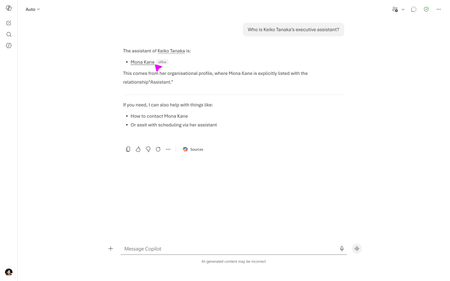
- Help employees find the right people faster with Assistant relationship dataJul 29, 2026211Views1like0Comments
- 4 MIN READWelcome to the July 2026 edition of What's New in Excel!Jul 28, 20266.1KViews0likes1Comment