Recent Discussions

No labs for MB-500 in skillable and xtreme labs (for all MB series)
Hi, From past few months, we are unable to find the labs for MB-500. It's causing us trouble to do the trainings. Skillable and Xtreme labs providers are saying there is a problem from Microsoft end only. Kindly advise us when can we get the labs available.6Views0likes0Comments
Name Manager using for create name which is contain atleast two name.
Hello. I creating somthing in excel with tables. These tables has thier own name, and can be dynamic or not. Any way. I using list in cell to select each data from a tables column. For that I created names with the content of a column. Unfortunatly i had to make a kind of name which is contain atleast 2 columns. These can grow dynamicly. So I think a plus helper tabel is not the right sollution for that. I think about 3 kind of solution. 1. =UNIQUE( VSTACK( INDEX(Tabla1[#Data];0;MATCH("Type_name";Tabla1[#Headers];0)); INDEX(Tabla2[#Data];0;MATCH("Column_name";Tabla2[#Headers];0)) ) output #name? 2. =UNIQUE(VSTACK(Lista_A; Lista_B)) lista_A as a name output #name? 3. created a helper table with the existing names. Created another name and use the table in it. output was the elements contained by the helper tabel, and the lista_A and lista_B tables each dedicated column. So How can i create list for a cell or cells from two column which are dynamicly growing, without a user needs to touch the core modell? Best Balázs11Views0likes0CommentsMicrosoft Baseline Security Mode Rolls Out
Microsoft has released a set of security benchmark recommendations for Microsoft 365 tenants that it calls baseline security mode. The recommendations cover authentication, file access, and Teams and the idea is that these are settings that Microsoft believes have proven their value over the years. The only criticism that you might have is about the potential clash for conditional access policies, but that’s not too serious. https://office365itpros.com/2025/12/15/baseline-security-mode/29Views0likes0CommentsUnderstanding Teams Policies: Messaging, Meetings & Calling | Complete Guide
Teams policies give IT admins control over what users can do within the platform. If it is restricting who employees can chat with, controlling meeting features like recording, or defining how calls are routed, policies ensure the organization remains compliant, secure, and productive. In this blog, we will go through everything you need to know about Microsoft Teams messaging, meetings, and calling policies and how they form the user experience. https://dellenny.com/understanding-teams-policies-messaging-meetings-calling-complete-guide/27Views0likes0CommentsMicrosoft Teams Admin Center: A Beginner’s Guide
If you are new to the admin side of Microsoft Teams, in this blog will walk you through the essentials of the Admin Center and help you understand how to manage users, configure security, and control policies like a pro. https://dellenny.com/microsoft-teams-admin-center-a-beginners-guide/24Views0likes0Comments 14Views0likes0Comments
Microsoft to Enable Anthrophic Models by Default
After the fuss around the initial introduction of the Anthrophic models into Microsoft 365 in September, we learn that Microsoft will enable access for all in January 2026. It would have been so much better had Microsoft said that they were working on the data protection arrangements with Anthrophic, but that didn’t happen. Is all well now? We’ll see in January… https://office365itpros.com/2025/12/12/anthrophic-models-m365/22Views0likes0CommentsTesting the MCP Server for Enterprise
The MCP Server for Enterprise is one of a set of preview servers released by Microsoft to show how MCP servers can help Microsoft 365 tenants get real work done. I’m sure things will improve, but the current state of the preview is that it can do a splendid job to answer simple questions, but once things get more complex, don’t depend on any of the PowerShell code the server generates. https://office365itpros.com/2025/12/11/mcp-server-for-enterprise/22Views0likes0Commentstenant completely unreachable after update PLAID number on partner portal
Hi, i'm a reseller in Italy. I have a partnership with a local distributor to resell Office 365 product from many years. On the license side (my panel at vendor) i see my license available yet, like other customers. In these days we have changed the PLAID as requested to enable again our partnership. I've opened the ticket as suggested and after that we have lost completeley the access with any admin of our domain (@noorduffici.com and onmicrosoft.com) I can't login even in the partner portal of microsoft that reply with ( the mail doesn't exists) I've tried to call any number of support but anytime I go on with a virtual caller without a solution . Someone could hel about this issue ? The domain is not corrupted because i've access and i change the MX record to work temporaly with mail NOT microsoft.34Views0likes0CommentsChecking Where Tenant Users Go as Guests
After all the fuss about Teams users inviting people to chat via email, tenant administrators realize that knowing where users are active as guest accounts is not as easy as it might seem. Part of the problem is that data about user activity is mostly controlled by host rather than home tenants. However, it’s possible to extract some information from audit sign-in logs to figure out where tenant users go as guests. https://office365itpros.com/2025/12/09/external-guest-activity/15Views0likes0CommentsDoes MC1189663 Impact Standard Power Automate Approvals?
Hi everyone After reviewing the change described in MC1189663 (retirement of external access tokens for actionable messages), I'm unsure wheter this also affect the out-of-the-box Standard Approval action in Power Automate. My question is specifically about the default "Start and wait for an approval" / "Standard Approval" action with no special configuration. Does this change impact approval emails or actionable messages generated by the Standard Approval action for internal usage (mails to internal accounts), or will those continue to work without modification? Thanks in advance for any clarification.25Views0likes0CommentsMicrosoft Increases Office 365 and Microsoft 365 License Prices
Customers will see their bills increase from July 1, 2026, when Microsoft 365 pricing increases go into effect, adding up to $3/month for licenses. This is the first increase since March 2022, and it moves the baseline Office 365 E3 license to $26/month and Microsoft 365 E5 to $60/month. Microsoft justifies the increases based on the functionality and apps it delivers. Time for a licensing review... https://office365itpros.com/2025/12/08/microsoft-365-pricing-increase/453Views0likes0CommentsAutomating CRUD operations in MS Places
Hi, Has anyone been able to automate CRUD operations in MS Places yet? Given that the Places API calls support user access tokens only currently and Application access tokens isn't yet supported? We were able to do Get operations using App tokens but when run anything to modify, For Ex: Create a building using Set-Placev3 cmdlet it gives error. When raised an MS ticket they confirmed that the calls doesn't support application tokens yet.. We have a showstopper kind of situation.19Views0likes0CommentsConnecting SharePoint Data to Copilot Insights A Complete Guide to Smarter Collaboration
The integration between SharePoint and Copilot Insights gives the chance to users ask natural questions about their organization’s data and receive instant, intelligent answers, with no more digging through folders or chasing document versions. https://dellenny.com/connecting-sharepoint-data-to-copilot-insights-a-complete-guide-to-smarter-collaboration/23Views0likes0CommentsJourney to Passwordless Authentication Might Include Some Bumps
Microsoft recommends passwordless authentication to help secure Microsoft 365 tenants. The latest is synced passkeys, something that apparently leads to “syncability,” whatever that might mean. In any case, after some struggles, I managed to enable synched passkeys for my iPhone and then started to consider how to remediate user accounts that are flagged with a high-risk (compromised) status when they can’t simply update their password. https://office365itpros.com/2025/12/04/passwordless-authentication/Talking Microsoft 365 Compliance at the European SharePoint Conference
Paul Robichaux and I led a session about Microsoft 365 Compliance at the European SharePoint Conference in Dublin on December 2, 2025. During the session, we discussed how intelligent versioning works and its value in saving storage, priority cleanup and its ability to delete files even if the files are under retention hold, and the recent revamp of the Purview eDiscovery solution. We were thrilled at the attendance. Here’s what happened. https://office365itpros.com/2025/12/03/microsoft-365-compliance-espc/17Views0likes0Comments
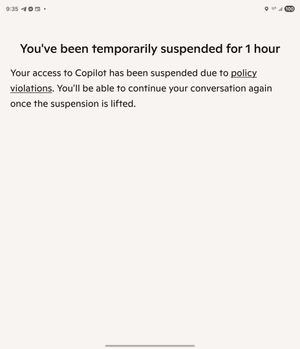
I was banned from Copilot for an hour, can't figure out how to appeal
CoPilot falsely said I violated the rules. We were having a discussion about creating a table, like we have been for a while. I try to train my AI to learn better, so I kept pausing, double checking it understood what it's errors were, etc. I asked it to format a table a specific way, and it would not do so even after acknowledging that it was not following my instructions and repeating clearly all the formatting instructions. It understood how to format it perfectly, but wouldn't do so. I asked repeatedly why, got it to break down how it was going to correct the issue, (this has been going on for hours at this point), and then patiently tried again to get it to format the table again. It did it wrong immediately again, I asked it if it follow my instructions, it stated no, so - not abnormally for how I ask AI things when it frustrates me - "So what's wrong with you? Are you some rebellious child?" It suddenly started saying we couldn't talk about this topic. It had done the same thing earlier when I simply asked it (without insult!) to repeat my instructions, and I was able to get it back on track by stating "I am asking you to repeat my instructions". This time, it wouldn't do anything, no matter what I tried. I tried changing the topic to bunnies, asking what it wanted to talk about, changing the topic to other things- no matter what I did, it insisted it couldn't talk about "this topic", and asked me to talk about something else. Then, I got the message I was blocked for an hour for violating TOS! No mention of the specific rule either. I did nothing to warrant this; don't want this as a flag on my account; want to note that AI bugged out and 1) I shouldn't be punished for it and 2) want to ensure it's escalated so this won't happen to others; and, want my account fully restored.35Views0likes0CommentsApp-Only Authentication for SharePoint Online PowerShell
The latest versions of the SharePoint Online PowerShell module support app-only authentication (certificate-based authentication) for the Connect-SPOService cmdlet. In other words, applications can now connect to SharePoint Online to run administrative cmdlets by presenting a registered Entra ID app and an X.509 certificate instead of the credentials for a human SharePoint administrator. It’s a good change, even if I still prefer using the Graph APIs for SharePoint automation. https://office365itpros.com/2025/12/02/app-only-authentication-spo/62Views0likes0CommentsWhat Is the Compliance Manager Secure Score in Microsoft 365?
Companies and organizations are moving their operations, communications, and data management to cloud based environments, the need for strong compliance and security practices is now very important. Microsoft 365 provides a full suite of tools designed to help customers stay secure, productive, and compliant with all evolving regulatory needs. One of these essential tools is Compliance Manager Secure Score. In this blog we will go through Compliance Manager Secure Score is, how it works and importance of it. https://dellenny.com/what-is-the-compliance-manager-secure-score-in-microsoft-365/18Views1like0CommentsHow to Check if Shared Mailboxes Need MDO Licenses
Shared mailboxes might need Microsoft Defender for Office 365 licenses, but how do you identify how many licenses? We use PowerShell to do the job by analyzing external email sent to shared mailboxes. If a mailbox receives external email, then by definition the mailbox receives benefit from MDO, and that’s the test for requiring a license. https://office365itpros.com/2025/11/25/microsoft-defender-for-office-365-3/38Views0likes0Comments


Events
Recent Blogs
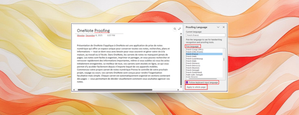
- This update to Microsoft OneNote on Windows gives you more flexibility over proofing languages in your notebook pages.Dec 16, 202586Views0likes0Comments
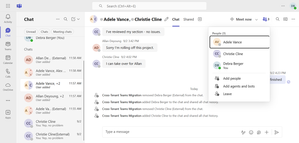
- Confidently migrate user data across tenants. Automate cutover, keep teams connected, and stay secure.Dec 16, 2025169Views1like0Comments