authentication
473 Topics
Not able to logon office 365 account or change it
If I want to logon to my Office 365 account I have to enter my emailaddress. Its is an @.onmicrosoft.com account. Entering password is ok, but then I am have to verify my phone number. The last two digits are shown, but clicking on this phone number I am getting an error like: 399287. There is no way of resetting this. I already contacted helpdesk but they cannot solve this problem. I have a bussniess account and I need some help about this. Every time I want to reset or want to make a change the account I am stuck in this error screen (endless loop). Please help me.560Views0likes5Comments
Microsoft Feedback Portal account is not working
I changed my Microsoft password a year ago, and it updated everywhere other than the Feedback Portal. As a result, I get an error when I try to login, or do anything on the page. Microsoft account support's suggestion was to login to the Feedback Portal which is insane given I'm having issues accessing it. How can I get this issue resolved? I've got three separate support tickets now and they keep asking me to wait 24 hours to get the issue resolved. Can someone from the Feedback Portal team please contact me to resolve this?" This is what Microsoft Support have said: "understand your frustration, and yes—this is an account‑related issue because the Feedback Portal is still tied to your old alias, which causes login conflicts and forces you out. Your Microsoft account itself signs in correctly, but the Feedback Portal is pulling outdated identity data that you cannot update on your own. Since you cannot access the Portal to submit feedback, directing you back there is not a workable solution. What you need is for Support to escalate this to the internal Identity/Feedback Platform engineering team so they can manually correct the outdated alias mapping on the backend. In this situation, the Feedback Portal and Tech Community teams are the ones who manage and maintain that specific platform. Because the issue appears on the Feedback Portal side—even though your Microsoft account is working normally—only their dedicated team can make the necessary corrections on their end. That’s why we are guiding you to connect with them through the links provided: https://techcommunity.microsoft.com/ or https://feedbackportal.microsoft.com/feedback. They will be able to review the portal‑specific account data and assist you further. I understand why this is frustrating. Since you’re unable to stay signed in to the Feedback Portal, I completely see why posting there isn’t possible for you. However, I do need to be transparent: I’m not able to escalate this issue directly to the Feedback Portal team, as they don’t provide internal escalation channels for us and only accept requests through their own platform. "60Views0likes2Comments
Case 2512040040001886 - Cannot Access Account
Since the 4th of December we have been patiently waiting on MS Tech support to assist on resolving our Case with no success endless calls and endless promises with no luck. How do you proceed in using Microsoft for a Business if they don't deliver on the support. My business is taking the brunt of it. I suppose another call holding for hours and another Support person promise a solution. No other methods to log complaints as you cannot log into your Account Portal.99Views0likes2CommentsSecuring the Modern Workplace: Transitioning from Legacy Authentication to Conditional Access
Authored by: Gonzalo Brown Ruiz, Senior Microsoft 365 Engineer & Cloud Security Specialist Date: July 2025 Introduction In today’s threat landscape, legacy authentication is one of the weakest links in enterprise security. Protocols like POP, IMAP, SMTP Basic, and MAPI are inherently vulnerable — they don’t support modern authentication methods like MFA and are frequently targeted in credential stuffing and password spray attacks. Despite the known risks, many organizations still allow legacy authentication to persist for “just one app” or “just a few users.” This article outlines a real-world, enterprise-tested strategy for eliminating legacy authentication and implementing a Zero Trust-aligned Conditional Access model using Microsoft Entra ID. Why Legacy Authentication Must Die No support for MFA: Enables attackers to bypass the most critical security control Password spray heaven: Common vector for brute-force and scripted login attempts Audit blind spots: Limited logging and correlation in modern SIEM tools Blocks Zero Trust progress: Hinders enforcement of identity- and device-based policies Removing legacy auth isn’t a nice-to-have — it’s a prerequisite for a modern security strategy. Phase 1: Auditing Your Environment A successful transition starts with visibility. Before blocking anything, I led an environment-wide audit to identify: All sign-ins using legacy protocols (POP, IMAP, SMTP AUTH, MAPI) App IDs and service principals requesting basic auth Users with outdated clients (Office 2010/2013) Devices and applications integrated via PowerShell, Azure Sign-In Logs, and Workbooks Tools used: Microsoft 365 Sign-In Logs Conditional Access insights workbook PowerShell (Get-SignInLogs, Get-CASMailbox, etc.) Phase 2: Policy Design and Strategy The goal is not just to block — it’s to transform authentication securely and gradually. My Conditional Access strategy included: Blocking legacy authentication protocols while allowing scoped exceptions Report-only mode to assess potential impact Role-based access rules (admins, execs, vendors, apps) Geo-aware policies and MFA enforcement Service account handling and migration to Graph or Modern Auth-compatible apps Key considerations: Apps that support legacy auth only Delegates and shared mailbox access scenarios BYOD and conditional registration enforcement Phase 3: Staged Rollout and Enforcement A phased approach reduced friction: Pilot group enforcement (IT, InfoSec, willing users) Report-only monitoring across business units Clear communications to stakeholders and impacted users User education campaigns on legacy app retirement Gradual enforcement by department, geography, or risk tier We used Microsoft Entra’s built-in messaging and Service Health alerts to notify users of policy triggers. Phase 4: Monitoring, Tuning, and Incident Readiness Once policies were in place: Monitored Sign-in logs for policy match rates and unexpected denials Used Microsoft Defender for Identity to correlate legacy sign-in attempts Created alerts and response playbooks for blocked sign-in anomalies Results: 100% of all user and app traffic transitioned to Modern Auth Drastic reduction in brute force traffic from foreign IPs Fewer support tickets around password lockouts and MFA prompts Lessons Learned Report-only mode is your best friend. Avoids surprise outages. Communication beats configuration. Even a perfect policy fails if users are caught off guard. Legacy mail clients still exist in vendor tools and old mobile apps. Service accounts can break silently. Replace or modernize them early. CA exclusions are dangerous. Every exception must be time-bound and documented. Conclusion Eliminating legacy authentication is not just a policy update — it’s a cultural shift toward Zero Trust. By combining deep visibility, staged enforcement, and a user-centric approach, organizations can securely modernize their identity perimeter. Microsoft Entra Conditional Access is more than a policy engine — it is the architectural pillar of enterprise-grade identity security. Author’s Note: This article is based on my real-world experience designing and enforcing Conditional Access strategies across global hybrid environments with Microsoft 365 and Azure AD/Entra ID. Copyright © 2025 Gonzalo Brown Ruiz. All rights reserved.911Views0likes1CommentPrimer: How to Use RBAC for Applications to Control App Use of the Mail.Send Permission
The temptation to use the Mail.Send application permission in scripts can lead PowerShell developers into trouble because the permission allows access to all mailboxes, including sensitive executive and financial mailboxes. Fortunately, RBAC for Applications allows tenants to control the access that apps have to mailboxes and other Exchange content. All explained here with an example script to test RBAC of Applications. https://office365itpros.com/2026/02/17/mail-send-rbac-for-applications/83Views2likes4Comments
Locked Out of Global Admin – Lost Authenticator – Case 2602060010000939 – Need Escalation
I am locked out of my Global Administrator account because my phone broke on February 5, 2026 and I no longer have access to Microsoft Authenticator. There is no alternative authentication method configured. Case ID: 2602060010000939. I contacted support on February 6 and the ticket was set as Severity C with an 8-hour response expectation. After several days, I have only received generic replies and no contact from an engineer. This account is critical for my business operations, and I have now been without access for five days. I understand it was my responsibility to maintain backup methods, but I urgently need help from Microsoft to recover access. Please contact me. Samuel LeoSolved133Views0likes1CommentMicrosoft Feedback Portal account issue
I changed my Microsoft email a year ago, and it updated everywhere other than the Feedback Portal. As a result, I get an error when I try to login, or do anything on the page. Microsoft account support's suggestion was to login to the Feedback Portal which is insane given I'm having issues accessing it. How can I get this issue resolved? I've got three separate support tickets now and they keep asking me to wait 24 hours to get the issue resolved. Can someone from the Feedback Portal team please contact me to resolve this? This is what Microsoft Support have said: "understand your frustration, and yes—this is an account‑related issue because the Feedback Portal is still tied to your old alias, which causes login conflicts and forces you out. Your Microsoft account itself signs in correctly, but the Feedback Portal is pulling outdated identity data that you cannot update on your own. Since you cannot access the Portal to submit feedback, directing you back there is not a workable solution. What you need is for Support to escalate this to the internal Identity/Feedback Platform engineering team so they can manually correct the outdated alias mapping on the backend. In this situation, the Feedback Portal and Tech Community teams are the ones who manage and maintain that specific platform. Because the issue appears on the Feedback Portal side—even though your Microsoft account is working normally—only their dedicated team can make the necessary corrections on their end. That’s why we are guiding you to connect with them through the links provided: https://techcommunity.microsoft.com/ or https://feedbackportal.microsoft.com/feedback. They will be able to review the portal‑specific account data and assist you further. I understand why this is frustrating. Since you’re unable to stay signed in to the Feedback Portal, I completely see why posting there isn’t possible for you. However, I do need to be transparent: I’m not able to escalate this issue directly to the Feedback Portal team, as they don’t provide internal escalation channels for us and only accept requests through their own platform."92Views0likes2Comments
MFA Enabled> conditional MFA policy setup > not prompting users to authenticate
I pulled a report in Entra that shows users with no MFA authentication methods setup, but we have a conditional mfa policy setup that should enforce MFA. I have worked with a user showing on the report. Their PC is joined in entra and managed Intune. I have revoked the user session reset his MFA still the user is able to sign in to his pc with his windows hello pin or his 0365 credentials without being prompted for MFA registration authentication setup...any help2.2KViews1like3CommentsExcel authentication token reuse for access to Log Analytics
I have noticed that Excel is not able to reuse the authentication token when accessing Log Analytics workspaces if an expired token was renewed for a single sheet in a workbook. Scenario: 1 workbook with 1+ worksheets Each worksheet is a different query to LA (KQL query displayed in Excel for ease and consolidation) Access to LA is protected by the usual access controls (Conditional Access; Security Reader role + Session control) After a period of time, session and token expire and require renewal User receives a prompt stating the token has expired and needs to be renew User clicks on "Sign-in" and successfully completes the prompts (u/n+pwd+MFA) Expected result: The new token will be reused for subsequent connections to LA within the same workbook Actual result: User is prompted to re-authenticate for each and every connection in the workbook resulting in as many auth requests as there are connections Workaround: After successfully completing the first auth request, close Excel and re-open it and run "Refresh all" This successfully completes refresh of all data without any additional re-auth requests Is this behaviour by design or due to a configuration? Is there a way to address this so that the first token is re-used by all other connections without having to close and reopen the workbook?Solved109Views0likes2Comments
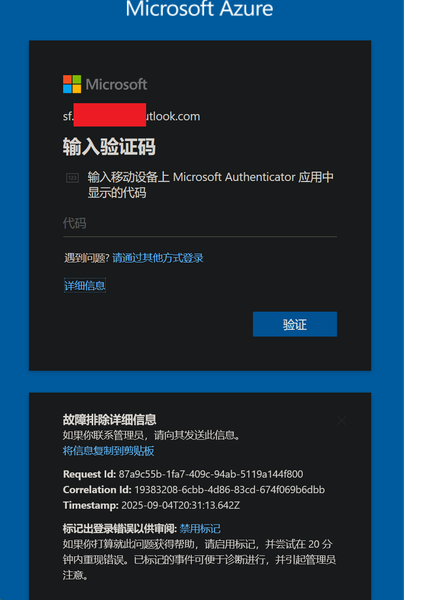
My Azure login is stuck at MFA and cannot proceed
In August, I was still able to log in to Azure, and by logging in through GitHub I could bypass 2FA. But now, no matter how I try, logging in via GitHub always requires 2FA. I can’t access my Azure account anymore—nothing works. The system prompts me to use Microsoft Authenticator to confirm a two-digit code in real time. My Microsoft Authenticator on my iPhone is logged into the same Microsoft account, but I’m not receiving any verification requests for Azure login. No matter how much I refresh, nothing shows up. I’ve already updated the Microsoft Authenticator app to the latest version from the App Store. However, my personal Microsoft account works fine and can log in without any issues.227Views0likes2Comments