Recent Discussions

Excel collage spécial formules
Bonjour, J'ai 3 fichiers excel qui ont la même structure. Lorsque je fais un collage spécial sur plusieurs cellules de l'un des fichiers, un travail se lance spontanément sur les 2 autres fichiers et fait qu'ils reviennent à l'état de leur dernier enregistrement. Impossible de revenir en arrière, même avec le raccourci clavier ctrl + Z. De plus le curseur dans le premier fichier ne s'affiche plus, une croix se mets à la place et il n'est plus possible d'utiliser la fonction coller9Views0likes0CommentsDon’t Miss Out – Adult Sex Toy Doll Available Now at Discounted Price
Don’t miss out on the latest deals—your perfect adult experience is just a click away. Discover high-quality adult silicone sex dolls crafted for realism, comfort, and satisfaction at an unbeatable discounted price. Whether you’re upgrading your collection or exploring new options, these premium products are ideal for anyone seeking the best adult sex toys for men. Designed with body-safe materials and attention to detail, they offer a truly immersive experience. Take advantage of this limited-time offer and enjoy discreet, fast delivery. Shop now and buy directly from sextoyofficial.com for trusted quality and exclusive savings today.11Views0likes0CommentsConditional Access Policies are the Best Way to Block Weekend Access to Microsoft 365
Conditional access policies are very powerful. A beta feature appears to support time-limited blocks, but maybe the new feature is not needed because the same effect can be accomplished today through a mixture of conditional access policies, dynamic groups, and Azure Automation runbooks (or scheduled PowerShell scripts). Maybe that’s why Microsoft hasn’t released any documentation for the beta feature! https://office365itpros.com/2026/03/30/conditional-access-weekend-block/11Views0likes0CommentsMicrosoft can you bring back the new microsoft rewards dashboard
Yeah i know its not related to anything but it is related to Microsoft rewards program (and dashboard) yesterday when I saw this dashboard i was shocked because I can get a lot of points in bonuses at the first day of next month. Since i was close to my rewards goal worth 6550 points, i was very happy to be able to claim my goal although it was still being restocked. the goal (400 robux digital card) was discounted by 200 points because in the new dashboard, i was able to claim it and now its 200pts less. Now today i'm very sad. why did they remove the new rewards dashboard? I dont know but what i only know is that i wont be able to claim it sooner than until few months from now which sucks and is very sad microsoft. That is why you (Microsoft) should bring the new rewards dashboard back because of this situation. and also the roblox 400 robux digital card should be restocked soon I hope. Thanks microsoft if you're able to fix this issue, and if you can kindly give me a reason why you rolled back the original rewards dashboard prior to yesterday (I was lucky I saw it though, i got a lot of points from that heheh until today..)🫠20Views0likes0Comments
How to keep the result of the formula from appearing down the column before a number is added
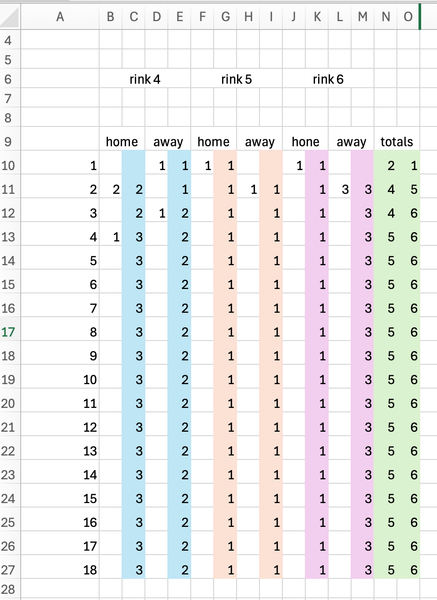
I wish to produce a Teams running score sheet for lawn bowls. When each team (rink) has finished their end the score for either the H or A team is entered. When the next end is finished again the score is entered for the winning team. I am using an IF function in each of the coloured cells: =IF(B13="",C12,B13+C12) This works well, however the result of C?? runs down the entire column as cells in column B are blank waiting for the scores to be added. How can I fix this so the scores show for the rows only and not the entire column. Formula for the TOTALS column is =C10+G10+K1010Views0likes0Comments
Word VBA, Unreachable table style setting?
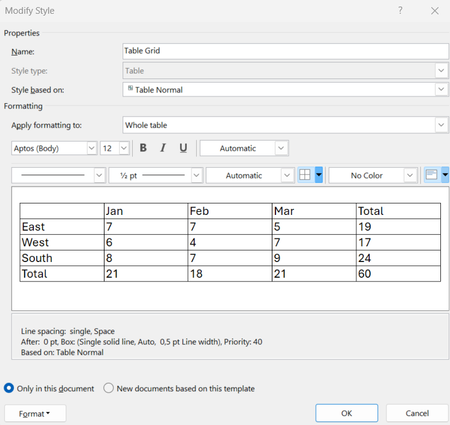
I've noticed something that may be a missing feature in the Word VBA Object model. Styles in word can be of different kinds set by the WdStyleType when adding a style via expression.Add (Name, Type) method of the Styles Object (https://learn.microsoft.com/en-us/office/vba/api/word.styles.add). Using wdStyleTypeTable gives a Table Style. Table styles differ somewhat from other styles since you build up the style of a table by setting the formatting for different parts/features of the table. E.g. the first, or last row may differ in their style compared to the rest of the table. These kind of settings are reached via the Condition method of the TableStyle object (reachable from the Style.Table property). Specifying different "conditions" (of data type WdConditionCode) give you access to ConditionalStyle objects handling the settings for different parts of the table. In word you can modify the table styles by for example <right-clicking> a table style and selecting "Modify Table Style" This presents you with the following UI. The setting I am unable to reach via VBA is tied to the Condition "First Row" which can be reached by selecting the pull-down menu "Apply formatting to:" to Header Row, then clicking the button menu "Format" at the lower left and selecting "Table Properties...". This gives us the "Table Properties" UI in which we in the tab "Row" is given the options to enable "Repeat as header row at the top of each page". The effect of this can be seen in the "Description field" in the previous "Modify Style (Table Edition)" view. (You might have to select something else in "!Apply formatting to:" menu and then re-select "Header row" again to get the description field to update). We now have a "Repeat as header row" shown in the description for "Header rows". This is a setting which in VBA can be reached for an inserted Table via a Rows property: table.rows.HeadingFormat https://learn.microsoft.com/en-us/office/vba/api/word.row.headingformat However, it should be possible to set for the table style as well. In the resulting XML file (styles.xml) of the .docx file we find it in a <w:trPr> block as a <w:tblHeader/> tag. Note that this is the definition of a style in the styles.xml, not the declaration of an inserted table. Have anyone managed to reach this style setting via VBA or know of how it can be done? I've scanned through the methods and properties of Style, TableStyle, and ConditionalStyle object definitions and not found anything allowing me to set this "Table property" as part of the style. It would make most sense if it was available in the TableStyle object (https://learn.microsoft.com/en-us/office/vba/api/word.tablestyle) since that is where properties such as "AllowBreakAcrossPage" can be found. Maybe something they missed in the Word VBA model.1View0likes0Comments
Latest MS Trend: abysmal AI phone support
Hello, I've just tried three times the MS 365 Support Phone Hotline. The AI Bot is designed to just hang up or provide an aka.ms/??? link which exactly leads to the problem that I am trying to contact support for. Thanks for nothing. Hope you fire also the people that worked on the Bot and not only your support hotline staff. It seems there are none left. I am going to recommend my company to move to a different product and drop ms ai slop. Bye5Views0likes0CommentsChatGPT Enterprise Apps Grab Some Work IQ
If installed into a Microsoft 365 tenant, ChatGPT Enterprise apps can access SharePoint Online files, Exchange Online email and calendar, and Teams chats, messages, and tasks. The Entra ID apps created by ChatGPT have the necessary permissions to access information accessible to the signed-in user. Microsoft 365 Copilot can access more information, but being able to process files, emails, calendar items, and chats and channel conversations delivers access to a lot of Work IQ. https://office365itpros.com/2026/03/24/chatgpt-enterprise-apps-workiq/19Views0likes0Comments
TechCommunity Report — Word extremely slow to open files (now resolved)
Issue summary Starting on March 22nd, Word became extremely slow when opening any .docx file (even new empty files). A document that normally opens in 5 seconds suddenly required 8–10 minutes. The issue affected all my devices (Windows PC, mobile, and Word Online). Symptoms observed Word took several minutes to open any file, including newly created ones Word Online displayed “servers are busy” errors My Microsoft account portals sometimes failed to load or did not recognize my identity The issue appeared immediately after an Office update on March 22nd PowerPoint and other Office apps were unaffected Another software opened the same files much quicker Reinstalling Office, repairing Office, and attempting System Restore did not fix the issue Key diagnostic findings The problem was not related to my files (another free online software opened them much quicker) The problem was not local to my PC (same behavior on mobile and Word Online) The issue was clearly linked to Microsoft cloud services or the March 22nd Word build System Restore failed, but the issue persisted exactly the same afterward The problem disappeared suddenly without any local change Resolution The issue resolved itself spontaneously. A document that previously took 10 minutes to open now opens in 5 seconds again. This strongly suggests that the root cause was on Microsoft’s side (cloud service dependency or faulty build). Current configuration After reinstalling Office, I am now on: Microsoft Word for Microsoft 365 Version 2408 — Build 16.0.17928.20148 (64-bit) This build is stable and does not exhibit the issue Request If possible, could Microsoft confirm whether there was a service degradation or a problematic build released around March 22nd? This would help users understand the root cause and avoid unnecessary troubleshooting. Thank you.28Views0likes0CommentsWord documents suddenly take several minutes to open after March 22 Office update
Hello everyone, I’m experiencing a severe and sudden issue with Microsoft Word that began immediately after the March 22, 2026 Office update. I’m hoping to understand whether this is a known regression or if others are seeing similar behavior. Summary of the issue Large Word documents (2.5 M.B ~4.5 MB, plain text, no images) now take 8–10 minutes to open. Smaller Word files also open more slowly than before. Once a document finally opens, performance is completely normal — editing, scrolling, and saving work fine. The slowdown affects every platform: Word on Windows Word on mobile (unable to open the 4.5 MB file) Word Online (which eventually fails with “servers are busy”) This suggests the issue is not device‑specific. Critical detail: The issue began exactly after the March 22 Office update In my update history, I noticed: A new Office build was installed on 2026‑03‑22. Word worked perfectly on March 21. On March 23, all large documents suddenly took several minutes to open. Nothing else changed on my system. This strongly suggests a regression or behavioral change introduced in the latest Word build. Troubleshooting already performed I’ve tried the following steps, none of which helped: Quick Repair and Online Repair Opening Word in Safe Mode Reinstalling Office Copying the entire content into a brand‑new blank Word file Saving the new file locally (outside OneDrive) Opening the file from a different Windows user profile Opening the same file on my phone Opening the file in Word Online Checking OneDrive sync Checking system performance and storage Even a brand‑new local file takes several minutes to open. Additional symptoms (possibly related) Since the same day the issue began: I cannot post on learn.microsoft.com (unexpected error) Some Microsoft portals report that my account “cannot be found” Word Online fails to load large documents and eventually shows “servers are busy” These symptoms make me wonder whether this could be related to: Microsoft account / identity services backend service degradation or a change in how Word performs cloud‑dependent checks during file opening Why this does not appear to be a file‑size or device limitation The same files opened in 10 seconds before March 22. They now take 10 minutes, without any change in size or structure. The files contain only text (no images, no tracked changes). PowerPoint opens a 1.2 GB file instantly on the same machine. The issue affects all devices, including mobile and Word Online. Even brand‑new Word files created locally exhibit the same delay. This points away from file complexity and toward a Word‑specific or service‑related issue introduced recently. Why I’m posting here I’m trying to determine whether: this is a known issue with the March 22 Office build, others are experiencing similar slowdowns, this is related to a backend or identity service problem, or if there is a workaround to bypass whatever Word is waiting for during the opening phase. Any insights, confirmations, or technical explanations would be greatly appreciated. Thank you, Raphaël54Views0likes0Comments
Font support issues for equations in Word
Although you can change the font for equations in Word, there are some issues with how they display. When an equation occupies an entire line, the spacing above and below it looks odd and becomes extremely wide. Currently, fonts like STIX and Latin Modern do not render well; only the default Cambria font maintains proper line spacing. This is extremely inconvenient for users who need to use other mathematical fonts, as many require Times-style mathematical fonts.11Views0likes0CommentsLow-Key Debut for Entra ID Backup and Recovery
Microsoft released the preview of the Entra ID Backup and Recovery solution to tenants on 19 March 2026. Although the software is functional in tenants, Microsoft didn’t make a big announcement for what is a really important piece of functionality. We've spent the last few days testing backup and recovery and put together the major points about the new solution, which is doubtless going to be welcomed by tenants if not by backup ISVs. https://office365itpros.com/2026/03/23/entra-id-backup-and-recovery/95Views0likes0Comments
Why can’t an Advanced Filter be re‑applied like an AutoFilter in Excel?
Hello everyone, I’m trying to clarify a technical question about how Excel handles Advanced Filters versus normal AutoFilters. In my course, I was asked to use an Advanced Filter to display only specific records in a dataset. I applied the Advanced Filter correctly, and the results were displayed as expected. However, when my instructor tried to “remove the filter and apply it again,” Excel did not behave like it does with a normal AutoFilter. Because of this, the instructor assumed the filter was not done correctly. From what I understand, this is actually normal behavior, because: Advanced Filters are not dynamic They do not remain active after being applied They do not have the “Reapply” option that AutoFilters have To use the filter again, you must run the Advanced Filter command manually each time The result is static and does not update automatically Microsoft’s documentation confirms this behavior. For example: “The Advanced Filter command is not an interactive filter. To change the criteria or reapply the filter, you must run the command again.” Source: https://support.microsoft.com/es-es/office/filtrar-por-criterios-avanzados-4c9222fe-8529-4cd7-a898-3f16abdff32b So my question is: Is this the expected behavior of Advanced Filters in Excel, and is it correct that they cannot be re‑applied automatically like AutoFilters? I want to make sure I fully understand the intended functionality so I can explain it properly. Thank you in advance for your help.8Views0likes0Comments
Hotmail to Outlook Migration Broke My Account
A year or two ago, I updated my Microsoft account to try and migrate from hotmail.com to @outlook.com. Since then, my Microsoft account is broken. I log in with my @outlook.com email, but account.microsoft.com displays my hotmail.com email everywhere. Mobile apps will not stay logged in properly and kick me out after a day. On my account info page my @outlook.com email isn't even listed and hotmail.com is listed as primary, but only logging in with @outlook works. I'm pretty sure when I originally tried to migrate my account some exception wasn't handled properly part way through the process and my account is in some sort of database limbo. Is there anyone at Microsoft here that can help with this? Also, sorry if this isn't the right place to post this, but a call with Microsoft support pointed me here and there doesn't seem to be a "Microsoft Account Support" hub or space on this platform. If anyone knows of a better location feel free to suggest that as well. Thanks!25Views0likes0CommentsSharePoint Hub Sites: Building a True Digital Workplace
As an information architect, I often see organizations struggle with a familiar problem: content exists everywhere, but meaning exists nowhere. Teams build sites, departments create silos, and before long, employees are lost in a maze of disconnected information. This is where SharePoint Hub Sites step in—not just as a feature, but as a structural philosophy for building a true digital workplace. Let’s break this down from both a conceptual and technical perspective, while answering the most common questions I hear from clients. https://dellenny.com/sharepoint-hub-sites-building-a-true-digital-workplace/40Views0likes0CommentsPlanner Agent Delivers AI Help for Tasks
The Planner agent is now available to users with Microsoft 365 Copilot licenses and any Planner license. The purpose of the Planner agent is to help people understand the steps necessary to accomplish assigned tasks. Like any AI tool, the quality of the agent’s output depends on the precision and completeness of the instructions given for a task. But if you’re prepared to iterate, the agent might work for you. https://office365itpros.com/2026/03/19/planner-agent/29Views0likes0CommentsPartner Question on Agent 365
We are an ISV, and build solutions that are deployed on a Customers Azure Tenant. We are also in the marketplace. If we decide to make our solution "Agent 365 Enabled" (don't have a better word for it now), here are a few questions: 1. Will there be a special designation on the Microsoft Marketplace? 2. Will that incur additional ACR costs to my customer? 3. If customer decides not to have this observability turned on, do I need to control it in my packaged infrastructure deployment to toggle Yes/No? Thanks!20Views0likes0CommentsAgent 365 Questions
Please clarify, about Agent 365 licenses, there are lot of confusions in this space (e.g who needs license, what will be covered - 1st party, studio agents, dependency with security suite - E5, Defender cloud apps etc) Please help us to understand, how to setup Agent 365 in the organization start to end (e.g. different admin configurations in Purview, Entra, Defender, etc), also, would be cool, to have this documented in learn.microsoft link Is looks like Agent 365, another product with a new license build on existing product & configurations which exist already? (e.g. DSPM, Defender, Entra CAS, etc), if so, why another license model? What happens after 1st of May, for the orgs that did not purchase Agent 365, what will be affected? (like Agent Inventory in MAC, Template, DSPM AI, etc) will disappear?62Views3likes0Comments




Events
REGISTER HERE
As content continues to grow, organizations need better ways to manage inactive data without sacrificing security, compliance, or discoverability.
Join us for an overview of how M...
Tuesday, Apr 07, 2026, 10:00 AM PDTOnline
0likes
2Attendees
0Comments

You’re passionate about what you do, and we’re passionate about empowering your potential. Microsoft 365 Community Conference - is your chance to keep up with AI, build game-changing skills, and take...
Tuesday, Apr 21, 2026, 08:00 AM PDTIn-Person
0likes
6Attendees
0Comments
Recent Blogs
- As content growth accelerates worldwide, organizations need better ways to manage inactive data without sacrificing security, compliance, retention, or discoverability. Today, we’re announcing a publ...Mar 30, 2026216Views0likes0Comments
- 3 MIN READAs SharePoint turns 25, we’re taking a moment to look back at how far it’s come.Mar 27, 2026386Views0likes0Comments