Recent Discussions
Conditional Access Policies are the Best Way to Block Weekend Access to Microsoft 365
Conditional access policies are very powerful. A beta feature appears to support time-limited blocks, but maybe the new feature is not needed because the same effect can be accomplished today through a mixture of conditional access policies, dynamic groups, and Azure Automation runbooks (or scheduled PowerShell scripts). Maybe that’s why Microsoft hasn’t released any documentation for the beta feature! https://office365itpros.com/2026/03/30/conditional-access-weekend-block/5Views0likes0Comments
In Cabin font family, horizontal lines move downwards when exporting to PDF
I am trying to create my CV in Microsoft Word, but I'm running into an issue: the horizontal lines under my section headings (created by typing three hyphens and then hitting Enter) are being lowered too much when exporting to PDF. To see what I mean, see the below images. The first is an image of the section heading and the text below it as it appears in Word: There is a decent level of space between the heading, the line, and the text below. However, when I export the document to a PDF, the horizontal line moves downwards to the point where it is almost touching the text below: This seems to be a problem with the Cabin font family that I'm using; I tried the same with Calibri (a native Word font) and Source Serif 4 (from Google Fonts) and the horizontal line stayed where it should.39Views0likes2Comments 44Views0likes1Comment
Text to Column
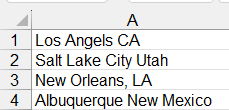
Hello Everyone. I'm trying to split data into 2 columns. The original data is made up of cities and states: Notice that some items have a comma and others don't. Also, the cities states are different lengths. So, I cannot use a space or a comma as a delimiter. I'm trying to figure out how to separate them. I came up with this formula to add a colon so I can use the delimiter to separate them. The problem then becomes the fact that I have to count the number of spaces in each city to add the colon. Then, I have to copy and paste special as values. Also, notice that in New Orleans (for example), it keeps the comma: One more issue, if I get a new report with added cities and states, then I have to re-do the calculations. HELP!!!! Balta40Views0likes1Comment
Excel formulas starting to include current sheet name
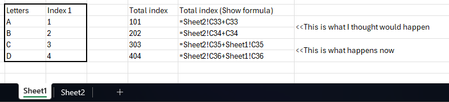
Hi I recently noticed that formulas in excel starting to automatically include the "current" sheet name after leaving and coming back to the sheet (example below). I don't remember this used to be the case but I could be wrong. Does anyone have a similar experience or can confirm if this is correct? Is there a setting somewhere I can turn this on and off? Example: I have 2 tables (1 per sheet). After clicking on Sheet2 to select the cell I want to sum, coming back to Sheet1 and referencing any cells will include "Sheet1!" in my formula. I believe previously the formula omits "Sheet1!". Both ways are useful in different scenarios but wondering if I have missed a trick to "turn on and off" how it behaves. Thanks!86Views0likes5CommentsThe Retirement of SharePoint Alerts is a Pain in the Rear
I’ve used a SharePoint alert to create an emailed daily digest of changes made to files in a document library for seven years. Microsoft plans to retire SharePoint Alerts in July 2026, and the race is on to find a replacement. Regretfully, neither Power Automate nor SharePoint Rules seem capable of generating an equivalent daily digest, perhaps because these solutions don’t handle the number of file versions created by AutoSave well. https://office365itpros.com/2026/03/27/sharepoint-alerts-replacement/44Views1like1Comment
Error Opening the Excel
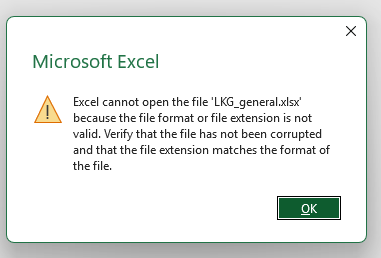
I can't open the file Get Message. Saved in Last time. Previous Version history Not available. Copy from Cloud to pen drive no difference. Try in 365 online mode not open. Try with google sheet not Open. Change the file extension to .xls & .csv not open. Online Platforms not open. Change the Computer and Operating System. Try to open WPS; But no change.50Views0likes1CommentAnalysis ToolPak
With respect to the Analysis ToolPak for use to perform the t-Test, if the option for "t-Test: Two-Sample Assuming Unequal Variances" is selected, is the Satterthwaite Approximation used and not the pooled standard error? Refer to the following URL: https://support.microsoft.com/en-us/office/use-the-analysis-toolpak-to-perform-complex-data-analysis-6c67ccf0-f4a9-487c-8dec-bdb5a2cefab6 Please advise or provide feedback.32Views0likes1CommentFilling a column with succeeding lists
Hi, I need a list of files, with numbers starting from 001 for each box. Adding the number for one box is easy but I have thousands of them. A box number is like "0001AA0001". The first number and the letters never change, so I have : 0001AA0001 0001AA0002 0001AA0003 Then I have to add the files numbers, like "0001AA0001/001". I already have a line for each file, but only with the box number in the forst column, repeated several times, each time for every file. What I have What I need 0001AA0001 0001AA0001/001 0001AA0001 0001AA0001/002 0001AA0001 0001AA0001/003 0001AA0002 0001AA0002/001 0001AA0002 0001AA0002/002 0001AA0003 0001AA0003/001 0001AA0004 0001AA0004/001 0001AA0004 0001AA0004/002 0001AA0004 0001AA0004/003 Can you please tell me how can I add automatically the /001 and so on without having to do it for each box ? I can't manage to use a model for CTRL+E and I'm not accustomed to use the functions. Thanks, M.T.62Views0likes3Comments
Office 365 issues
We have an end user that started with us approximately a year ago. Shortly after he started he began noticing that his status would go away on a fairly regular basis on MS Teams. We tried uninstall/reinstall, resetting, repairing and the problem persisted. Since he was a relatively new hire we were thinking it was something with his laptop so we replaced and the issue returned. Turned in a ticket with our Office 365 vendor who in turn opened a ticket with Microsoft. After some initial testing they sent a Teams install file that seemed to fix the issue. Since that time he has regularly had issues with Teams disconnecting, Outlook just stop receiving emails, while showing connected. Typically the only fix was a restart and on some occasions that did not work. Sometimes a reset or repair might fix this issue. Throughout this we did clear credential manager, caches, etc...This got a point yesterday where I created a new user profile for him, basically like a new laptop and it temporarily fixed the Teams and Outlook issue, however when attempting to sign into MS Edge it would just spin and had to use task manager to close the app. Tried a repair on the app as you cannot uninstall and same result it would hang up and have to forcibly closed. Just wondering if someone else has encountered something like this and possible fixes. Thanks48Views0likes1CommentSPILL error
Hi. I'm just using a very simple formula to calculate how much money is still due from an original total amount. The formula I have typed is simply in this format: 6000 -(B2-B8), but in the next again cell where I am looking to display the result, I am getting a SPILL error. The correct total is displayed in the cell, but a number of cells immediately below are displaying the "6000" figure!! I'm struggling to correct this - can you help :-) Thank you 👍91Views0likes4Comments
Latest MS Trend: abysmal AI phone support
Hello, I've just tried three times the MS 365 Support Phone Hotline. The AI Bot is designed to just hang up or provide an aka.ms/??? link which exactly leads to the problem that I am trying to contact support for. Thanks for nothing. Hope you fire also the people that worked on the Bot and not only your support hotline staff. It seems there are none left. I am going to recommend my company to move to a different product and drop ms ai slop. Bye5Views0likes0CommentsNewly created folder and files doesn't appear in power query transform data
Hi team Happy Thursday !! I wants to merge all files in a SharePoint folder. However, that newly created file and folder doesn't appear in the Power query. I have tried to clear caches, it still doens't appear there Can anyone please assist to solve this issue ? ThanksSolved56Views0likes4Comments
Latest updated removed all of my Quick Access Toolbar customizations.
Latest updated removed all of my Quick Access Toolbar customizations. It's not hidden - it's there, it's just empty of everything but the default commands. I have checked for a *.qat file in these directories C:\Users\<username>\AppData\Roaming\Microsoft\Office C:\Users\<username>\AppData\Local\Microsoft\Office but there's nothing there. I have never exported it (did not know you could) so there is no *.exportedUI file to use I have around 40 commands and don't even remember all of the correct names to rebuild it.37Views0likes1Comment#NAME? error in add-ins
The #NAME? error continues to be a problem when using excel add-ins. It occurs randomly and the troubleshooting steps provided by Microsoft do not always work. Does anyone know of a way to mitigate this issue, or how we can escalate further to Microsoft to address?43Views0likes1CommentComplex formulae with data model
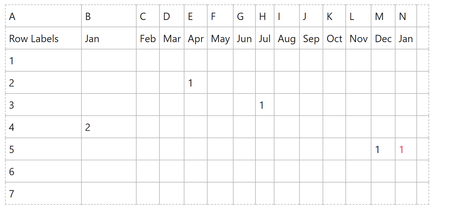
Over the years, I have developed a significant excel data sheet which has gotten slower and slower with time. I have discovered the idea of excel's data model this week and have learnt how to import the data I need from its source CSV to the data model and I now have a power pivot which looks like what I originally had in excel. What I would like to do next, is to replicate some of the formulae I had in excel to calculate if something should be counted or not. I would not want the red one to be counted as this row would have been counted in the previous month. In excel I was using the following formula- =IF(COUNTIF(B5:M4,">0"),SUM(Patient!B5:M5*0),Patient!N5) is there a way of achieving this with the data model or would I have to hardcode this into another sheet? I was trying to avoid doing this to minimise the number of formulae... Many thanks for your help...147Views0likes7CommentsPowerPoint NEW Image Editing Tools Explained — Remove Background, Upscale & Edit Images Instantly!
🚀 PowerPoint just received one of its most powerful updates ever! Microsoft has introduced a brand‑new built‑in image editing experience, allowing you to enhance visuals without leaving PowerPoint. In my latest YouTube video, I walk through all the new capabilities now rolling out in Microsoft 365, including: ✨ Remove background 🧽 Erase unwanted objects 🔄 Move elements inside an image 🔍 Upscale low‑resolution pictures ⚡ Auto‑enhance lighting & contrast 📝 Add or edit text directly on images All of this happens directly inside PowerPoint, making slide creation faster and more intuitive than ever. These features are now available on: 💻 Windows 🍎 Mac 🌐 PowerPoint for the Web If you work with presentations daily, this update is a real productivity boost. 📹 Watch the full breakdown and demo here ➡️ https://youtu.be/OZzfFi2qpAk Let me know what feature you find the most useful! 👇 #Microsoft365 #PowerPoint #Productivity #AI #Presentations #Microsoft365Insider #Creators44Views0likes0Comments



Events
REGISTER HERE
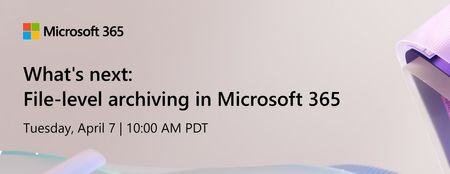
As content continues to grow, organizations need better ways to manage inactive data without sacrificing security, compliance, or discoverability.
Join us for an overview of how M...
Tuesday, Apr 07, 2026, 10:00 AM PDTOnline
0likes
2Attendees
0Comments

You’re passionate about what you do, and we’re passionate about empowering your potential. Microsoft 365 Community Conference - is your chance to keep up with AI, build game-changing skills, and take...
Tuesday, Apr 21, 2026, 08:00 AM PDTIn-Person
0likes
6Attendees
0Comments
Recent Blogs
- 3 MIN READAs SharePoint turns 25, we’re taking a moment to look back at how far it’s come.Mar 27, 2026329Views0likes0Comments
- Change is the only constant, but adapting to change isn't always easy. If we consider the celestial speed at which technology is evolving, keeping up with every trending tool can be daunting. An ecos...Mar 26, 2026232Views0likes0Comments