Security and AI Essentials
Protect your organization with AI-powered, end-to-end security.
Defend Against Threats
Get ahead of threat actors with integrated solutions.
Secure All Your Clouds
Protection from code to runtime.
Secure All Access
Secure access for any identity, anywhere, to any resource.
Protect Your Data
Comprehensive data security across your entire estate.
Recent Blogs
For many organizations using Microsoft Intune to manage devices, integrating Intune logs into Microsoft Sentinel is an essential for security operations (Incorporate the device into the SEIM). By rou...
Apr 10, 2026422Views
1like
0Comments
5 MIN READ
Many organizations run workloads across multiple cloud providers and need to maintain a strong security posture while ensuring interoperability. Microsoft Defender for Cloud is a cloud-native applica...
Apr 10, 2026170Views
1like
0Comments
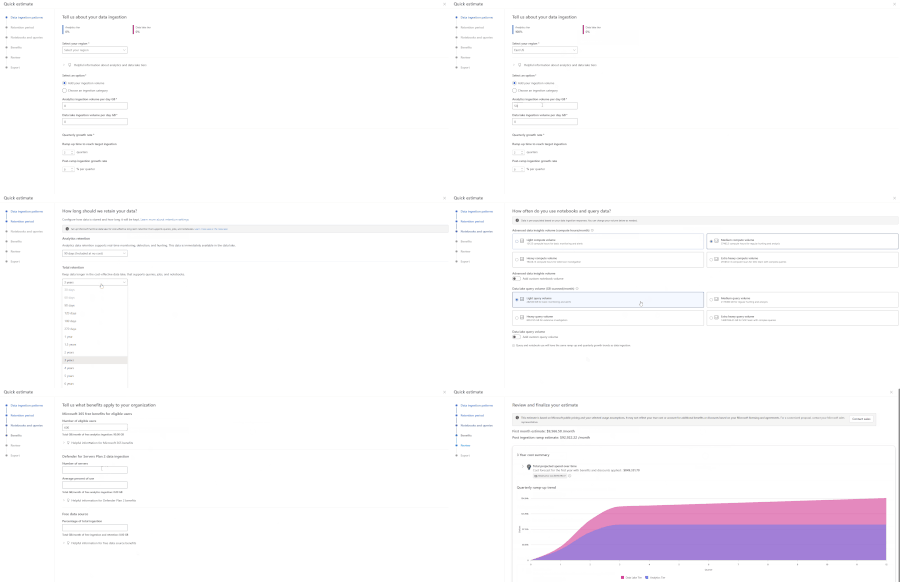
One of the first questions teams ask when evaluating Microsoft Sentinel is simple: what will this actually cost? Today, many customers and partners estimate Sentinel costs using the Azure Pricing Cal...
Apr 09, 2026839Views
0likes
0Comments
We have reviewed the new settings in Microsoft Edge version 147 and determined that there are no additional security settings that require enforcement. The Microsoft Edge version 139 security baselin...
Apr 09, 2026268Views
0likes
0Comments
Recent Discussions

VPN Integration not persistent
Hello, We tried to configure https://learn.microsoft.com/en-us/defender-for-identity/vpn-integration from supported Cisco VPN GW. We established the RADIUS Accounting logs to be sent to DC with MDI sensors installed. Yet when we enabled this in Defender Portal (Settings > Identities > VPN) by checking the box and inserting the shared secret, the configuration is not persistent. We hit save, and we are presented with the success green message, but once we refresh the page or go elsewhere in the portal, the checkbox is not checked. Has anyone encountered the same issue? Thanks, Simon
Understand Why a Service Principal Was Created in Your Entra Tenant
Are you a tenant admin or member of a security team in your organization and find yourself asking “Why was this service principal created in our tenant?” Historically, answering this required correlating audit logs with Microsoft Graph queries or going through long investigations. Microsoft Entra now introduces enhanced audit log properties that make it significantly easier to understand the origin and intent behind newly created service principals directly from tenant audit logs. These new improvements surface additional insights within the Add service principal activity under the ApplicationManagement category—helping administrators determine whether a service principal was provisioned automatically by Microsoft services, triggered by a purchased subscription, or explicitly created by user or application activity. What’s in it for me as an Admins or member of the Security Team When a service principal is created, new metadata is now captured within Microsoft Entra audit logs that enables faster root‑cause analysis. These properties help distinguish between Microsoft‑driven provisioning processes and tenant‑initiated actions, allowing teams to quickly assess whether an event is expected platform behavior or something requiring deeper investigation. For example, administrators can now: Identify provisioning initiated by Microsoft services versus internal users or automation. Determine which tenant subscription or service plan enabled just‑in‑time provisioning. Recognize provisioning linked to Azure resource onboarding or managed identities. Investigate service principal creation without relying on additional Graph lookups. By leveraging these enriched audit logs, security teams can streamline investigations into newly created enterprise applications and reduce manual dependency on downstream data sources. This ultimately improves visibility into application onboarding events and supports faster decision‑making when assessing potential risk or unexpected provisioning activity within the tenant. Learn more here- Understand why a service principal was created in your tenant - Microsoft Entra ID | Microsoft Learn25Views0likes0Comments
Purview Graph API
Hello. I'm trying to find information on the Purview Graph API and it's endpoints. It looks like the endpoints aren't posted publicly and are listed within an admin console. Can someone help me with how to view the endpoints? Also, are the graph API endpoints capable of reading and creating assets into Purview?20Views0likes0CommentsLeveraging Microsoft Graph to Automate Compliance Workflows MS Purview
Background Microsoft Purview provides organizations with capabilities to discover, classify, protect, and govern sensitive information across Microsoft 365 workloads. As organizations increasingly rely on Purview for compliance operations such as auditing, investigations, and regulatory response, there is a growing need to automate these processes beyond the Microsoft Purview portal. Microsoft exposes key compliance capabilities through Microsoft Graph APIs, enabling organizations to integrate Purview operations directly into automation workflows. The Microsoft Purview APIs in Microsoft Graph allow applications to align with data governance, security, and compliance policies defined within the Purview portal, helping ensure that applications handling sensitive information respect organizational controls. Automating eDiscovery Operations with Microsoft Graph The Microsoft Purview eDiscovery APIs available through Microsoft Graph enable organizations to automate repetitive compliance tasks and integrate with existing investigation or legal workflows. These APIs are intended to support litigation, investigation, and regulatory scenarios by allowing administrators to programmatically manage key eDiscovery components such as cases, custodians, searches, review sets, and exports. This capability allows organizations to move from manual portal‑based workflows toward repeatable, policy‑aligned processes integrated into automation platforms or downstream compliance tooling. Programmatic Access to Audit Logs Microsoft Purview Audit captures thousands of operations across Microsoft 365 services and retains them in the unified audit log for security investigations and compliance obligations. Through Microsoft Graph, administrators can now programmatically search and retrieve audit logs using the Purview Audit Search API. This API enables administrators and applications to query and retrieve relevant audit activity logs across workloads such as Exchange, Entra ID, OneDrive, SharePoint, and Intune, providing visibility into user activity and administrative operations performed across the organization. This provides a programmatic alternative to legacy PowerShell‑based audit search methods, improving reliability and enabling automation of compliance monitoring workflows. Supporting Policy‑Aware Applications Applications that integrate with Microsoft Purview APIs through Microsoft Graph can interpret and enforce compliance policies such as sensitivity labels or data loss prevention (DLP) rules. Microsoft documents that apps built using these APIs can prevent data misuse by aligning with compliance and security requirements defined within the organization’s governance framework. This integration also allows enterprise applications to respect sensitivity labels and policy‑driven controls, ensuring that interactions with organizational data remain compliant with regulatory requirements and internal governance policies. Conclusion Microsoft Purview governs organizational data through classification, retention, auditing, and investigation capabilities. Microsoft Graph provides the automation layer that allows these governance controls to be accessed programmatically. By integrating Microsoft Graph with Microsoft Purview APIs, organizations can automate eDiscovery workflows, retrieve audit logs programmatically, and ensure that applications interacting with sensitive data respect compliance policies defined within their Microsoft 365 environment. Learning Resources Use the Microsoft Purview eDiscovery API in Microsoft Graph Use Microsoft Purview APIs for eDiscovery Overview of Microsoft Purview APIs in Microsoft Graph Introducing the Microsoft Purview Audit Search Graph API42Views1like0CommentsMicrosoft Entra Conditional Access Optimization Agent - Move from Static to Continuous Protection
Conditional Access has long been Microsoft Entra’s Zero Trust policy engine—powerful, flexible, and can easily go wrong with misconfiguration over time due to large volume of policies. As the no of tenants increase the no of new users and applications the new modern authentication methods are introduced continuously, and Conditional Access policies that once provided full coverage often drift into partial or inconsistent protection. This is an operational gap which introduces complexity and manageability challenges. The solution to this is utilizing Conditional Access Optimization Agent, an AI‑powered agent integrated with Microsoft Security Copilot that continuously evaluates Conditional Access coverage and recommends targeted improvements aligned to Microsoft Zero Trust best practices. In this article, Let us understand what problem the agent can solve, how it works, how it can be best utilized with the real‑world Entra Conditional Access strategy. The Problem is Conditional Access does not break loudly Most Conditional Access issues are not caused by incorrect syntax or outright failure. Instead, they emerge gradually due to the continuous changes into the enviornment. New users are created but not included in existing policies New SaaS or enterprise apps bypass baseline controls MFA policies exist, but exclusions expand silently Legacy authentication or device code flow remains enabled for edge cases Multiple overlapping policies grow difficult to reason about Although there are tools like What‑If, Insights & Reporting, and Gap Analyzer workbooks help, they all require manual review and interpretation. At enterprise scale with large no of users and applications, this becomes increasingly reactive rather than preventative. What is the Conditional Access Optimization Agent? The Conditional Access Optimization Agent is one of the Microsoft Entra agents built to operate autonomously using Security Copilot. Its purpose is to continuously answer a critical question. Are all users, applications, and agent identities protected by the right Conditional Access policies - right now? The agent analyzes your tenant and recommends the following. Creating new policies Updating existing policies Consolidating similar policies Reviewing unexpected policy behavior patterns All recommendations are reviewable and optional, with actions typically staged in Report‑Only mode before enforcement. How the agents actually works ? The agent operates in two distinct phases - First the Analysis and then Recommendation & remediation During the analysis phase it evaluates the following. Enabled Conditional Access policies User, application, and agent identity coverage Authentication methods and device‑based controls Recent sign‑in activity (24‑hour evaluation window) Redundant or near‑duplicate policies This phase identifies gaps, overlaps, and deviations from Microsoft’s learned best practices. The next and final phase of recommendation and remediation depends on the results from the finding. Based on this the agent can suggest the following. Enforcing MFA where coverage is missing Adding device compliance or app protection requirements Blocking legacy authentication and device code flow Consolidating policies that differ only by minor conditions Creating new policies in report‑only mode Some of offer one click remediation making it easy for the administrators to control and enforce the decisions more appropriately. What are its key capabilities ? Continuous coverage validation The agent continuously checks for new users and applications that fall outside existing Conditional Access policy scope - one of the most common real‑world gaps in Zero Trust deployments. Policy consolidation support Large environments often accumulate near‑duplicate policies over time. The agent analyzes similar policy pairs and proposes consolidation, reducing policy sprawl while preserving intent. Plain‑language explanations Each recommendation includes a clear rationale explaining why the suggestion exists and what risk it addresses, helping administrators validate changes rather than blindly accepting automation. Policy review reports (This feature is still in preview) The agent can generate policy review reports that highlight spikes or dips in enforcement behavior—often early indicators of misconfiguration or unintended impact Beyond classic MFA and device controls, One of the most important use case is the agent also supports passkey adoption campaigns (This feature is still in preview) . It can include the following. Assess user readiness Generate phased deployment plans Guide enforcement once prerequisites are met This makes the agent not only a corrective tool, but it is helpful as a migration and modernization assistant for building phishing‑resistant authentication strategies. Zero Trust strategies utilizing agents For a mature Zero Trust strategies, the agent provides continuous assurance that Conditional Access intent does not drift as identities and applications evolve. The use of Conditional Access Optimization Agent does not replace the architectural design or automatic policy enforcement instead it can be utilized to ensure continuous evaluation, early‑alarm system for any policy drift and can act as a force‑multiplier for identity teams managing change at scale. The object of agent usage is to help close the gap upfront between policy intent depending on the actual use, instead of waiting for the analysis to complete upon resolving incidents and post auditing. In this modernized era, the identity environments are dynamic by default. The Microsoft Entra Conditional Access Optimization Agent reflects a shift toward continuous validation and assisted governance, where policies are no longer assumed to be correct simply because they exist. For organizations already mature in Conditional Access, the agent offers operational resilience. For those still building, it provides guardrails that scale with complexity but without removing human accountability.
Security Copilot Clinic: AI‑Driven Agentic Defense for Healthcare
Healthcare security teams are operating under unprecedented pressure. Ransomware continues to target clinical environments, identity‑based attacks are increasing in sophistication, and the risk of PHI exposure remains a constant concern — all while SOC teams face chronic staffing shortages. Microsoft Security Copilot is now available for organizations using Microsoft 365 E5, bringing generative AI assistance directly into the security tools healthcare teams already rely on. This clinic series is designed to show how Security Copilot changes day‑one operations — turning noisy alerts into clear, actionable investigations and faster containment. Why attend this clinic For healthcare CISOs, SOC leaders, and security architects, Security Copilot represents more than an AI assistant — it’s a shift in how investigations are conducted across endpoint, identity, email, data, and cloud workloads. In this session, you’ll see how Security Copilot helps healthcare security teams: Move faster with confidence by summarizing complex evidence across security signals Reduce investigation fatigue by standardizing analyst workflows Communicate risk clearly by translating technical findings into leadership‑ready insights Protect patient data without adding new tools or headcount All examples and demonstrations are grounded in real healthcare security scenarios. What we’ll explore See the full incident picture in one place Microsoft‑built Security Copilot agents embedded across Defender, Entra, Intune, and Purview automatically correlate signals from endpoint, identity, email, data, and cloud applications into a single investigation view — eliminating manual pivoting between tools. Move from alert to action faster Embedded agents analyze related signals in real time and surface prioritized investigation paths along with recommended containment actions directly in the analyst workflow. Standardize investigations and reduce noise Agent‑driven prompts and investigation structure help standardize analyst response, reduce alert fatigue, and create repeatable workflows that scale in lean SOC environments. Protect PHI and communicate risk with confidence Security Copilot uses embedded data and threat intelligence to produce leadership‑ready summaries that clearly articulate potential PHI exposure, attack progression, and business impact. Session format and audience Format 60‑minute live session End‑to‑end demo Interactive Q&A Who should attend CISOs and Security Leaders SOC Managers and Analysts Security and Cloud Architects Clinical IT and Infrastructure Leaders Upcoming sessions Date Time (ET) Registration March 13, 2026 12:00 – 1:00 PM Session #1 March 20, 2026 12:00 – 1:00 PM Session #2 March 27, 2026 12:00 – 1:00 PM Session #3 Secure healthcare — together Security Copilot enables healthcare organizations to respond faster, investigate smarter, and communicate risk more effectively — all within the Microsoft security ecosystem teams already trust. If you’re evaluating how AI‑driven, agentic defense can support your healthcare SOC, this clinic will give you practical insight you can apply immediately.Sentinel to Defender Portal Migration - my 5 Gotchas to help you
The migration to the unified Defender portal is one of those transitions where the documentation covers "what's new" but glosses over what breaks on cutover day. Here are the gotchas that consistently catch teams off-guard, along with practical fixes. Gotcha 1: Automatic Connector Enablement When a Sentinel workspace connects to the Defender portal, Microsoft auto-enables certain connectors - often without clear notification. The most common surprises: Connector Auto-Enables? Impact Defender for Endpoint Yes EDR telemetry starts flowing, new alerts created Defender for Cloud Yes Additional incidents, potential ingestion cost increase Defender for Cloud Apps Conditional Depends on existing tenant config Azure AD Identity Protection No Stays in Sentinel workspace only Immediate action: Within 2 hours of connecting, navigate to Security.microsoft.com > Connectors & integrations > Data connectors and audit what auto-enabled. Compare against your pre-migration connector list and disable anything unplanned. Why this matters: Auto-enabled connectors can duplicate data sources - ingesting the same telemetry through both Sentinel and Defender connectors inflates Log Analytics costs by 20-40%. Gotcha 2: Incident Duplication The most disruptive surprise. The same incident appears twice: once from a Sentinel analytics rule, once from the Defender portal's auto-created incident creation rule. SOC teams get paged twice, deduplication breaks, and MTTR metrics go sideways. Diagnosis: SecurityIncident | where TimeGenerated > ago(7d) | summarize IncidentCount = count() by Title | where IncidentCount > 1 | order by IncidentCount desc If you see unexpected duplicates, the cause is almost certainly the auto-enabled Microsoft incident creation rule conflicting with your existing analytics rules. Fix: Disable the auto-created incident creation rule in Sentinel Automation rules, and rely on your existing analytics rule > incident mapping instead. This ensures incidents are created only through Sentinel's pipeline. Gotcha 3: Analytics Rule Title Dependencies The Defender portal matches incidents to analytics rules by title, not by rule ID. This creates subtle problems: Renaming a rule breaks the incident linkage Copying a rule with a similar title causes cross-linkage Two workspaces with identically named rules generate separate incidents for the same alert Prevention checklist: Audit all analytics rule titles for uniqueness before migration Document the title-to-GUID mapping as a reference Avoid renaming rules en masse during migration Use a naming convention like <Severity>_<Tactic>_<Technique> to prevent collisions Gotcha 4: RBAC Gaps Sentinel workspace RBAC roles don't directly translate to Defender portal permissions: Sentinel Role Defender Portal Equivalent Gap Microsoft Sentinel Responder Security Operator Minor - name change Microsoft Sentinel Contributor Security Operator + Security settings (manage) Significant - split across roles Sentinel Automation Contributor Automation Contributor (new) New role required Migration approach: Create new unified RBAC roles in the Defender portal that mirror your existing Sentinel permissions. Test with a pilot group before org-wide rollout. Keep workspace RBAC roles for 30 days as a fallback. Gotcha 5: Automation Rules Don't Auto-Migrate Sentinel automation rules and playbooks don't carry over to the Defender portal automatically. The syntax has changed, and not all Sentinel automation actions are available in Defender. Recommended approach: Export existing Sentinel automation rules (screenshot condition logic and actions) Recreate them in the Defender portal Run both in parallel for one week to validate behavior Retire Sentinel automation rules only after confirming Defender equivalents work correctly Practical Migration Timeline Phase 1 - Pre-migration (1-2 weeks before): Audit connectors, analytics rules, RBAC roles, and automation rules Document everything - titles, GUIDs, permissions, automation logic Test in a pilot environment first Phase 2 - Cutover day: Connect workspace to Defender portal Within 2 hours: audit auto-enabled connectors Within 4 hours: check for duplicate incidents Within 24 hours: validate RBAC and automation rules Phase 3 - Post-migration (1-2 weeks after): Monitor incident volume for duplication spikes Validate automation rules fire correctly Collect SOC team feedback on workflow impact After 1 week of stability: retire legacy automation rules Phase 4 - Cleanup (2-4 weeks after): Remove duplicate automation rules Archive workspace-specific RBAC roles once unified RBAC is stable Update SOC runbooks and documentation The bottom line: treat this as a parallel-run migration, not a lift-and-shift. Budget 2 weeks for parallel operations. Teams that rushed this transition consistently reported longer MTTR during the first month post-migration.Introducing the Entra Helpdesk Portal: A Zero-Trust, Dockerized ITSM Interface for Tier 1 Support
Hello everyone, If you manage identity in Microsoft Entra ID at an enterprise scale, you know the struggle: delegating day-to-day operational tasks (like password resets, session revocations, and MFA management) to Tier 1 and Tier 2 support staff is inherently risky. The native Azure/Entra portal is incredibly powerful, but it’s complex and lacks mandatory ITSM enforcement. Giving a helpdesk technician the "Helpdesk Administrator" role grants them access to a portal where a single misclick can cause a major headache. To solve this, I’ve developed the Entra Helpdesk Portal (Community Edition)—an open-source, containerized application designed to act as an isolated "airlock" between your support team and your Entra ID tenant. Why This Adds Value to Your Tenant Instead of having technicians log into the Azure portal, they log into this clean, Material Design web interface. It leverages a backend Service Principal (using MSAL and the Graph API) to execute commands on their behalf. Strict Zero Trust: Logging in via Microsoft SSO isn’t enough. The app intercepts the token and checks the user’s UPN against a hardcoded ALLOWED_ADMINS whitelist in your Docker environment file. Mandatory ITSM Ticketing: You cannot enforce ticketing in the native Azure Portal. In this app, every write action prompts a modal requiring a valid ticket number (e.g., INC-123456). Local Audit Logging: All actions, along with the actor, timestamp, and ticket number, are written to an immutable local SQLite database (audit.db) inside the container volume. Performance: Heavy Graph API reads are cached in-memory with a Time-To-Live (TTL) and smart invalidation. Searching for users or loading Enterprise Apps takes milliseconds. What Can It Do? Identity Lifecycle: Create users, auto-generate secure 16-character passwords, revoke sign-in sessions, reset passwords, and delete specific MFA methods to force re-registration. Diagnostics: View a user's last 5 sign-in logs, translating Microsoft error codes into plain English. Group Management: Add/remove members to Security and M365 groups. App/SPN Management: Lazy-load raw requiredResourceAccess Graph API payloads to audit app permissions, and instantly rotate client secrets. Universal Restore: Paste the Object ID of any soft-deleted item into the Recycle Bin tab to instantly resurrect it. How Easy Is It to Setup? I wanted this to be universally deployable, so I compiled it as a multi-architecture Docker image (linux/amd64 and linux/arm64). It will run on a massive Windows Server or a simple Raspberry Pi. Setup takes less than 5 minutes: Create an App Registration in Entra ID and grant it the necessary Graph API Application Permissions (e.g., User.ReadWrite.All, AuditLog.Read.All). Create a docker-compose.yml file. Define your feature toggles. You can literally turn off features (like User Deletion) by setting an environment variable to false. version: '3.8' services: helpdesk-portal: image: jahmed22/entra-helpdesk:latest container_name: entra_helpdesk restart: unless-stopped ports: - "8000:8000" environment: # CORE IDENTITY - TENANT_ID=your_tenant_id_here - CLIENT_ID=your_client_id_here - CLIENT_SECRET=your_client_secret_here - BASE_URL=https://entradesk.jahmed.cloud - ALLOWED_ADMINS=email address removed for privacy reasons # CUSTOMIZATION & FEATURE FLAGS - APP_NAME=Entra Help Desk - ENABLE_PASSWORD_RESET=true - ENABLE_MFA_MANAGEMENT=true - ENABLE_USER_DELETION=false - ENABLE_GROUP_MANAGEMENT=true - ENABLE_APP_MANAGEMENT=true volumes: - entra_helpdesk_data:/app/static/uploads - entra_helpdesk_db:/app volumes: entra_helpdesk_data: entra_helpdesk_db: 4.Run docker compose up -d and you are done! I built this to give back to the community and help secure our Tier 1 operations. If you are interested in testing it out in your dev tenants or want to see the full architecture breakdown, you can read the complete documentation on my website here I’d love to hear your thoughts, feedback, or any feature requests you might have!Do XDR Alerts cover the same alerts available in Alert Policies?
The alerts in question are the 'User requested to release a quarantined message', 'User clicked a malicious link', etc. About 8 of these we send to 'email address removed for privacy reasons'. That administrator account has an EOM license, so Outlook rules can be set. We set rules to forward those 8 alerts to our 'email address removed for privacy reasons' address. This is, very specifically, so the alert passes through the @tenant.com address, and our ticketing endpoint knows what tenant sent it. But this ISN'T ideal because it requires an EOP license (or similar - this actually hasn't been an issue until now just because of our customer environments). I've looked at the following alternatives: - Setting email address removed for privacy reasons as the recipient directly on the Alert Policies in question. This results in the mail going directly from microsoft to our Ticketing Portal - so it ends up sorted into Microsoft tickets. and the right team doesn't get it. SMTP Forwarding via either Exchange AC User controls or Mail Flow Rules. But these aren't traditional forwarding, and they have the same issue as above. Making administrator @tenant.com a SHARED mailbox that we can also login to (for administration purposes). But this doesn't allow you to set Outlook rules (or even login to Outlook). I've checked out the newer alerts under Defender's Settings panel - XDR alerts, I think they're called. Wondering if these can be leveraged at all for this? Essentially, trying to get these Alerts to come to our external ticketing address, from the tenants domain (instead of Microsoft). I could probably update Autotask's rules to check for a header, and set that header via Mail Flow rules, but.. just hoping I don't have to do that for everyone.Impersonation Protection: Users to Protect should also be Trusted Senders
Hey all, sort of a weird question here. Teaching my staff about Impersonation Protection, and it's kind of occurred to me that any external sender added to 'Senders to Protect' sort of implicitly should also be a 'Trusted Sender'. Example - we're an MSP, and we want our Help Desk (email address removed for privacy reasons) to be protected from impersonation. Specifically, we want to protect the 'Help Desk' name. So we add email address removed for privacy reasons to Senders to protect. However, we ALSO want to make sure our emails come thru. So we've ALSO had to add email address removed for privacy reasons to Trusted Senders on other tenants. Chats with Copilot have sort of given me an understanding that this is essentially a 'which is more usefuI' scenario. But CoPilot makes things up, and I want some human input. In theory, ANYONE we add to 'trusted senders' we ALSO want protected from Impersonation. Anyone we protect from Impersonation we ALSO want to trust. Copilot says you SHOULDN'T do both. Which is better / more practical?
Feature Request: Extend Security Copilot inclusion (M365 E5) to M365 A5 Education tenants
Background At Ignite 2025, Microsoft announced that Security Copilot is included for all Microsoft 365 E5 customers, with a phased rollout starting November 18, 2025. This is a significant step forward for security operations. The gap Microsoft 365 A5 for Education is the academic equivalent of E5 — it includes the same core security stack: Microsoft Defender, Entra, Intune, and Purview. However, the Security Copilot inclusion explicitly covers only commercial E5 customers. There is no public roadmap or timeline for extending this benefit to A5 education tenants. Why this matters Education institutions face the same cybersecurity threats as commercial organizations — often with fewer dedicated security resources. The A5 license was positioned as the premium security offering for education. Excluding it from Security Copilot inclusion creates an inequity between commercial and education customers holding functionally equivalent license tiers. Request We would like Microsoft to: Confirm whether Security Copilot inclusion will be extended to M365 A5 Education tenants If yes, provide an indicative timeline If no, clarify the rationale and what alternative paths exist for education customers Are other EDU admins in the same situation? Would appreciate any upvotes or comments to help raise visibility with the product team.Security Copilot Integration with Microsoft Sentinel - Why Automation matters now
Security Operations Centers face a relentless challenge - the volume of security alerts far exceeds the capacity of human analysts. On average, a mid-sized SOC receives thousands of alerts per day, and analysts spend up to 80% of their time on initial triage. That means determining whether an alert is a true positive, understanding its scope, and deciding on next steps. With Microsoft Security Copilot now deeply integrated into Microsoft Sentinel, there is finally a practical path to automating the most time-consuming parts of this workflow. So I decided to walk you through how to combine Security Copilot with Sentinel to build an automated incident triage pipeline - complete with KQL queries, automation rule patterns, and practical scenarios drawn from common enterprise deployments. Traditional triage workflows rely on analysts manually reviewing each incident - reading alert details, correlating entities across data sources, checking threat intelligence, and making a severity assessment. This is slow, inconsistent, and does not scale. Security Copilot changes this equation by providing: Natural language incident summarization - turning complex, multi-alert incidents into analyst-readable narratives Automated entity enrichment - pulling threat intelligence, user risk scores, and device compliance state without manual lookups Guided response recommendations - suggesting containment and remediation steps based on the incident type and organizational context The key insight is that Copilot does not replace analysts - it handles the repetitive first-pass triage so analysts can focus on decision-making and complex investigations. Architecture - How the Pieces Fit Together The automated triage pipeline consists of four layers: Detection Layer - Sentinel analytics rules generate incidents from log data Enrichment Layer - Automation rules trigger Logic Apps that call Security Copilot Triage Layer - Copilot analyzes the incident, enriches entities, and produces a triage summary Routing Layer - Based on Copilot's assessment, incidents are routed, re-prioritized, or auto-closed (Forgive my AI-painted illustration here, but I find it a nice way to display dependencies.) +-----------------------------------------------------------+ | Microsoft Sentinel | | | | Analytics Rules --> Incidents --> Automation Rules | | | | | v | | Logic App / Playbook | | | | | v | | Security Copilot API | | +-----------------+ | | | Summarize | | | | Enrich Entities | | | | Assess Risk | | | | Recommend Action| | | +--------+--------+ | | | | | v | | +-----------------------------+ | | | Update Incident | | | | - Add triage summary tag | | | | - Adjust severity | | | | - Assign to analyst/team | | | | - Auto-close false positive| | | +-----------------------------+ | +-----------------------------------------------------------+ Step 1 - Identify High-Volume Triage Candidates Not every incident type benefits equally from automated triage. Start with alert types that are high in volume but often turn out to be false positives or low severity. Use this KQL query to identify your top candidates: SecurityIncident | where TimeGenerated > ago(30d) | summarize TotalIncidents = count(), AutoClosed = countif(Classification == "FalsePositive" or Classification == "BenignPositive"), AvgTimeToTriageMinutes = avg(datetime_diff('minute', FirstActivityTime, CreatedTime)) by Title | extend FalsePositiveRate = round(AutoClosed * 100.0 / TotalIncidents, 1) | where TotalIncidents > 10 | order by TotalIncidents desc | take 20 This query surfaces the incident types where automation will deliver the highest ROI. Based on publicly available data and community reports, the following categories consistently appear at the top: Impossible travel alerts (high volume, around 60% false positive rate) Suspicious sign-in activity from unfamiliar locations Mass file download and share events Mailbox forwarding rule creation Step 2 - Build the Copilot-Powered Triage Playbook Create a Logic App playbook that triggers on incident creation and leverages the Security Copilot connector. The core flow looks like this: Trigger: Microsoft Sentinel Incident - When an incident is created Action 1 - Get incident entities: let incidentEntities = SecurityIncident | where IncidentNumber == <IncidentNumber> | mv-expand AlertIds | join kind=inner (SecurityAlert | extend AlertId = SystemAlertId) on $left.AlertIds == $right.AlertId | mv-expand Entities | extend EntityData = parse_json(Entities) | project EntityType = tostring(EntityData.Type), EntityValue = coalesce( tostring(EntityData.HostName), tostring(EntityData.Address), tostring(EntityData.Name), tostring(EntityData.DnsDomain) ); incidentEntities Note: The <IncidentNumber> placeholder above is a Logic App dynamic content variable. When building your playbook, select the incident number from the trigger output rather than hardcoding a value. Action 2 - Copilot prompt session: Send a structured prompt to Security Copilot that requests: Analyze this Microsoft Sentinel incident and provide a triage assessment: Incident Title: {IncidentTitle} Severity: {Severity} Description: {Description} Entities involved: {EntityList} Alert count: {AlertCount} Please provide: 1. A concise summary of what happened (2-3 sentences) 2. Entity risk assessment for each IP, user, and host 3. Whether this appears to be a true positive, benign positive, or false positive 4. Recommended next steps 5. Suggested severity adjustment (if any) Action 3 - Parse and route: Use the Copilot response to update the incident. The Logic App parses the structured output and: Adds the triage summary as an incident comment Tags the incident with copilot-triaged Adjusts severity if Copilot recommends it Routes to the appropriate analyst tier based on the assessment Step 3 - Enrich with Contextual KQL Lookups Security Copilot's assessment improves dramatically when you feed it contextual data. Before sending the prompt, enrich the incident with organization-specific signals: // Check if the user has a history of similar alerts (repeat offender vs. first time) let userAlertHistory = SecurityAlert | where TimeGenerated > ago(90d) | mv-expand Entities | extend EntityData = parse_json(Entities) | where EntityData.Type == "account" | where tostring(EntityData.Name) == "<UserPrincipalName>" | summarize PriorAlertCount = count(), DistinctAlertTypes = dcount(AlertName), LastAlertTime = max(TimeGenerated) | extend IsRepeatOffender = PriorAlertCount > 5; userAlertHistory // Check user risk level from Entra ID Protection AADUserRiskEvents | where TimeGenerated > ago(7d) | where UserPrincipalName == "<UserPrincipalName>" | summarize arg_max(TimeGenerated, RiskLevel), RecentRiskEvents = count() | project RiskLevel, RecentRiskEvents Including this context in the Copilot prompt transforms generic assessments into organization-aware triage decisions. A "suspicious sign-in" for a user who travels internationally every week is very different from the same alert for a user who has never left their home country. Step 4 - Implement Feedback Loops Automated triage is only as good as its accuracy over time. Build a feedback mechanism by tracking Copilot's assessments against analyst final classifications: SecurityIncident | where Tags has "copilot-triaged" | where TimeGenerated > ago(30d) | where Classification != "" | mv-expand Comments | extend CopilotAssessment = extract("Assessment: (True Positive|False Positive|Benign Positive)", 1, tostring(Comments)) | where isnotempty(CopilotAssessment) | summarize Total = dcount(IncidentNumber), Correct = dcountif(IncidentNumber, (CopilotAssessment == "False Positive" and Classification == "FalsePositive") or (CopilotAssessment == "True Positive" and Classification == "TruePositive") or (CopilotAssessment == "Benign Positive" and Classification == "BenignPositive") ) by bin(TimeGenerated, 7d) | extend AccuracyPercent = round(Correct * 100.0 / Total, 1) | order by TimeGenerated asc For this query to work reliably, the automation playbook must write the assessment in a consistent format within the incident comments. Use a structured prefix such as Assessment: True Positive so the regex extraction remains stable. According to Microsoft's published benchmarks and community feedback, Copilot-assisted triage typically achieves 85-92% agreement with senior analyst classifications after prompt tuning - significantly reducing the manual triage burden. A Note on Licensing and Compute Units Security Copilot is licensed through Security Compute Units (SCUs), which are provisioned in Azure. Each prompt session consumes SCUs based on the complexity of the request. For automated triage at scale, plan your SCU capacity carefully - high-volume playbooks can accumulate significant usage. Start with a conservative allocation, monitor consumption through the Security Copilot usage dashboard, and scale up as you validate ROI. Microsoft provides detailed guidance on SCU sizing in the official Security Copilot documentation. Example Scenario - Impossible Travel at Scale Consider a typical enterprise that generates over 200 impossible travel alerts per week. The SOC team spends roughly 15 hours weekly just triaging these. Here is how automated triage addresses this: Detection - Sentinel's built-in impossible travel analytics rule flags the incidents Enrichment - The playbook pulls each user's typical travel patterns from sign-in logs over the past 90 days, VPN usage, and whether the "impossible" location matches any known corporate office or VPN egress point Copilot Analysis - Security Copilot receives the enriched context and classifies each incident Expected Result - Based on common deployment patterns, around 70-75% of impossible travel incidents are auto-closed as benign (VPN, known travel patterns), roughly 20% are downgraded to informational with a triage note, and only about 5% are escalated to analysts as genuine suspicious activity This type of automation can reclaim over 10 hours per week - time that analysts can redirect to proactive threat hunting. Getting Started - Practical Recommendations For teams ready to implement automated triage with Security Copilot and Sentinel, here is a recommended approach: Start small. Pick one high-volume, high-false-positive incident type. Do not try to automate everything at once. Run in shadow mode first. Have the playbook add triage comments but do not auto-close or re-route. Let analysts compare Copilot's assessment with their own for two to four weeks. Tune your prompts. Generic prompts produce generic results. Include organization-specific context - naming conventions, known infrastructure, typical user behavior patterns. Monitor accuracy continuously. Use the feedback loop KQL above. If accuracy drops below 80%, pause automation and investigate. Maintain human oversight. Even at 90%+ accuracy, keep a human review step for high-severity incidents. Automation handles volume - analysts handle judgment. The combination of Security Copilot and Microsoft Sentinel represents a genuine step forward for SOC efficiency. By automating the initial triage pass - summarizing incidents, enriching entities, and providing classification recommendations - analysts are freed to focus on what humans do best: making nuanced security decisions under uncertainty. Feel free to like or/and connect :)I would like to know the complete list of alerts whose serviceSource is MDO
Hi all In order to determine the alerts that should be monitored by the SOC, I would like to identify, from the alerts listed at the link below, those whose serviceSource is Microsoft Defender for Office 365 (MDO). https://learn.microsoft.com/en-us/defender-xdr/alert-policies I couldn’t find where this is documented, no matter how thoroughly I searched, so I would appreciate it if you could point me to the relevant documentation. thxWebinar Cancellation
Hi everyone! The webinar originally scheduled for April 14th on "Using distributed content to manage your multi-tenant SecOps" has unfortunately been cancelled for now. We apologize for the inconvenience and hope to reschedule it in the future. Please find other available webinars at: http://aka.ms/securitycommunity All the best, The Microsoft Security Community Team20Views0likes0CommentsAuthentication Context (Entra ID) Use case
Microsoft Entra ID has evolved rapidly over the last few years, with Microsoft continuously introducing new identity, access, and security capabilities as part of the broader Zero Trust strategy. While many organizations hold the necessary Entra ID and Microsoft 365 licenses (often through E3 or E5 bundles), a number of these advanced features remain under‑utilised or entirely unused. This is frequently due to limited awareness, overlapping capabilities or uncertainty about where and how these features provide real architectural value. One such capability which is not frequently used is Authentication Context. Although this feature is available for quite some time, it is often misunderstood or overlooked because it does not behave like traditional Conditional Access controls. Consider Authentication Context as a mobile “assurance tag” that connects a resource (or a particular access route to that resource) to one or several Conditional Access (CA) policies, allowing security measures to be enforced with resource-specific accuracy instead of broad, application-wide controls. Put simply, it permits step-up authentication only when users access sensitive information or perform critical actions, while maintaining a smooth experience for the “regular path.” When used intentionally, it enables resource‑level and scenario‑driven access control, allowing organizations to apply stronger authentication only where it is actually needed without increasing friction across the entire user experience. Not expensive Most importantly to use Authentication Context the minimum licensing requirement is Microsoft Entra ID Premium P1 which most customers already have this license. so you not need to convenience for higher license to utilize this feature. But do note Entra Premium 2 is needed if your Conditional Access policy uses advanced signals, such as: User or sign‑in risk (Identity Protection) Privileged Identity Management (PIM) protected roles Risk‑based Conditional Access policies The Workflow Architecturally, Authentication Context works when a claims request is made as part of token issuance commonly expressed via the acrs claim. When the request includes a specific context (for example c1), Entra evaluates CA policies that target that context and forces the required controls (MFA, device compliance, trusted location, etc.). The important constraint: the context must be requested/triggered by a supported workload (e.g., SharePoint) or by an application designed to request the claim; it is not an automatic “detect any action inside any app” feature. Lets look at few high level architecture reference 1. Define “assurance tiers” as contexts Create a small set of contexts (e.g., c1: Confidential Access, c2: Privileged Operations) and publish them for use by supported apps/services. 2. Bind contexts to resources Assign the context to the resource boundary you want to protect—most commonly SharePoint sites (directly or via sensitivity labels), so only those sites trigger the context. (e.g - Specific SharePoint sites like financials, agreements etc ) 3. Attach Conditional Access policies to the context Create CA policies that target the context and define enforcement requirements (Additional MFA strength, mandating device compliance, or location constraint through named locations etc.). The context is the “switch” that activates those policies at the right moment. 4. Validate runtime behavior and app compatibility Because authentication context can impact some client apps and flows, validate supported clients and known limitations (especially for SharePoint/OneDrive/Teams integrations). Some Practical Business Scenarios Scenario A — Confidential SharePoint Sites (M&A / Legal / HR) Problem: You want stronger controls for a subset of SharePoint sites without forcing those controls for all SharePoint access. Architect pattern: Tag the confidential site(s) with Authentication Context and apply a CA policy requiring stronger auth (e.g., compliant device + MFA) for that context. Pre-reqs: SharePoint Online support for authentication context; appropriate licensing and admin permissions; CA policies targeted to the context Scenario B — “Step-up” Inside a Custom Line-of-Business App Problem: Users can access the app normally, but certain operations (approval, export, privileged view) need elevated assurance. Architect pattern: Build the app on OpenID Connect/OAuth2 and explicitly request the authentication context (via acrs) when the user reaches the sensitive path; CA then enforces step-up. Pre-reqs: App integrated with Microsoft identity platform using OIDC/OAuth2; the app can trigger claims requests/handle claim challenges where applicable; CA policies defined for the context Scenario C — Granular “Resource-based” Zero Trust Without Blanket MFA Problem: Security wants strong controls on crown jewels, but business wants minimal prompts for routine work. Architect pattern: Use authentication context to enforce higher assurance only for protected resources (e.g., sensitive SharePoint sites). This provides least privilege at the resource boundary while reducing global friction. Pre-reqs: Clearly defined resource classification; authentication context configured and published; CA policies and monitoring. In a nutshell, Authentication Context allows organizations to move beyond broad, one‑size‑fits‑all Conditional Access policies and adopt a more precise, resource‑driven security model. By using it to link sensitive resources or protected access paths to stronger authentication requirements, organizations can improve security outcomes while minimizing unnecessary user friction. When applied deliberately and aligned to business‑critical assets, Authentication Context helps close the gap between licensing capability and real‑world value—turning underused Entra ID features into practical, scalable Zero Trust controls. If you find this useful, please do not forget to like and add your thoughts 🙂Your Sentinel AMA Logs & Queries Are Public by Default — AMPLS Architectures to Fix That
When you deploy Microsoft Sentinel, security log ingestion travels over public Azure Data Collection Endpoints by default. The connection is encrypted, and the data arrives correctly — but the endpoint is publicly reachable, and so is the workspace itself, queryable from any browser on any network. For many organisations, that trade-off is fine. For others — regulated industries, healthcare, financial services, critical infrastructure — it is the exact problem they need to solve. Azure Monitor Private Link Scope (AMPLS) is how you solve it. What AMPLS Actually Does AMPLS is a single Azure resource that wraps your monitoring pipeline and controls two settings: Where logs are allowed to go (ingestion mode: Open or PrivateOnly) Where analysts are allowed to query from (query mode: Open or PrivateOnly) Change those two settings and you fundamentally change the security posture — not as a policy recommendation, but as a hard platform enforcement. Set ingestion to PrivateOnly and the public endpoint stops working. It does not fall back gracefully. It returns an error. That is the point. It is not a firewall rule someone can bypass or a policy someone can override. Control is baked in at the infrastructure level. Three Patterns — One Spectrum There is no universally correct answer. The right architecture depends on your organisation's risk appetite, existing network infrastructure, and how much operational complexity your team can realistically manage. These three patterns cover the full range: Architecture 1 — Open / Public (Basic) No AMPLS. Logs travel to public Data Collection Endpoints over the internet. The workspace is open to queries from anywhere. This is the default — operational in minutes with zero network setup. Cloud service connectors (Microsoft 365, Defender, third-party) work immediately because they are server-side/API/Graph pulls and are unaffected by AMPLS. Azure Monitor Agents and Azure Arc agents handle ingestion from cloud or on-prem machines via public network. Simplicity: 9/10 | Security: 6/10 Good for: Dev environments, teams getting started, low-sensitivity workloads Architecture 2 — Hybrid: Private Ingestion, Open Queries (Recommended for most) AMPLS is in place. Ingestion is locked to PrivateOnly — logs from virtual machines travel through a Private Endpoint inside your own network, never touching a public route. On-premises or hybrid machines connect through Azure Arc over VPN or a dedicated circuit and feed into the same private pipeline. Query access stays open, so analysts can work from anywhere without needing a VPN/Jumpbox to reach the Sentinel portal — the investigation workflow stays flexible, but the log ingestion path is fully ring-fenced. You can also split ingestion mode per DCE if you need some sources public and some private. This is the architecture most organisations land on as their steady state. Simplicity: 6/10 | Security: 8/10 Good for: Organisations with mixed cloud and on-premises estates that need private ingestion without restricting analyst access Architecture 3 — Fully Private (Maximum Control) Infrastructure is essentially identical to Architecture 2 — AMPLS, Private Endpoints, Private DNS zones, VPN or dedicated circuit, Azure Arc for on-premises machines. The single difference: query mode is also set to PrivateOnly. Analysts can only reach Sentinel from inside the private network. VPN or Jumpbox required to access the portal. Both the pipe that carries logs in and the channel analysts use to read them are fully contained within the defined boundary. This is the right choice when your organisation needs to demonstrate — not just claim — that security data never moves outside a defined network perimeter. Simplicity: 2/10 | Security: 10/10 Good for: Organisations with strict data boundary requirements (regulated industries, audit, compliance mandates) Quick Reference — Which Pattern Fits? Scenario Architecture Getting started / low-sensitivity workloads Arch 1 — No network setup, public endpoints accepted Private log ingestion, analysts work anywhere Arch 2 — AMPLS PrivateOnly ingestion, query mode open Both ingestion and queries must be fully private Arch 3 — Same as Arch 2 + query mode set to PrivateOnly One thing all three share: Microsoft 365, Entra ID, and Defender connectors work in every pattern — they are server-side pulls by Sentinel and are not affected by your network posture. Please feel free to reach out if you have any questions regarding the information provided.Rescheduled Webinar: Copilot Skilling Series
Rescheduled Webinar Copilot Skilling Series | Security Copilot Agents, DSPM AI Observability, and IRM for Agents Hello everyone! The Copilot Skilling Series webinar on Security Copilot Agents, DSPM AI Observability, and IRM for Agents originally scheduled for April 16th, has been rescheduled for April 28th at 8:00 AM Pacific Time. We are sorry for the inconvenience and hope to see you there on the 28th. Please register for the updated time at http://aka.ms/securitycommunity All the best! The Security Community Team43Views0likes0CommentsLooking for a Microsoft FTE Co-Owner — New AVM Terraform Module: Network Security Perimeter
🔍 Looking for a Microsoft FTE Co-Owner — New AVM Terraform Module: Network Security Perimeter Hi EveryOne, I've just submitted a module proposal to the Azure Verified Modules (AVM) program for a Terraform resource module covering Azure Network Security Perimeter (Microsoft.Network/networkSecurityPerimeters). Module name: avm-res-network-networksecurityperimeter As a community contributor (non-FTE), I'm looking for a Microsoft FTE who is willing to take on the formal module owner role so we can move this forward together. I'm fully committed to doing the development work — building, testing, and maintaining the module to AVM specification — and I'm familiar with AVM standards, Terraform module structure, and the contribution flow. This module covers: - Network Security Perimeter resource lifecycle - Profile and access rule management (inbound/outbound) - PaaS resource associations - Diagnostic settings, locks, RBAC, and tags per AVM interface specs NSP is increasingly being mandated in enterprise Landing Zone deployments — especially in regulated industries — and there's currently no AVM Terraform representation for it. This is a great opportunity to fill a real gap in the ecosystem. If you're a Microsoft FTE interested in co-owning this module, please reply here or reach out directly. Happy to share the GitHub proposal link and discuss further. Thanks! #AzureVerifiedModules #Terraform #Azure #IaC #AzureLandingZonesWhat’s New in Microsoft Sentinel and XDR: AI Automation, Data Lake Innovation, and Unified SecOps
The most consequential “new” Microsoft Sentinel / Defender XDR narrative for a deeply technical Microsoft Tech Community article is the operational and engineering shift to unified security operations in the Microsoft Defender portal, including an explicit Azure portal retirement/sunset timeline and concrete migration implications (data tiering, correlation engine changes, schema differences, and automation behavior changes). Official sources now align on March 31, 2027 as the sunset date for managing Microsoft Sentinel in the Azure portal, with customers being redirected to the Defender portal after that date. The “headline” feature announcements to anchor your article around (because they create new engineering patterns, not just UI changes) are: AI playbook generator (preview): Natural-language-driven authoring of Python playbooks in an embedded VS Code environment (Cline), using Integration Profiles for dynamic API calls and an Enhanced Alert Trigger for broader automation triggering across Microsoft Sentinel, Defender, and XDR alert sources. CCF Push (public preview): A push-based connector model built on the Azure Monitor Logs Ingestion API, where deploying via Content Hub can automate provisioning of the typical plumbing (DCR/DCE/app registration/RBAC), enabling near-real-time ingestion plus ingestion-time transformations and (per announcement) direct delivery into certain system tables. Data lake tier ingestion for Advanced Hunting tables (GA): Direct ingestion of specific Microsoft XDR Advanced Hunting tables into the Microsoft Sentinel data lake without requiring analytics-tier ingestion—explicitly positioned for long-retention, cost-effective storage and retrospective investigations at scale. Microsoft 365 Copilot data connector (public preview): Ingests Copilot-related audit/activity events via the Purview Unified Audit Log feed into a dedicated table (CopilotActivity) with explicit admin-role requirements and cost notes. Multi-tenant content distribution expansion: Adds support for distributing analytics rules, automation rules, workbooks, and built-in alert tuning rules across tenants via distribution profiles, with stated limitations (for example, automation rules that trigger a playbook cannot currently be distributed). Alert schema differences for “standalone vs XDR connector”: A must-cite engineering artifact documenting breaking/behavioral differences (CompromisedEntity semantics, field mapping changes, alert filtering differences) when moving to the consolidated Defender XDR connector path. What’s new and when Feature and release matrix The table below consolidates officially documented Sentinel and Defender XDR features that are relevant to a “new announcements” technical article. If a source does not explicitly state GA/preview or a specific date, it is marked “unspecified.” Feature Concise description Status (official) Announcement / release date Azure portal Sentinel retirement / redirection Sentinel management experience shifts to Defender portal; sunset date extended; post-sunset redirection expected Date explicitly stated Mar 31, 2027 sunset (date stated) extension published Jan 29, 2026 Sentinel in Defender portal (core GA) Sentinel is GA in Defender portal, including for customers without Defender XDR/E5; unified SecOps surface GA Doc updated Sep 30, 2025; retirement note reiterated 2026 AI playbook generator Natural language → Python playbook, documentation, and a visual flow diagram; VS Code + Cline experience Preview Feb 23, 2026 Integration Profiles (playbook generator) Centralized configuration objects (base URL, auth method, credentials) used by generated playbooks to call external APIs dynamically Preview feature component Feb 23, 2026 Enhanced Alert Trigger (generated playbooks) Tenant-level trigger designed to target alerts across Sentinel + Defender + XDR sources and apply granular conditions Preview feature component Feb 23, 2026 CCF Push Push-based ingestion model that reduces setup friction (DCR/DCE/app reg/RBAC), built on Logs Ingestion API; supports transformations and high-throughput ingestion Public preview Feb 12–13, 2026 Legacy custom data collection API retirement Retirement of legacy custom data collection API noted as part of connector modernization Retirement date stated Sep 2026 (retirement) Data lake tier ingestion for Microsoft XDR Advanced Hunting tables Ingest selected Advanced Hunting tables from MDE/MDO/MDA directly into Sentinel data lake; supports long retention and lake-first analytics GA Feb 10, 2026 Microsoft 365 Copilot data connector Ingests Copilot activities/audit logs; data lands in CopilotActivity; requires specific tenant roles to enable; costs apply Public preview Feb 3, 2026 Multi-tenant content distribution: expanded content types Adds support for analytics rules, automation rules, workbooks, and built-in alert tuning rules; includes limitations and prerequisites Stated as “supported”; feature described as part of public preview experience in monthly update Jan 29, 2026 GKE dedicated connector Dedicated connector built on CCF; ingests GKE cluster activity/workload/security events into GKEAudit; supports DCR transformations and lake-only ingestion GA Mar 4, 2026 UEBA behaviors layer “Who did what to whom” behavior abstraction from raw logs; newer sources state GA; other page sections still label Preview GA and Preview labels appear in official sources (inconsistent) Feb 2026 (GA statement) UEBA widget in Defender portal home Home-page widget to surface anomalous user behavior and accelerate workflows Preview Jan 2026 Alert schema differences: standalone vs XDR connector Documents field mapping differences, CompromisedEntity behavior changes, and alert filtering/scoping differences Doc (behavioral/change reference) Feb 4, 2026 (last updated) Defender incident investigation: Blast radius analysis Graph visualization built on Sentinel data lake + graph for propagation path analysis Preview (per Defender XDR release notes) Sep 2025 (release notes section) Advanced hunting: Hunting graph Graph rendering of predefined threat scenarios in advanced hunting Preview (per Defender XDR release notes) Sep 2025 (release notes section) Sentinel repositories API version retirement “Call to action” to update API versions: older versions retired June 1, 2026; enforcement June 15, 2026 for actions Dates explicitly stated March 2026 (noticed); Jun 1 / Jun 15, 2026 (deadline/enforcement) Technical architecture and integrations Unified reference architecture Microsoft’s official integration documentation describes two “centers of gravity” depending on how you operate: In Defender portal mode, Sentinel data is ingested alongside organizational data into the Defender portal, enabling SOC teams to analyze and respond from a unified surface. In Azure portal mode, Defender XDR incidents/alerts flow via Sentinel connectors and analysts work across both experiences. Integration model: Defender suite and third-party security tools The Defender XDR integration doc is explicit about: Supported Defender components whose alerts appear through the integration (Defender for Endpoint, Identity, Office 365, Cloud Apps), plus other services such as Purview DLP and Entra ID Protection. Behavior when onboarding Sentinel to the Defender portal with Defender XDR licensing: the Defender XDR connector is automatically set up and component alert-provider connectors are disconnected. Expected latency: Defender XDR incidents typically appear in Sentinel UI/API within ~5 minutes, with additional lag before securityIncident ingestion is complete. Cost model: Defender XDR alerts and incidents that populate SecurityAlert / SecurityIncident are synchronized at no charge, while other data types (for example, Advanced Hunting tables) are charged. For third-party tools, Microsoft’s monthly “What’s new” explicitly calls out new GA out-of-the-box connectors/solutions (examples include Mimecast audit logs, Vectra AI XDR, and Proofpoint POD email security) as part of an expanding connector ecosystem intended to unify visibility across cloud, SaaS, and on-premises environments. Telemetry, schemas, analytics, automation, and APIs Data flows and ingestion engineering CCF Push and the “push connector” ingestion path Microsoft’s CCF Push announcement frames the “old” model as predominantly polling-based (Sentinel periodically fetching from partner/customer APIs) and introduces push-based connectors where partners/customers send data directly to a Sentinel workspace, emphasizing that “Deploy” can auto-provision the typical prerequisites: DCE, DCR, Entra app registration + secrets, and RBAC assignments. Microsoft also states that CCF Push is built on the Logs Ingestion API, with benefits including throughput, ingestion-time transformation, and system-table targeting. A precise engineering description of the underlying Logs Ingestion API components (useful for your article even if your readers never build a connector) is documented in Azure Monitor: Sender app authenticates via an app registration that has access to a DCR. Sender sends JSON matching the DCR’s expected structure to a DCR endpoint or a DCE (DCE required for Private Link scenarios). The DCR can apply a transformation to map/filter/enrich before writing to the target table. DCR transformation (KQL) Microsoft documents “transformations in Azure Monitor” and provides concrete sample KQL snippets for common needs such as cost reduction and enrichment. // Keep only Critical events source | where severity == "Critical" // Drop a noisy/unneeded column source | project-away RawData // Enrich with a simple internal/external IP classification (example) source | extend IpLocation = iff(split(ClientIp,".")[0] in ("10","192"), "Internal", "External") These are direct examples from Microsoft’s sample transformations guidance; they are especially relevant because ingestion-time filtering is one of the primary levers for both performance and cost management in Sentinel pipelines. A Sentinel-specific nuance: Microsoft states that Sentinel-enabled Log Analytics workspaces are not subject to Azure Monitor’s filtering ingestion charge, regardless of how much data a transformation filters (while other Azure Monitor transformation cost rules still exist in general). Telemetry schemas and key tables you should call out A “new announcements” article aimed at detection engineers should explicitly name the tables that are impacted by new features: Copilot connector → CopilotActivity table, with a published list of record types (for example, CopilotInteraction and related plugin/workspace/prompt-book operations) and explicit role requirements to enable (Global Administrator or Security Administrator). Defender XDR incident/alert sync → SecurityAlert and SecurityIncident populated at no charge; other Defender data types (Advanced Hunting event tables such as DeviceInfo/EmailEvents) are charged. Sentinel onboarding to Defender advanced hunting: Sentinel alerts tied to incidents are ingested into AlertInfo and accessible in Advanced hunting; SecurityAlert is queryable even if not shown in the schema list in Defender (notable for KQL portability). UEBA “core” tables (engineering relevance: query joins and tuning): IdentityInfo, BehaviorAnalytics, UserPeerAnalytics, Anomalies. UEBA behaviors layer tables (new behavior abstraction): SentinelBehaviorInfo and SentinelBehaviorEntities, created only if behaviors layer is enabled. Microsoft XDR Advanced Hunting lake tier ingestion GA: explicit supported tables from MDE/MDO/MDA (for example DeviceProcessEvents, DeviceNetworkEvents, EmailEvents, UrlClickEvents, CloudAppEvents) and an explicit note that MDI support will follow. Detection and analytics: UEBA and graph UEBA operating model and scoring Microsoft’s UEBA documentation gives you citeable technical detail: UEBA uses machine learning to build behavioral profiles and detect anomalies versus baselines, incorporating peer group analysis and “blast radius evaluation” concepts. Risk scoring is described with two different scoring models: BehaviorAnalytics.InvestigationPriority (0–10) vs Anomalies.AnomalyScore (0–1), with different processing characteristics (near-real-time/event-level vs batch/behavior-level). UEBA Essentials is positioned as a maintained pack of prebuilt queries (including multi-cloud anomaly detection), and Microsoft’s February 2026 update adds detail about expanded anomaly detection across Azure/AWS/GCP/Okta and the anomalies-table-powered queries. Sentinel data lake and graph as the new “analytics substrate” Microsoft’s data lake overview frames a two-tier model: Analytics tier: high-performance, real-time analytics supporting alerting/incident management. Data lake tier: centralized long-term storage for querying and Python-based analytics, designed for retention up to 12 years, with “single-copy” mirroring (data in analytics tier mirrored to lake tier). Microsoft’s graph documentation states that if you already have Sentinel data lake, the required graph is auto-provisioned when you sign into the Defender portal, enabling experiences like hunting graph and blast radius. Microsoft also notes that while the experiences are included in existing licensing, enabling data sources can incur ingestion/processing/storage costs. Automation: AI playbook generator details that matter technically The playbook generator doc contains unusually concrete engineering constraints and required setup. Key technical points to carry into your article: Prerequisites: Security Copilot must be enabled with SCUs available (Microsoft states SCUs aren’t billed for playbook generation but are required), and the Sentinel workspace must be onboarded to Defender. Roles: Sentinel Contributor is required for authoring Automation Rules, and a Detection tuning role in Entra is required to use the generator; permissions may take up to two hours to take effect. Integration Profiles: explicitly defined as Base URL + auth method + required credentials; cannot change API URL/auth method after creation; supports multiple auth methods including OAuth2 client credentials, API key, AWS auth, Bearer/JWT, etc. Enhanced Alert Trigger: designed for broader coverage across Sentinel, Defender, and XDR alerts and tenant-level automation consistency. Limitations: Python only, alerts as the sole input type, no external libraries, max 100 playbooks/tenant, 10-minute runtime, line limits, and separation of enhanced trigger rules from standard alert trigger rules (no automatic migration). APIs and code/CLI (official) Create/update a DCR with Azure CLI (official) Microsoft documents an az monitor data-collection rule create workflow to create/update a DCR from a JSON file, which is directly relevant if your readers build their own “push ingestion” paths outside of CCF Push or need transformations not supported via a guided connector UI. az monitor data-collection rule create \ --location 'eastus' \ --resource-group 'my-resource-group' \ --name 'my-dcr' \ --rule-file 'C:\MyNewDCR.json' \ --description 'This is my new DCR' Send logs via Azure Monitor Ingestion client (Python) (official) Microsoft’s Azure SDK documentation provides a straightforward LogsIngestionClient pattern (and the repo samples document the required environment variables such as DCE, rule immutable ID, and stream name). import os from azure.identity import DefaultAzureCredential from azure.monitor.ingestion import LogsIngestionClient endpoint = os.environ["DATA_COLLECTION_ENDPOINT"] rule_id = os.environ["LOGS_DCR_RULE_ID"] # DCR immutable ID stream_name = os.environ["LOGS_DCR_STREAM_NAME"] # stream name in DCR credential = DefaultAzureCredential() client = LogsIngestionClient(endpoint=endpoint, credential=credential) body = [ {"Time": "2026-03-18T00:00:00Z", "Computer": "host1", "AdditionalContext": "example"} ] # Actual upload method name/details depend on SDK version and sample specifics. # Refer to official ingestion samples and README for the exact call. The repo sample and README explicitly define the environment variables and the use of LogsIngestionClient + DefaultAzureCredential. Sentinel repositories API version retirement (engineering risk) Microsoft’s Sentinel release notes contain an explicit “call to action” that older REST API versions used for Sentinel Repositories will be retired (June 1, 2026) and that Source Control actions using older versions will stop being supported (starting June 15, 2026), recommending migration to specific versions. This is critical for “content-as-code” SOC engineering pipelines. Migration and implementation guidance Prerequisites and planning gates A technically rigorous migration section should treat this as a set of gating checks. Microsoft’s transition guidance highlights several that can materially block or change behavior: Portal transition has no extra cost: Microsoft explicitly states transitioning to the Defender portal has no extra cost (billing remains Sentinel consumption). Data storage and privacy policies change: after onboarding, Defender XDR policies apply even when working with Sentinel data (data retention/sharing differences). Customer-managed keys constraint for data lake: CMK is not supported for data stored in Sentinel data lake; even broader, Sentinel data lake onboarding doc warns that CMK-enabled workspaces aren’t accessible via data lake experiences and that data ingested into the lake is encrypted with Microsoft-managed keys. Region and data residency implications: data lake is provisioned in the primary workspace’s region and onboarding may require consent to ingest Microsoft 365 data into that region if it differs. Data appearance lag when switching tiers: enabling ingestion for the first time or switching between tiers can take 90–120 minutes for data to appear in tables. Step-by-step configuration tasks for the most “new” capabilities Enable lake-tier ingestion for Advanced Hunting tables (GA) Microsoft’s GA announcement provides direct UI steps in the Defender portal: Defender portal → Microsoft Sentinel → Configuration → Tables Select an Advanced Hunting table (from the supported list) Data Retention Settings → choose “Data lake tier” + set retention + save Microsoft states that this allows Defender data to remain accessible in the Advanced Hunting table for 30 days while a copy is sent to Sentinel data lake for long-term retention (up to 12 years) and graph/MCP-related scenarios. Deploy the Microsoft 365 Copilot data connector (public preview) Microsoft’s connector post provides the operational steps and requirements: Install via Content Hub in the Defender portal (search “Copilot”, install solution, open connector page). Enablement requires tenant-level Global Administrator or Security Administrator roles. Data lands in CopilotActivity. Ingestion costs apply based on Sentinel workspace settings or Sentinel data lake tier pricing. Configure multi-tenant content distribution (expanded content types) Microsoft documents: Navigate to “Content Distribution” in Defender multi-tenant management portal. Create/select a distribution profile; choose content types; select content; choose up to 100 workspaces per tenant; save and monitor sync results. Limitations: automation rules that trigger a playbook cannot currently be distributed; alert tuning rules limited to built-in rules (for now). Prerequisites: access to more than one tenant via delegated access; subscription to Microsoft 365 E5 or Office E5. Prepare for Defender XDR connector–driven changes Microsoft explicitly warns that incident creation rules are turned off for Defender XDR–integrated products to avoid duplicates and suggests compensating controls using Defender portal alert tuning or automation rules. It also warns that incident titles will be governed by Defender XDR correlation and recommends avoiding “incident name” conditions in automation rules (tags recommended). Common pitfalls and “what breaks” A strong engineering article should include a “what breaks” section, grounded in Microsoft’s own lists: Schema and field semantics drift: The “standalone vs XDR connector” schema differences doc calls out CompromisedEntity behavior differences, field mapping changes, and alert filtering differences (for example, Defender for Cloud informational alerts not ingested; Entra ID below High not ingested by default). Automation delays and unsupported actions post-onboarding: Transition guidance states automation rules might run up to 10 minutes after alert/incident changes due to forwarding, and that some playbook actions (like adding/removing alerts from incidents) are not supported after onboarding—breaking certain playbook patterns. Incident synchronization boundaries: incidents created in Sentinel via API/Logic App playbook/manual Azure portal aren’t synchronized to Defender portal (per transition doc). Advanced hunting differences after data lake enablement: auxiliary log tables are no longer available in Defender Advanced hunting once data lake is enabled; they must be accessed via data lake exploration KQL experiences. CI/CD failures from API retirement: repository connection create/manage tooling that calls older API versions must migrate by June 1, 2026 to avoid action failures. Performance and cost considerations Microsoft’s cost model is now best explained using tiering and retention: Sentinel data lake tier is designed for cost-effective long retention up to 12 years, with analytics-tier data mirrored to the lake tier as a single copy. For Defender XDR threat hunting data, Microsoft states it is available in analytics tier for 30 days by default; retaining beyond that and moving beyond free windows drives ingestion and/or storage costs depending on whether you extend analytics retention or store longer in lake tier. Ingesting data directly to data lake tier incurs ingestion, storage, and processing costs; retaining in lake beyond analytics retention incurs storage costs. Ingestion-time transformations are a first-class cost lever, and Microsoft explicitly frames filtering as a way to reduce ingestion costs in Log Analytics. Sample deployment checklist Phase Task Acceptance criteria (engineering) Governance Confirm target portal strategy and dates Internal cutover plan aligns with March 31, 2027 retirement; CI/CD deadlines tracked Identity/RBAC Validate roles for onboarding + automation Required Entra roles + Sentinel roles assigned; propagation delays accounted for Data lake readiness Decide whether to onboard to Sentinel data lake CMK policy alignment confirmed; billing subscription owner identified; region implications reviewed Defender XDR integration Choose integration mode and test incident sync Incidents visible within expected latency; bi-directional sync fields behave as expected Schema regression Validate queries/rules against XDR connector schema KQL regression tests pass; CompromisedEntity and filtering changes handled Connector modernization Inventory connectors; plan CCF / CCF Push transitions Function-based connectors migration plan; legacy custom data collection API retirement addressed Automation Pilot AI playbook generator + enhanced triggers Integration Profiles created; generated playbooks reviewed; enhanced trigger scopes correct Multi-tenant operations Configure content distribution if needed Distribution profiles sync reliably; limitations documented; rollback/override plan exists Outage-proofing Update Sentinel repos tooling for API retirement All source-control actions use recommended API versions before June 1, 2026 Use cases and customer impact Detection and response scenarios that map to the new announcements Copilot governance and misuse detection The Copilot connector’s published record types enable detections for scenarios such as unauthorized plugin/workspace/prompt-book operations and anomalous Copilot interactions. Data is explicitly positioned for analytic rules, workbooks, automation, and threat hunting within Sentinel and Sentinel data lake. Long-retention hunting on high-volume Defender telemetry (lake-first approach) Lake-tier ingestion for Advanced Hunting tables (GA) is explicitly framed around scale, cost containment, and retrospective investigations beyond “near-real-time” windows, while keeping 30-day availability in the Advanced Hunting tables themselves. Faster automation authoring and customization (SOAR engineering productivity) Microsoft positions the playbook generator as eliminating rigid templates and enabling dynamic API calls across Microsoft and third-party tools via Integration Profiles, with preview-customer feedback claiming faster automation development (vendor-stated). Multi-tenant SOC standardization (MSSP / large enterprise) Multi-tenant content distribution is explicitly designed to replicate detections, automation, and dashboards across tenants, reducing drift and accelerating onboarding, while keeping execution local to target tenants. Measurable benefit dimensions (how to discuss rigorously) Most Microsoft sources in this announcement set are descriptive (not benchmark studies). A rigorous article should therefore describe what you can measure, and label any numeric claims as vendor-stated. Recommended measurable dimensions grounded in the features as documented: Time-to-detect / time-to-ingest: CCF Push is positioned as real-time, event-driven delivery vs polling-based ingestion. Time-to-triage / time-to-investigate: UEBA layers (Anomalies + Behaviors) are designed to summarize and prioritize activity, with explicit scoring models and tables for query enrichment. Incident queue pressure: Defender XDR grouping/enrichment is explicitly described as reducing SOC queue size and time to resolve. Cost-per-retained-GB and query cost: tiering rules and retention windows define cost tradeoffs; ingestion-time transformations reduce cost by dropping unneeded rows/columns. Vendor-stated metrics: Microsoft’s March 2026 “What’s new” roundup references an external buyer’s guide and reports “44% reduction in total cost of ownership” and “93% faster deployment times” as outcomes for organizations using Sentinel (treat as vendor marketing unless corroborated by an independent study in your environment). Comparison of old vs new Microsoft capabilities and competitor XDR positioning Old vs new (Microsoft) Capability “Older” operating model (common patterns implied by docs) “New” model emphasized in announcements/release notes Primary SOC console Split experience (Azure portal Sentinel + Defender portal XDR) Defender portal as the primary unified SecOps surface; Azure portal sunset Incident correlation engine Sentinel correlation features (e.g., Fusion in Azure portal) Defender XDR correlation engine replaces Fusion for incident creation after onboarding; incident provider always “Microsoft XDR” in Defender portal mode Automation authoring Logic Apps playbooks + automation rules Adds AI playbook generator (Python) + Enhanced Alert Trigger, with explicit constraints/limits Custom ingestion Data Collector API legacy patterns + manual DCR/DCE plumbing CCF Push built on Logs Ingestion API; emphasizes automated provisioning and transformation support Long retention Primarily analytics-tier retention strategies Data lake tier supports up to 12 years; lake-tier ingestion for AH tables GA; explicit tier/cost model Graph-driven investigations Basic incident graphs Blast radius analysis + hunting graph experiences built on Sentinel data lake + graph Competitor XDR offerings (high-level, vendor pages) The table below is intentionally “high-level” and marks details as unspecified unless explicitly stated on the cited vendor pages. Vendor Positioning claims (from official vendor pages) Notes / unspecified items CrowdStrike Falcon Insight XDR is positioned as “AI-native XDR” for “endpoint and beyond,” emphasizing detection/response and threat intelligence. Data lake architecture, ingestion transformation model, and multi-tenant content distribution specifics are unspecified in cited sources. Palo Alto Networks Cortex XDR is positioned as integrated endpoint security with AI-driven operations and broader visibility; vendor site highlights outcome metrics in customer stories and “AI-driven endpoint security.” Lake/graph primitives, connector framework model, and schema parity details are unspecified in cited sources. SentinelOne Singularity XDR is positioned as AI-powered response with automated workflows across the environment; emphasizes machine-speed incident response. Specific SIEM-style retention tiering and documented ingestion-time transformations are unspecified in cited sources.
Challenges with custom data provided resource reviews
I was thrilled to see the ability to review disconnected applications in Entra, and even more thrilled to see that the permission and its description are available to the reviewer, which addresses a significant gap present in group-based reviews. However, the current decision-tracking approach does not adequately replicate the closed-loop remediation model typically found in traditional IGA access reviews for integrated applications. Requiring reviewers to upload confirmation that revocations have been completed is problematic. This approach does not mitigate the core risk: access may remain in place due to fulfillment errors or be incorrectly retained, and the reviewer may unknowingly validate an inaccurate state. This can lead to a compliance incident or audit finding. A more effective solution would allow reviewers to upload a current export of access data, enabling the review system to reconcile intended revocations against the actual state. Any discrepancies could then be flagged for remediation where revocations were missed or have failed, or for validation where access was revoked and immediately reinstated (e.g., due to reviewer misjudgement), ideally supported by corresponding ticketing or justification. There are currently a lot of gaps in Entra ID access reviews, and while this new feature arguably resolved the worst one, I think it's headed down the wrong path. I am curious about other people's thoughts.

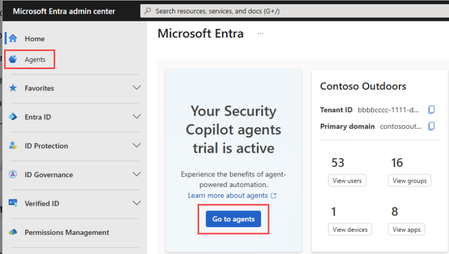


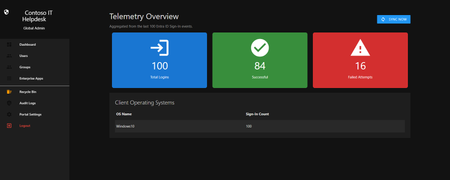

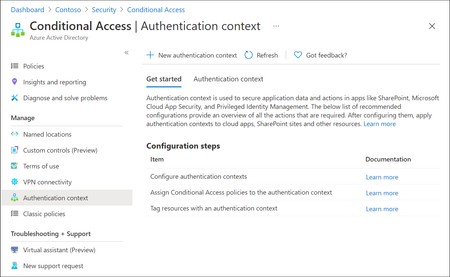

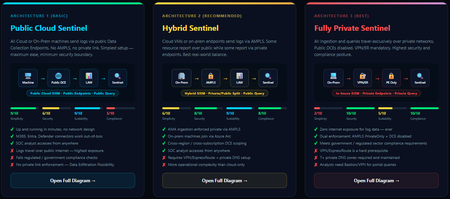


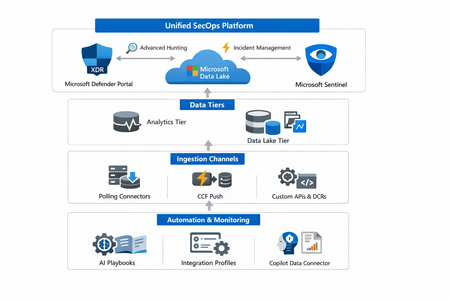
Events
Accidental changes and security compromises can quickly cascade across your tenant. Learn how to recover with confidence using Microsoft Entra Backup and Recovery.
Tune in to see how this Microsof...
Wednesday, Apr 22, 2026, 09:00 AM PDTOnline
0likes
43Attendees
0Comments

Purview Lightning Talks Join the Microsoft Security Community for Purview Lightning Talks; quick technical sessions delivered by the community, for the community.
You’ll pick up practical Pu...
Thursday, Apr 30, 2026, 08:00 AM PDTOnline
0likes
12Attendees
0Comments