administrator
50 Topics
Microsoft Entra provisioning Agent Error
Hello, I have deployed the Microsoft Entra provisioning agent in my organization, with synchronization configured from AD to Microsoft Entra ID. I am encountering an issue on the server where the Cloud Sync agent is installed: when connecting to Microsoft endpoints via a Squid proxy, I receive the error shown in the screenshot. The synchronization itself works perfectly, and the configuration status in the cloud is "Healthy." I frequently see the error shown in the screenshot (error code 12015), and I also occasionally encounter error code 12011. Has anyone experienced a similar issue? Could you please advise on how to resolve it? Thanks.17Views0likes0Comments
Sole Global Administrator locked out — no working MFA method — need account recovery
I'm the sole Global Administrator of my Microsoft Entra ID tenant and I'm completely locked out due to losing access to my MFA device, with no other admin and no working alternate verification method. Account details: - User (UPN): email address removed for privacy reasons - Custom verified domain: apip.dk - Tenant ID: can be provided - Azure Subscription ID: can be provided What happened: My phone (with Microsoft Authenticator installed — my only registered MFA method) was destroyed. I know my password and secondary email, but: - Phone-call verification during sign-in does not connect. - I have a FIDO2 security key, but it is not currently enabled/registered as a sign-in method on this account. - There is no other Global Administrator in this tenant and no other active session I can use to self-recover. What I need: An MFA/authentication-method reset on my account so I can sign back in and register a new MFA method, or guidance on an alternative recovery path. Proof of ownership I can provide: - I own the custom domain apip.dk and can add/modify a DNS TXT (or CNAME) record to verify tenant ownership. - I can provide billing details for the subscription (card on file, recent invoice amounts, billing address) if needed for verification. Additional context: I recently updated the payment method on this subscription, so I'm concerned about a billing failure at the next payment date while this recovery is pending — I'd appreciate the account being flagged so it isn't suspended during this process. Please let me know what verification steps you need from me to proceed. Thank you, Andreas199Views0likes1CommentDoes Rights Management Service currently support MFA claims from EAM?
We've been testing EAM (external authentication methods) for a few months now as we try to move our Duo configuration away from CA custom controls. I noticed today that when my Outlook (classic) client would not correctly authenticate to Rights Management Service to decrypt OME-protected emails from another org. It tries to open the message, fails to connect to RMS, and opens a copy of the email with the "click here to read the message" spiel. It then throws a "something is wrong with your account" warning in the Outlook client's top right corner. If I try to manually authenticate & let it redirect to Duo's EAM endpoint, it simply fails with an HTTP 400 error. When you close that error, it then presents another error of "No Network Connection. Please check your network settings and try again. [2603]". I can close/reopen Outlook and that warning message in the top right stays suppresses unless I attempt signing into RMS all over again. However.. If I do the same thing and instead use an alternate MFA method (MS Authenticator, for example), it signs in perfectly fine and will decrypt those OME-protected emails on the fly in the Outlook client, as expected. I verified that we excluded "aadrm.com" from SSL inspection and that we're not breaking certificate pinning. So all I can assume at the moment is that Rights Management Service isn't honoring MFA claims from EAM. Any experience/thoughts on this? Thanks in advance!327Views0likes1Comment
Can the built-in "No account? Create one" link redirect to a custom sign-up page?
I'm using Microsoft Entra External ID with a built-in sign-in/sign-up user flow. On the Microsoft-hosted sign-in page, the "No account? Create one" link always redirects users to the default Entra sign-up page. I already have a custom registration page and would like this built-in link to redirect to my custom URL instead. Is there any supported way to customize the destination of this link in a built-in user flow? If not, could someone confirm whether this behavior is fixed by design? Thanks!486Views0likes2Comments
AADSTS50105 error message is unreadable for end users — UX improvement suggestion
1. What’s wrong with the current error message a. It’s written for administrators, not users The message exposes: Internal system names (AADSTS50105) GUIDs (aaaabbbb-cccc-dddd-eeee-ffff01234567) Identity provider jargon (“direct member of a group with access”) None of this helps the person who sees the error decide what to do next. b. The actual problem is buried in a wall of text The real issue is simply: You don’t have permission to access this app. Instead, the message forces users to: Read a long paragraph Decode domain-specific language Guess which part matters Cognitively, this is high effort for low payoff. c. “Contact your administrator” is vague and unhelpful Users ask: Which administrator? IT? Security? App owner? Their manager? What should they say? Without context, users either: Ignore the error Forward screenshots randomly Open the wrong support ticket d. Error codes without guidance increase support load AADSTS50105 may be meaningful internally, but: Users don’t know whether to Google it Support teams receive unclear tickets (“it doesn’t work”) This paradoxically raises support cost instead of lowering it. 2. What a better error message should do A good error message answers four questions in order: What happened? Why did it happen (in plain language)? What can the user do next? Who specifically can help? And it does so in under 30 seconds of reading time. 3. Example of a much better error message You don’t have access to [APPLICATION] Your account (email address removed for privacy reasons) isn’t currently authorized to use [APPLICATION]. This usually means: You haven’t been added to the required security group, or Access hasn’t been requested or approved yet. What to do next If you believe you should have access, contact IT Service Desk or your [APPLICATION] owner and request access. Helpful details to include in your request Application name: [APPLICATION] Your email: email address removed for privacy reasons Error reference: Access not assigned (Error ID: AADSTS50105 — for IT use) 4. Optional but high-impact improvement: Add a “Request Access” button or link One-click takes users to: ServiceNow / Jira / internal form Auto-populates app name and user email Administrators configure support link when configuring the application710Views0likes1Comment'Registering user becomes local admin on Joined Devices' - WHAT
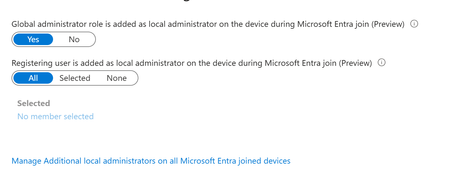
Stumbled on a tenant with 'JOIN' available for all users. Haven't worked with this much - most tenants I see only have registration. But then I noticed the horrifying 'Registering user is added as local administrator on the device during Microsoft Entra join' option was ALSO set to ALL. This is a tenant we just took on, but I've never seen that control before. This is terrifying, considering AFAIK, there is no real way for a registering user to know if they're registering or joining. Beneath it is an option to 'Manage Additional local administrators on all Microsoft Entra joined devices', which leads to the Role page for Device Administrators, which is empty. Under Description, this describes what APPEARS to be to be the same thing mentioned in the previous control - 'Users with this role become local machine administrators on all Windows 10 devices that are joined to Microsoft Entra'. But no one is assigned this. Conveniently, on my own tenant, I happened to let someone JOIN yesterday. We have this limited to 2 (now 3) people - most just register... But this user Joined, and the 'Joining user becomes local admin' option was on ALL. But I can't validate that the user ever become local admin. They don't have the role, their device shows as joined, but there's no additional roles. The audit logs don't look weird. They're not in that 'Device Administrators' group, which describes itself as 'Users with this role become local machine administrators on all Windows 10 devices that are joined to Microsoft Entra'. Thoughts? Freaking out, honestly. We have a mix of DC and Cloud users. I've inherited them all, and had the understanding that Join was essentially registration but with Org ownership. I've tried to get some input from Copilot, but he has basically waffled between 'No, this setting is just badly named' and 'no, actually it's this other setting' and 'no, you know what, it all makes sense somehow'. 1. Does that option actually set the joining user as global admin? Is that really the default setting? 2. can you validate this ANYWHERE in Entra? Or does it just disappear? 3. what is that Device Admin group? A separate group, independent of these two settings, that gives local admin? 4. Is there a graph endpoint that can be used to set this? Thanks1.1KViews0likes2CommentsIntroducing the Entra Helpdesk Portal: A Zero-Trust, Dockerized ITSM Interface for Tier 1 Support
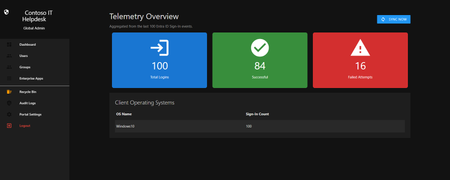
Hello everyone, If you manage identity in Microsoft Entra ID at an enterprise scale, you know the struggle: delegating day-to-day operational tasks (like password resets, session revocations, and MFA management) to Tier 1 and Tier 2 support staff is inherently risky. The native Azure/Entra portal is incredibly powerful, but it’s complex and lacks mandatory ITSM enforcement. Giving a helpdesk technician the "Helpdesk Administrator" role grants them access to a portal where a single misclick can cause a major headache. To solve this, I’ve developed the Entra Helpdesk Portal (Community Edition)—an open-source, containerized application designed to act as an isolated "airlock" between your support team and your Entra ID tenant. Why This Adds Value to Your Tenant Instead of having technicians log into the Azure portal, they log into this clean, Material Design web interface. It leverages a backend Service Principal (using MSAL and the Graph API) to execute commands on their behalf. Strict Zero Trust: Logging in via Microsoft SSO isn’t enough. The app intercepts the token and checks the user’s UPN against a hardcoded ALLOWED_ADMINS whitelist in your Docker environment file. Mandatory ITSM Ticketing: You cannot enforce ticketing in the native Azure Portal. In this app, every write action prompts a modal requiring a valid ticket number (e.g., INC-123456). Local Audit Logging: All actions, along with the actor, timestamp, and ticket number, are written to an immutable local SQLite database (audit.db) inside the container volume. Performance: Heavy Graph API reads are cached in-memory with a Time-To-Live (TTL) and smart invalidation. Searching for users or loading Enterprise Apps takes milliseconds. What Can It Do? Identity Lifecycle: Create users, auto-generate secure 16-character passwords, revoke sign-in sessions, reset passwords, and delete specific MFA methods to force re-registration. Diagnostics: View a user's last 5 sign-in logs, translating Microsoft error codes into plain English. Group Management: Add/remove members to Security and M365 groups. App/SPN Management: Lazy-load raw requiredResourceAccess Graph API payloads to audit app permissions, and instantly rotate client secrets. Universal Restore: Paste the Object ID of any soft-deleted item into the Recycle Bin tab to instantly resurrect it. How Easy Is It to Setup? I wanted this to be universally deployable, so I compiled it as a multi-architecture Docker image (linux/amd64 and linux/arm64). It will run on a massive Windows Server or a simple Raspberry Pi. Setup takes less than 5 minutes: Create an App Registration in Entra ID and grant it the necessary Graph API Application Permissions (e.g., User.ReadWrite.All, AuditLog.Read.All). Create a docker-compose.yml file. Define your feature toggles. You can literally turn off features (like User Deletion) by setting an environment variable to false. version: '3.8' services: helpdesk-portal: image: jahmed22/entra-helpdesk:latest container_name: entra_helpdesk restart: unless-stopped ports: - "8000:8000" environment: # CORE IDENTITY - TENANT_ID=your_tenant_id_here - CLIENT_ID=your_client_id_here - CLIENT_SECRET=your_client_secret_here - BASE_URL=https://entradesk.jahmed.cloud - ALLOWED_ADMINS=email address removed for privacy reasons # CUSTOMIZATION & FEATURE FLAGS - APP_NAME=Entra Help Desk - ENABLE_PASSWORD_RESET=true - ENABLE_MFA_MANAGEMENT=true - ENABLE_USER_DELETION=false - ENABLE_GROUP_MANAGEMENT=true - ENABLE_APP_MANAGEMENT=true volumes: - entra_helpdesk_data:/app/static/uploads - entra_helpdesk_db:/app volumes: entra_helpdesk_data: entra_helpdesk_db: 4.Run docker compose up -d and you are done! I built this to give back to the community and help secure our Tier 1 operations. If you are interested in testing it out in your dev tenants or want to see the full architecture breakdown, you can read the complete documentation on my website here I’d love to hear your thoughts, feedback, or any feature requests you might have!311Views0likes0CommentsAdd members to a dynamic sec-grp excluding users with a specific "serviceplanid" assigned license
Hello, I am trying to populate dynamically a security group that shoud contain all members with a specific attribut value and trying to filter the groupe membership based on a serviceplanId assigned to members (user.extensionAttribute9 -startsWith "83") -and (user.accountEnabled -eq True) -and (user.mail -ne null) -and (User.AssignedPlans -any (assignedPlan.servicePlanId -ne "818523f5-016b-4355-9be8-ed6944946ea7" -and assignedPlan.capabilityStatus -eq "Enabled")) How to exclude members with the ServicePlanId : "818523f5-016b-4355-9be8-ed6944946ea7" from the list of the groupe members ?229Views0likes1CommentJoin Merill Fernando and other guests for our Identity and Network Practitioner Webinar Series!
This October, we’re hosting a three-part webinar series led by expert Merill Fernando for Identity and Network Access practitioners. Join us as we journey from high-level strategy to hands-on implementation, unifying identity and network access every step of the way. Each session builds on the last, helping you move from understanding why a unified approach matters to what are the foundations to get started, and finally to how to configure in practice. The goal is to equip you with actionable skills, expert insights, and resources to secure your organization in a unified, Zero Trust way. Register below: Identity and Network Security Practitioner Webinar Series | Microsoft Community Hub150Views1like0Comments
Disable MFA for User with certain admin roles
Hello all, we have a user with sharepoint administrator role and a self build application support manager role (the suer is allowed to create apps in Azure). We are now at a point where this user has to register an app for our helpdesk tool, but we have to remove the MFA for the registration. We excluded the user from the "MFA is mandatory for all users"-policy, the "MFA is mandatory for admins"-policy and set his MFA in the MFA-per-user setting on disabled. We have no other policy that enforces MFA for this user. Wenn we try to log in with the user (under http://www.office.com), we still get the request to register MFA Authenticator. I am aware that MS enforced MFA for admins, when they try to log in into the admin portals. Does this also apply for sharepoint admins? Does anyone have an idea, where the MFA request for this user could come from. Any help is appreciated. Cheers, Erik577Views0likes2Comments