api
28 Topics
Purview SDK
I've been spending quite a bit of time working with Purview APIs, The APIs themselves are fine, but after a while I realized I was writing the same authentication, pagination and relationship handling code over and over again. So instead of construction the same code from project to project, I turned it into a python package, and now it's available on PyPI pip install purview-unified-sdk Right now, the SDK supports most of the common operations, such as creating, retrieving, updating and deleting business domains, data products, glossary terms, objectives, key results and etc., It also make it much easier to work with relationships, add group id as a owner, navigate resources and retrieve metadata across the unified catalog. https://niki9001.github.io/purview-unified-sdk/ https://github.com/purview-unified-sdk Feel free to fork the project, submit a pull request or open an issue if you have ideas or suggestions231Views0likes0Comments
Missing activity names from Audit Log documentation
We all know that the documentation team is A-tier and amazing at what they do and isn't just copy and pasting marketing materials. But I've noticed that some really obscure functionalities like 'user registered a device' or 'user joined a device' or about half the other things a user can do, are not documented on this list of activity names. The ironically named 'friendly' list doesn't work. So I actually can't audit the unfamiliar devices under our tenants? It appears that this KB is actually locked down, so more can't be added when they are discovered. How are we supposed to use the tool Microsoft has forced everyone towards, when the Documentation team is too bad to document anything, so they outsource it to the community (Microsoft victims), but then they lock down contributions (presumably, because they have some metric that keeps them from being useful - atleast based on my interactions with them). Documentation seems to be a massive fail on Microsoft's part. How did it get this way? Is there a reliable way of finding the activity name - one that ISN'T some preview Graph endpoint that I can't teach my techs to use, because I'm not teaching my techs to program?327Views1like1Comment
Struggling with running DQ Scans (Long queuing and Retry Count Error Issues)
Hi everyone, I have been exploring Microsoft Purview Data Quality quite extensively. At this point, I have configured more than 4,000 data quality rules across more than 10 Microsoft Fabric capacities, each with a minimum capacity of F16. Fabric is the source for all assets registered in Purview. I have identified several issues with the product, but the two that are currently impacting me the most are the following: DQ scans failing with a generic error“Max Retry Count Reached. Ending Workflow. Current Task HandleError”The challenge is that the error message does not identify which rule is causing the failure. As a result, I have to troubleshoot manually by disabling groups of rules, rerunning the scans, and repeating the process until I find the problematic rule. This trial-and-error approach is very time-consuming, especially at this scale. This seems to be caused by issues in some of the DQ rules, even though all rules are marked as “Good to go” in Purview. When running Data Quality scans, I often receive the following error: DQ scans remain queued for a long timeI am not sure why this happens or what resource, orchestration, or scheduling constraint is causing the delay. Whenever I run these DQ scans, they remain in a Queued state for at least 10 minutes, even when there is nothing running on the Fabric capacities. Has anyone experienced similar behavior with Purview Data Quality at this scale? Specifically, I would appreciate any guidance on: How to identify which DQ rule is causing a scan failure Why scans remain queued even when Fabric capacity appears to be idle Whether there are known limitations or best practices for running thousands of DQ rules in Purview Thank you.370Views0likes1Comment
Purview HR connector
Hi, I am trying to upload a csv file with resigning users to Purview through the HR connector, following the steps from this documentation (https://learn.microsoft.com/en-us/purview/import-hr-data). Have set up a power automate flow to create a bearer token and upload the csv file using a POST API to "https://webhook.ingestion.office.com/api/signals" as shown in the Github sample solution and script. However, I run into the following error: "No HTTP resource was found that matches the request URI 'https://40.75.149.147/api/signals'. The IP seems to change each time I make the API call. Is the URI correct or should I be using another specific URI? Any help would be greatly appreaciated. Thanks in advance!Solved199Views0likes1Comment
Data System Wide Lineage via API Request
I'm struggling with finding a solution. My goal is to identify all existing lineage relationships for any data objects within a specific data system they belong to. I've been using the Purview REST API (Datamap Dataplane) but I haven't found an endpoint returning data system side lineage/relationships. For my scenario I have a Databricks metastore and need to know the existing lineage relationships of those data objects within Purview so I can purge them out when we are doing our scheduled lineage refresh.Solved262Views1like3CommentsPurview Graph API
Hello. I'm trying to find information on the Purview Graph API and it's endpoints. It looks like the endpoints aren't posted publicly and are listed within an admin console. Can someone help me with how to view the endpoints? Also, are the graph API endpoints capable of reading and creating assets into Purview?Solved208Views0likes1Comment
Unable to use MS Graph DLP Api's to use with my Entra Registered App
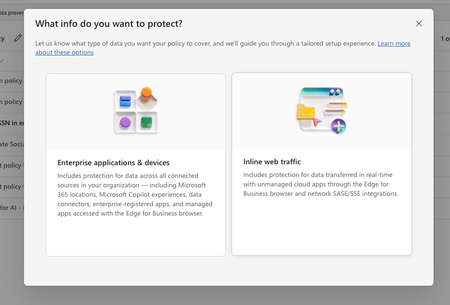
In purview, I have set of policies in DLP, where I have registered to block the US SSN in the text contents and I have created different policies in all of them I have selected the available locations: Exchange email - All accounts SharePoint sites OneDrive accounts - All accounts Teams chat and channel messages - All accounts Devices - All accounts Microsoft Defender for Cloud Apps On-premises repositories And selected action as block all, in all of them for the rule and enabled the rule (not in simulation mode) Now, I have the app registered in Entra and I try to use the following API's https://learn.microsoft.com/en-us/graph/api/userprotectionscopecontainer-compute?view=graph-rest-1.0 https://learn.microsoft.com/en-us/graph/api/userdatasecurityandgovernance-processcontent?view=graph-rest-1.0&tabs=http But whenever I use the compute api I can see i'm only getting curl -X POST https://graph.microsoft.com/v1.0/users/5fd51e08-c5f1-4298-b79b-a357eaa414ff/dataSecurityAndGovernance/protectionScopes/compute\ -H 'Authorization: Bearer <ACCESS_TOKEN>'\ -H 'Content-Type: application/json' -d '{ "activities": "uploadText,downloadText" }' { "@odata.context": "https://graph.microsoft.com/v1.0/$metadata#Collection(microsoft.graph.policyUserScope)", "value": [ { "activities": "uploadText,downloadText", "executionMode": "evaluateOffline", "locations": [ { "@odata.type": "#microsoft.graph.policyLocationApplication", "value": "b48106d9-1cdb-4d90-9485-fe2b6ee78acf" } ], "policyActions": [] } ] } My sample App's Id is showing up but always with `evaluateOffline` I don't know why it always gives 'evaluteOffline' and policyActions is always empty array Also, I can see my Entra registered app is showing up here in the value of the locations And when I use the processContent api , I always get modified in the response and nothing else like below: curl -XPOST https://graph.microsoft.com/v1.0/users/5fd51e08-c5f1-4298-b79b-a357eaa414ff/dataSecurityAndGovernance/processContent \ -H 'Authorization: <ACCESS TOKEN>'\ -H 'Content-Type: application/json' -d '{ "contentToProcess": { "contentEntries": [ { "@odata.type": "microsoft.graph.processConversationMetadata", "identifier": "07785517-9081-4fe7-a9dc-85bcdf5e9075", "content": { "@odata.type": "microsoft.graph.textContent", "data": "Please process this application for John VSmith, his SSN is 121-98-1437 and credit card number is 4532667785213500" }, "name": "Postman message", "correlationId": "d63eafd2-e3a9-4c1a-b726-a2e9b9d9580d", "sequenceNumber": 0, "isTruncated": false, "createdDateTime": "2026-04-06T00:23:20", "modifiedDateTime": "2026-04-06T00:23:20" } ], "activityMetadata": { "activity": "uploadText" }, "deviceMetadata": { "operatingSystemSpecifications": { "operatingSystemPlatform": "Windows 11", "operatingSystemVersion": "10.0.26100.0" }, "ipAddress": "127.0.0.1" }, "protectedAppMetadata": { "name": "Postman", "version": "1.0", "applicationLocation": { "@odata.type": "microsoft.graph.policyLocationApplication", "value": "b48106d9-1cdb-4d90-9485-fe2b6ee78acf" } }, "integratedAppMetadata": { "name": "Postman", "version": "1.0" } } }' In the above request I have mentioned some sample US Security SSN, but the response I get is { "@odata.context": "https://graph.microsoft.com/v1.0/$metadata#microsoft.graph.processContentResponse", "protectionScopeState": "notModified", "policyActions": [], "processingErrors": [] } But Ideally I want to see whether I can get the content is valid or not, for example in the above request, it has SSN, so ideally I should get restrictAction or something right? Or is that evaluateInline is not available or something? Note that I have purchased E5 and assigned to the user who is trying this Also, whenever I choose to create a Policy in DLP , I got two options And Lets say I choose "Enterprise applications & devices", what happens is in the Locations, I'm seeing only these as the options: And If I choose the "Inline Traffic", i'm seeing only these options In Unmanaged, I'm seeing the following And in the Enforcement Options, I have the following : And in the "Advanced DLP rules" I'm seeing only these So, can you tell me the exact steps in the Purview suite, I couldn't where to mention the Entra registered App, I searched and I couldn't find one But in the compute endpoint, https://learn.microsoft.com/en-us/graph/api/userprotectionscopecontainer-compute?view=graph-rest-1.0 I'm getting my app but only with "evaluateOffline" and with that ETag, If I use the processContent Api, its not giving anything except as I mentioned above in the postSolved209Views0likes1CommentHow to cancel a Norton subscription Allow Uniqueness of Glossary Terms across Governance Domains
When glossary terms are created and published, there is no check for the same term name in another governance domain. Some organizations do want to enforce term uniqueness across all domains. Would it be feasible to provide an optional switch in Unified Catalog settings to turn this on?153Views0likes1Comment
C# MIP SDK v1.17.x - AccessViolationException on creation of MIPContext in 64-bit console app
I first logged this on https://stackoverflow.com/questions/79746967/accessviolationexception-when-creating-mipcontext-after-upgrade-to-v1-17 and the responses there have indicated I should raise with Microsoft a a likely bug, but I don't see a clear route to reporting other than here so any response would be appreciated, even if just to direct me to the appropriate reporting location. I've built a simple console app that demonstrates this issue that I'm happy to provide but we're seeing an issue with the 1.17.x version of the C# MIP SDK where an AccessViolationException is being thrown when trying to create an MIP context object. This is for a .Net Framework 4.8 console app built in 64-bit configuration, deployed to a Windows Server 2016 with the latest VC++ redistributable (14.44.35211) installed (both x86 and x64 versions), though we've seen the same on Windows Server 2019 and 2022. When the same app is built in 32-bit and deployed to the same environment the exception doesn't occur. The following code is what I've used to repro the issue: MIP.Initialize(MipComponent.File); var appInfo = new ApplicationInfo { ApplicationId = string.Empty, ApplicationName = string.Empty, ApplicationVersion = string.Empty }; var diagnosticConfiguration = new DiagnosticConfiguration { IsMinimalTelemetryEnabled = true }; var mipConfiguration = new MipConfiguration(appInfo, "mip_data", LogLevel.Info, false, CacheStorageType.InMemory) { DiagnosticOverride = diagnosticConfiguration }; //Expect BadInputException here due to empty properties of appInfo //When built as part of a 64-bit console app this causes AccessViolationException instead MIP.CreateMipContext(mipConfiguration); The AccessViolationException crashes the console app, with the following logged in the Windows Event Log: Framework Version: v4.0.30319 Description: The process was terminated due to an unhandled exception. Exception Info: System.AccessViolationException at Microsoft.InformationProtection.Internal.SdkWrapperPINVOKE.MipContext_Create__SWIG_1(System.Runtime.InteropServices.HandleRef) at Microsoft.InformationProtection.Internal.MipContext.Create(Microsoft.InformationProtection.Internal.MipConfiguration) at Microsoft.InformationProtection.Utils.MIPHelper.CreateMipContext(Microsoft.InformationProtection.MipConfiguration) The issue doesn't occur with the latest 1.16 version (1.16.149) of the SDK but does appear to be in all versions of the 1.17 release. Library: C# MIP SDK v1.17.x Target App: .Net Framework 4.8 console app Deployed OS: Windows Server 2016, 2019 and 2022 (With .Net Framework 4.8 and latest VC++ redist installed)501Views0likes1Comment