api
571 Topics
Introducing native Service Bus message publishing from Azure API Management (Preview)
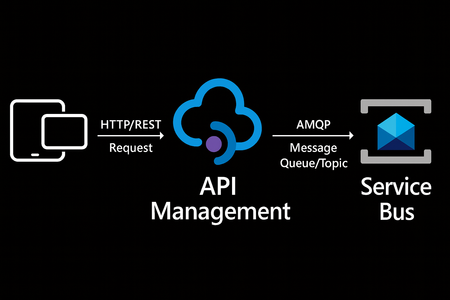
We’re excited to announce a preview capability in Azure API Management (APIM) — you can now send messages directly to Azure Service Bus from your APIs using a built-in policy. This enhancement, currently in public preview, simplifies how you connect your API layer with event-driven and asynchronous systems, helping you build more scalable, resilient, and loosely coupled architectures across your enterprise. Why this matters? Modern applications increasingly rely on asynchronous communication and event-driven designs. With this new integration: Any API hosted in API Management can publish to Service Bus — no SDKs, custom code, or middleware required. Partners, clients, and IoT devices can send data through standard HTTP calls, even if they don’t support AMQP natively. You stay in full control with authentication, throttling, and logging managed centrally in API Management. Your systems scale more smoothly by decoupling front-end requests from backend processing. How it works The new send-service-bus-message policy allows API Management to forward payloads from API calls directly into Service Bus queues or topics. High-level flow A client sends a standard HTTP request to your API endpoint in API Management. The policy executes and sends the payload as a message to Service Bus. Downstream consumers such as Logic Apps, Azure Functions, or microservices process those messages asynchronously. All configurations happen in API Management — no code changes or new infrastructure are required. Getting started You can try it out in minutes: Set up a Service Bus namespace and create a queue or topic. Enable a managed identity (system-assigned or user-assigned) on your API Management instance. Grant the identity the “Service Bus data sender” role in Azure RBAC, scoped to your queue/ topic. Add the policy to your API operation: <send-service-bus-message queue-name="orders"> <payload>@(context.Request.Body.As<string>())</payload> </send-service-bus-message> Once saved, each API call publishes its payload to the Service Bus queue or topic. 📖 Learn more. Common use cases This capability makes it easy to integrate your APIs into event-driven workflows: Order processing – Queue incoming orders for fulfillment or billing. Event notifications – Trigger internal workflows across multiple applications. Telemetry ingestion – Forward IoT or mobile app data to Service Bus for analytics. Partner integrations – Offer REST-based endpoints for external systems while maintaining policy-based control. Each of these scenarios benefits from simplified integration, centralized governance, and improved reliability. Secure and governed by design The integration uses managed identities for secure communication between API Management and Service Bus — no secrets required. You can further apply enterprise-grade controls: Enforce rate limits, quotas, and authorization through APIM policies. Gain API-level logging and tracing for each message sent. Use Service Bus metrics to monitor downstream processing. Together, these tools help you maintain a consistent security posture across your APIs and messaging layer. Build modern, event-driven architectures With this feature, API Management can serve as a bridge to your event-driven backbone. Start small by queuing a single API’s workload, or extend to enterprise-wide event distribution using topics and subscriptions. You’ll reduce architectural complexity while enabling more flexible, scalable, and decoupled application patterns. Learn more: Get the full walkthrough and examples in the documentation 👉 here4.7KViews4likes8CommentsProductize, observe, version, and automate MCP servers in Azure API Management
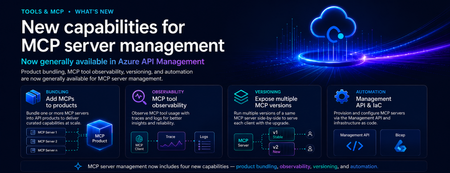
Introduction As organizations move from AI-assisted applications to agentic workflows, MCP servers are becoming a critical integration layer between agents, tools, APIs, data sources, and enterprise systems. Azure API Management already helps teams bring MCP servers under enterprise governance. But as MCP adoption scales, platform teams need more than basic exposure. They need a way to package MCP servers for the right consumers, understand tool usage in detail, manage changes safely, and automate configuration across environments. These are familiar API management challenges — and the same patterns that organizations already use for APIs can now be applied more deeply to MCP servers. We are excited to announce new generally available capabilities for MCP server management in Azure API Management: Add MCP servers to products to package and govern MCP capabilities for specific consumers MCP tool observability to trace tool usage, logs, errors, and payload context MCP server versioning to run multiple versions side by side and manage change safely Management API and Bicep support to automate MCP server configuration as part of CI/CD workflows Together, these capabilities extend MCP server management in Azure API Management and help make MCP servers first-class managed resources — productized, observable, versionable, and automatable. Why MCP server management matters MCP gives agents a standard way to connect with tools and external capabilities. That standardization is powerful, but it also introduces a new operational surface for enterprises. Without a management layer, teams can quickly run into questions such as: Which MCP servers are approved for use? Who can access each server? How do we expose MCP servers to different developer or agent audiences? How do we monitor tool calls, latency, errors, and cost? How do we run preview and production versions side by side? How do we automate MCP server configuration across environments? These are not just developer experience questions. They are enterprise governance questions. With Azure API Management, MCP servers can now be managed using the same core patterns organizations already use for APIs: products, subscriptions, policies, observability, versioning, and automation. What’s new 1. Add MCP servers to products Azure API Management products are a proven way to package APIs for consumption. With this release, you can now add one or more MCP servers to APIM products as well. This makes it easier to expose MCP capabilities to specific consumers, teams, applications, or agent experiences using familiar product-based governance. For example, a platform team can create a product for internal agents that includes approved MCP servers such as: Customer profile lookup Order status retrieval Knowledge base search Ticket creation Workflow automation tools By adding MCP servers to products, teams can use familiar controls such as subscriptions, quotas, approval workflows, and access management to govern how MCP capabilities are consumed. Why it matters: MCP servers are no longer isolated endpoints. They can be bundled, governed, and delivered as secure, consumable products. 2. MCP tool observability As agents use MCP servers to discover and invoke tools, teams need more than basic traffic visibility. They need end-to-end trace context for each agent-to-tool interaction. With MCP observability in Azure API Management, teams can inspect key MCP-specific details, including: Operation context: whether the request was a tools/list or tools/call operation Session context: the MCP session ID through gen_ai.conversation.id Client context: MCP client name and version Protocol context: MCP protocol name and version Server context: MCP server name and version Access context: authentication type and API type Tool context: tool name and tool type for tool invocation traces Error context: error type and error message when a call fails Payload context: tool invocation arguments and results when payload logging is enabled This is especially important for agentic workflows, where a single user request may trigger multiple tool calls across different systems. With APIM, MCP traffic can be traced, inspected, and monitored using the same operational practices teams already use across their API estate. Why it matters: MCP servers are not just accessible through APIM — they are observable. Platform teams can trace tool calls, inspect errors, and understand MCP usage with the same operational discipline they expect from managed APIs. 3. Expose multiple MCP versions Enterprise teams need safe ways to evolve MCP servers over time. With MCP server versioning in Azure API Management, you can expose multiple versions of the same MCP server side by side. This allows teams to run a stable GA version while introducing a preview or next version for early adopters. For example: v1 can serve the majority of production traffic. v2 can be exposed to a subset of consumers for testing. Teams can monitor adoption, errors, latency, and behavior. Once the new version is validated, v2 can be promoted with confidence. This pattern is especially useful when MCP tools evolve, schemas change, new capabilities are added, or teams want to validate agent behavior before rolling changes out broadly. Why it matters: MCP servers can now follow a safer lifecycle model: preview, validate, route, promote, and retire. 4. Management API and Infrastructure as Code MCP server management also needs to work at enterprise scale. With Management API and Infrastructure as Code support, teams can provision and configure MCP servers programmatically through Azure API Management APIs and automation pipelines. This allows platform teams to define MCP server resources as part of repeatable deployment workflows using tools such as Bicep, Terraform, ARM, REST APIs, and CI/CD pipelines. Teams can automate configuration for: MCP server endpoints Runtime and transport settings Authentication configuration Metadata and ownership Versioning Product association Policies Environment promotion This is critical for organizations that need consistent MCP governance across development, test, staging, and production environments. Why it matters: MCP server management can now be automated, reviewed, deployed, and governed like the rest of your API platform. How these capabilities work together Individually, each capability solves an important operational need. Together, they create a complete management model for MCP servers in Azure API Management. A platform team can: Register or expose MCP servers through Azure API Management. Package them into products for specific consumers. Apply access controls, subscriptions, quotas, and policies. Observe tool-level usage, latency, errors, traces, and cost. Run multiple versions side by side. Promote changes safely. Automate deployment through APIs and Infrastructure as Code. This brings the full API management playbook to MCP. Instead of treating MCP servers as unmanaged agent extensions, organizations can operate them as governed enterprise resources. Example scenario Imagine a company building internal copilots for customer support, sales, and operations. Each copilot needs access to different tools: Customer lookup Order history Case management Knowledge search Refund workflows Escalation workflows With MCP and Azure API Management, the platform team can expose these capabilities as MCP servers and organize them into products. The customer support copilot can subscribe to the support product. The sales copilot can subscribe to the sales product. Early adopters can be routed to a preview version of a tool. Operations teams can monitor usage, errors, latency, traces, and cost. Platform teams can automate the entire setup across environments. The result is a more governed and scalable way to bring MCP-based tools into enterprise agent workflows. Getting started To get started with MCP server management in Azure API Management: Create or identify an MCP server you want to expose through Azure API Management. Add the MCP server as a managed resource in APIM. Add the MCP server to an APIM product. Configure access, subscriptions, quotas, and approval workflows. Enable observability to monitor tool-level usage and traces. Use versioning to manage preview and production versions. Use the Management API or Infrastructure as Code to automate configuration. Conclusion MCP is quickly becoming an important standard for connecting agents to tools and enterprise capabilities. But for MCP to succeed in production, organizations need more than connectivity. They need governance, lifecycle management, observability, and automation. With these new MCP server management capabilities in Azure API Management, platform teams can manage MCP servers using the same trusted patterns they already use for APIs. MCP servers are now first-class APIM resources — productized, observable, versionable, and automatable. We are excited to see how customers use these capabilities to build the next generation of governed, enterprise-ready agentic applications.271Views1like0Comments
Data System Wide Lineage via API Request
I'm struggling with finding a solution. My goal is to identify all existing lineage relationships for any data objects within a specific data system they belong to. I've been using the Purview REST API (Datamap Dataplane) but I haven't found an endpoint returning data system side lineage/relationships. For my scenario I have a Databricks metastore and need to know the existing lineage relationships of those data objects within Purview so I can purge them out when we are doing our scheduled lineage refresh.Solved108Views1like3Comments
Training & Learning Paths – Request for Guidance and Walkthrough
Jumeirah Hospitality Group is looking to develop structured training and learning paths for our teams. We would like to understand the end-to-end process, including: How to design and structure learning paths How to upload and organize content How to assign paths to different roles or departments How to track completion and performance We would appreciate it if someone could walk us through the process and provide clear guidance on the steps involved. Please let us know who we should contact and when availability can be arranged.29Views2likes1CommentNew AI gateway capabilities in Azure API Management
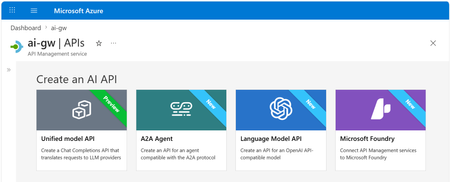
Multi-model, multi-protocol AI applications are quickly becoming the norm. Teams are mixing OpenAI, Anthropic, and Vertex AI models, exposing tools through MCP, and wiring agents together with A2A. As that surface grows, so does the work of keeping it secure, observable, and consistent. Our ongoing strategy for the AI gateway capabilities in Azure API Management centers on that problem: providing one place to manage models, MCP tools, and agents, no matter which provider or protocol is behind them. The updates below are the latest steps in that direction. Unified Model API (preview) The headline change in this release: the Unified Model API lets clients speak one API format — OpenAI Chat Completions — while API Management transforms requests to the backend provider, whether that's a model using OpenAI Chat Completions or Anthropic Messages API. By centralizing model access behind a single API layer, you can: Standardize on a single API format for clients, independently from the formats used by backend models. Unify observability, security, and governance with policies that apply across model providers. Configure failover across model providers. Decouple client-facing model names from backend model names using aliases. Learn more about the unified model API. Model aliases Model aliases give clients a stable, provider-neutral name to use when calling a model. By assigning an alias like gpt or claude-sonnet, you decouple the client-facing model name from the actual backend deployment. That makes a few common operations a lot easier: Upgrading a model. Update the alias target to point at a new version — no client code changes required. A/B tests. Shift traffic between backends behind the same alias using API Management's load balancing capabilities. Vendor swaps. Replace one provider with another without touching application code. Model discovery Developers can discover available models by calling the /models endpoint of the Unified Model API. API Management returns the list of model aliases, so apps and tools can adapt to what the platform team has published — without out-of-band documentation. Anthropic and Vertex AI models (GA) AI gateway policies and observability now work with Anthropic and Google Vertex AI models, alongside the providers we already support. You can: Apply runtime policies such as content safety, token limits, and semantic caching to Anthropic and Vertex AI traffic. Collect logs, traces, and metrics for these models in the same place as the rest of your AI traffic. If you're running a multi-provider setup, you no longer need a separate governance story for each vendor. Learn more about AI gateway capabilities in API Management. Anthropic API operations in Microsoft Foundry import When you import a Microsoft Foundry resource as an API in Azure API Management, the import now creates operations for Anthropic APIs alongside the existing model APIs. In a few clicks, you can stand up an API that mediates traffic to Foundry models using either the OpenAI or Anthropic API format — no manual operation definitions needed — and then apply the same policies, security, and observability you use for the rest of your AI traffic. Learn more about Microsoft Foundry import. Token metrics for additional token types (preview) Token tracking used to stop at prompt, completion, and total tokens. Modern models add cached, reasoning, and thinking tokens, which can make up a significant share of token consumption, cost, and latency. API Management now logs metrics for these additional token types into Application Insights, across API formats (OpenAI Chat Completions, OpenAI Responses, and Anthropic Messages API) and providers (Microsoft Foundry, OpenAI, Amazon Bedrock, Google Vertex AI, and others). With richer signals, your cost dashboards, budget alerts, and capacity planning can actually reflect how today's models behave. Learn more about token metrics. Content safety for MCP and A2A (GA) The llm-content-safety policy now covers MCP and A2A traffic in addition to LLM traffic. That includes MCP tool-call arguments, MCP response text, and A2A payloads. A couple of related improvements: llm-content-safety can now be configured directly as an outbound policy. Two new attributes — window-size and window-overlap-size — let you tune how messages exceeding the Azure Content Safety limit of 10,000 characters are chunked and forwarded for validation, balancing detection sensitivity with Azure Content Safety call volume. The result is one consistent safety policy across LLM, MCP, and A2A flows instead of stitching together custom filters per protocol. Learn more about the content safety policy. A2A APIs (GA) Support for Agent-to-Agent (A2A) APIs in API Management is now generally available. Agent APIs can now be governed with the same policies, identity, and observability you use for the rest of your APIs. What you can do with A2A APIs in API Management: Mediate JSON-RPC runtime operations to your agent backend with full policy support — including the content safety improvements above. Expose and manage agent cards, automatically transformed by API Management to represent the managed agent API. Log traces to Application Insights using OpenTelemetry GenAI semantic conventions for deep correlation between API and agent execution traces. What's new in GA, on top of the preview: Available in classic tiers, in addition to v2 tiers — bring A2A governance to existing API Management resources without migrating tiers. Richer diagnostic logging for A2A APIs, giving more actionable telemetry for monitoring and troubleshooting agent traffic. Learn more about A2A support in API Management. Related: Bring Your Own Model in Foundry Agent Service (GA) Last month, Bring Your Own Model (BYOM) in Foundry Agent Service went GA. BYOM lets enterprise teams route Foundry agent model calls through their own infrastructure — typically for compliance, governance, or to reuse an existing model gateway. This pairs naturally with the AI gateway capabilities in Azure API Management. Put API Management in front of your models, apply the policies and observability described above, and have Foundry agents call through it — getting consistent governance for both your direct AI traffic and your agent workloads. Get started Together, these updates make Azure API Management a more complete AI gateway: consistent governance, security, and observability across models from various providers, MCP tools, and agent interactions. Some of these features are still rolling out. They will first become available in v2 tiers of API Management and in the AI release channel for classic tiers, then continue rolling out to the rest of classic tier resources over the following weeks. Get started with the unified model API or explore the AI gateway capabilities in API Management.820Views0likes0CommentsMCP Test Console and Git Repository synch in Azure API Center
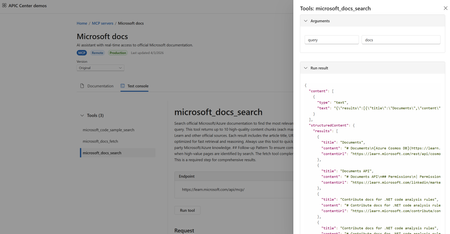
Why This Matters As organizations race to build AI-powered applications, the Model Context Protocol (MCP) has emerged as the standard way to connect AI agents with external tools and data sources. Managing these MCP servers at enterprise scale, however, has been a growing challenge — until now. AI agents are only as useful as the tools they can access. MCP servers expose those tools — from databases and internal APIs to third-party services — in a standardized way that any AI agent or model can consume. As your MCP ecosystem grows, so does the challenge of keeping track of what's available, what's working, and what your teams are actually using. Azure API Center already serves as a centralized registry for APIs across your organization. Now it extends that same governance model to MCP servers, complete with developer-friendly discovery, live testing, and automated synchronization from your source repositories. New Feature: MCP Test Console in the API Center Portal Developers can now test MCP server tools interactively without leaving the Azure portal. Once an MCP server is registered in your API Center inventory, the API Center portal — your organization's customizable developer portal — surfaces a dedicated test console on the server's Documentation tab. Developers simply select a tool, click Run tool, and immediately see the response. This means your teams can: Validate tools before connecting them to agents — no more building a test harness from scratch. Explore tool schemas interactively — the portal surfaces endpoint details and input/output schemas alongside the live console. Onboard faster — developers browsing your internal MCP registry can go from discovery to verified integration in minutes. The MCP server tiles in the portal provide a clear, browsable view of all registered servers. Each tile surfaces the server's endpoint URL, available tools, and installation instructions for Visual Studio Code — giving developers everything they need to get started in one place. Getting started: Set up your API Center portal, then navigate to any registered MCP server. On the Documentation tab, select a tool and click Run tool to open the test console. New Feature: Synch MCP Servers from a Git Repository Managing API assets shouldn't require manual registration every time something changes. With Git repository integration, Azure API Center can automatically sync assets — including MCP server definitions — directly from your source repository. How It Works When you connect a Git repository to your API Center: An environment is created in your API Center representing the repository as an asset source. API Center regularly synchronizes MCP servers from the repository into your inventory — no manual intervention required. Assets appear in your inventory on the Inventory > Assets page with a visual link indicator, making it easy to identify which assets are source-controlled. This is especially valuable for teams that maintain MCP server definitions, skill files, or OpenAPI specs in version control. As your repository evolves, your API Center inventory stays current automatically. Setting It Up Step 1: Secure your access credentials (for private repos) If your repository is private, store a personal access token (PAT) as a secret in Azure Key Vault. Your API Center instance uses a managed identity to retrieve this secret securely — you can configure the managed identity manually or let API Center handle it automatically during the integration setup. Step 2: Connect the repository In the Azure portal, go to your API Center and navigate to Platforms > Integrations > + New integration > From Git repository. You'll configure: Repository URL — including an optional branch and subfolder path (e.g., https://github.com/<org>/<repo>/tree/main/skills). Git provider — such as GitHub. Asset type configuration — API Center defaults to a skill asset type with the file pattern **/skill.md, but you can add additional asset types to match your repository structure. PAT reference — select the Key Vault secret containing your PAT, if applicable. Environment details — give the repository environment a friendly name, resource ID, type (e.g., Production), and lifecycle stage for synced assets. Step 3: Let the sync run Once created, the integration runs automatically. Your assets will appear in the Inventory > Assets view, linked to their source in the repository. Access Control for Private Repositories The integration uses Azure's managed identity framework to authenticate to Key Vault. Assign your API Center's managed identity the Key Vault Secrets User role on your Key Vault to grant the necessary read access. If you prefer, API Center can configure this automatically — just enable the Automatically configure managed identity and assign permissions option during integration setup. Bringing It Together: A Complete MCP Governance Story Together, these two features complete an end-to-end workflow for enterprise MCP governance: Register → Connect your Git repository and let API Center automatically synch your MCP servers and skills as they evolve. Discover → Developers and AI engineers browse the API Center portal to find the right MCP server for their agent, with full schema visibility and endpoint details. Test → The built-in test console lets developers validate tools interactively before committing to an integration. Govern → Use API Center's access management capabilities to control who can view and consume specific MCP servers across your organization. And if you're building MCP servers on Azure services, the registry integrates directly with Azure API Management, Azure Logic Apps, and Azure Functions — so your MCP ecosystem and your API ecosystem share a single source of truth. Get Started Register and discover MCP servers in Azure API Center Synchronize API assets from a Git repository Set up the API Center portal Explore MCP Center — Azure API Center's public MCP registryMore Control, Less Overhead: Custom Domain Upgrades in Azure API Management v2
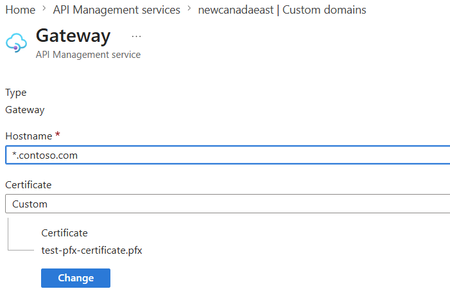
Multiple custom domains in Premium v2 Large organizations rarely expose APIs under a single domain. A global enterprise might need api.contoso.com for external partners, apis.hrportal.contoso.com for internal teams, and dev.europe.contoso.com for a regional developer portal — all at once. Until now, achieving this required spinning up separate API Management instances, adding cost and operational complexity. Azure API Management Premium v2 now supports multiple custom domains within a single instance — across gateway, developer portal, and management endpoints. This allows organizations to: Configure distinct hostnames for different endpoints and target audiences Align API experiences with business units, products, or regional brands Simplify domain-scoped networking and security policies Reduce the need for separate APIM instances created solely for domain separation For enterprises managing large, distributed API estates, this provides greater flexibility in how APIs and developer experiences are exposed — while maintaining centralized governance. Wildcard custom hostnames in Premium v2 and Standard v2 As API estates grow, managing individual certificates for every subdomain becomes a scaling problem fast. Each new surface — payments.api.contoso.com, inventory.api.contoso.com, orders.api.contoso.com — previously required its own hostname registration and certificate. Ten new API surfaces meant ten separate management tasks. Azure API Management Premium v2 and Standard v2 now support wildcard entries in custom hostnames. A single *.api.contoso.com entry paired with a single wildcard certificate covers all subdomains automatically — no per-subdomain configuration required. This helps teams: Simplify certificate and domain management at scale Accelerate onboarding of new API surfaces without repeated hostname setup Maintain consistent branded endpoints across dynamic subdomains Reduce operational overhead for rapidly growing API environments By extending this capability to both Premium v2 and Standard v2, Azure API Management makes flexible, scalable domain management accessible to more organizations without requiring higher-tier deployments. Both updates are generally available now. Learn more about Azure API Management v2 tiers and how they help organizations build scalable, enterprise-grade API platforms. Further reading: Configure a custom domain name for Azure API ManagementAzure API Center Introduces a Data Plane MCP Server for Enterprise-Wide API and AI Asset Discovery
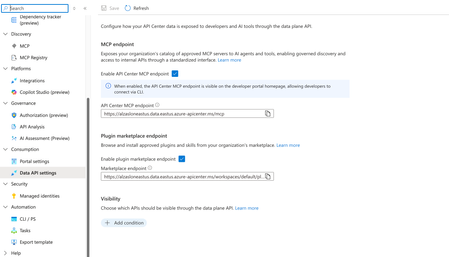
As organizations scale their adoption of MCP-based tooling and AI agents, one challenge keeps surfacing: developers spend too much time figuring out what APIs, tools, and AI assets exist — and then manually wiring up connections to each one. Today, we're excited to announce general availability of a new capability that changes that. What's new Azure API Center now provides a data plane MCP server — a unified enterprise discovery endpoint that gives agents and developer tools a single connection point to your organization's full catalog of registered MCP servers, tools, APIs, and AI assets. Instead of hunting across systems or hand-configuring integrations one by one, developers and agents can now connect once and immediately access everything that's been registered in your API Center. Why this matters The MCP ecosystem is growing fast. So is the number of enterprise APIs and AI assets that teams need to manage and consume. Without a central discovery mechanism, that growth creates friction — more manual configuration, more drift between what's available and what's actually reachable, and more integration complexity for every new agentic application. The Azure API Center data plane MCP server addresses this directly. With it, teams can: Give agents centralized access to enterprise APIs and AI assets without custom routing logic Eliminate manual configuration of connections to individual MCP servers Automatically surface newly registered MCP servers and tools without reconfiguration Simplify discovery and consumption across a rapidly growing enterprise catalog Built for how organizations actually operate Agentic applications don't just need APIs — they need to find the right APIs, trust that the catalog is current, and connect reliably at scale. By acting as a unified discovery endpoint, Azure API Center helps teams operationalize AI ecosystems with stronger discoverability, governance, and developer productivity, while meaningfully reducing integration complexity. This is especially valuable as enterprises move from experimenting with AI agents to deploying them in production workflows, where manual integration approaches don't scale. How to enable the data plane MCP server Turning on the MCP server takes just a few clicks in the Azure portal. Navigate to your API Center instance and open Data API settings under the Consumption section in the left-hand menu. From there, under MCP endpoint, toggle Enable API Center MCP endpoint to on. Once enabled, your MCP endpoint URL (in the form https://<your-instance>.data.<region>.azure-apicenter.ms/mcp) will appear and can be copied directly for use in agent configurations or developer tools. Note: When enabled, the MCP endpoint is also surfaced on the developer portal homepage, so developers can connect via CLI without needing to look up the URL separately. You can also enable the Plugin marketplace endpoint from the same settings page to let developers browse and install approved plugins and skills from your organization's marketplace. The Visibility section lets you control which APIs are exposed through the data plane — use Add condition to filter the catalog based on your governance requirements. Get started Learn more about Azure API Center and how organizations are building unified catalogs for APIs, MCP tools, agents, and AI assets.Find what you need, faster: Azure API Center now supports custom metadata filtering
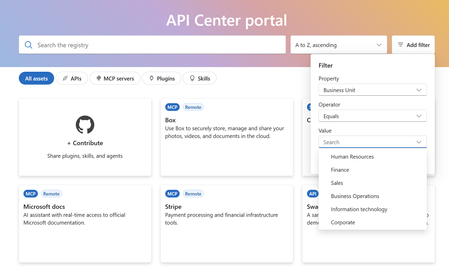
Enterprise API and AI catalogs have expanded dramatically. Where teams once managed dozens of APIs, they now govern hundreds — spanning business units, environments, compliance domains, and an ever-growing roster of AI assets. The catalog itself has become a discovery challenge. What's new Developers can now filter catalog assets using organization-defined metadata attributes. These aren't generic tags — they're the classifications your organization already uses: environments, business units, domains, compliance tiers, ownership groups, and more. Custom metadata filtering works across all major asset types in Azure API Center: APIs Skills Agents MCP tools Why it matters Discovery friction is a hidden tax on developer productivity. When a developer needs to find the right API for a project, every minute spent navigating inconsistent lists or applying manual filters is a minute not spent building. At scale, this compounds quickly. Custom metadata filtering addresses this directly by aligning the catalog's search experience with how your organization already thinks about its assets: Surface the right assets faster — filter by internal classifications and governance models instead of browsing overwhelming lists Improve discoverability at scale — no need to retag or reorganize existing assets to make them findable Align with your organizational taxonomy — filter by domain, environment, business unit, compliance requirement, or any custom attribute your teams already use Built for governed, AI-ready teams This update reinforces Azure API Center's role as the foundation for scalable, AI-ready discovery experiences — where governance and developer velocity move together, not against each other. By making enterprise catalogs easier to navigate, Azure API Center helps developers spend less time searching and more time building with governed APIs and AI assets. Get started Learn more about Azure API Center custom metadata filtering and how organizations are building scalable, AI-ready discovery experiences.Built-in gateway support for workspaces in Azure API Management
Workspaces in Azure API Management let platform teams hand off API ownership to individual API teams while keeping centralized governance. Until now, using them meant deploying a dedicated workspace gateway on the Premium tier — adding cost, operational overhead, and limiting regional availability. That requirement is going away. Workspaces can now be associated directly with the built-in gateway, and this capability is generally available. What changes Available in more tiers. Use workspaces on the built-in gateway in any API Management tier except Consumption. Available in every region. Create workspaces in any region where API Management is supported. All built-in gateway capabilities apply. Workspaces deployed with the built-in gateway inherit features that dedicated workspace gateways don't offer today, including multi-region deployments, custom hostnames, and Private Link connectivity. Availability Rolling out now to v2 tiers, with Azure portal UI support expected around July. Rollout to classic tiers (Developer, Basic, Standard, Premium) will begin by August and may take up to a few months to complete. Get started Learn more about workspaces and how to deploy them on the built-in gateway.213Views0likes0Comments