Azure API Center now provides a data plane MCP server — a unified enterprise discovery endpoint that gives agents and developer tools a single connection point to your organization's full catalog of registered MCP servers, tools, APIs, and AI assets.
As organizations scale their adoption of MCP-based tooling and AI agents, one challenge keeps surfacing: developers spend too much time figuring out what APIs, tools, and AI assets exist — and then manually wiring up connections to each one. Today, we're excited to announce general availability of a new capability that changes that.
What's new
Azure API Center now provides a data plane MCP server — a unified enterprise discovery endpoint that gives agents and developer tools a single connection point to your organization's full catalog of registered MCP servers, tools, APIs, and AI assets.
Instead of hunting across systems or hand-configuring integrations one by one, developers and agents can now connect once and immediately access everything that's been registered in your API Center.
Why this matters
The MCP ecosystem is growing fast. So is the number of enterprise APIs and AI assets that teams need to manage and consume. Without a central discovery mechanism, that growth creates friction — more manual configuration, more drift between what's available and what's actually reachable, and more integration complexity for every new agentic application.
The Azure API Center data plane MCP server addresses this directly. With it, teams can:
- Give agents centralized access to enterprise APIs and AI assets without custom routing logic
- Eliminate manual configuration of connections to individual MCP servers
- Automatically surface newly registered MCP servers and tools without reconfiguration
- Simplify discovery and consumption across a rapidly growing enterprise catalog
Built for how organizations actually operate
Agentic applications don't just need APIs — they need to find the right APIs, trust that the catalog is current, and connect reliably at scale. By acting as a unified discovery endpoint, Azure API Center helps teams operationalize AI ecosystems with stronger discoverability, governance, and developer productivity, while meaningfully reducing integration complexity.
This is especially valuable as enterprises move from experimenting with AI agents to deploying them in production workflows, where manual integration approaches don't scale.
How to enable the data plane MCP server
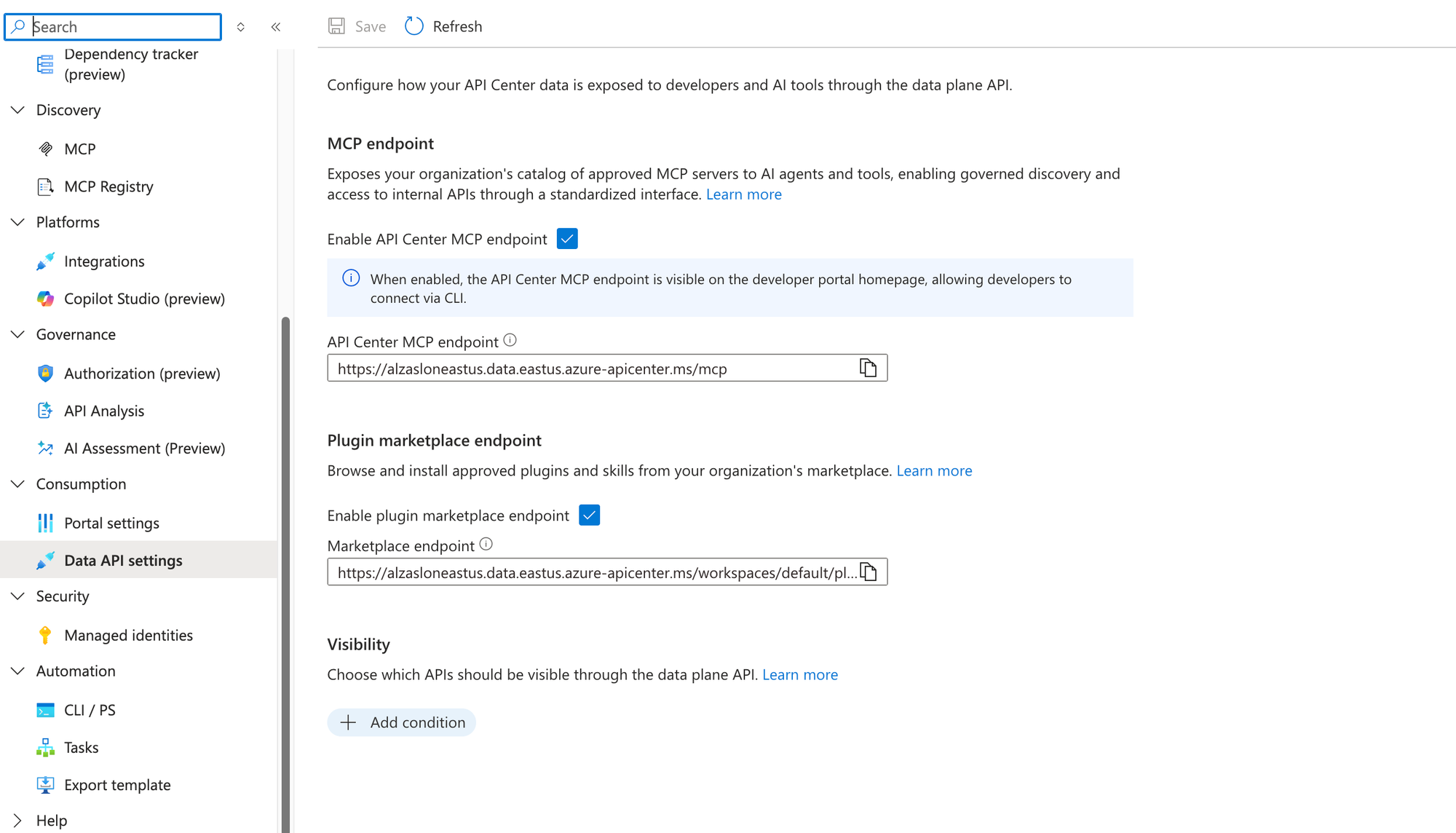
Turning on the MCP server takes just a few clicks in the Azure portal. Navigate to your API Center instance and open Data API settings under the Consumption section in the left-hand menu.
From there, under MCP endpoint, toggle Enable API Center MCP endpoint to on. Once enabled, your MCP endpoint URL (in the form https://<your-instance>.data.<region>.azure-apicenter.ms/mcp) will appear and can be copied directly for use in agent configurations or developer tools.
Note: When enabled, the MCP endpoint is also surfaced on the developer portal homepage, so developers can connect via CLI without needing to look up the URL separately.
You can also enable the Plugin marketplace endpoint from the same settings page to let developers browse and install approved plugins and skills from your organization's marketplace.
The Visibility section lets you control which APIs are exposed through the data plane — use Add condition to filter the catalog based on your governance requirements.
Get started
Learn more about Azure API Center and how organizations are building unified catalogs for APIs, MCP tools, agents, and AI assets.

 Microsoft