content
62 TopicsSentinel Foundry - MCP Server (Github Community Release)
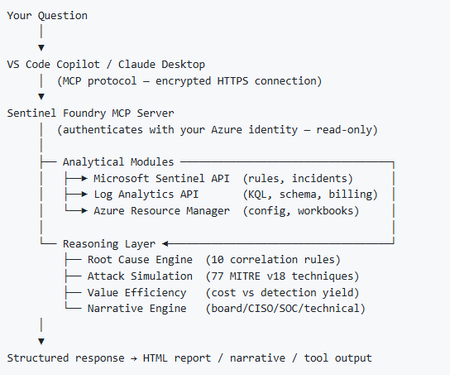
I’ve been cooking something that a lot of people in SOC have been struggling with — especially on the engineering side of Microsoft Sentinel. Thanks to the Microsoft Security team for shaping the capabilities of Sentinel even better with Sentinel Data Lake & Modern SecOps. Today’s the day I can finally share it. Note: This is not an official Microsoft product, but it is designed to make the Sentinel Build even better (complement) with much more intelligence. 🚀 Sentinel Foundry is now in public preview with 43 tools. (Sentinel Foundry - MCP Server) It’s an MCP server built to act like the brain of a strong Sentinel engineer — helping make building, improving, and operating Sentinel far more practical, faster, and honestly more enjoyable. For a lot of teams, the challenge is not understanding what Sentinel can do. The hard part is the engineering work around it: -> Deciding what data should actually be ingested -> Building a clean, scalable Sentinel foundation -> Writing useful detections instead of noisy ones -> Balancing security value with cost -> Turning ideas into deployable engineering outputs That is exactly why I built Sentinel Foundry to help communities grow stronger. It helps with the real engineering tasks behind Sentinel — from architecture thinking to detection design, deployment planning, ingestion strategy, automation ideas, and many of the workflows outlined in the GitHub project. How does it work? Here’s one of the flagship prompts I ran with it: “Give me a complete security posture report for our workspace. Score each pillar and tell me what to prioritise.” And within seconds, it produced a structured engineering blueprint that would normally take a lot longer to pull together manually. You can see the example prompts here in what it can do: https://github.com/prabhukiranveesam/Sentinel-Foundry#what-can-it-do I want building Sentinel to feel less like repetitive engineering overhead — and more like real security engineering that is fast, creative, and enjoyable. If you work with Sentinel as a SOC L2 analyst, engineer, detection engineer, consultant, or architect, I’d genuinely love for you to try it and tell me what you think. 🔗 Public Preview: https://github.com/prabhukiranveesam/Sentinel-Foundry This is just the start of an AI era — and I’m excited to keep shaping it with more powerful features over the coming days. This is very easy to set up and will be available to all of you at no cost during this month as part of the public preview, and your feedback is extremely valuable to shape this as a powerful solution.1KViews0likes2Comments
MSSP migration to Unified portal: how are you sequencing your customer portfolio?
Following the automation and SOAR discussion, I wanted to open a conversation specifically focused on the MSSP and multi-tenant side of the migration, because this is where the coordination challenges are an order of magnitude higher than the technical ones. A few things I am working through before writing this up as Part 5 of the migration series. On Workspace Manager: Microsoft's own documentation now points you away from Workspace Manager at the point of onboarding to the Defender portal, directing you to Microsoft Defender multitenant management instead. For MSSPs who built their operating model around Workspace Manager, this is a significant structural change. For those implementing now, the recommendation is to go straight to the multitenant portal. I am interested in what the transition has looked like in practice for teams who were mid-flight on Workspace Manager when this became clear. On access delegation: one of the more honest framings I want to include in the article is around the GDAP plus Unified RBAC gap. A Microsoft employee confirmed in the RSAC 2026 thread that Unified RBAC support for GDAP in the Defender portal is on the roadmap with no firm date. MSSPs choosing between Entra B2B and the governance relationships model today are making an architectural call that is difficult to reverse. I want to present this accurately, and real experience from practitioners will sharpen that framing. On the connector deployment constraint: you cannot deploy connectors from a managed workspace configured with Azure Lighthouse alone, you also need GDAP. This makes a layered delegation architecture, Lighthouse plus GDAP plus B2B or governance relationships, necessary rather than optional. I am curious whether MSSPs are already running this layered model or whether most are still trying to make Lighthouse work as a single mechanism. On migration sequencing: the question I want to ask specifically is how teams are structuring their customer portfolio migration. Are you running waves based on customer complexity, based on contract renewal timing, based on customer risk appetite, or some other factor? And when something goes wrong in one tenant's migration, how are you containing the impact on the rest of the programme? Sharing the full article once it is written. Happy to discuss anything above in more detail in the thread.398Views0likes1CommentThe Sentinel migration mental model question: what's actually retiring vs what isn't?
Something I keep seeing come up in conversations with other Sentinel operators lately, and I think it's worth surfacing here as a proper discussion. There's a consistent gap in how the migration to the Defender portal is being understood, and I think it's causing some teams to either over-scope their effort or under-prepare. The gap is this: the Microsoft comms have consistently told us *what* is happening (Azure portal experience retires March 31, 2027), but the question that actually drives migration planning, what is architecturally changing versus what is just moving to a different screen, doesn't have a clean answer anywhere in the community right now. The framing I've been working with, which I'd genuinely like to get other practitioners to poke holes in: What's retiring: The Azure portal UI experience for Sentinel operations. Incident management, analytics rule configuration, hunting, automation management: all of that moves to the Defender portal. What isn't changing: The Log Analytics workspace, all ingested data, your KQL rules, connectors, retention config, billing. None of that moves. The Defender XDR data lake is a separate Microsoft-managed layer, not a replacement for your workspace. Where it gets genuinely complex: MSSP/multi-tenant setups, teams with meaningful SOAR investments, and anyone who's built tooling against the SecurityInsights API for incident management (which now needs to shift to Microsoft Graph for unified incidents). The deadline extension from July 2026 to March 2027 tells its own story. Microsoft acknowledged that scale operators needed more time and capabilities. If you're in that camp, that extra runway is for proper planning, not deferral. A few questions I'd genuinely love to hear about from people who've started the migration or are actively scoping it: For those who've done the onboarding already: what was the thing that caught you most off guard that isn't well-documented? For anyone running Sentinel across multiple tenants: how are you approaching the GDAP gap while Microsoft completes that capability? Are you using B2B authentication as the interim path, or Azure Lighthouse for cross-workspace querying? I've been writing up a more detailed breakdown of this, covering the RBAC transition, automation review, and the MSSP-specific path, and the community discussion here is genuinely useful for making sure the practitioner perspective covers the right edge cases. Happy to share more context on anything above if useful.Solved691Views2likes7Comments
XdrLogRaider Defender XDR portal telemetry
A Microsoft Sentinel custom data connector that ingests Microsoft Defender XDR portal-only telemetry — configuration, compliance, drift, exposure, governance — that public Microsoft APIs (Graph Security, Microsoft 365 Defender, MDE) don't expose. https://github.com/akefallonitis/xdrlograider— Defender XDR portal telemetry Happy Hunting 🥳 🎉349Views0likes2CommentsSentinel RBAC in the Unified portal: who has activated Unified RBAC, and how did it go?
Following the RSAC 2026 announcements last month, I have been working through the full permission picture for the Unified portal and wanted to open a discussion here given how much has shifted in a short period. A quick framing of where things stand. The baseline is still that Azure RBAC carries across for Sentinel SIEM access when you onboard, no changes required. But there are now two significant additions in public preview: Unified RBAC for Sentinel SIEM itself (extending the Defender Unified RBAC model to cover Sentinel directly), and a new Defender-native GDAP model for non-CSP organisations managing delegated access across tenants. The GDAP piece in particular is worth discussing carefully, because I want to be precise about what has and has not changed. The existing limitation from Microsoft's onboarding documentation, that GDAP with Azure Lighthouse is not supported for Sentinel data in the Defender portal, has not changed. What is new is a separate, Defender-portal-native GDAP mechanism announced at RSAC, which is a different thing. These are not the same capability. If you were using Entra B2B as the interim path based on earlier guidance, that guidance was correct and that path remains the generally available option today. A few things I would genuinely like to hear from practitioners: For those who have activated Unified RBAC for a Sentinel workspace in the Defender portal: what did the migration from Azure RBAC roles look like in practice? Did the import function bring roles across cleanly, or did you find gaps particularly around custom roles? For environments using Playbook Operator, Automation Contributor, or Workbook Contributor role assignments: how are you handling the fact those three roles are not yet in Unified RBAC and still require Azure portal management? Is the dual-management posture creating operational friction? For MSSPs evaluating the new Defender-native GDAP model against their existing Entra B2B setup: what factors are driving the decision either way at your scale? Writing this up as Part 3 of the migration series and the community experience here is directly useful for making sure the practitioner angle is grounded.Solved676Views0likes3CommentsHow do I import Purview Unified Audit Log data related to the use of the Audit Log into Sentinel?
Dear Community, I would like to implement the following scenario on an environment with Microsoft 365 E5 licenses: Scenario: I want to import audit activities into an Azure Log Analytics workspace linked to Sentinel to generate alerts/incidents as soon as a search is performed in the Microsoft 365 Purview Unified Audit Log (primarily for IRM purposes). Challenge: Neither the "Microsoft 365" connector, nor the "Defender XDR" or "Purview" (which appear to be exclusively Azure Purview) connectors are importing the necessary data. Question: Which connector do I have to use in order to obtain Purview Unified Audit Log activities about the use of the Purview Unified Audit Log so that I can identify... ...which user conducted when an audit log search and with what kind of search query. Thank you!Solved555Views0likes2CommentsWebinar Cancellation
Hi everyone! The webinar originally scheduled for April 14th on "Using distributed content to manage your multi-tenant SecOps" has unfortunately been cancelled for now. We apologize for the inconvenience and hope to reschedule it in the future. Please find other available webinars at: http://aka.ms/securitycommunity All the best, The Microsoft Security Community Team186Views0likes0CommentsNew content types supported in multi-tenant content distribution
Onboard new tenants and maintain a consistent security baseline We’re excited to announce a set of new content types that are now supported by the multi-tenant content distribution capability in the Defender portal: You can now distribute analytics rules, automation rules, workbooks, and alert tuning built in rules. What is content distribution? Content distribution is a powerful multi-tenant feature that enables scalable management of security content across tenants. With this capability, you can create content distribution profiles in the multi-tenant portal that allow you to seamlessly replicate existing content—such as custom detection rules and endpoint security policies—from a source tenant to designated target tenants. Once distributed, the content runs on the target tenant, enabling centralized control with localized execution. This allows you to onboard new tenants quickly and maintain a consistent security baseline across tenants. New supported content types With this release, we add support for several new content types: Analytics rules (Sentinel) Automation rules (Sentinel) Workbooks (Sentinel) Alert tuning rules (built-in rules) Soon, we will introduce more content types, including URBAC roles. How it works Navigate to ‘Content Distribution’ in Defender’s multi-tenant management portal Create a new distribution profile or select an existing distribution profile In the ‘Content selection’ step, select one of the new content types to distribute After choosing the content types, select the actual content that you want to distribute. For example, select analytics rules that you want to distribute to other tenants Use the filters to select which tenant (and workspace) to take the content from Choose at least one workspace that you want to distribute the content to. You can select up to 100 workspaces per tenant. Save the distribution profile and the content will be synced to your target tenants Review the sync result in your distribution profile Good to know Automation rules that trigger a playbook cannot currently be distributed Alert tuning rules are currently limited to distributing built-in rules, this will be expanded to custom rules later Learn more For more information, see Content distribution in multitenant management. To get started, navigate to Content distribution. FAQ What pre-requisites are required? Access to more than one tenant, with delegated access via Azure B2B, using multi-tenant management A subscription to Microsoft 365 E5 or Office E5 What permissions are needed to distribute? Each content type requires you to have permission to create that content type on the target tenant. For example, to create Analytics Rules, you require ‘Sentinel Contributor’ permissions. To distribute content using multi-tenant management content distribution, the Security settings (manage) or Security Data Basic (read) permission is required. Both roles are assigned to the Security Administrator and Security Reader Microsoft Entra built-in roles by default. Can I update or expand distribution profiles later? Yes. You can add more content, include additional tenants, or modify scopes as needed.1.9KViews2likes5Comments